pengenalan
Terima kasih kerana membeliasing the Acctim Infinity 71952 Radio Controlled LCD Alarm Clock. This manual provides detailed instructions for setting up, operating, and maintaining your new alarm clock. Please read these instructions carefully before use and retain them for future reference.
This clock features a radio-controlled time signal for automatic and precise timekeeping (UK and Ireland only), a clear LCD display, dual alarms with snooze, calendar display, weekday display, and indoor temperature monitoring.
Kandungan Pakej
- Acctim Infinity 71952 Radio Controlled LCD Alarm Clock
- Manual Pengguna
Produk Selesaiview
Familiarize yourself with the clock's display and control buttons.
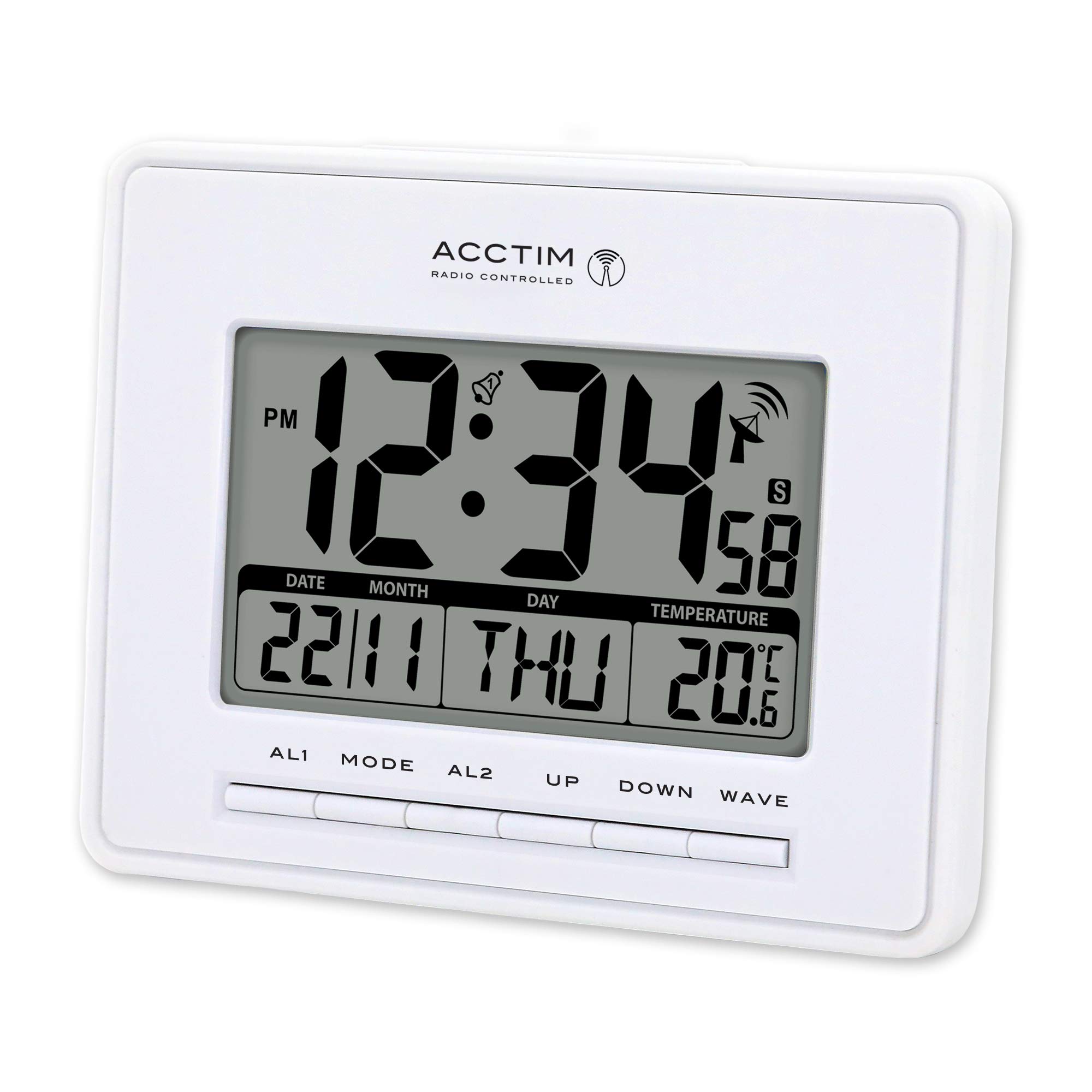
This image displays the front of the Acctim Infinity 71952 alarm clock. The large blue LCD screen shows the time (12:34 PM), date (22/11), day (THU), and indoor temperature (20.6°C). Below the screen are control buttons labeled AL1, MODE, AL2, UP, DOWN, and WAVE.
Elemen Paparan:
- Paparan Masa: Shows current time (12 or 24-hour format).
- Penunjuk PM: Appears for PM hours in 12-hour format.
- Penunjuk Penggera: Bell icons for AL1 and AL2 when active.
- Radio Control Signal: Antenna icon indicates signal reception strength.
- Paparan Tarikh: Shows day and month.
- Hari dalam seminggu: Displays the current day (e.g., THU).
- Paparan suhu: Shows indoor temperature in Celsius or Fahrenheit.
Butang Kawalan:
- AL1: Accesses and sets Alarm 1.
- ARAHAN: Toggles between display modes and enters setting modes.
- AL2: Accesses and sets Alarm 2.
- KE ATAS: Increases values during setting, activates/deactivates functions.
- TURUN: Decreases values during setting, activates/deactivates functions.
- GELOMBANG: Initiates manual radio control signal search.
Pemasangan Bateri
The clock requires 3 x AAA batteries (not included) for operation.
- Cari penutup petak bateri di belakang jam.
- Remove the cover by sliding it down or lifting it off.
- Insert 3 new AAA batteries, ensuring the correct polarity (+ and -) as indicated inside the compartment.
- Gantikan penutup petak bateri dengan selamat.
Upon battery insertion, the clock will power on and attempt to receive the radio control signal.
Initial Setup (Radio Control)
The Acctim Infinity 71952 is a radio-controlled clock, designed to automatically synchronize its time with the atomic clock signal (available in the UK and Ireland). This ensures accurate timekeeping and automatic adjustment for Daylight Saving Time (summer/winter time changes).
- After installing batteries, place the clock near a window for optimal signal reception.
- The clock will automatically begin searching for the radio signal. A flashing antenna icon on the display indicates it is searching.
- Once the signal is received and synchronized, the antenna icon will become solid, and the correct time and date will be displayed. This process may take several minutes or up to 24 hours depending on location and signal strength.
- To manually initiate a signal search, press the GELOMBANG butang.
Nota: If the signal is weak or unavailable, the clock will operate as a standard quartz clock, and you may need to set the time manually.
Tetapan Masa dan Tarikh Manual
If radio control is not desired or unavailable, you can set the time and date manually.
- Tekan dan tahan butang MODE button for approximately 3 seconds until the time display starts flashing.
- Gunakan UP or TURUN buttons to adjust the flashing value (e.g., hour).
- Tekan MODE again to confirm the setting and move to the next adjustable item (e.g., minute, year, month, day, 12/24-hour format, temperature unit).
- Ulangi langkah 2 dan 3 sehingga semua tetapan yang dikehendaki dilaraskan.
- Tekan MODE one last time or wait for 15 seconds for the clock to exit the setting mode automatically.
Tetapan Penggera
Jam ini mempunyai dua penggera bebas (AL1 dan AL2).
Menetapkan penggera:
- Tekan ke AL1 or AL2 butang sekali untuk memaparkan masa penggera semasa.
- Tekan dan tahan butang AL1 or AL2 button for approximately 3 seconds until the alarm hour starts flashing.
- Gunakan UP or TURUN butang untuk melaraskan jam penggera.
- Tekan AL1 or AL2 again to move to the alarm minute setting.
- Gunakan UP or TURUN butang untuk melaraskan minit penggera.
- Tekan AL1 or AL2 one last time or wait for 15 seconds to exit the alarm setting mode.
Activating/Deactivating an Alarm:
- Dalam mod paparan masa biasa, tekan butang UP button repeatedly to cycle through alarm activation options: AL1 ON, AL2 ON, AL1 & AL2 ON, ALARMS OFF.
- A bell icon will appear on the display next to AL1 or AL2 when the respective alarm is active.
Fungsi Tunda:
- When an alarm sounds, press any button (except AL1 or AL2) to activate the snooze function. The alarm will temporarily stop and sound again after a few minutes.
- To stop the alarm completely, press the AL1 or AL2 button corresponding to the sounding alarm.
Paparan Suhu
The clock displays the indoor temperature. During manual time setting, you can switch between Celsius (°C) and Fahrenheit (°F) using the UP or TURUN buttons when the temperature unit is flashing.
Penjagaan dan Penyelenggaraan
- Bersihkan jam dengan kain lembut dan kering. Jangan gunakan pembersih atau pelarut yang melelas.
- Elakkan daripada mendedahkan jam kepada suhu yang melampau, cahaya matahari langsung atau kelembapan yang tinggi.
- If the display becomes dim or the clock malfunctions, replace the batteries.
- Tanggalkan bateri jika jam tidak akan digunakan untuk tempoh yang lama untuk mengelakkan kebocoran.
Menyelesaikan masalah
| Masalah | Kemungkinan Punca | Penyelesaian |
|---|---|---|
| Tiada paparan atau paparan malap | Bateri hampir habis atau tidak dimasukkan dengan betul. | Gantikan dengan bateri AAA baharu, pastikan kekutuban yang betul. |
| Masa yang salah dipaparkan | No radio signal received or manual time not set. | Place clock near a window and press GELOMBANG to initiate signal search. If signal is consistently poor, set time manually. |
| Radio control signal icon is flashing or absent | Weak signal, interference, or out of reception range. | Move the clock to a different location, preferably near a window, away from electronic devices that may cause interference. Try a manual signal search with the GELOMBANG butang. |
| Penggera tidak berbunyi | Penggera tidak diaktifkan atau ditetapkan dengan tidak betul. | Ensure the alarm time is set correctly and the alarm is activated (bell icon visible). |
Spesifikasi
- model: Acctim Infinity 71952
- Jenis Paparan: LCD Digital
- Penjagaan masa: Radio Controlled (UK & Ireland only) / Quartz
- Fungsi: Time, Date, Day of Week, Indoor Temperature, Dual Alarm, Snooze
- Pelarasan Automatik: Daylight Saving Time (Summer/Winter)
- Sumber Kuasa: 3 x Bateri AAA (tidak termasuk)
- Dimensi (H x W x L): 12.5 cm x 16.4 cm x 2.3 cm
- Berat: 0.242 kg
- warna: putih
Waranti dan Sokongan
Untuk maklumat waranti dan sokongan pelanggan, sila rujuk dokumentasi yang diberikan semasa pembelian atau hubungi peruncit anda. Simpan bukti pembelian anda untuk sebarang tuntutan waranti.


