1. Pengenalan
Thank you for choosing the Lenco SCD-720 Boombox. This versatile audio system offers a wide range of playback options, including DAB+ and FM radio, Bluetooth 5.0 connectivity, a CD/MP3 player, a cassette player, and a USB port for digital audio files. It features 2 x 6W RMS audio output with Bass Reflex for enhanced sound and comes with a remote control for convenient operation. This manual provides essential information for setting up, operating, and maintaining your device.
2. Maklumat Keselamatan Penting
- Baca semua arahan dengan teliti sebelum menggunakan peranti.
- Simpan manual ini untuk rujukan masa hadapan.
- Jangan dedahkan unit kepada hujan atau lembapan untuk mengelakkan kebakaran atau kejutan elektrik.
- Pastikan pengudaraan yang betul. Jangan sekat sebarang bukaan pengudaraan.
- Jangan letakkan unit berhampiran sumber haba seperti radiator, daftar haba, dapur, atau radas lain (termasuk amppenghidup) yang menghasilkan haba.
- Lindungi kord kuasa daripada berjalan atau tersepit, terutamanya pada palam, bekas kemudahan dan tempat keluar dari radas.
- Hanya gunakan lampiran/aksesori yang ditentukan oleh pengilang.
- Cabut plag radas ini semasa ribut petir atau apabila tidak digunakan untuk tempoh yang lama.
- Rujuk semua servis kepada kakitangan perkhidmatan yang berkelayakan. Servis diperlukan apabila radas telah rosak dalam apa jua cara, seperti kord bekalan kuasa atau palam rosak, cecair telah tertumpah atau objek jatuh ke dalam radas, radas telah terdedah kepada hujan atau lembapan, tidak beroperasi seperti biasa. , atau telah digugurkan.
3. Produk Lebihview
Familiarize yourself with the main components and controls of your Lenco SCD-720 Boombox.
Depan View dengan Port USB

This image shows the front of the Lenco SCD-720 Boombox, highlighting the main control panel, speakers, and a USB stick inserted into the USB port on the top left.
Depan View with CD Compartment Open

This image displays the Lenco SCD-720 Boombox from the front, with the top-loading CD compartment lid open, ready for CD insertion.
belakang View
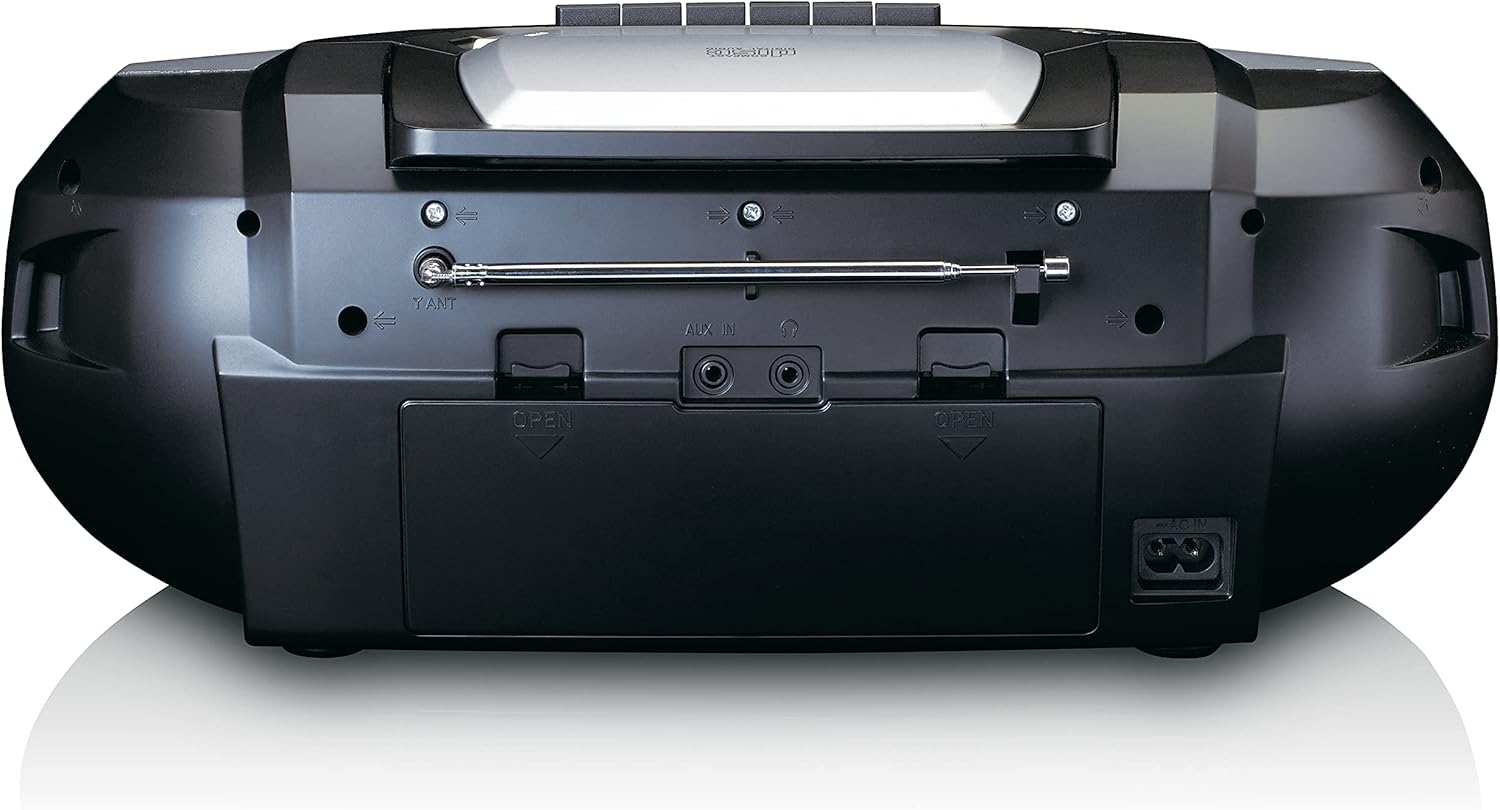
This image shows the back of the Lenco SCD-720 Boombox, featuring the telescopic antenna, AUX input, headphone jack, and the AC power input socket.
Control Panel Close-up

A terperinci view of the Lenco SCD-720 Boombox's central control panel, including the digital display, source selection buttons, tuning/navigation buttons, and the illuminated volume knob.
Boombox with Remote Control
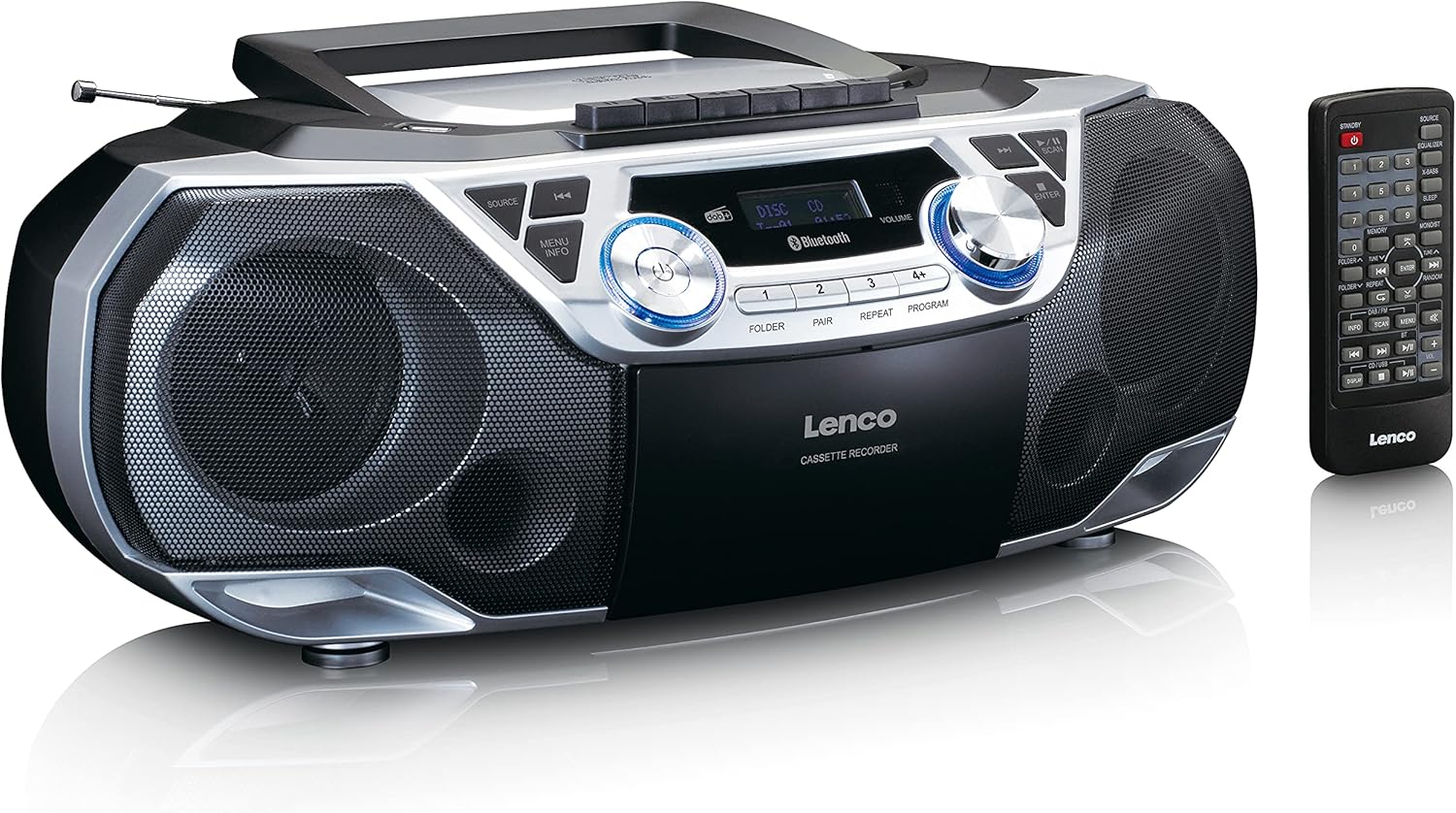
The Lenco SCD-720 Boombox is displayed next to its included remote control, illustrating the complete package.
Susun Atur Kawalan Jauh

A close-up image of the remote control for the Lenco SCD-720 Boombox, showing all buttons for power, source selection, playback, tuning, and other functions.
4. Persediaan
4.1 Sambungan Kuasa
The Lenco SCD-720 Boombox can be powered by AC mains or batteries.
- Kuasa AC: Connect the supplied AC power cord to the AC IN socket on the rear of the unit and then to a standard wall outlet.
- Operasi Bateri: For portable use, open the battery compartment on the rear of the unit and insert 8 x 'C' type batteries (not included), ensuring correct polarity. Close the compartment securely.
4.2 Pelarasan Antena
For optimal radio reception, extend the telescopic antenna fully. Adjust its position and angle to achieve the best signal quality for both DAB+ and FM broadcasts.
4.3 Kuasa Awal Hidup
Tekan ke KUASA button on the unit or remote control to turn on the boombox. The display will light up, and the unit will typically start in the last used mode.
5. Arahan Operasi
5.1 Kawalan Am
- Hidupkan/Mati Kuasa: Tekan ke KUASA butang.
- Kawalan Kelantangan: Putar JILID knob on the unit or use the VOL + / - butang pada alat kawalan jauh.
- Pemilihan Sumber: Tekan ke SUMBER button on the unit or the dedicated source buttons (DAB/FM, CD/USB, BT) on the remote to switch between modes (DAB+, FM, CD, USB, Bluetooth, AUX).
5.2 Operasi Radio (DAB+/FM)
- Pilih Mod: Tekan ke SUMBER button until DAB+ or FM mode is selected.
- Imbasan Auto: In DAB+ or FM mode, press the IMBAS butang untuk mencari dan menyimpan stesen yang tersedia secara automatik.
- Penalaan Manual: Gunakan TUNE < / > butang untuk melaraskan frekuensi secara manual.
- Stesen Pratetap: The unit allows you to save your favorite stations. Press and hold one of the numbered preset buttons (1-4) to store the current station. Briefly press a preset button to recall a stored station.
- DAB+ Information: Dalam mod DAB+, tekan butang INFO button to cycle through various information such as program type, signal strength, time, and date.
5.3 Main Semula CD/MP3
- Muatkan CD: Open the CD compartment lid by pressing the TERBUKA button. Place a CD or MP3 CD with the label side facing up. Close the lid securely.
- Main balik: The CD will start playing automatically. If not, press the MAIN/JEDA butang.
- Kawalan: guna SKIP << / >> butang untuk melangkau trek. Tekan dan tahan untuk mara/undur pantas.
- Ulang: Tekan ULIKAN to repeat the current track or all tracks.
- Program: Tekan PROGRAM to create a custom playback order for tracks.
5.4 Main Semula Kaset dan Rakaman
- Load Cassette: Open the cassette compartment. Insert a cassette tape.
- Main balik: Tekan ke BERMAIN butang.
- Rakaman: To record from Radio, CD, USB, or AUX, select the desired source. Insert a blank cassette. Press the REKOD button (usually red) along with the BERMAIN butang serentak.
- Kawalan: guna CEPAT KE HADAPAN dan REWIND butang. Tekan BERHENTI/EJECT to stop playback and open the compartment.
5.5 Kesambungan Bluetooth 5.0
- Masukkan Mod Bluetooth: Tekan ke SUMBER button until 'BT' or 'Bluetooth' appears on the display. The unit will enter pairing mode, indicated by a flashing Bluetooth icon.
- Berpasangan: On your smartphone or tablet, enable Bluetooth and search for available devices. Select 'Lenco SCD-720' from the list. Once paired, the Bluetooth icon will stop flashing.
- Main balik: Start playing audio on your connected device. The sound will be streamed to the boombox.
5.6 Main Semula USB
- Masukkan USB: Masukkan pemacu kilat USB yang mengandungi MP3 files ke dalam port USB.
- Pilih Mod USB: Tekan ke SUMBER button until 'USB' appears. The unit will automatically scan and begin playing MP3 files.
- Kawalan: Gunakan butang kawalan main balik (PLAY/PAUSE, SKIP << / >>) to manage your music.
5.7 Input AUX
Connect external audio devices (e.g., MP3 players, smartphones without Bluetooth) to the AUX IN jack on the rear of the unit using a 3.5mm audio cable (not included). Select AUX mode via the SUMBER butang.
5.8 Output Fon Kepala
For private listening, connect headphones to the Fon kepala jack on the rear of the unit. The main speakers will be muted automatically.
5.9 Alat Kawalan Jauh
The included remote control provides full functionality for the boombox, allowing you to control power, source, volume, playback, tuning, and other settings from a distance. Ensure the remote has working batteries and is pointed towards the front of the boombox.
6. Penyelenggaraan
6.1 Membersihkan Unit
Wipe the exterior of the boombox with a soft, dry cloth. Do not use abrasive cleaners, waxes, or solvents as they may damage the finish. For stubborn stains, a slightly damp kain boleh digunakan, diikuti dengan kain kering.
6.2 Penjagaan Kanta CD
If CD playback becomes erratic, the CD lens may need cleaning. Use a commercially available CD lens cleaner disc. Do not touch the lens directly.
6.3 Pembersihan Kepala Kaset
Regularly clean the cassette heads, pinch rollers, and capstans with a cotton swab lightly moistened with isopropyl alcohol to ensure optimal sound quality and prevent tape damage.
6.4 Penggantian Bateri
If the unit is powered by batteries and performance degrades, replace all 8 'C' type batteries with new ones, ensuring correct polarity. Do not mix old and new batteries or different types of batteries.
7. Penyelesaian masalah
| Masalah | Kemungkinan Punca | Penyelesaian |
|---|---|---|
| Tiada kuasa | Kord kuasa tidak disambungkan; Bateri habis atau salah dimasukkan. | Periksa sambungan kord AC; Gantikan bateri, pastikan polariti yang betul. |
| Tiada bunyi | Kelantangan terlalu rendah; Sumber yang salah dipilih; Fon kepala disambungkan. | Increase volume; Select correct source; Disconnect headphones. |
| Penerimaan radio yang lemah | Antenna not extended or positioned correctly; Weak signal. | Extend and adjust the telescopic antenna; Try moving the unit to a different location. |
| CD/USB tidak dimainkan | Disc dirty/scratched; USB format not supported; Incorrect mode. | Clean or replace disc; Ensure USB contains MP3 files; Select CD or USB mode. |
| Penggandingan Bluetooth gagal | Boombox not in pairing mode; Device too far; Bluetooth off on device. | Ensure boombox is in BT pairing mode; Move device closer; Enable Bluetooth on your device. |
| Cassette recording issues | Incorrect source selected; Cassette write-protect tab engaged. | Select the desired recording source; Ensure the write-protect tab on the cassette is not broken off. |
8. Spesifikasi
- model: SCD-720SI
- Jenama: Lenco
- Ketersambungan: DAB+, FM Radio, Bluetooth 5.0, CD/MP3 Player, Cassette Player, USB Playback, AUX Input, Headphone Output
- Output Audio: 2 x 6W RMS
- Sumber Kuasa: AC 230V ~ 50Hz or 8 x 'C' type batteries (DC 12V)
- Format Audio yang Disokong: CD, CD-R/RW, MP3 (from CD/USB)
- Ciri Khas: Bass Reflex, Remote Control
- Dimensi (L x W x H): Kira-kira 38.5 cm x 23.5 cm x 14.5 cm
- warna: Perak
- Pengeluar: Lenco GmbH
- Negara Asal: China
9. Waranti dan Sokongan
Lenco products are covered by a warranty in accordance with European law. For specific warranty terms and conditions, please refer to the warranty card included with your product or visit the official Lenco website. For technical support, service, or spare parts information, please contact Lenco customer service or your local dealer. Please have your model number (SCD-720SI) and purchase details ready when contacting support.
Information regarding software updates and spare parts availability is not provided at this time.


