1. Pengenalan
This manual provides comprehensive instructions for the Technical Pro Dual 21 Band Professional Stereo Equalizer, model EQ7153. This device is engineered to offer precise control over audio frequencies, allowing for detailed sound shaping and enhancement in various audio environments. Please read this manual thoroughly before operating the unit to ensure proper usage and to maximize its performance.
2. Arahan Keselamatan Penting
- Sumber Kuasa: Sambungkan unit hanya kepada volum bekalan kuasa yang dinyatakantage as indicated on the rear panel. Ensure the power switch is set to the correct voltage (110V or 220V) for your region before connecting to power.
- Pengudaraan: Ensure adequate ventilation around the unit. Do not block ventilation openings. Avoid placing the unit on carpets or in enclosed spaces that restrict airflow.
- Kelembapan: Do not expose the unit to rain, moisture, dripping, or splashing. Do not place objects filled with liquids, such as vases, on the apparatus.
- haba: Jauhkan unit daripada sumber haba seperti radiator, daftar haba, dapur, atau radas lain (termasuk amppenghidup) yang menghasilkan haba.
- Pembersihan: Disconnect the power cord from the outlet before cleaning. Use only a dry cloth for cleaning.
- Servis: Jangan cuba servis produk ini sendiri. Rujuk semua servis kepada kakitangan perkhidmatan yang berkelayakan. Servis diperlukan apabila radas telah rosak dalam apa jua cara, seperti kord bekalan kuasa atau palam rosak, cecair telah tertumpah atau objek telah jatuh ke dalam radas, radas telah terdedah kepada hujan atau lembapan, tidak beroperasi seperti biasa, atau telah terjatuh.
- Objek dan Kemasukan Cecair: Jangan sekali-kali menolak objek dalam apa jua bentuk ke dalam produk ini melalui bukaan kerana ia boleh menyentuh vol berbahayatagmata e atau bahagian pendek yang boleh mengakibatkan kebakaran atau kejutan elektrik.
3. Kandungan Pakej
Setelah membuka bungkusan, sila sahkan bahawa item berikut disertakan:
- Technical Pro EQ7153 Dual 21 Band Professional Stereo Equalizer
- Kabel Kuasa
- Kurungan Rak Boleh Tanggal
- Manual Arahan (dokumen ini)
4. Produk Lebihview
The EQ7153 is a dual 21-band graphic equalizer designed for precise audio frequency adjustment. It features individual LED indicators for each frequency band, a fluorescent spectrum display, and multiple input/output options.
4.1 Panel Depan

- Butang Kuasa: Menghidupkan atau mematikan unit.
- Pemilih Input: Buttons for MP3, DVD, TAPE, TUNER, MP3/AUX, LOW, HIGH, DIRECT, EQ to select the desired audio source or processing mode.
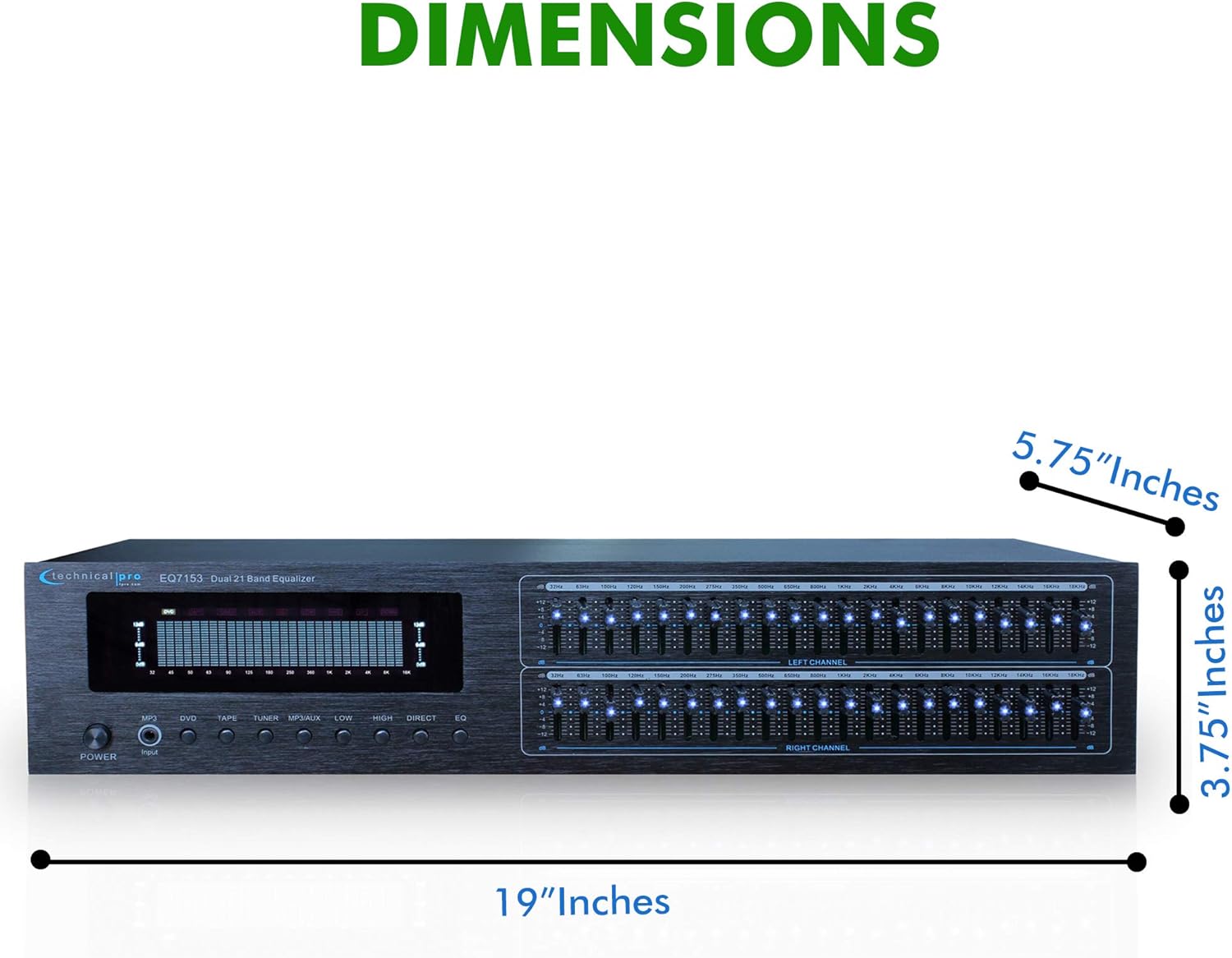
- Dual 21-Band Equalizer Sliders: Individual sliders for Left and Right channels, each with 21 frequency bands for precise audio adjustment. Each slider has an individual LED indicator.
- Fluorescent Spectrum Display: Visual representation of the audio frequency spectrum.
- Penggalak Bass: Increases low-frequency levels.
- Loudness Booster: Increases both low and high-frequency levels.
- Direct / Equalizer Function: Allows for an unfiltered pass-through of the audio signal or engages the equalizer processing.
4.2 Panel Belakang
- Input Audio RCA: Connect up to four audio sources (DVD, TAPE, TUNER, AUX) using RCA cables. An additional 1/8'' MP3 input is available on the front panel.
- Output Audio RCA: Sambung ke anda amplifier or recording device via the RECORD and MAIN RCA outputs.
- Input Kuasa: Standard AC power connection with a voltage selector switch (110V/220V).
4.3 Ciri-ciri Utama

- Dual 21-Band Equalization: Offers precise control over 21 frequency bands per channel.
- Equalization Points: 32Hz, 63Hz, 100Hz, 120Hz, 150Hz, 200Hz, 275Hz, 350Hz, 500Hz, 1KHz, 1.5KHz, 2KHz, 2.5KHz, 3KHz, 4KHz, 5KHz, 6KHz, 8KHz, 10KHz, 12KHz, 14KHz.
- Julat Pelarasan: ±12dB for each frequency band.
- Respons Kekerapan: 20Hz-20kHz.
- Fluorescent Spectrum Display: Provides real-time visual feedback of audio levels across frequencies.
- Bass Booster & Loudness Booster: Dedicated functions to enhance low and high frequencies.
- Berbilang Input: RCA (4 audio sources) and 1/8'' MP3 input.
- Output RCA: For main audio and recording.
- Removable Rack-Mount Brackets: For easy integration into a standard audio rack.
5. Arahan Persediaan
5.1 Membongkar dan Meletakkan
- Carefully remove the EQ7153 from its packaging.
- Place the unit on a stable, flat surface or install it into a standard 19-inch audio rack using the provided brackets.
- Ensure there is adequate space around the unit for proper ventilation to prevent overheating.
5.2 Sambungan Audio
The EQ7153 typically connects between your audio source(s) and your amppenguat/penerima.
- Sambungkan Sumber Audio: Use RCA cables to connect your audio sources (e.g., DVD player, tape deck, tuner, auxiliary device) to the corresponding RCA INPUT jacks on the rear panel (DVD, TAPE, TUNER, AUX). For MP3 players or other portable devices, use a 1/8'' stereo cable to the front panel MP3 input.
- Sambung ke Amppenguat/Penerima: Use RCA cables to connect the MAIN OUTPUT jacks on the rear panel of the EQ7153 to an available input on your amplifier or receiver (e.g., AUX IN, CD IN).
- Connect to Recording Device (Optional): If you wish to record the processed audio, connect the REC OUTPUT jacks on the EQ7153 to the input of your recording device.
5.3 Sambungan Kuasa
- Before connecting the power cable, verify that the 110V/220V voltage selector switch on the rear panel is set to match your local power supply.
- Connect the provided power cable to the AC IN socket on the rear panel of the EQ7153.
- Pasangkan hujung kabel kuasa yang satu lagi ke dalam soket kuasa AC yang sesuai.
6. Arahan Operasi
6.1 Menghidupkan/Mematikan
Tekan ke KUASA button on the front panel to turn the unit on or off. The fluorescent spectrum display and individual LED indicators will illuminate when the unit is powered on.
6.2 Pemilihan Input
Press the corresponding input button on the front panel (MP3, DVD, TAPE, TUNER, MP3/AUX) to select the audio source you wish to process. Ensure only one input is selected at a time.
6.3 Pelarasan Penyamaan
- Engage Equalizer: Tekan ke EQ button to activate the equalizer function. If you prefer an unprocessed signal, press the TERUS butang.
- Adjust Frequency Bands: Use the individual sliders for the Left and Right channels to boost or cut specific frequency bands. Moving a slider up boosts the frequency, while moving it down cuts the frequency. The range of adjustment is ±12dB.
- Paparan Monitor: Observe the fluorescent spectrum display to visually monitor the frequency distribution of your audio signal as you make adjustments.
6.4 Using Boost Functions
- Penggalak Bass: Tekan ke RENDAH button to engage the Bass Booster, which will increase the overall low-frequency levels in your audio.
- Loudness Booster: Tekan ke TINGGI button to engage the Loudness Booster, which will simultaneously increase both low and high-frequency levels, providing a fuller sound at lower volumes.
7. Penyelenggaraan
7.1 Pembersihan
To maintain the appearance and longevity of your EQ7153:
- Sentiasa cabut kabel kuasa sebelum membersihkan.
- Gunakan kain lembut dan kering untuk mengelap permukaan luar.
- Do not use liquid cleaners, aerosol cleaners, or strong chemicals, as they may damage the finish or internal components.
- For dust accumulation around sliders or buttons, use a soft brush or compressed air, being careful not to force dust into the unit.
7.2 Penjagaan Am
- Elakkan meletakkan objek berat di atas unit.
- Protect the unit from extreme temperatures and direct sunlight.
- Ensure all cable connections are secure and free from strain.
8. Penyelesaian masalah
If you encounter issues with your EQ7153, refer to the following common problems and solutions:
| Masalah | Kemungkinan Punca | Penyelesaian |
|---|---|---|
| Unit tidak dihidupkan. | Power cable not connected; Power outlet faulty; Voltagpemilih e salah. | Ensure power cable is securely connected. Test power outlet with another device. Verify 110V/220V switch matches local voltage. |
| Tiada keluaran bunyi. | Incorrect input selected; Cables not connected properly; Ampinput penguat tidak dipilih. | Select the correct input source on the EQ7153. Check all RCA cable connections. Ensure your amplifier is set to the correct input connected to the EQ7153. |
| Kualiti bunyi yang herot atau lemah. | Input signal too high; Equalizer settings extreme; Faulty cables. | Reduce the input level from your source device. Adjust equalizer sliders to a more neutral position. Replace audio cables if suspected faulty. |
| LED indicators are too bright. | This is a characteristic of the product design. | While there is no built-in brightness adjustment, some users have applied light-dimming films or paint to the LEDs for personal preference. This is not officially supported and may void warranty. |
9. Spesifikasi

- model: TPEQA7153
- Jalur Penyamaan: Dual 21-band per channel
- Equalization Points: 32Hz, 63Hz, 100Hz, 120Hz, 150Hz, 200Hz, 275Hz, 350Hz, 500Hz, 1KHz, 1.5KHz, 2KHz, 2.5KHz, 3KHz, 4KHz, 5KHz, 6KHz, 8KHz, 10KHz, 12KHz, 14KHz
- Julat Pelarasan: ±12dB
- Respons Kekerapan: 20Hz-20kHz
- Input: RCA (4 audio sources), 1/8'' MP3
- Keluaran: RCA (Record, Main)
- Dimensi Produk (W x D x H): 19 x 5.75 x 3.75 inci
- Berat Barang: 4 paun
- Pengeluar: Pro Teknikal
10. Waranti dan Sokongan
For warranty information and technical support, please refer to the documentation provided with your purchase or visit the official Technical Pro webtapak. Simpan bukti pembelian anda untuk sebarang tuntutan waranti.


