pengenalan
This manual provides comprehensive instructions for the use and maintenance of your AFTERSHOKZ OpenComm Wireless Bone Conduction Headset. Designed for professional communication, the OpenComm headset utilizes bone conduction technology to deliver audio while keeping your ears open to your surroundings. Please read this manual thoroughly to ensure proper operation and to maximize your experience with the device.
Produk Selesaiview dan Ciri
The AFTERSHOKZ OpenComm headset is engineered for clear communication and comfort in various professional settings. Key features include:
- Keselesaan Telinga Terbuka: Patented bone conduction technology delivers audio through the cheekbone, allowing you to remain aware of your surroundings.
- Kesedaran Situasi: The open-ear design ensures you stay connected to your environment and team.
- Noise-Cancelling Boom Microphone: An adjustable DSP noise-cancelling boom microphone effectively reduces background noise for clear calls.
- Masa Bual Lanjutan: Up to 16 hours of talk time and 8 hours of listening time on a single charge.
- Bluetooth 5.0 with NFC Pairing: Provides stable wireless connectivity and quick pairing with NFC-enabled devices.
- IP55 Tahan Air: Designed to withstand splashes and sweat, suitable for various environments.
- Quick & Easy Charging: Efficient charging mechanism for minimal downtime.
- Reka bentuk ringan: Weighing only 30g, the headset offers comfortable extended wear.
- Secure Titanium Fit: A durable and flexible titanium frame ensures a secure and comfortable fit.
- Butang pelbagai fungsi: Easy controls for playback, calls, and voice assistant activation.
Visual Overview
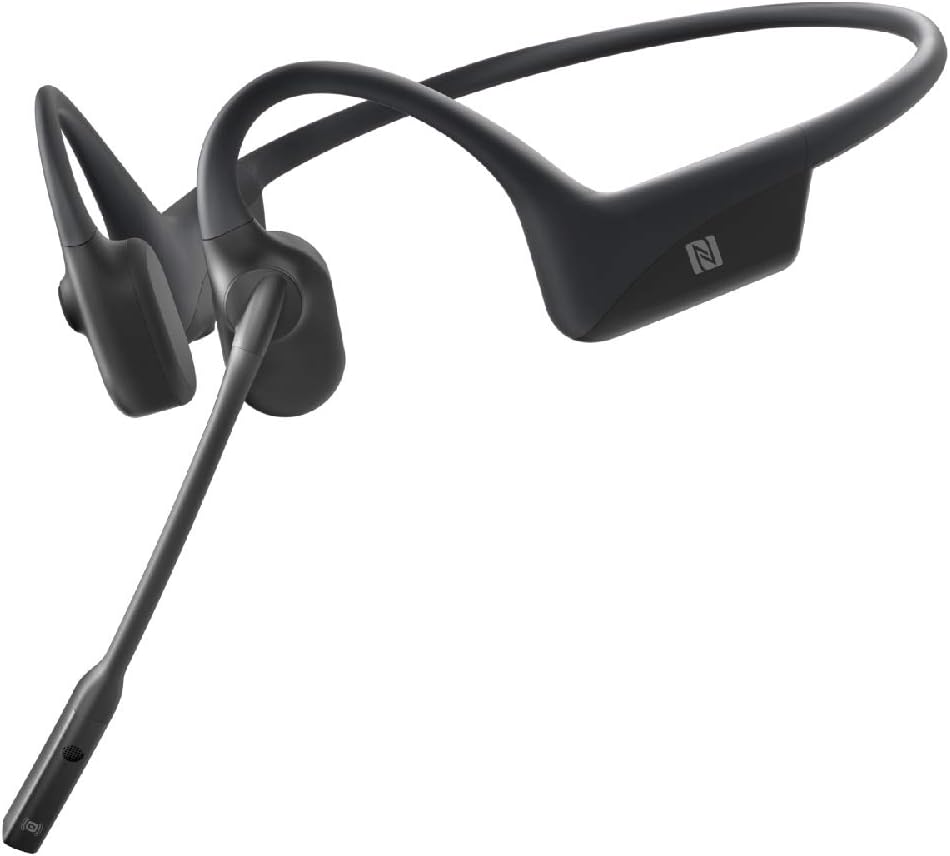


Persediaan
1. Mengecas Alat Dengar
Before initial use, fully charge your OpenComm headset. Connect the magnetic charging cable to the charging port on the headset and plug the USB end into a compatible power source (e.g., computer USB port, USB wall adapter). The LED indicator will show charging status. A full charge provides up to 16 hours of talk time.
2. Menghidupkan/Mematikan
- Untuk Menghidupkan: Press and hold the Power/Volume+ button until the LED indicator flashes blue and Audrey says "Welcome to Shokz."
- Untuk Mematikan: Press and hold the Power/Volume+ button until the LED indicator flashes red and Audrey says "Power off."
3. Berpasangan Bluetooth
The OpenComm headset supports Bluetooth 5.0 for wireless connectivity.
- Mulakan dengan set kepala dimatikan.
- Press and hold the Power/Volume+ button for 5-7 seconds until the LED indicator flashes red and blue alternately, and Audrey says "Pairing."
- On your device (smartphone, computer, etc.), enable Bluetooth and select "OpenComm by Shokz" from the list of available devices.
- Audrey will say "Connected" when pairing is successful.
Berpasangan NFC: For NFC-enabled devices, simply tap the NFC area of your device against the NFC tag on the headset (usually located on the left transducer) to initiate pairing.
4. Memakai Alat dengar
Position the headset so the transducers rest on your cheekbones, just in front of your ears. The band should wrap around the back of your head. Adjust the boom microphone so it is close to your mouth for optimal voice pickup.
Arahan Operasi
Kawal Selesaiview
- Power/Volume+ Button: Located on the right side, behind the ear.
- Volume- Button: Located on the right side, behind the ear.
- Butang pelbagai fungsi: Located on the left transducer.
- Mikrofon Boom: Adjustable, located on the left side.
Main balik Muzik
- Main/Jeda: Tekan Butang Multifungsi sekali.
- Lagu Seterusnya: Tekan dua kali Butang Pelbagai Fungsi.
- Trek Sebelumnya: Triple-press the Multifunction Button.
Pengurusan Panggilan
- Jawab Panggilan: Tekan Butang Multifungsi sekali.
- Tamatkan Panggilan: Tekan Butang Multifungsi sekali semasa panggilan.
- Tolak Panggilan: Tekan dan tahan Butang Multifungsi selama 2 saat.
- Redam/Nyahredam Mikrofon: During a call, press the Multifunction Button for 2 seconds.
- Laraskan Kedudukan Mikrofon: For optimal clarity, position the boom microphone approximately 2-3 cm from your mouth.
Kawalan Kelantangan
- Tingkatkan Kelantangan: Tekan butang Kelantangan+.
- Kurangkan Kelantangan: Tekan butang Kelantangan.
Pembantu Suara
To activate your device's voice assistant (e.g., Siri, Google Assistant), press and hold the Multifunction Button for 2 seconds when not on a call.
Penyelenggaraan
- Pembersihan: Lap alat dengar dengan kain lembut,amp kain. Elakkan menggunakan bahan kimia yang keras atau bahan yang melelas.
- Storan: Store the headset in a cool, dry place. Avoid extreme temperatures.
- Tahan Air: The OpenComm headset is IP55 water-resistant, meaning it can withstand light rain and sweat. It is not designed for submersion in water. Ensure the charging port is dry before charging.
- Penjagaan Bateri: For optimal battery life, avoid fully discharging the battery frequently. Charge the headset regularly.
Menyelesaikan masalah
Tiada Kuasa
- Ensure the headset is charged. Connect it to the charger and check the LED indicator.
- Try pressing and holding the Power/Volume+ button for a longer duration (up to 7 seconds).
Tidak Boleh Berpasangan dengan Peranti
- Ensure the headset is in pairing mode (LED flashing red and blue alternately).
- Matikan Bluetooth pada peranti anda dan hidupkannya semula.
- Forget "OpenComm by Shokz" from your device's Bluetooth list and attempt to pair again.
- Ensure the headset is not connected to another device.
Tiada Bunyi atau Kelantangan Rendah
- Tingkatkan kelantangan pada kedua-dua set kepala dan peranti anda yang disambungkan.
- Ensure the headset is properly positioned on your cheekbones.
- Check if the audio output on your device is set to "OpenComm by Shokz."
Mikrofon Tidak Berfungsi
- Ensure the microphone is not muted (press Multifunction Button for 2 seconds during a call to toggle mute).
- Adjust the boom microphone closer to your mouth.
- Check microphone input settings on your connected device.
Spesifikasi
| Model | ASC100 |
| Jenama | AFTERSHOKZ |
| Ketersambungan | Bluetooth 5.0 |
| Julat Tanpa Wayar | Sehingga 10 meter (33 kaki) |
| Hayat Bateri (Masa Berbual) | Sehingga 16 jam |
| Battery Life (Listening Time) | Sehingga 8 jam |
| Masa Mengecas | Lebih kurang 1 jam |
| Berat badan | 30 g |
| Tahan Air | IP55 (Kalis air) |
| Jenis Mikrofon | DSP Noise-Cancelling Boom Microphone |
| Peranti Serasi | Samsung, Huawei, Android, iOS, iPhone, Macbook, Windows PC |
| Dimensi | 16.99 x 13.49 x 6.5 cm |
| Komponen Termasuk | OpenComm Headset |
Waranti dan Sokongan
Your AFTERSHOKZ OpenComm headset is covered by a manufacturer's warranty. For detailed warranty information, product registration, and technical support, please visit the official AFTERSHOKZ webtapak. Simpan bukti pembelian anda untuk tuntutan waranti.
For further assistance, refer to the support section on the AFTERSHOKZ webtapak atau hubungi perkhidmatan pelanggan mereka secara langsung.