1. Pengenalan
Thank you for choosing the MOVA Z500 Robot Vacuum and Mop. This intelligent cleaning device is designed to provide efficient and thorough cleaning for your home, combining powerful vacuuming with effective mopping capabilities. Featuring smart visual navigation, strong suction, and a long-lasting battery, the Z500 simplifies your cleaning routine. Please read this manual carefully to ensure proper use and maintenance of your device.
2. Arahan Keselamatan Penting
Before using your MOVA Z500, please observe the following safety precautions:
- Baca semua arahan dengan teliti sebelum operasi.
- Keep the robot and its accessories out of reach of children and pets.
- Jangan kendalikan robot dalam persekitaran basah atau berhampiran air.
- Ensure the charging dock is placed against a wall and in an open area to prevent obstruction.
- Remove any loose cables, small objects, or fragile items from the cleaning path to prevent entanglement or damage.
- Do not use the robot to pick up large debris, sharp objects, or liquids.
- Bersihkan berus dan penapis secara berkala untuk mengekalkan prestasi optimum.
- Hanya gunakan penyesuai kuasa asal dan dok pengecasan yang disediakan bersama peranti.
- If the robot is not functioning correctly, refer to the troubleshooting section or contact customer support.
3. Kandungan Pakej
Sahkan bahawa semua komponen terdapat dalam pakej:
- MOVA Z500 Robot Vacuum and Mop
- Dok Pengecasan
- Penyesuai Kuasa
- Berus Sisi (x1)
- Berus Utama
- Tong sampah
- Water Tank with Mop Cloth
- Penapis Kecekapan Tinggi (HEPA)
- Manual Pengguna
4. Produk Lebihview
Familiarize yourself with the components of your MOVA Z500.

Rajah 4.1: Atas view of the MOVA Z500 Robot Vacuum, showing the power button and home button.

Rajah 4.2: Bawah view of the MOVA Z500, illustrating the main brush, side brush, and wheels.
5. Panduan Persediaan
5.1. Penempatan Dok Pengecasan
Letakkan dok pengecas pada dinding di kawasan terbuka, pastikan tiada halangan dalam jarak 1 meter (3 kaki) ke sisi dan 2 meter (6 kaki) di hadapan dok. Sambungkan penyesuai kuasa ke dok pengecas dan pasangkannya ke soket kuasa.

Rajah 5.1: The MOVA Z500 robot vacuum approaching its charging dock.
5.2. Pengecasan Awal
Place the MOVA Z500 onto the charging dock. The indicator lights will illuminate, indicating that the robot is charging. For first-time use, fully charge the robot (approximately 4-5 hours) before operation.
5.3. Sambungan Apl
Download the MOVA app from your smartphone's app store. Follow the in-app instructions to connect your MOVA Z500 to your home Wi-Fi network. This will enable smart features, scheduling, and remote control.

Rajah 5.2: The MOVA Z500 can be controlled via a smartphone app and is compatible with smart home devices like Alexa.
6. Operasi
6.1. Memulakan Kitaran Pembersihan
Press the power button on the robot or use the MOVA app to start a cleaning cycle. The robot will begin cleaning using its intelligent visual navigation system.
Video 6.1: Demonstrates the MOVA Z500's intelligent visual navigation and efficient cleaning capabilities, including vacuuming and mopping.
6.2. Mod Pembersihan
The MOVA Z500 offers 2-in-1 vacuuming and mopping functionality. You can select different cleaning modes and adjust suction power (4 levels) and water control (3 levels) via the app to suit your specific cleaning needs.

Rajah 6.1: The MOVA Z500 features 3000Pa strong suction and a 5200mAh large battery for extensive cleaning.
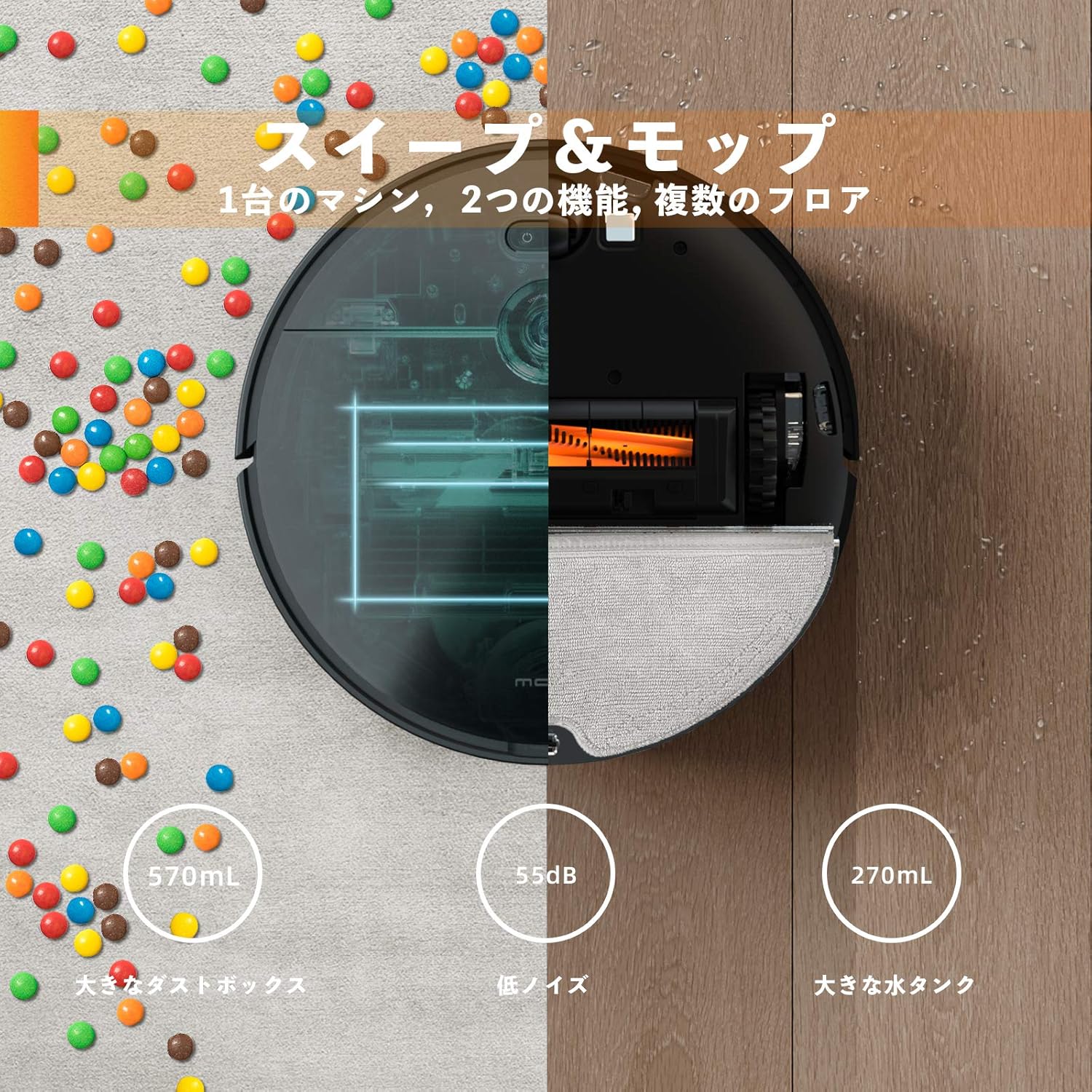
Rajah 6.2: Illustration of the MOVA Z500's combined sweeping and mopping functions, highlighting the dustbin and water tank.
6.3. Navigasi dan Pengelakan Halangan
The robot uses visual navigation and smart algorithms to map your home and plan the most efficient cleaning path. Its slim 3.2-inch (8.2 cm) body allows it to clean under furniture and navigate through tight spaces. It can also cross door sills up to 0.8 inches (2 cm) high.
Rajah 6.3: The MOVA Z500's ultra-thin body (8.2cm) allows it to clean under low furniture.
Video 6.2: Pra singkatview video demonstrating the MOVA Z500 navigating around furniture and obstacles.
6.4. Kawalan Suara
The MOVA Z500 is compatible with smart home devices like Amazon Alexa. Once connected through the app, you can use voice commands to start, stop, or send the robot back to its charging dock.
7. Penyelenggaraan
Regular maintenance ensures optimal performance and extends the lifespan of your MOVA Z500.
7.1. Mengosongkan Tong Sampah
The 570mL dustbin should be emptied after each cleaning cycle, especially if you have pets or high traffic areas. Press the release button to remove the dustbin, open it, and discard the collected debris.
7.2. Membersihkan Penapis
The high-efficiency HEPA filter should be cleaned regularly. Tap it gently to remove dust or rinse it with water if necessary (ensure it is completely dry before reinserting). Replace the filter every 3-6 months depending on usage.
7.3. Berus Pembersih
The main brush and side brush should be inspected and cleaned weekly. The tangle-free vacuuming system is designed to minimize hair wrapping, but occasional removal of tangled hair or debris is recommended. Use the cleaning tool provided to cut and remove any wrapped hair.
7.4. Cleaning the Water Tank and Mop Cloth
After mopping, empty any remaining water from the tank and clean the mop cloth. The mop cloth is washable and reusable. Ensure the air inlet on the water tank is clear for proper water dispensing.
8. Penyelesaian masalah
If you encounter issues with your MOVA Z500, refer to the following common problems and solutions:
| Masalah | Kemungkinan Punca | Penyelesaian |
|---|---|---|
| Robot tidak bermula atau bertindak balas. | Bateri lemah; matikan kuasa; robot tersekat. | Ensure robot is fully charged. Check power switch. Clear any obstructions. |
| Blinking red lights (Power/Dock). | Error condition; battery issue. | Try resetting the robot by holding the power button. Ensure proper charging. |
| Prestasi pembersihan yang lemah. | Tong sampah penuh; penapis tersumbat; berus kusut masai. | Kosongkan tong sampah. Bersihkan atau gantikan penapis. Bersihkan berus utama dan sisi. |
| Fungsi mengemop tidak berfungsi atau bocor. | Water tank not properly installed; air inlet blocked. | Ensure water tank is correctly inserted. Check and clear the air inlet (may need to squeeze it). |
| Robot kerap tersangkut. | Obstacles (cords, small items); low clearance. | Clear the cleaning area of potential obstructions. The robot learns over time to avoid problem areas. |
| Isu sambungan apl. | Incorrect Wi-Fi password; network interference. | Ensure correct Wi-Fi credentials. Restart router and robot. Try re-adding the device in the app. |
If the problem persists, please contact MOVA customer support for further assistance.
9. Spesifikasi
| Ciri | Perincian |
|---|---|
| Jenama | MOVA |
| Nombor Model | Z500 |
| Ciri Khas | Tanpa beg |
| Jenis Penapis | Cartridge (HEPA) |
| Hayat Bateri | Sehingga 110 minit |
| Sumber Kuasa | Dikuasakan Bateri, Elektrik Bertali |
| Bateri Termasuk | Yes (3 Lithium Ion batteries) |
| Kaedah Kawalan | Suara, Apl |
| Faktor Bentuk | Robotik |
| Dimensi Produk | 5.43 x 16.73 x 15.16 inci |
| Berat Barang | 9.68 paun |
| Kuasa Sedutan | 3000Pa |
| Kapasiti tong sampah | 570mL |
| Kapasiti Tangki Air | 270mL (implied from image) |
| Tinggi Badan | 3.2 inci (8.2 cm) |
| Door Sill Crossing | Sehingga 0.8 inci (2 cm) |
10. Waranti dan Sokongan
The MOVA Z500 Robot Vacuum and Mop comes with a standard manufacturer's warranty. For detailed warranty information, please refer to the warranty card included in your product packaging or visit the official MOVA webtapak.
For technical support, troubleshooting assistance, or replacement parts, please contact MOVA customer service. Contact information can typically be found on the product packaging, the official website, or within the MOVA app.


