pengenalan
This manual provides instructions for the safe and effective use of your Celestron PowerTank 12V Portable Power Supply and the accompanying Car Battery Adapter. The PowerTank is designed to provide portable power for computerized telescopes and other electronic devices, offering a reliable power source for extended outdoor use.
Maklumat Keselamatan
- Read all instructions before using the PowerTank.
- Do not expose the PowerTank to rain or moisture.
- Jangan buka unit ini. Rujuk semua servis kepada kakitangan yang berkelayakan.
- Ensure proper ventilation during charging and use.
- Jauhkan daripada kanak-kanak.
- Recycle the sealed lead acid battery responsibly at the end of its life.
- When using the car battery boost function, ensure correct polarity connection to avoid damage to the PowerTank or vehicle battery.
Kandungan Pakej
Sahkan bahawa semua item terdapat dalam pakej anda:
- Celestron PowerTank 12V Portable Power Supply (7-amp hour/84 Wh)
- AC Charger (for PowerTank)
- Car Battery Adapter (25-foot cord)
- Car Battery Terminals (for boosting weak car batteries)
Produk Selesaiview
The Celestron PowerTank is a versatile portable power source designed for astronomers and outdoor enthusiasts. It features multiple output options and integrated lighting.
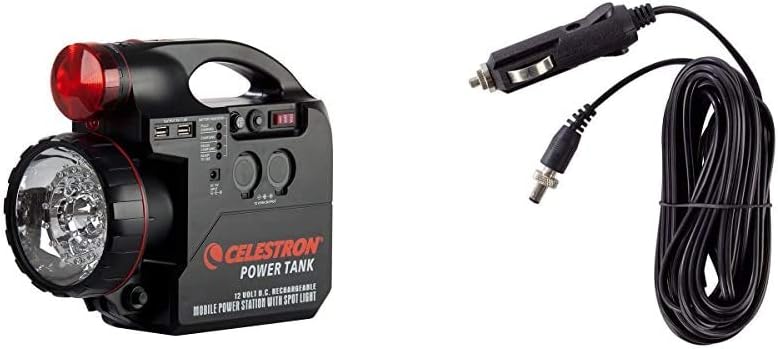
Rajah 1: Celestron PowerTank 12V Portable Power Supply shown with the included Car Battery Adapter.
PowerTank Features:
- 12V DC Output Ports: Two cigarette lighter style ports for powering telescopes and other 12V accessories.
- Port Pengecasan USB: Two 5V/1.5A USB ports for charging smartphones, tablets, and other USB-powered devices.
- Integrated Flashlights:
- Red LED Flashlight: For maintaining night vision during astronomy sessions.
- White LED Flashlight: For general illumination and cleanup.
- Penunjuk Bateri: LED lights to show battery charge status (Full, Charging, Needs Charging, Ready to Use).
- Car Battery Terminals: For emergency boosting of weak car batteries.
- Pemutus Litar Terbina dalam: Meningkatkan keselamatan semasa operasi.

Rajah 2: Depan view of the PowerTank, highlighting the main flashlight and control panel.

Rajah 3: sebelah view of the PowerTank, showing the important recharge reminder and battery type information.

Rajah 4: Terperinci view of the PowerTank's output ports, including USB and 12V sockets, and the battery indicator lights.
Car Battery Adapter Features:
- Kord 25 kaki: Menyediakan ample reach between your telescope and a 12V power source.
- Cigarette Lighter Plug: Connects to a vehicle's cigarette lighter outlet or the PowerTank's 12V output.
- Penyambung tong: Compatible with Celestron computerized telescopes (NexStar SLT, GT, CGEM, CPC, CPC Deluxe, Advanced VX Series) and other telescopes requiring a 5.5 mm outer diameter, 2.1 mm inner diameter, tip-positive 12V input.

Rajah 5: The Celestron Car Battery Adapter, showing the cigarette lighter plug and barrel connector.
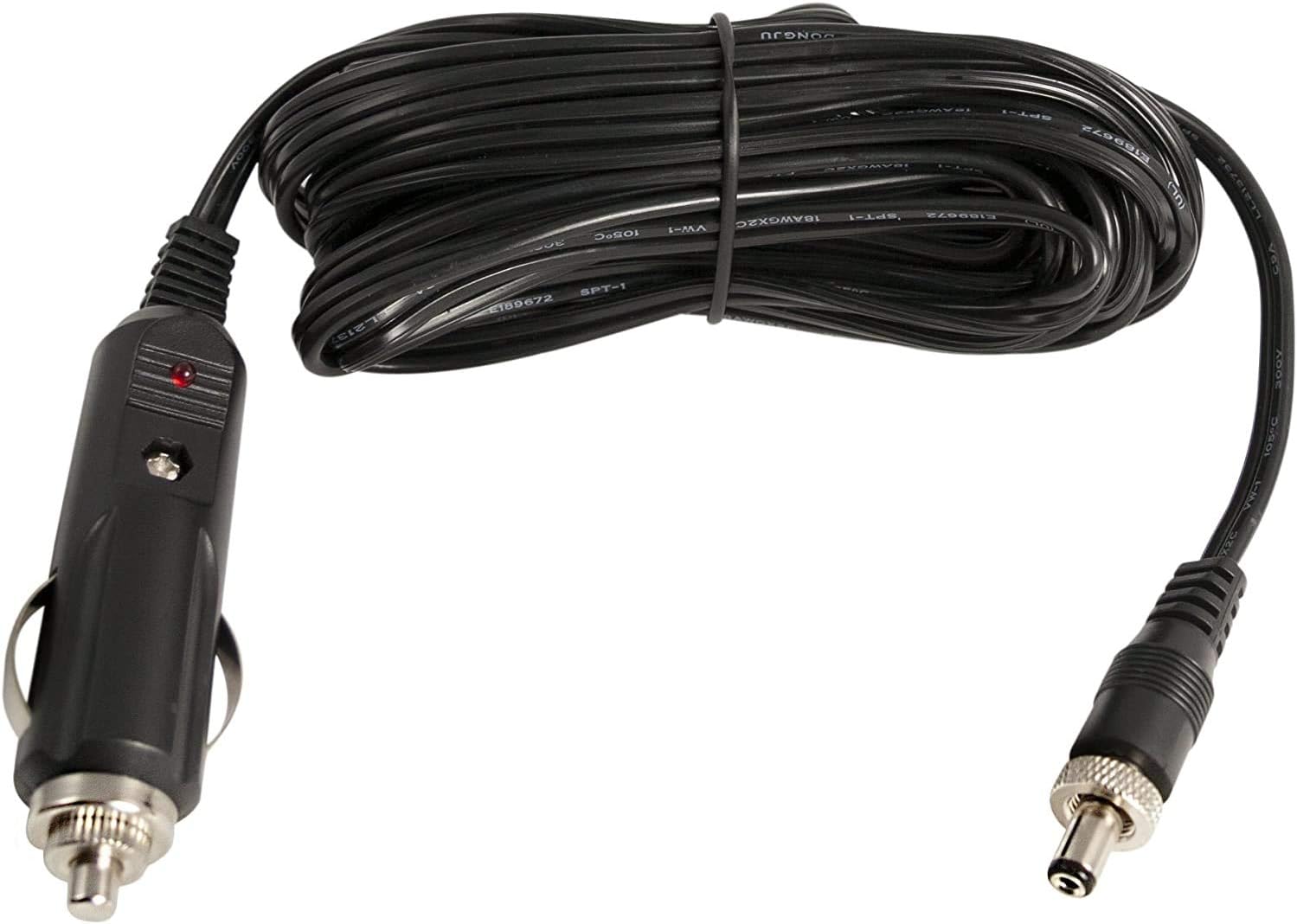
Rajah 6: Terperinci view of the Car Battery Adapter's barrel connector and cigarette lighter plug.
Persediaan
Initial Charging of PowerTank:
- Connect the supplied AC charger to the DC 15V Input port on the PowerTank.
- Palamkan pengecas AC ke salur keluar dinding standard.
- Allow the PowerTank to charge for a full 24 hours before first use. The "Charging" indicator light will illuminate during this process. The "Fully Charged" light will indicate when charging is complete.
Nota: For optimal battery life, always fully charge the PowerTank before its initial use and after any period of extended storage.
Connecting the Car Battery Adapter:
- Identify the 12V input jack on your Celestron computerized telescope. This is typically a round port with an outer diameter of 5.5 mm and an inner diameter of 2.1 mm, requiring a tip-positive connection.
- Insert the barrel connector end of the Car Battery Adapter into the telescope's 12V input jack.
- Insert the cigarette lighter plug end of the Car Battery Adapter into a 12V cigarette lighter outlet on your PowerTank or directly into your vehicle's cigarette lighter socket.
- Ensure all connections are secure before powering on your telescope.
Arahan Operasi
Powering Telescopes and 12V Devices:
- Ensure the PowerTank is adequately charged (check battery indicator lights).
- Connect your telescope or 12V accessory to one of the two 12V cigarette lighter output ports on the PowerTank.
- Turn on the PowerTank's main power switch (if applicable, refer to PowerTank controls).
- Power on your connected device.
Mengecas Peranti USB:
- Connect your USB device (e.g., smartphone, tablet) to one of the two 5V/1.5A USB output ports on the PowerTank using a compatible USB cable.
- The PowerTank will begin charging your device automatically.
Using the Integrated Flashlights:
- Red LED Flashlight: Locate the red flashlight switch on the PowerTank. Turn it on for low-level illumination that preserves your night vision during astronomy observations.
- White LED Flashlight: Locate the white flashlight switch. Turn it on for brighter illumination when packing up equipment or for general use.
Emergency Car Battery Boost:
The PowerTank includes terminals for providing a boost to a weak car battery. Exercise extreme caution and follow vehicle manufacturer guidelines when performing this procedure.
- Ensure the PowerTank is fully charged.
- Connect the red positive (+) terminal clamp from the PowerTank to the positive (+) terminal of the car battery.
- Connect the black negative (-) terminal clamp from the PowerTank to a clean, unpainted metal surface on the car engine block, away from the battery and moving parts.
- Attempt to start the vehicle. If it starts, disconnect the clamps in reverse order (negative first, then positive).
- If the vehicle does not start after a few attempts, consult a professional.
Penyelenggaraan
- Jadual Pengecasan Semula: To maintain battery health, recharge your PowerTank every 3 months. During periods of frequent use or during summer months, recharge monthly. Always fully charge the unit before and after long-term storage.
- Pembersihan: Wipe the exterior of the PowerTank with a soft, damp kain. Jangan gunakan pembersih yang melelas atau rendam unit di dalam air.
- Kitar Semula Bateri: The PowerTank contains a sealed lead acid battery. When the battery reaches the end of its service life, it must be recycled according to local regulations. Do not dispose of it in household waste.
Menyelesaikan masalah
| Masalah | Kemungkinan Punca | Penyelesaian |
|---|---|---|
| PowerTank does not turn on or provide power. | Bateri habis. | Recharge the PowerTank fully using the AC charger. |
| Device connected to 12V port does not power on. | Incorrect connection or device fault. | Ensure the 12V plug is fully inserted. Verify the device itself is functional. Check PowerTank battery level. |
| USB device not charging. | USB cable fault or PowerTank battery low. | Try a different USB cable or port. Recharge the PowerTank. |
| Car Battery Adapter not powering telescope. | Incorrect barrel connector size/polarity or faulty 12V source. | Confirm telescope input requirements (5.5mm OD, 2.1mm ID, tip positive). Ensure the 12V source (PowerTank or car outlet) is active. |
Spesifikasi
- PowerTank Battery Type: Asid Plumbum Tertutup
- PowerTank Capacity: 7-amp hour (Ah) / 84 Watt-hours (Wh)
- PowerTank 12V Output: Two cigarette lighter ports
- PowerTank USB Output: Two 5V / 1.5A ports
- PowerTank Input: DC 15V
- Flashlights: Red LED, White LED
- Car Battery Adapter Cord Length: 25 kaki
- Car Battery Adapter Barrel Connector: 5.5 mm Outer Diameter, 2.1 mm Inner Diameter, Tip Positive
- Compatible Telescopes (with Car Adapter): NexStar SLT Series, NexStar GT Series, CGEM Series, CPC Series, CPC Deluxe Series, Advanced VX Series
Waranti dan Sokongan
For warranty information, technical support, or service inquiries, please contact Celestron customer support directly. Refer to the official Celestron webtapak untuk butiran hubungan terkini dan syarat jaminan.
Webtapak: www.celestron.com


