1. Pengenalan
Thank you for choosing the Hama BB/CATV Amplifier 00205234. This device is designed to amplify antenna signals for both cable television (CATV) and satellite antenna systems, ensuring a clear and stable signal reception. With its adjustable gain of up to 25 dB, you can fine-tune the signal strength to suit your specific needs. Please read this manual carefully before installation and use to ensure proper operation and safety.
2. Arahan Keselamatan
- This device is intended for indoor use only. Do not expose it to moisture, rain, or extreme temperatures.
- Jangan buka peranti casing. Servis hanya boleh dilakukan oleh kakitangan yang berkelayakan.
- Pastikan alur keluar kuasa mudah diakses dan dibumikan dengan betul.
- Disconnect the device from the power supply before cleaning or if it will not be used for an extended period.
- Elakkan meletakkan peranti berhampiran sumber haba atau di bawah cahaya matahari langsung.
3. Kandungan Pakej
Sila pastikan semua item ada dan dalam keadaan baik:
- Hama BB/CATV Amplifier 00205234 (Main Unit)
4. Produk Lebihview
Familiarize yourself with the components of your Hama BB/CATV Amplebih hidup:
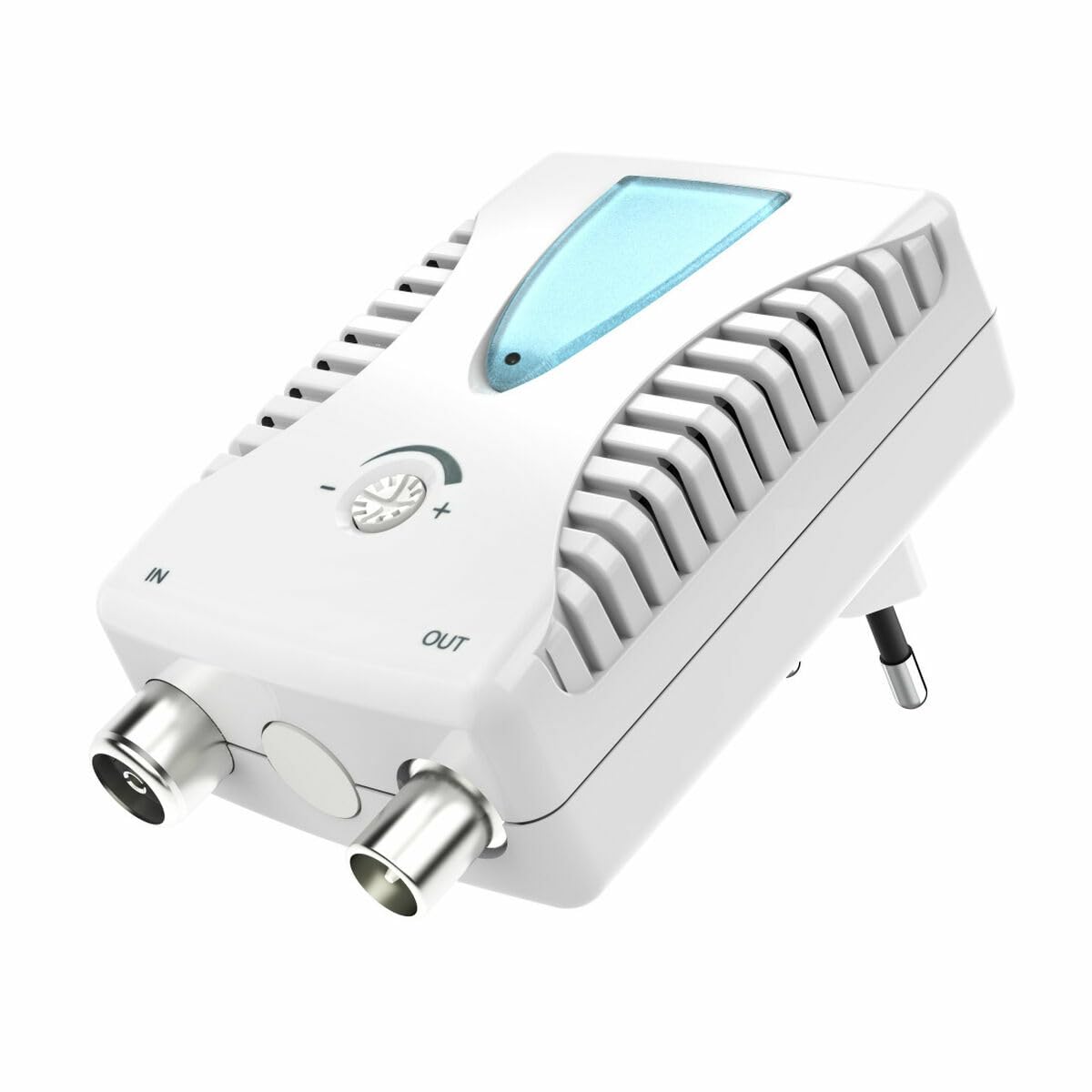
Rajah 1: Depan view of the Hama BB/CATV Amplifier 00205234. It features an "IN" port for the incoming antenna signal, an "OUT" port for the amplified signal to your television or receiver, a rotary knob for signal gain adjustment, a blue LED indicator, and an integrated power plug.
- DALAM Pelabuhan: Connects to the incoming antenna cable (from wall outlet or satellite dish).
- Pelabuhan OUT: Connects to your television, receiver, or distribution system.
- Tombol Pelarasan: Digunakan untuk mengawal amplification level (gain).
- Penunjuk LED: Menyala apabila peranti dihidupkan.
- Integrated Power Plug: For connecting to a standard electrical outlet.
5. Persediaan dan Pemasangan
Follow these steps to install your Hama BB/CATV Amplebih hidup:
- Kenal pasti Titik Sambungan: Locate the antenna cable coming from your wall outlet or satellite dish (this will be your input signal) and the input port on your television or receiver (this will be your output destination).
- Connect Input Cable: Connect the incoming antenna cable to the IN port on the Hama amplifier. Ensure the connection is secure.
- Connect Output Cable: Use a suitable coaxial cable (not included) to connect the KELUAR port of the Hama amplifier to the antenna input on your television or receiver. Ensure the connection is secure.
- Sambungan Kuasa: Palamkan palam kuasa bersepadu bagi amplifier into a standard electrical wall outlet. The blue LED indicator on the amplifier should illuminate, indicating that the device is powered on.
- Pelarasan Awal: Turn the adjustment knob to its minimum setting (usually fully counter-clockwise) before turning on your television.
Nota: For optimal performance, ensure all coaxial cable connections are tight and free from damage.
6. Mengendalikan Amplebih hidup
The Hama BB/CATV Amplifier features an adjustable gain control to optimize your signal strength.
- Hidupkan kuasa: Memastikan amplifier is plugged into a power outlet and the blue LED is lit.
- Turn on TV/Receiver: Switch on your television or receiver and select the appropriate input source (e.g., "Antenna" or "Cable").
- Laraskan Keuntungan: Slowly turn the adjustment knob clockwise to increase the amplification. Observe your television screen for signal quality.
- If the picture is pixelated or distorted, the signal might be too weak or too strong.
- Adjust the knob until you achieve the clearest possible picture and sound.
- lebih-amplification can lead to signal distortion, so avoid setting the gain higher than necessary.
- Scan Channels (if necessary): After adjusting the gain, you may need to perform a channel scan on your television or receiver to detect new or improved channels. Refer to your TV's manual for instructions on how to perform a channel scan.
7. Penyelenggaraan dan Penjagaan
- Pembersihan: Putuskan sambungan amplifier from the power outlet before cleaning. Use a soft, dry, lint-free cloth to wipe the exterior. Do not use liquid cleaners or abrasive materials.
- Storan: If storing the device for an extended period, unplug it and keep it in a cool, dry place away from direct sunlight and moisture.
- Sambungan Kabel: Periksa semua sambungan kabel secara berkala untuk memastikan ia kukuh dan bebas daripada kakisan atau kerosakan.
8. Penyelesaian masalah
| Masalah | Kemungkinan Punca | Penyelesaian |
|---|---|---|
| No picture or poor signal quality. |
|
|
| Blue LED not illuminated. |
|
|
| Picture is distorted or over-saturated. |
|
|
9. Spesifikasi Teknikal
| Nombor Model: | 00205234 |
| Jenama: | Hama |
| Amplification (Gain): | Up to 25 dB (adjustable) |
| Julat Kekerapan: | 862 MHz |
| Jenis Penyambung: | Auxiliary (Coaxial F-type) |
| Peranti Serasi: | Satellite Antenna, Television |
| Persekitaran Penggunaan: | Dalaman |
| Berat Barang: | 0.19 Kilogram |
10. Waranti dan Sokongan
Hama products are subject to strict quality controls. Should you nevertheless experience a problem with this product, please contact your retailer or the Hama service department. Please retain your proof of purchase for any warranty claims. For detailed warranty terms and conditions, please refer to the official Hama webtapak atau hubungi sokongan pelanggan mereka.


