pengenalan
Welcome to the user manual for your OtterBox Defender Series Case, designed specifically for the Samsung Galaxy Tab A 8.4 (2020). This manual provides essential information on how to install, use, and maintain your case to ensure optimal protection for your device.
The Defender Series offers robust protection against drops, dirt, and scratches. It features a multi-layer design including a rigid internal shell, a soft outer cover, and an integrated screen protector. The included protective stand allows for convenient hands-free viewing and comfortable typing.
Produk Selesaiview
The OtterBox Defender Series case is engineered for durability and protection. Familiarize yourself with its key components:
- Rigid Internal Shell: Provides structural integrity and impact resistance.
- Soft Outer Cover: Absorbs shock and provides grip.
- Integrated Screen Protector: Guards your tablet's display from scratches and scuffs.
- Penutup Pelabuhan: Protects ports and jacks from dust and debris.
- Protective Stand: Doubles as a screen cover and a multi-position stand for media viewing dan menaip.

Rajah 1: Depan dan belakang view of the OtterBox Defender Series case, showcasing reka bentuknya yang mantap.

Rajah 2: Bahagian belakang yang terperinci view of the OtterBox Defender Series case, highlighting the OtterBox logo and textured surface.

Rajah 3: Depan view of the case with a Samsung Galaxy Tab A 8.4 (2020) installed, showing the integrated screen protector.
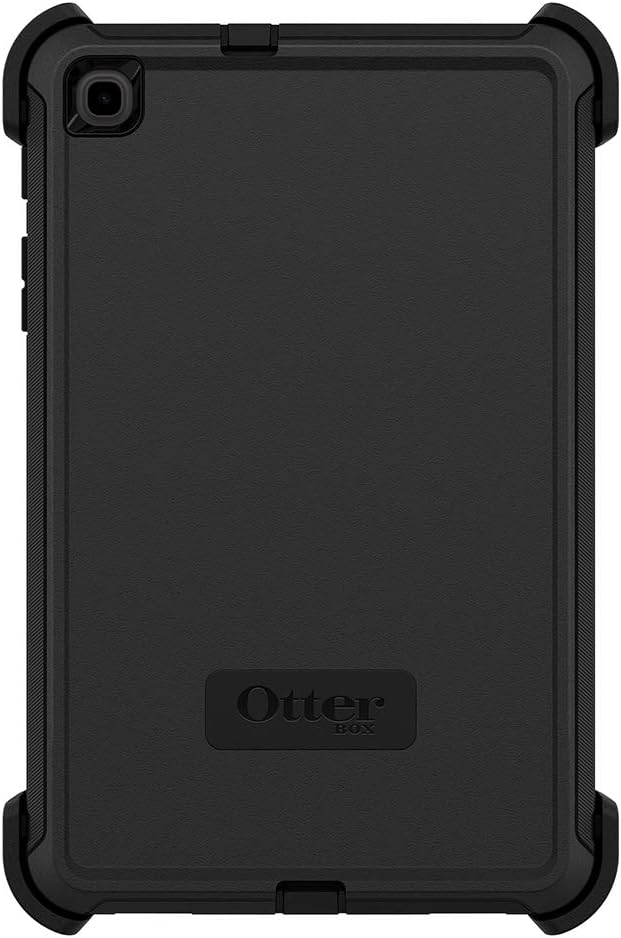
Rajah 4: Belakang view of the case with the tablet, illustrating the precise cutouts for the camera and ports.

Rajah 5: Pro sampinganfile of the case with the tablet, demonstrating the slim yet protective design and accessible buttons.
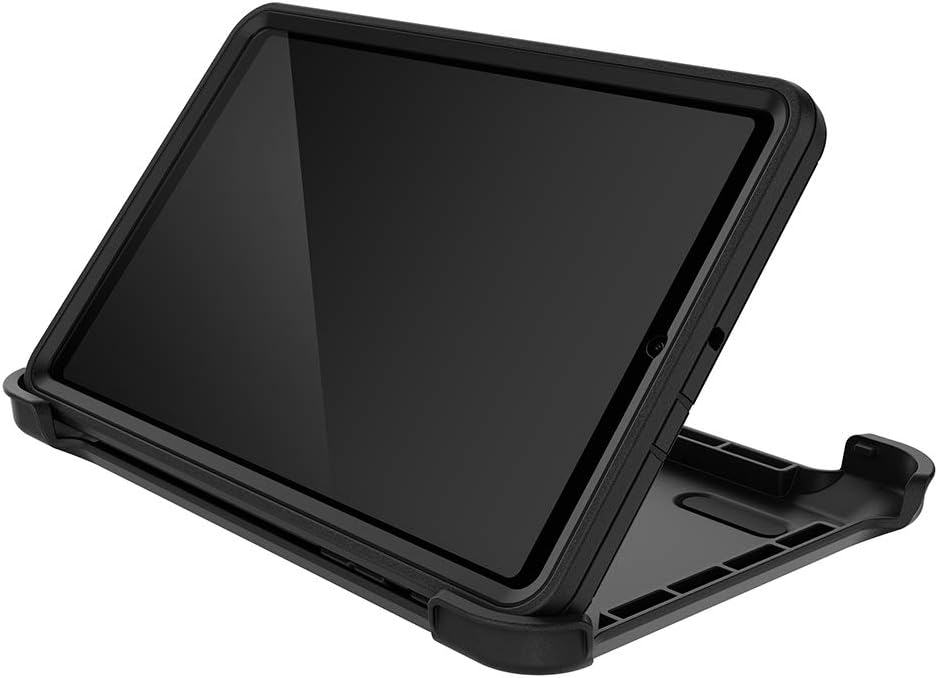
Figure 6: The OtterBox Defender Series case with its protective stand deployed, providing a stable viewing angle for the tablet.
Persediaan: Arahan Pemasangan
Follow these steps to properly install your Samsung Galaxy Tab A 8.4 (2020) into the OtterBox Defender Series case:
- Bongkarkan Kes: Carefully separate the outer soft cover from the rigid internal shell. Then, unclip the two halves of the rigid internal shell.
- Bersihkan Peranti Anda: Ensure your Samsung Galaxy Tab A 8.4 (2020) screen and body are clean and free of dust or debris before installation.
- Place Tablet in Internal Shell: Position your tablet into the front half of the rigid internal shell, ensuring it sits snugly.
- Close Internal Shell: Place the back half of the rigid internal shell over the tablet and snap the two halves together securely around your device. Ensure all clips are engaged.
- Sapukan Penutup Luar: Carefully stretch and fit the soft outer cover over the assembled rigid internal shell. Start from one end and work your way around, ensuring all edges are properly seated and the port covers align with your tablet's ports.
- Check Port Covers: Verify that all port covers are properly sealed to prevent dust and dirt from entering.
The integrated screen protector is designed to provide direct screen protection. Ensure there are no air bubbles or debris between the screen protector and your tablet's screen after installation.
Arahan Operasi
The OtterBox Defender Series case enhances the usability of your Samsung Galaxy Tab A 8.4 (2020) with its integrated features:
- Using the Integrated Screen Protector: The built-in screen protector allows full touch functionality while safeguarding your display from scratches and minor impacts. No special operation is required; simply use your tablet as normal.
- Utilizing Port Covers: To access charging ports, headphone jacks, or other openings, gently lift the corresponding port cover. Ensure to press them firmly back into place after use to maintain protection against dust and debris.
- Deploying the Protective Stand: The included protective stand can be detached from the case and used to prop up your tablet. It offers multiple viewing angles for comfortable media consumption or typing. Simply snap the tablet into the stand in the desired orientation.
Penyelenggaraan
Proper maintenance will extend the life of your OtterBox Defender Series case and ensure continued protection for your device:
- Membersihkan Kes: Gunakan yang lembut, damp cloth to wipe down the exterior of the case. For stubborn dirt, a mild soap solution can be used. Avoid harsh chemicals or abrasive cleaners, as these can damage the materials.
- Cleaning the Screen Protector: For the integrated screen protector, use a microfiber cloth specifically designed for electronics screens. If necessary, slightly dampen the cloth with water or a screen cleaner. Do not spray cleaner directly onto the screen protector.
- Inspecting Port Covers: Periodically check the port covers for wear or damage. Ensure they form a tight seal when closed to prevent ingress of dust and debris.
- Elakkan Keadaan Melampau: While the case offers robust protection, avoid exposing it to extreme temperatures, prolonged direct sunlight, or corrosive substances.
Menyelesaikan masalah
If you encounter any issues with your OtterBox Defender Series case, consider the following common solutions:
| Masalah | Kemungkinan Punca | Penyelesaian |
|---|---|---|
| Difficulty installing tablet | Case components not fully separated or misaligned. | Ensure the outer cover is completely removed and the rigid internal shell is fully unclipped before attempting to insert the tablet. Align the tablet carefully. |
| Dust or debris under screen protector | Tablet screen was not clean before installation. | Remove the tablet from the case, thoroughly clean both the tablet screen and the integrated screen protector with a microfiber cloth, then reinstall. |
| Port covers not sealing properly | Misalignment or wear. | Ensure the outer cover is correctly seated around the rigid shell. If covers are worn, consider contacting OtterBox support for replacement options. |
Spesifikasi
| Ciri | Perincian |
|---|---|
| Nombor Model | 77-65204 |
| Peranti Serasi | Samsung Galaxy Tab A 8.4 (2020) |
| warna | Hitam |
| bahan | Polikarbonat |
| Dimensi (L x W x H) | 21.23 x 13.67 x 1.45 cm (8.36 x 5.38 x 0.57 inci) |
| Berat Barang | 301 g (0.66 paun) |
| Ciri Khas | Integrated Screen Protector, Drop Protection, Dust Protection, Protective Stand |
Waranti dan Sokongan
For detailed warranty information, product registration, and customer support, please visit the official OtterBox website. You can also find FAQs and additional resources there.
Official OtterBox Store: OtterBox Store on Amazon


