1. Pengenalan
Thank you for choosing the Selvim WiFi Mini Projector. This portable movie projector offers 1080P compatibility, a large 200-inch display, Bluetooth audio, and a 60,000-hour LED lamp life. It is designed for versatile connectivity with devices such as TV sticks, HDMI, USB, laptops, PS4, and iOS/Android smartphones. This manual provides detailed instructions for setup, operation, and maintenance to ensure you get the best experience from your projector.
2. Kandungan Pakej
Sila tandai kotak untuk item berikut:
- Selvim WiFi Mini Projector
- Alat Kawalan Jauh (bateri tidak disertakan)
- Kabel Kuasa
- Kabel HDMI
- AV Cable (3-in-1 RCA to 3.5mm jack)
- Kain Pembersih Lensa
- Skru Kaki Boleh Laras
- Manual Pengguna
3. Produk Lebihview
The Selvim Mini Projector features a compact design with multiple connectivity options and user-friendly controls.
3.1 Depan dan Belakang View
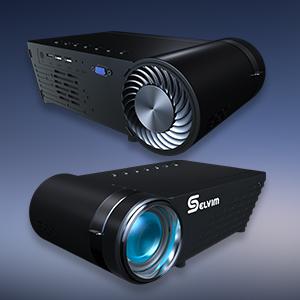
Imej: Depan dan belakang view of the Selvim Mini Projector, highlighting its compact design and various ports.
3.2 Pelabuhan dan Kawalan
- Penerima IR: Untuk isyarat kawalan jauh.
- Port HDMI: Connect to HDMI-enabled devices (laptops, game consoles, TV sticks).
- USB1/USB2 Ports: Connect USB storage devices or power compatible streaming sticks.
- AV/AUX Input: Connect devices using the included AV cable.
- Port VGA: Connect to computers with VGA output.
- Audio Keluar (3.5mm): Sambungkan pembesar suara atau fon kepala luaran.
- Input Kuasa: Sambungkan kabel kuasa.
- Cincin Fokus: Adjust for image clarity.
- Pembetulan Keystone: Adjust image shape (±15 degrees).
- On-device Control Buttons: Navigate menus and adjust settings directly on the projector.

Image: The rear panel of the Selvim Mini Projector, clearly showing the HDMI, USB, AV, AUX, and VGA ports for multi-device connectivity.
4. Persediaan
4.1 Placement and Screen Size
Position the projector on a stable surface or mount it using a tripod or ceiling mount. The recommended projection distance is 2-5 meters (approximately 6.5-16.4 feet) for a screen size of 50-200 inches.
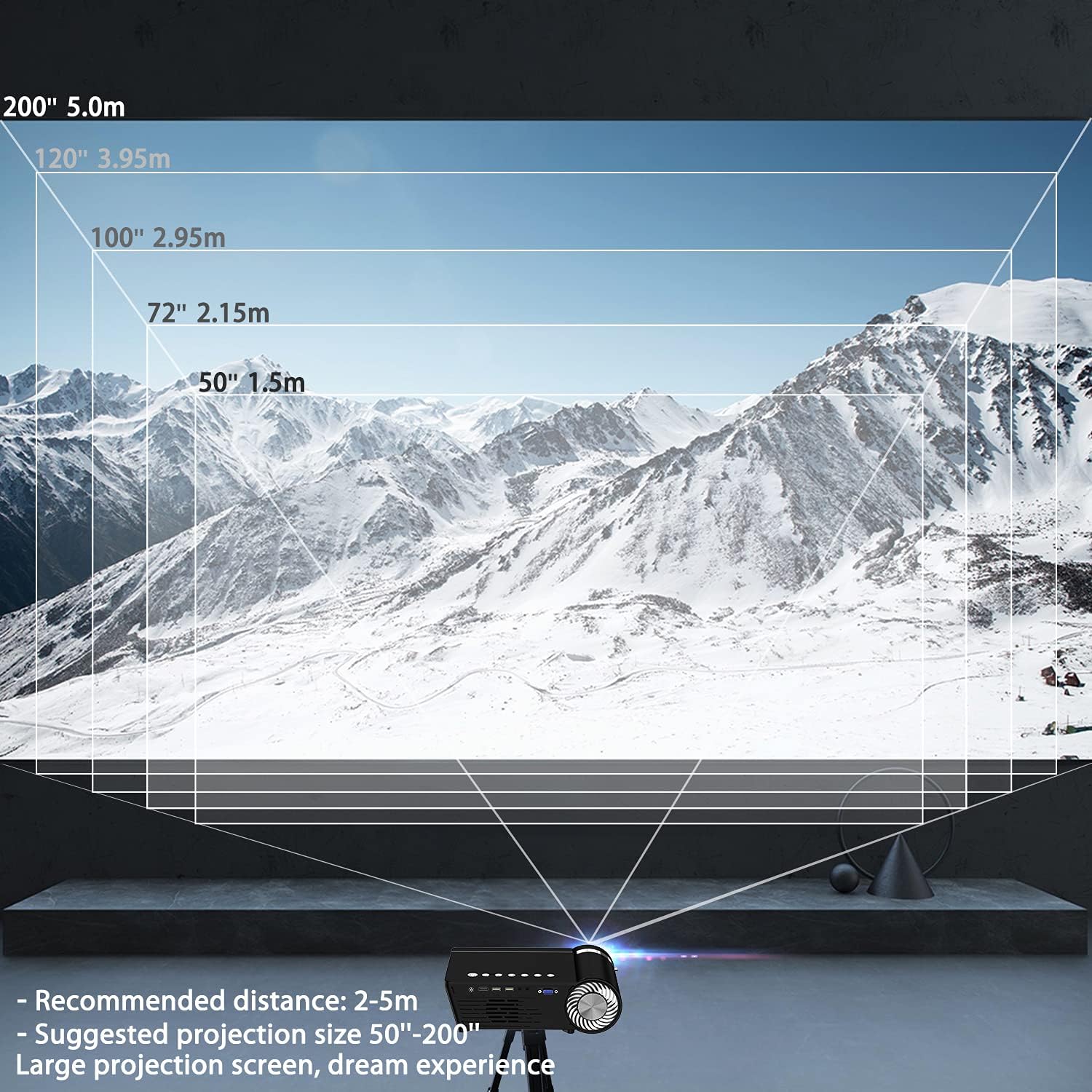
Image: A diagram illustrating recommended projection distances (1.5m for 50", 2.15m for 72", 2.95m for 100", 3.95m for 120", 5.0m for 200") for various screen sizes.
4.2 Sambungan Kuasa
Sambungkan kabel kuasa ke input kuasa projektor dan kemudian ke soket kuasa.
4.3 Pelarasan Fokus dan Keystone
After powering on, adjust the focus ring on the lens until the image is clear. Use the keystone correction dial to correct any trapezoidal distortion, ensuring the projected image is rectangular.

Image: A visual representation of how focus and keystone adjustments affect the projected image, showing a blurry image being sharpened by focus and a trapezoidal image being corrected to a rectangle by keystone.
4.4 Pilihan Kesambungan
The projector supports various wired and wireless connections:
- HDMI: Connect your laptop, game console, or streaming device via an HDMI cable.
- USB: Masukkan pemacu kilat USB untuk memainkan media files secara langsung.
- AV/VGA: Use the provided AV cable or a VGA cable for older devices.
- Bluetooth 5.0: Sambungkan pembesar suara atau fon kepala Bluetooth luaran untuk audio yang dipertingkatkan.
- Sambungan WiFi: For screen mirroring from iOS and Android devices.

Image: The Selvim Mini Projector connected wirelessly to Bluetooth 5.0 headphones and earbuds, illustrating stable signal transmission and a superior stereo experience.
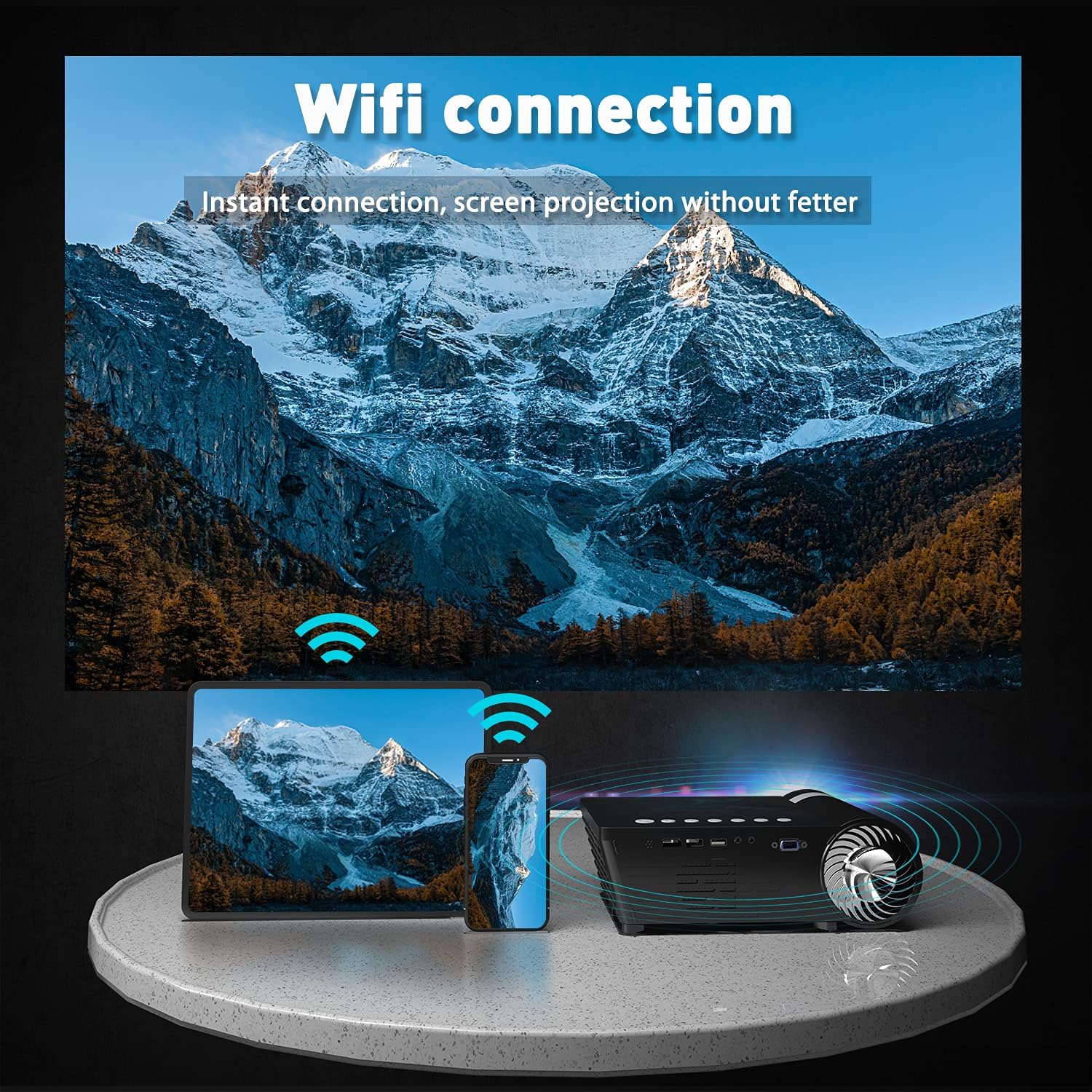
Image: The Selvim Mini Projector demonstrating WiFi connection for instant screen projection from a smartphone and tablet.
5. Arahan Operasi
5.1 Kawalan Asas
Use the included remote control or the buttons on top of the projector to navigate the menu, select input sources, and adjust settings.

Image: A four-panel image showing the projector's main menu, remote control interaction, and options for iOS and Android screen mirroring.
5.2 Pemilihan Sumber Input
From the main menu, select the desired input source (HDMI, USB, AV, VGA, or Miracast for screen mirroring) using the remote or projector buttons.
5.3 Wireless Screen Mirroring (iOS/Android)
Untuk mencerminkan skrin telefon pintar atau tablet anda:
- Select 'Miracast' or 'iOS Display' / 'Android Display' from the projector's main menu.
- On your mobile device, go to WiFi settings and connect to the projector's WiFi network (e.g., 'PROJECTOR-XXXX').
- Buka a web browser on your mobile device and enter the IP address displayed on the projector screen (e.g., 192.168.49.1).
- pada webpage, select 'WiFi AP' and then 'Scan' to find your home WiFi network.
- Connect your mobile device to your home WiFi network.
- Ensure your mobile device is connected to the same WiFi network as the projector.
- For iOS, activate 'Screen Mirroring' from your Control Center and select the projector. For Android, use the 'Screen Cast' or 'Wireless Display' function.
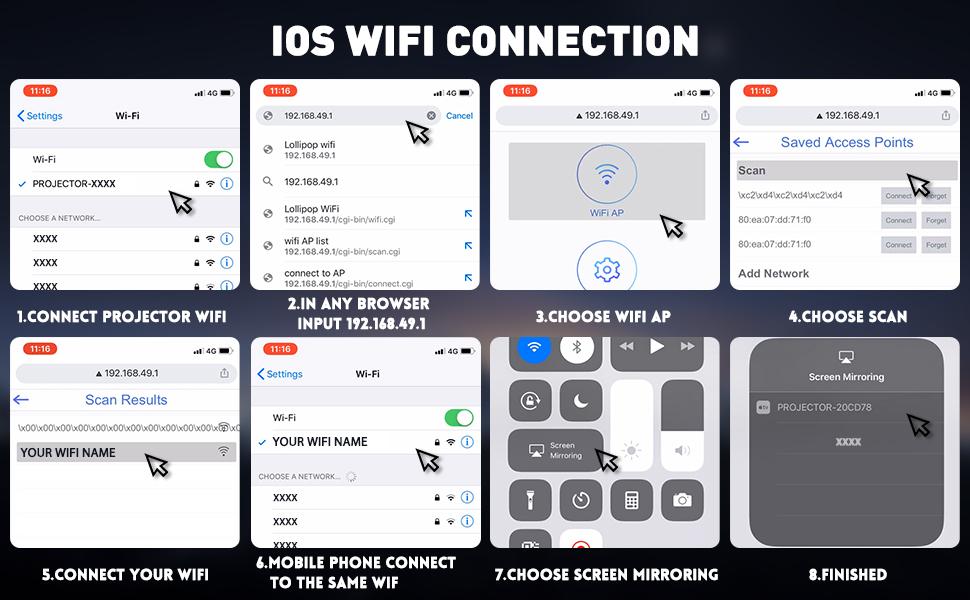
Image: A detailed eight-step visual guide demonstrating how to connect an iOS device to the Selvim Mini Projector for screen mirroring via WiFi.
5.4 Penggandingan Audio Bluetooth
Untuk berpasangan dengan peranti audio Bluetooth:
- Pastikan pembesar suara atau fon kepala Bluetooth anda berada dalam mod berpasangan.
- On the projector, navigate to the 'Sound' settings menu.
- Select 'Bluetooth On' and then 'Scan Device'.
- Choose your Bluetooth device from the list to pair.
6. Penyelenggaraan
6.1 Pembersihan Kanta
Regularly clean the projector lens using the provided cleaning cloth or a soft, lint-free cloth. Avoid abrasive materials that could scratch the lens.

Image: A cutaway diagram showing the multi-layer glass lens of the Selvim Mini Projector, emphasizing its optical quality.
6.2 Sistem Penyejukan
The projector features an efficient cooling system with multiple fans to dissipate heat and ensure a long lamp life. Ensure the ventilation vents are not blocked during operation.
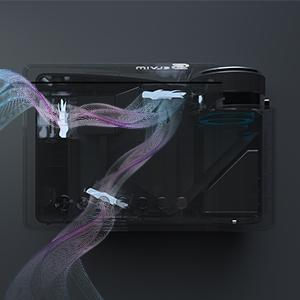
Image: An internal diagram of the Selvim Mini Projector showing the airflow and cooling system, designed to maintain optimal operating temperature.
6.3 LED Lamp kehidupan
The projector utilizes an LED lamp with an impressive lifespan of up to 60,000 hours, providing years of reliable use.
7. Penyelesaian masalah
- Tiada gambar: Check power connection, input source selection, and cable connections. Ensure the lens cap is removed.
- Imej Kabur: Adjust the focus ring. If edges are blurry, adjust keystone correction. Ensure the projection distance is within the recommended range.
- Tiada Bunyi: Check volume settings on both the projector and the source device. Ensure external speakers are properly connected or Bluetooth is paired correctly.
- Isu Pencerminan Skrin: Ensure both the projector and your mobile device are connected to the same WiFi network. For iOS, verify Screen Mirroring is active. For Android, check 'Screen Cast' or 'Wireless Display' settings. Some apps or content may be protected and not allow mirroring.
- Terlalu panas: Ensure ventilation vents are clear and not obstructed. Operate the projector in a well-ventilated area.
8. Spesifikasi
| Jenama | Selvim |
| Model | B08RYTXVY8 |
| Resolusi Paparan Maksimum | 1920 x 1080 (1080P Compatible) |
| Teknologi Ketersambungan | Bluetooth, HDMI, USB, VGA |
| Ciri Khas | Built-In Wi-Fi, Portable, Wireless |
| Berat Barang | 3.91 paun |
| Dimensi Pakej | 12.76 x 8.86 x 5 inci |
| LED Lamp kehidupan | 60,000 Jam |
| Pembetulan Batu Kunci | ±15 darjah |
9. Waranti dan Sokongan
For warranty information or technical support, please refer to the contact details provided with your purchase or visit the official Selvim webtapak. Simpan resit pembelian anda sebagai bukti pembelian untuk tuntutan waranti.


