1. Pengenalan
The Chieftec MUB-3003C is a versatile USB hub designed for installation into a standard 3.5-inch external drive bay of a desktop computer. It expands your system's connectivity by providing one USB 3.2 Type-C port and two USB 3.0 Type-A ports, offering high-speed data transfer capabilities directly from your PC's front panel.
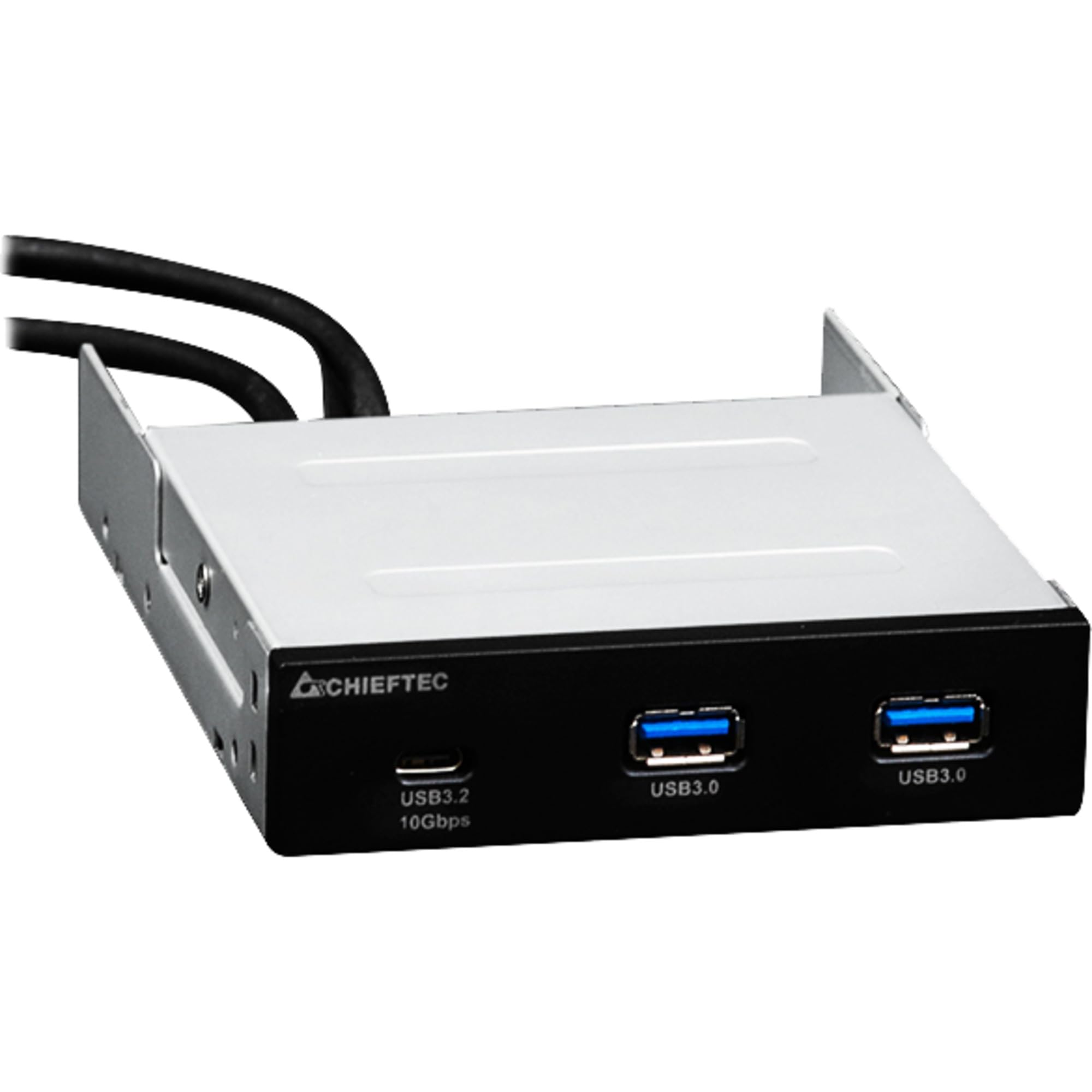
Imej 1.1: Depan view of the Chieftec MUB-3003C USB Hub, showing the USB 3.2 Type-C and two USB 3.0 Type-A ports.
2. Maklumat Keselamatan
Please read and follow these safety instructions carefully to prevent damage to the device or injury to yourself.
- Jangan dedahkan peranti kepada kelembapan, suhu melampau atau cahaya matahari langsung.
- Jangan cuba membuka atau mengubah suai peranti. Rujuk semua servis kepada kakitangan yang berkelayakan.
- Ensure proper grounding of your computer system before installation.
- Disconnect power from your computer before installing or removing the USB hub.
- Jauhkan peranti daripada kanak-kanak.
3. Kandungan Pakej
Sahkan bahawa semua item terdapat dalam pakej anda:
- Chieftec MUB-3003C USB Hub
- Internal USB 3.0 Header Cable
- Mounting Screws (typically included with PC cases or the hub)

Image 3.1: The Chieftec MUB-3003C USB Hub shown with its retail packaging.
4. Persediaan dan Pemasangan
Follow these steps to install the Chieftec MUB-3003C USB Hub into your computer system.
- Sediakan Sistem Anda: Power off your computer and disconnect the power cable from the wall outlet. Open your computer case to access the internal components.
- Locate a 3.5-inch Bay: Identify an available 3.5-inch external drive bay in your computer case. This is typically found at the front of the case.
- Pasang Hab: Slide the MUB-3003C USB Hub into the chosen 3.5-inch bay from the front of the case until it is flush with the front panel. Secure the hub using the appropriate mounting screws on both sides.
- Connect Internal Cables:
- Connect the internal USB 3.0 header cable from the MUB-3003C to an available USB 3.0 (or USB 3.1 Gen1) header on your motherboard. This header is usually blue and labeled 'USB3' or 'F_USB3'.
- Nota: The MUB-3003C typically draws power directly from the USB 3.0 header. No separate SATA power connection is usually required for this model.
- Tutup Sarung dan Hidupkan: Once all connections are secure, close your computer case, reconnect the power cable, and power on your computer. The system should automatically detect the new USB hub.

Imej 4.1: Sisi view of the Chieftec MUB-3003C USB Hub, illustrating the mounting bracket and the internal USB 3.0 header cable connection.
5. Arahan Operasi
Using the Chieftec MUB-3003C USB Hub is straightforward:
- Sambungkan Peranti: Plug your USB devices (e.g., flash drives, external hard drives, card readers, smartphones) into the available ports on the front of the hub.
- Port USB 3.2 Jenis-C: This port supports data transfer speeds up to 10 Gbps (USB 3.1 Gen2). Use it for devices that require the highest speed and utilize a USB-C connector.
- Port USB 3.0 Jenis-A: These two ports support data transfer speeds up to 5 Gbps (USB 3.1 Gen1). They are compatible with standard USB-A devices.
- Pasang & Main: The hub is plug-and-play compatible, meaning no additional drivers are typically required for most operating systems.

Image 5.1: Close-up of the Chieftec MUB-3003C USB Hub's front panel, highlighting the USB 3.2 Type-C and USB 3.0 Type-A ports.
6. Penyelenggaraan
To ensure the longevity and optimal performance of your USB hub:
- Pembersihan: Use a soft, dry cloth to gently wipe the exterior of the hub. Avoid using liquid cleaners or abrasive materials.
- Persekitaran: Keep the hub installed in a well-ventilated area within your PC case to prevent overheating.
- Sambungan: Periodically check that all internal and external connections are secure.
7. Penyelesaian masalah
If you encounter issues with your Chieftec MUB-3003C USB Hub, refer to the following common problems and solutions:
- Peranti Tidak Dikenali:
- Ensure the internal USB 3.0 header cable is securely connected to both the hub and the motherboard.
- Try connecting the USB device directly to a motherboard port to verify the device itself is functional.
- Semak tetapan BIOS/UEFI papan induk anda untuk memastikan port USB diaktifkan.
- Kelajuan Pemindahan Data Perlahan:
- Ensure you are using USB 3.0/3.2 compatible devices and cables. Connecting a USB 2.0 device will result in USB 2.0 speeds.
- Verify that the hub is connected to a USB 3.0 or higher header on your motherboard.
- Avoid connecting multiple high-bandwidth devices simultaneously if you experience performance degradation.
- No Power to USB Devices:
- Confirm the internal USB 3.0 header cable is fully seated on the motherboard.
- Some high-power USB devices may require an externally powered hub. This hub draws power from the motherboard's USB header, which has power limitations.
8. Spesifikasi
| Ciri | Spesifikasi |
|---|---|
| Jenama | Chieftec |
| Nombor Model | MUB-3003C |
| Antara Muka Perkakasan | USB |
| Peranti Serasi | Card Readers, Desktops, USB Flash Drives |
| Jumlah Port USB | 3 |
| Konfigurasi Pelabuhan | 1x USB 3.2 Type-C (10 Gbps), 2x USB 3.0 Type-A (5 Gbps) |
| Installation Bay | 3.5-inch external drive bay |
| Berat Barang | 10.6 auns |
9. Waranti dan Sokongan
Chieftec products are designed for reliability and performance. For warranty information, technical support, or service inquiries, please refer to the official Chieftec webtapak atau hubungi peruncit tempatan anda. Simpan bukti pembelian anda untuk tuntutan waranti.
Sumber Dalam Talian: For the latest drivers, FAQs, and support documentation, visit the official Chieftec support page.


