1. Pengenalan
Thank you for choosing the MEDION MD19601 Robot Vacuum Cleaner. This device is designed to provide efficient and automated cleaning for your home, combining vacuuming and mopping functionalities. This manual provides essential information for the safe and effective use, setup, operation, and maintenance of your robot vacuum cleaner. Please read it thoroughly before first use and keep it for future reference.

The MEDION MD19601 Robot Vacuum Cleaner on a wooden floor, showcasing its sleek design and low profile.
2. Arahan Keselamatan
- Baca semua arahan dengan teliti sebelum menggunakan perkakas.
- This appliance is for indoor household use only. Do not use outdoors or on commercial or industrial surfaces.
- Do not allow children to operate the robot vacuum cleaner. Supervise children and pets when the robot is operating.
- Ensure the power adapter and charging station are placed in a dry area, away from water or moisture.
- Do not use the robot vacuum cleaner to pick up large debris, liquids, burning or smoking objects, or sharp objects.
- Before use, clear the area of loose cables, small objects, rugs with long fringes, and anything that could entangle the brushes.
- Do not operate the robot vacuum cleaner if it is damaged or malfunctioning. Contact customer support for assistance.
- Only use the original charging station and power adapter provided with the device.
3. Kandungan Pakej
Sila semak kandungan bungkusan semasa membuka bungkusan. Jika terdapat barang yang hilang atau rosak, hubungi khidmat pelanggan.
- MEDION MD19601 Robot Vacuum Cleaner
- Stesen Pengecasan
- Penyesuai Kuasa
- 2 x Side Brushes (pre-installed)
- 2 x Spare Side Brushes
- Tangki Air
- 2 x Mop Pads
- 1 x Spare Filter
- Berus Pembersih

All components included with the MEDION MD19601 Robot Vacuum Cleaner: the robot, charging station, power adapter, cleaning brush, spare side brushes, spare filter, water tank, and mop pads. Dimensions are indicated as 325mm diameter and 80mm height.
4. Produk Lebihview
Ciri-ciri Utama:
- Pembersihan 2-dalam-1: Combines powerful vacuuming with effective mopping for comprehensive floor cleaning.
- Kawalan Pintar: Control your robot via the dedicated MEDION Robots app (Android/iOS), or through voice commands using Amazon Alexa and Google Assistant.
- Navigasi Pintar: Equipped with sensors and bumpers for collision detection, obstacle avoidance, and stair detection, protecting both your furniture and the robot.
- Pembersihan yang cekap: Features powerful side and main brushes for thorough dirt and dust collection.
- Hayat Bateri yang Panjang: A powerful battery allows for up to 100 minutes of continuous cleaning on a single charge, with automatic return to the charging station.
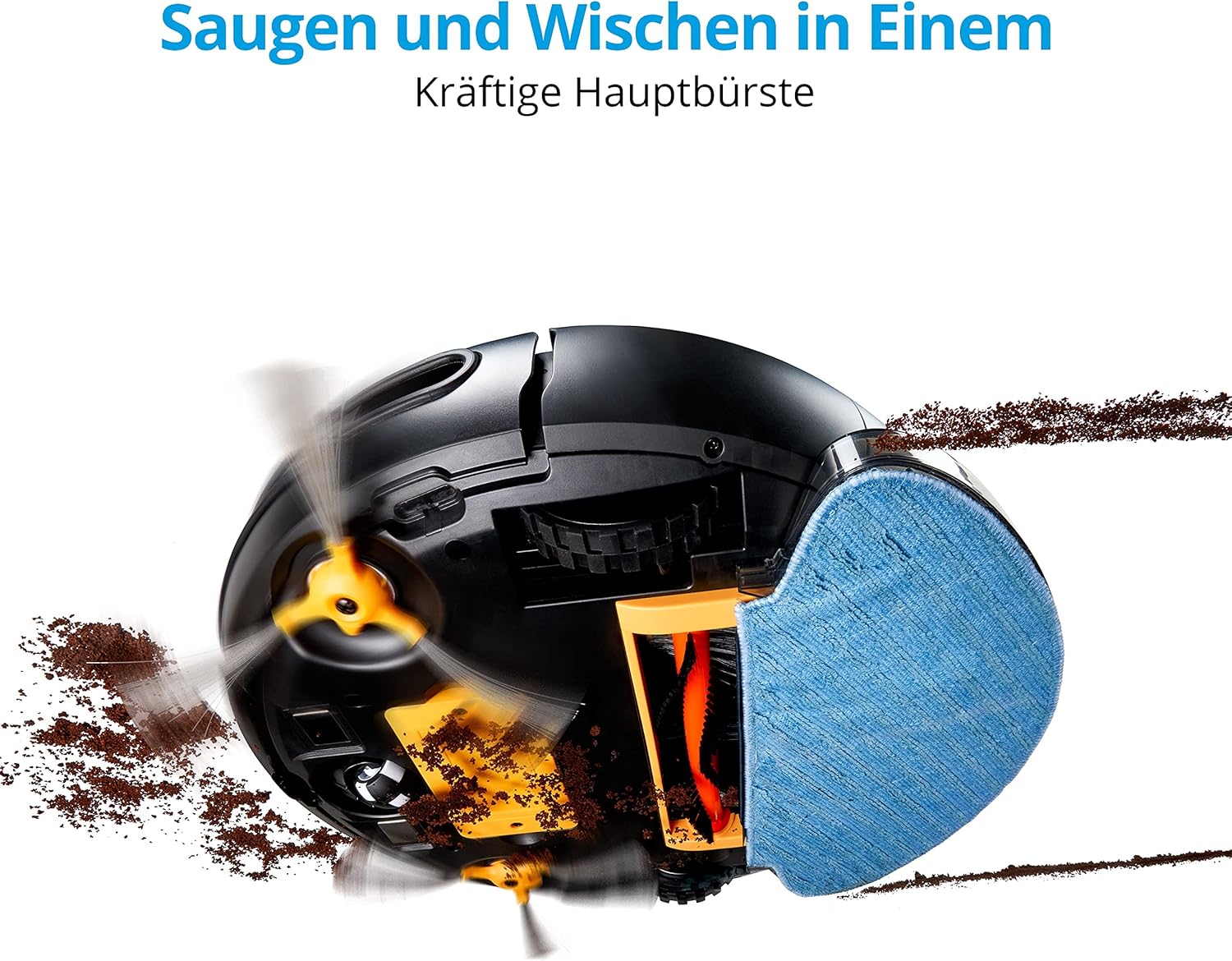
Bahagian bawah view of the MEDION MD19601 Robot Vacuum Cleaner demonstrating its powerful main brush and side brushes for simultaneous vacuuming and mopping.

Atas ke bawah view of the MEDION MD19601 Robot Vacuum Cleaner, highlighting its clean white and black design with the power button and MEDION logo.
5. Persediaan
5.1 Penempatan Stesen Pengecasan
- Place the charging station against a wall in an open area, ensuring at least 0.5 meters (1.6 feet) of clear space on both sides and 1.5 meters (5 feet) in front.
- Connect the power adapter to the charging station and plug it into a power outlet. Ensure the indicator light on the charging station is on.
5.2 Pengecasan Awal
- Place the robot vacuum cleaner onto the charging station, aligning its charging contacts with those on the station.
- Allow the robot to charge completely before its first use. The indicator light on the robot will change to indicate a full charge (refer to the robot's LED indicator guide for details).
5.3 Pemasangan Apl dan Berpasangan
- Download the "MEDION Robots" app from the App Store (iOS) or Google Play Store (Android).
- Buka aplikasi dan buat akaun atau log masuk.
- Follow the in-app instructions to add your MD19601 robot vacuum cleaner. This typically involves connecting your smartphone to a 2.4GHz Wi-Fi network and then connecting the robot to the same network.
- Once paired, you can control the robot, set schedules, and monitor its status via the app.

A smartphone screen displaying the MEDION Robots app interface, showing options for manual control, scheduling, cleaning modes, push notifications, and suction power adjustment.
6. Arahan Operasi
6.1 Starting/Stopping Cleaning
- Permulaan Manual: Press the power button on the robot once to start cleaning. Press it again to pause.
- Kawalan Apl: Use the "Start" or "Clean" button within the MEDION Robots app to initiate or stop a cleaning cycle.
6.2 Mod Pembersihan
Robot ini menawarkan pelbagai mod pembersihan yang boleh diakses melalui aplikasi:
- Mod Auto: Robot itu menavigasi dan membersihkan seluruh kawasan yang boleh diakses dengan bijak.
- Mod Tepi: Robot membersihkan sepanjang dinding dan tepi perabot.
- Spot/Circle Mode: Robot itu membersihkan kawasan tertentu dalam corak lingkaran untuk pembersihan tertumpu.
6.3 Penjadualan
Use the MEDION Robots app to set cleaning schedules for specific times and days. The robot will automatically start cleaning according to your programmed schedule.
6.4 Fungsi Mop
- Fill the water tank with clean water. You may add a small amount of neutral floor cleaner suitable for robot vacuums (avoid foaming detergents).
- Attach a clean mop pad securely to the water tank.
- Insert the filled water tank with the mop pad into the designated slot on the robot.
- Start a cleaning cycle. The robot will now vacuum and mop simultaneously.
- After mopping, remove the water tank and empty any remaining water. Clean the mop pad.
6.5 Kawalan Suara
Integrate your MEDION MD19601 with Amazon Alexa or Google Assistant for convenient voice control. Follow the instructions in the MEDION Robots app or your smart home assistant app to link the devices. Common commands include:
- "Alexa, start MEDION Robot cleaning."
- "Hey Google, tell MEDION Robot to stop."

The MEDION MD19601 Robot Vacuum Cleaner with a speech bubble indicating voice control compatibility with Alexa and Google Assistant.

Satu overhed view of the MEDION MD19601 Robot Vacuum Cleaner on a wooden floor, illustrating its intelligent navigation system mapping a cleaning path around obstacles like a laptop.
7. Penyelenggaraan
Penyelenggaraan tetap memastikan prestasi optimum dan memanjangkan jangka hayat pembersih vakum robot anda.
7.1 Pembersihan Tong Sampah dan Penapis
- Buka penutup atas robot dan keluarkan tong sampah.
- Empty the dustbin contents into a trash can.
- Remove the filter assembly (HEPA filter and sponge filter). Tap them gently to remove dust. Do not wash the HEPA filter with water.
- Rinse the dustbin with water if necessary, ensuring it is completely dry before reinserting.
- Reassemble the filters and dustbin, then place them back into the robot.
7.2 Brush Cleaning (Side and Main)
- Balikkan robot.
- Remove the side brushes by gently pulling them upwards. Remove any hair or debris wrapped around them.
- Remove the main brush cover and then the main brush. Use the provided cleaning tool to cut and remove tangled hair or fibers.
- Reinstall the main brush and cover, then reattach the side brushes.

Terperinci view of the underside of the MEDION MD19601 Robot Vacuum Cleaner, showing the main brush, side brushes, and wheels.
7.3 Pembersihan Sensor
Wipe the cliff sensors (located on the bottom of the robot) and the bumper sensors (on the front) with a clean, dry cloth to ensure proper operation.
7.4 Water Tank and Mop Pad Maintenance
- Selepas setiap sesi mengemop, kosongkan sebarang air yang tinggal dari tangki.
- Rinse the water tank thoroughly and allow it to air dry.
- Remove the mop pad and wash it by hand or machine. Allow it to dry completely before reuse.
8. Penyelesaian masalah
| Masalah | Kemungkinan Punca | Penyelesaian |
|---|---|---|
| Robot tidak bermula atau bertindak balas. | Bateri lemah; Suis kuasa dimatikan; Robot tersekat. | Cas robot; Pastikan suis kuasa HIDUP; Kosongkan halangan. |
| Robot tidak boleh kembali ke stesen pengecasan. | Stesen pengecasan tersekat; Robot terlalu jauh dari stesen. | Ensure clear space around charging station; Manually place robot closer. |
| Prestasi pembersihan yang lemah. | Tong sampah penuh; Berus kusut; Penapis tersumbat. | Kosongkan tong sampah; Bersihkan berus; Bersihkan atau gantikan penapis. |
| Isu sambungan apl. | Kata laluan Wi-Fi yang salah; Penghala terlalu jauh; Rangkaian Wi-Fi 5GHz. | Sahkan kata laluan Wi-Fi; Alihkan robot lebih dekat ke penghala; Pastikan Wi-Fi 2.4GHz digunakan. |
| Fungsi mengemop tidak berfungsi. | Water tank empty; Mop pad not attached correctly. | Fill water tank; Attach mop pad securely. |
9. Spesifikasi
| Ciri | Spesifikasi |
|---|---|
| Jenama | MEDION |
| Nombor Model | MD19601 |
| warna | putih |
| Tahap Kebisingan | 44 Desibel |
| Hayat Bateri | Sehingga 100 minit |
| Dimensi Produk (L x W x H) | 32.5 x 32.5 x 8 cm |
| Berat Barang | 2.9 Kilogram |
| Ciri Khas | Tanpa wayar |
| Keserasian | Amazon Echo (Alexa), Pembantu Google |
| Jenis Penapis | HEPA |
10. Waranti dan Sokongan
MEDION offers a commitment to quality and support for its products.
- Ketersediaan Alat Ganti: Spare parts for the MEDION MD19601 are available for a period of 2 years from the date of purchase.
- For further assistance, troubleshooting, or to inquire about warranty services, please refer to the official MEDION webtapak atau hubungi sokongan pelanggan mereka secara langsung.


