1. Pengenalan
This manual provides essential information for the safe and efficient operation of the FBT SIMPHOENIX E550-2S0055L Variable Frequency Drive (VFD). This VFD is designed for precise motor control in applications such as CNC routers, terminal machines, wire-cutting machines, and dividing/cutting machines. It offers advanced features including Sensorless Vector Control (SVC), V/F control, and high adaptability to grid voltage fluctuations (enduring ±20% fluctuation).
2. Maklumat Keselamatan
AMARAN: Failure to follow these safety instructions may result in serious injury or equipment damage.
- Refer to the instruction manual thoroughly before installation and operation.
- Do not connect AC power to the output terminals (UVW). This is for motor connection only.
- Do not remove any cover while applying power. Wait at least 10 minutes after disconnecting power before accessing internal components to allow capacitors to discharge.
- Kencangkan (tanahkan) peralatan dengan kukuh untuk mengelakkan kejutan elektrik.
3. Produk Lebihview
The FBT SIMPHOENIX E550-2S0055L VFD features a user-friendly control panel for easy configuration and monitoring.
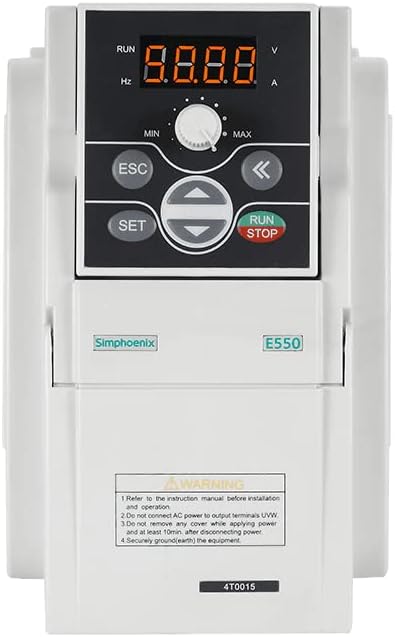
Rajah 3.1: Depan view of the FBT SIMPHOENIX E550-2S0055L VFD, showing the digital display, control buttons, and potentiometer.
3.1 Ciri Panel Kawalan
- Paparan Digital: A 4-digit LED display shows operational parameters such as frequency (Hz), voltage (V), and current (A). Indicators for RUN status are also present.
- Potensiometer: A rotary knob labeled MIN/MAX for adjusting frequency or other parameters.
- Butang ESC: Digunakan untuk keluar dari menu atau membatalkan operasi.
- Butang SET: Used to enter menus or confirm settings.
- Butang Arah (Atas/Bawah/Kiri/Kanan): Used for navigation within menus and adjusting parameter values.
- Butang LARI/BERHENTI: Memulakan atau menghentikan operasi motor.
4. Persediaan dan Pemasangan
4.1 Sambungan Elektrik
- Input Kuasa: Connect the 220V AC power supply to the designated input terminals. Ensure the power source matches the VFD's voltage keperluan.
- Keluaran Motor: Connect the motor to the UVW output terminals. Do not connect AC power to these terminals.
- Pembumian: Ensure the VFD is securely grounded (earthed) to a proper ground point.
- Pendawaian Kawalan: Utilize the multifunctional input terminals for external control signals. The VFD supports 29 kinds of terminal function definitions and 16 kinds of programmable status outputs for flexible control.
4.2 Antara Muka Komunikasi
The VFD includes a standard RS485 communication interface. It supports the MODBUS protocol and Simphoenix self-defined protocols, allowing for easy integration with PLCs or other industrial control equipment.
5. Arahan Operasi
5.1 Operasi Asas
- Hidupkan kuasa: Apply power to the VFD. The digital display will illuminate.
- Pelarasan Parameter: Use the SET button to enter the parameter menu. Navigate with the directional buttons and adjust values using the potentiometer or directional buttons. Press SET to confirm and ESC to exit.
- Mulakan Motor: Tekan ke LARI button to start the motor. The RUN indicator will light up.
- Laraskan Kekerapan: While the motor is running, the potentiometer can be used to adjust the output frequency, thereby controlling motor speed.
- Berhenti Motor: Tekan ke BERHENTI butang untuk menghentikan motor.
5.2 Ciri Lanjutan
- Pemantauan masa nyata: The VFD provides vivid real-time monitoring of input and output current, voltage, and other operational parameters directly on the display.
- Self-Adaptive Control: Features special self-adaptive control technology for automatic current-limiting, voltage-penghad, dan kurang volumtage suppression during operation.
- Built-in Counter: A built-in counter function allows for simple counting operations when matched with multifunctional terminals.
- Pengawal PID: An integrated and optimized PID controller facilitates closed-loop control over variables like temperature, simplifying control system structures and reducing costs.
6. Penyelenggaraan
Regular maintenance ensures the longevity and reliable operation of your VFD.
- Pembersihan: Pastikan VFD bersih dan bebas daripada habuk dan serpihan. Gunakan kain lembut dan kering untuk membersihkan. Jangan gunakan pembersih cecair.
- Pemeriksaan: Periodically inspect all electrical connections for tightness and signs of wear or damage.
- penyejukan: Ensure adequate ventilation around the VFD to prevent overheating. Keep cooling fins clear.
- Pemutusan Kuasa: Always disconnect power and wait at least 10 minutes before performing any maintenance or inspection that requires opening the VFD cover.
7. Penyelesaian masalah
Bahagian ini menyediakan panduan umum untuk isu-isu biasa. Untuk masalah yang rumit, hubungi sokongan teknikal.
- VFD Not Powering On:
- Check the main power supply connection.
- Sahkan input voltage (220V).
- Inspect fuses or circuit breakers.
- Motor Tidak Berjalan:
- Ensure the RUN button has been pressed.
- Check motor wiring to UVW terminals.
- Verify motor parameters are correctly set in the VFD.
- Check for any error codes on the display and consult the full manual for their meaning.
- Bunyi atau Getaran Tidak Normal:
- Check motor mounting and alignment.
- Verify motor parameters and VFD settings.
- Ensure the motor is suitable for VFD operation.
8. Spesifikasi
| Ciri | Spesifikasi |
|---|---|
| Model | E550-2S0055L |
| Jenama | FBT / SIMPHOENIX |
| Input Voltage | 220V |
| Kuasa Keluaran | 5.5KW (5500 Watts) |
| Mod Kawalan | SVC, V/F Control |
| Antaramuka Komunikasi | Standard RS485 (MODBUS, Simphoenix protocol) |
| bahan | Kuprum (komponen dalaman) |
| Pengeluar | FBT |
9. Waranti dan Sokongan
For warranty information, technical support, or service inquiries, please contact your vendor or the manufacturer directly. Keep your purchase receipt for warranty claims.
You can visit the FBT Store for more products and information: FBT Store on Amazon


