pengenalan
This manual provides essential information for the proper setup, operation, and maintenance of your PiPo X10s All-in-One Mini PC. Please read this manual thoroughly before using the device to ensure optimal performance and safety.
The PiPo X10s is a versatile 10.1-inch tablet computer designed as an all-in-one mini PC, featuring a Windows 10 operating system, Intel Celeron J4105 Quad Core processor, 6GB RAM, and 64GB ROM. It supports various connectivity options including WiFi, Bluetooth, TF Card, and RJ45 Ethernet.

Image: The PiPo X10s Mini PC, showcasinreka bentuk padat dan paparan bersepadunya.
Maklumat Keselamatan
- Jangan dedahkan peranti kepada suhu yang melampau, cahaya matahari langsung atau kelembapan yang tinggi.
- Elakkan daripada menjatuhkan atau meletakkan peranti kepada kesan yang kuat.
- Gunakan hanya penyesuai kuasa asal yang disediakan bersama peranti.
- Jangan cuba membuka atau membaiki peranti sendiri. Rujuk kepada kakitangan perkhidmatan yang berkelayakan.
- Jauhkan peranti daripada air dan cecair lain.
- Pastikan pengudaraan yang betul untuk mengelakkan terlalu panas.
Produk Selesaiview
Familiarize yourself with the various ports and components of your PiPo X10s Mini PC.

Image: Detailed diagram of the PiPo X10s ports and controls.
- Butang mati: Hidupkan/matikan peranti.
- Volume up and down keys: Laraskan kelantangan audio.
- USB interface (x4): Connect USB devices such as keyboards, mice, or external storage.
- Antara muka audio 3.5mm: Sambungkan fon kepala atau pembesar suara luaran.
- Soket kad TF: Insert a TF (MicroSD) card for expanded storage (up to 32GB, not included).
- Antara muka HDMI: Connect to an external display or TV.
- RJ45 network interface: Connect to a wired Ethernet network.
- DC 12V power interface: Sambungkan penyesuai kuasa.
- Antara muka RS232: Serial port for specific industrial or legacy connections.
Persediaan
Hidupkan Kuasa Awal
- Connect the provided 12V / 2.4A power adapter to the DC 12V power interface on the device.
- Palamkan penyesuai kuasa ke salur keluar dinding.
- Press and hold the "Off button" (Power button) located on the side of the device until the screen lights up.
- Ikut arahan pada skrin untuk melengkapkan persediaan awal Windows 10, termasuk pemilihan bahasa, sambungan rangkaian dan penciptaan akaun pengguna.
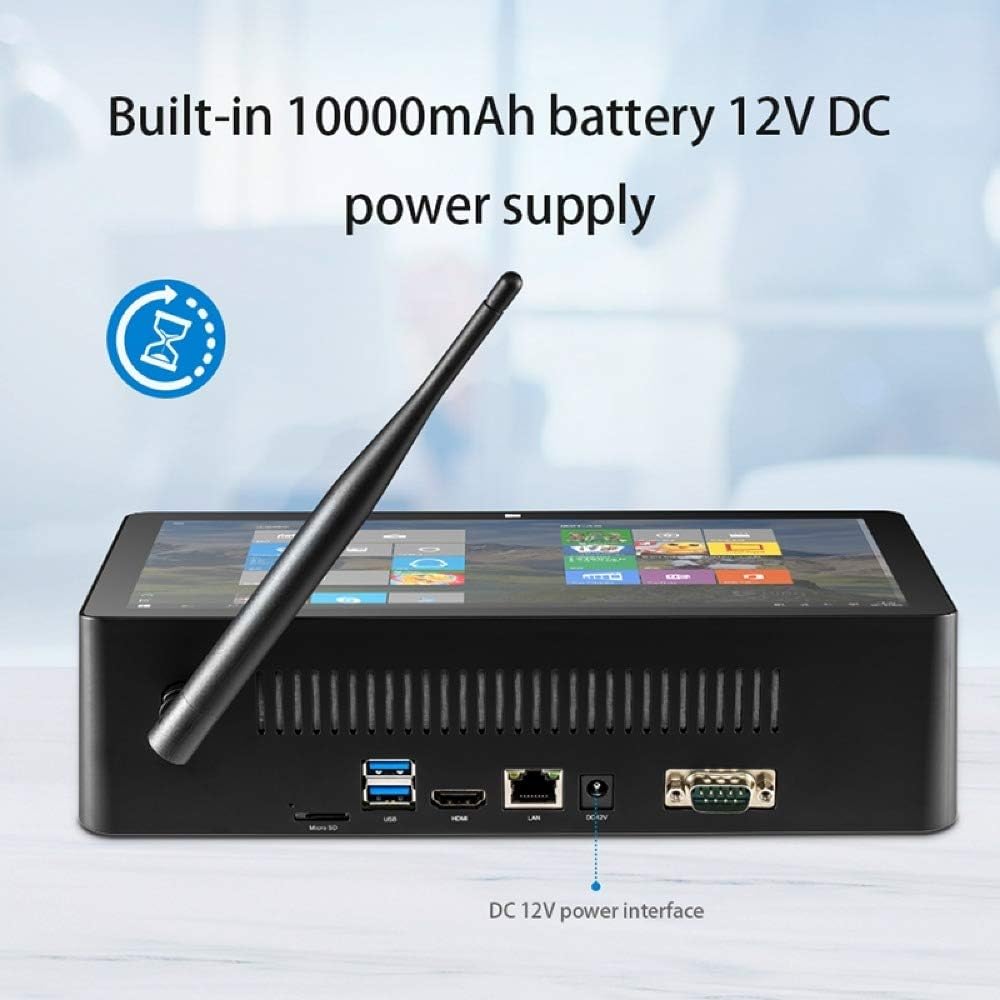
Image: The DC 12V power interface on the rear of the device.
Beroperasi
Operasi Asas
- Hidupkan/Mati Kuasa: Press the power button to turn on. To turn off, click the Start button in Windows, then Power > Shut down. A short press of the power button will put the device to sleep.
- Interaksi Skrin: The 10.1-inch IPS capacitive screen supports touch input. Navigate Windows 10 by tapping, swiping, and pinching.
- Kawalan Kelantangan: Use the dedicated volume up and down buttons on the device, or adjust volume through the Windows taskbar.
Windows 10 Environment
Your PiPo X10s comes pre-installed with Windows 10. You can customize settings, install applications, and manage files just like on a standard desktop PC. The system supports multi-languages, which can be downloaded and installed via Windows settings.
Ketersambungan
Sambungan Wi-Fi
- Klik ikon Wi-Fi dalam bar tugas Windows.
- Pilih rangkaian yang anda inginkan daripada senarai rangkaian yang tersedia.
- Masukkan kata laluan rangkaian jika diminta dan klik "Sambung".
Sambungan Bluetooth
- Pergi ke Tetapan Windows > Peranti > Bluetooth & peranti lain.
- Pastikan Bluetooth dihidupkan "Hidup".
- Klik "Tambah Bluetooth atau peranti lain" dan pilih "Bluetooth".
- Choose your Bluetooth device from the list and follow the pairing instructions.
Wired Ethernet (LAN)
Connect an Ethernet cable from your router or network switch to the RJ45 network interface on the device. The device will automatically detect and connect to the wired network.
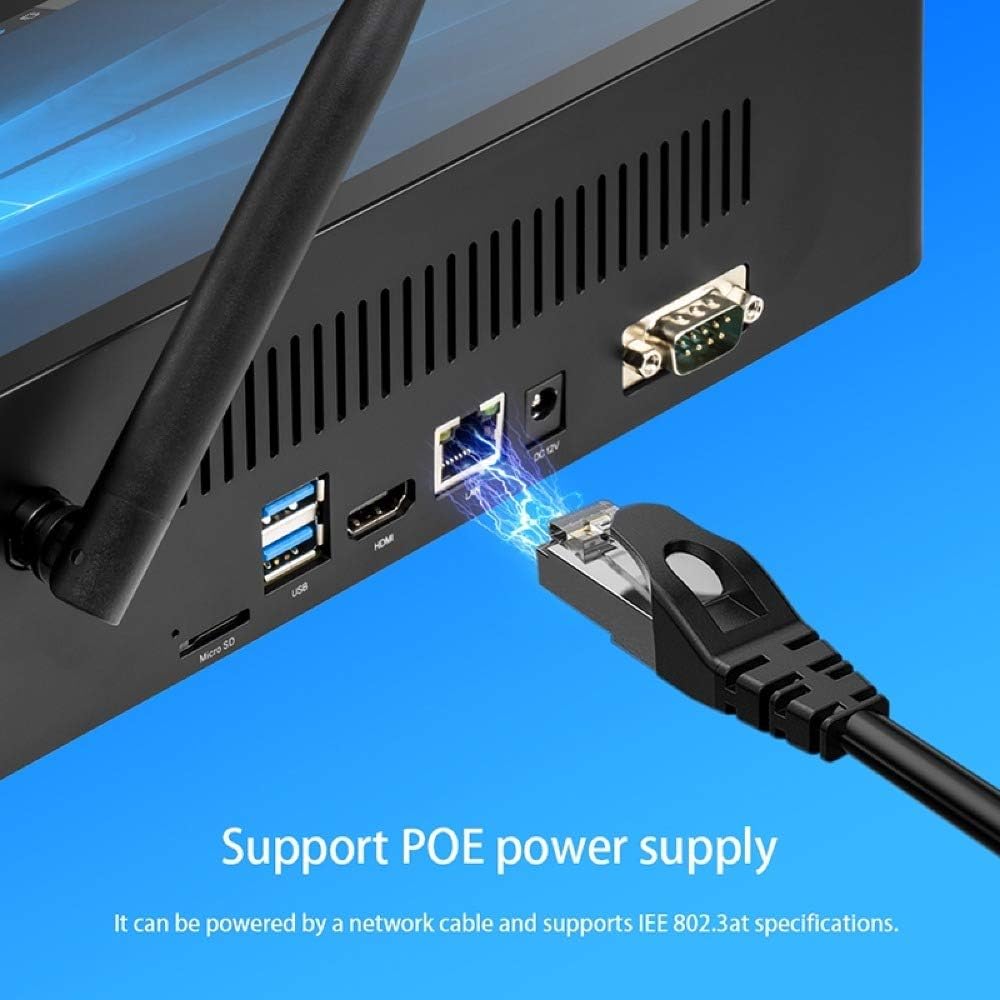
Image: Connecting an Ethernet cable to the RJ45 port.
External Display (HDMI)
Connect an HDMI cable from the HDMI interface on the device to an HDMI input on your monitor or TV. Windows will automatically detect the external display. You can configure display settings (duplicate, extend, second screen only) via Windows Display Settings.
USB Devices and TF Card
- Port USB: Plug in USB keyboards, mice, flash drives, or other peripherals into any of the four USB 2.0 ports.
- Kad TF: Insert a TF (MicroSD) card into the TF card slot for additional storage. The device supports cards up to 32GB.
Penyelenggaraan
- Pembersihan: Gunakan kain lembut dan kering untuk membersihkan skrin dan bahagian luar. Untuk tanda degil, sedikit dampen kain dengan air. Elakkan bahan kimia yang keras.
- Kemas Kini Perisian: Regularly check for Windows updates to ensure your system has the latest security patches and performance improvements. Go to Windows Settings > Update & Security > Windows Update.
- Pengurusan Storan: Kosongkan sementara secara berkala files and unnecessary applications to maintain optimal performance. Windows Disk Cleanup utility can assist with this.
Menyelesaikan masalah
| Masalah | Penyelesaian yang Mungkin |
|---|---|
| Peranti tidak dihidupkan. | Ensure the power adapter is securely connected to both the device and a working power outlet. Check if the power outlet is active. The built-in battery might be depleted; allow it to charge for a few minutes before attempting to power on again. |
| Tiada sambungan Wi-Fi. | Check if Wi-Fi is enabled in Windows settings. Ensure you are within range of a Wi-Fi network. Verify the Wi-Fi password is correct. Restart the device and your Wi-Fi router. |
| Skrin tidak bertindak balas. | Mulakan semula peranti. Jika masalah berterusan, pastikan skrin bersih dan bebas daripada serpihan. |
| Prestasi perlahan. | Close unnecessary applications. Check for and install Windows updates. Run Disk Cleanup to free up storage space. Consider reducing the number of startup programs. |
| Paparan luaran tidak dikesan. | Ensure the HDMI cable is securely connected to both the device and the external display. Verify the external display is set to the correct HDMI input. Try restarting both devices. |
Spesifikasi
Detailed technical specifications for the PiPo X10s All-in-One Mini PC:
| Ciri | Perincian |
|---|---|
| Model | PiPo X10s |
| Sistem Operasi | Windows 10 |
| CPU | Intel Celeron J4125 Quad-core, 1.5-2.5 GHz |
| GPU | Intel Graphics UHD 600 |
| RAM | 6GB |
| ROM (Storan Dalaman) | 64GB |
| Memori Luaran | TF card up to 32GB (not included) |
| Saiz Skrin | 10.1 inci |
| Jenis Skrin | IPS Capacitive Screen |
| Resolusi Paparan | 1920 x 1200 |
| Wi-Fi | 802.11a/b/g/n |
| Bluetooth | V4.0 |
| Kapasiti Bateri | 3.7V 10000mAh |
| Input Kuasa | 12V / 2.4A |
| Antara muka | 1 x TF Card Slot, 1 x 3.5mm Earphone Port, 1 x DC Port, 1 x HDMI Port, 1 x RJ45 Jack, 4 x USB 2.0 Ports, 1 x RS232 DB9 |
| Dimensi (L x W x H) | 274 x 162 x 68mm |
| Berat badan | 1025g |

Image: Physical dimensions of the PiPo X10s.
Waranti dan Sokongan
For warranty information and technical support, please refer to the documentation included with your purchase or visit the official Pipo webtapak. Simpan bukti pembelian anda untuk tuntutan waranti.
For common issues, please consult the Troubleshooting section of this manual. If you require further assistance, contact Pipo customer support.


