1. Pengenalan
The NEWCARE 2-Way Coaxial Cable Splitter is designed to distribute a single digital signal to two separate devices. It supports a wide frequency range of 5-2400MHz, making it compatible with various applications including cable TV, satellite, high-speed internet, MoCA internet, and CATV antenna signals. Its robust construction ensures reliable performance in diverse environments.
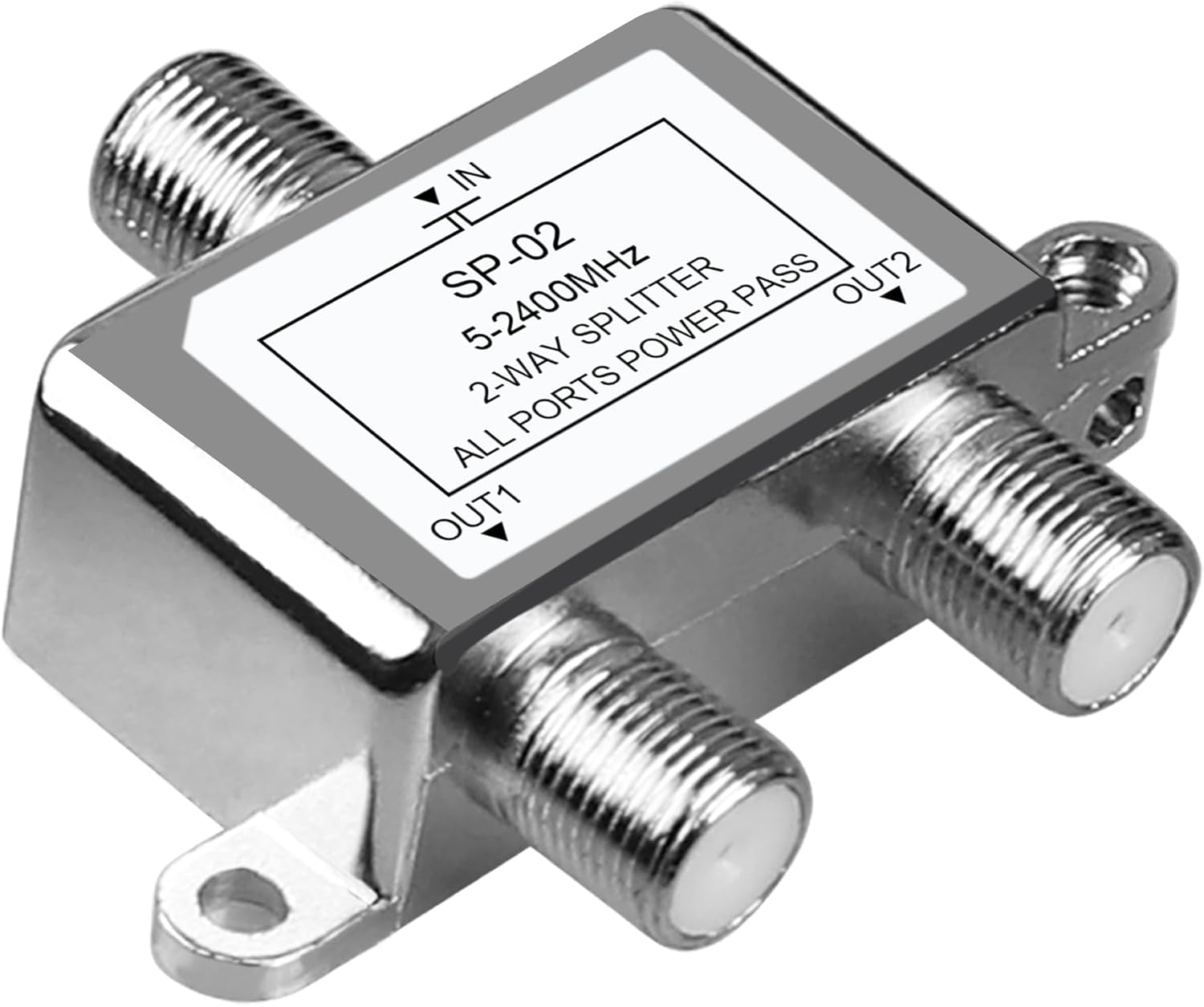
Image 1.1: The NEWCARE 2-Way Coaxial Cable Splitter, showing its compact design and F-type connectors.
Apa yang Termasuk:
- 1x NEWCARE Coaxial Splitter
- 1x Screws (for mounting, if desired)
2. Ciri-ciri Utama
- Multi-Purpose 2-Way Coax Cable Splitter: Splits a single digital signal to up to two devices. Compatible with RG59 and RG6 coax cables for cable TV, satellite, high-speed internet, MoCA internet, and CATV antenna signals.
- Pembinaan Premium: Made of nickel-plated zinc die-cast casing for enhanced weather resistance, rust resistance, and stability. The sealed housing provides waterproof protection, suitable for indoor, outdoor, wet, or dry environments.
- Low Signal Loss: Supports a frequency range of 5-2400MHz (2.4GHz). Features a high shielding structure with low insertion loss, high return loss, and isolation for optimal signal performance across all connected devices.
- Power Passing Ports: All coaxial ports are power passing to facilitate balanced satellite connections. Note: Only one highest voltage is allowed to pass at a time.

Image 2.1: The splitter's wide compatibility with various signal sources and display devices.

Image 2.2: Visual representation of stable signal transmission provided by the splitter.

Image 2.3: The durable die-cast zinc casing and high shielding structure of the splitter.
3. Arahan Pemasangan
Follow these steps to properly install your NEWCARE Coaxial Cable Splitter:
- Sediakan Kabel: Ensure you have the necessary coaxial cables (RG59 or RG6 compatible) and F-type male connectors.
- Strip Coaxial Cable: Carefully strip the coaxial cable ends to expose the center conductor and dielectric, ensuring a clean connection.
- Attach F-Type Connectors: Connect the F-type male connectors securely to the stripped coaxial cable ends.
- Connect to Splitter:
- Connect the incoming coaxial cable (from your signal source like antenna, cable TV, or satellite) to the "MASUK" port pada pembahagi.
- Connect the outgoing coaxial cables (to your devices like TVs, modems, or set-top boxes) to the "OUT1" dan "OUT2" pelabuhan.
- Sambungan Selamat: Hand-tighten all F-type connectors to ensure a firm and stable connection. Avoid over-tightening.
- Pemasangan (Pilihan): If desired, use the provided screws to mount the splitter to a wall or other stable surface using the integrated mounting brackets.
NOTE: Coaxial cables are not included with the splitter.

Imej 3.1: Cthample installation diagram for connecting the splitter to TV and internet devices.

Image 3.2: Illustration of a 2-way coaxial splitter distributing a signal from a satellite dish to two televisions.
4. Operasi
The NEWCARE Coaxial Cable Splitter is a passive device, meaning it does not require external power to operate. Once properly installed, it will automatically distribute the incoming signal to the connected output devices. There are no controls or settings to adjust on the splitter itself.
Ensure all connections are secure to maintain optimal signal quality. Signal strength may decrease slightly when split, especially over long cable runs or with multiple splits. If you experience significant signal degradation, consider checking cable quality or using an amplified splitter (not this model).
5. Penyelenggaraan
The NEWCARE Coaxial Cable Splitter requires minimal maintenance due to its durable construction.
- Pembersihan: Periodically wipe the exterior of the splitter with a dry, soft cloth to remove dust or dirt. Do not use liquid cleaners or solvents.
- Semakan Sambungan: Occasionally check all coaxial cable connections to ensure they remain tight and secure. Loose connections can lead to signal loss or interference.
- Perlindungan Alam Sekitar: While designed for various environments, avoid prolonged exposure to extreme temperatures or direct water submersion to maximize lifespan.
6. Penyelesaian masalah
If you encounter issues with your coaxial cable splitter, consider the following troubleshooting steps:
- No Signal or Poor Signal Quality:
- Semak Sambungan: Ensure all coaxial cables are securely connected to the splitter and your devices. Loose connections are a common cause of signal issues.
- Periksa Kabel: Examine coaxial cables for any damage, kinks, or frayed ends. Damaged cables can significantly degrade signal quality.
- Kehilangan Isyarat: Splitting a signal inherently causes some signal loss. If the original signal strength is weak, splitting it further might result in an unusable signal for one or both devices. Consider using a signal amplifier before the splitter if this is the case.
- Test Without Splitter: Temporarily connect one device directly to the signal source (bypassing the splitter) to determine if the issue lies with the splitter or the original signal.
- Isyarat Sekejap-sekejap:
- This can often be caused by loose connections or damaged cables. Re-tighten all connections and inspect cables.
- Ensure the splitter is not exposed to excessive moisture or extreme temperatures, which could affect its internal components.
- MoCA Network Issues:
- While this splitter supports MoCA, ensure your MoCA adapters are correctly configured and that the overall MoCA network is stable. Signal loss from splitting can sometimes impact MoCA performance.
7. Spesifikasi
| Ciri | Perincian |
|---|---|
| Nombor Model | 1x2 |
| Dimensi Produk | 2.05 x 1.77 x 0.59 inci |
| Berat Barang | 1.13 auns |
| Jenama | PENJAGAAN BARU |
| Bilangan Saluran | 2 |
| Julat Kekerapan | 5-2400MHz |
| Impedans | 75 ohm |
| bahan | Nickel-plated zinc die-cast casing |
| UPC | 754909812959 |

Image 7.1: Detailed dimensions of the coaxial splitter.
8. Waranti dan Sokongan
For warranty information or technical support, please refer to the product packaging or contact NEWCARE customer service directly. Contact details can typically be found on the manufacturer's official webtapak atau melalui tempat pembelian anda.
Sila simpan bukti pembelian anda untuk sebarang tuntutan waranti.


