1. Pengenalan
Terima kasih kerana membeliasing the Audizio Rome Internet WiFi Stereo DAB+ Radio. This manual provides essential information for the safe and efficient operation of your device. Please read it thoroughly before use and retain it for future reference.
The Audizio Rome is a versatile audio system offering a wide range of listening options, including Internet Radio, DAB+, FM, and Bluetooth streaming. It features a clear color display, multiple presets, alarm functions, and various connectivity options for an enhanced audio experience.
2. Maklumat Keselamatan
- Bekalan Kuasa: Gunakan hanya penyesuai kuasa yang ditentukan. Pastikan voltage matches the requirements of your region (230Vac / 50Hz).
- Air dan Kelembapan: Do not expose the device to rain, moisture, or dripping/splashing liquids. Do not place objects filled with liquids, such as vases, on the apparatus.
- Pengudaraan: Pastikan pengudaraan yang mencukupi. Jangan sekat bukaan pengudaraan.
- Sumber Haba: Jauhkan peranti ini daripada sumber haba seperti radiator, daftar haba, dapur atau peralatan lain (termasuk amppenghidup) yang menghasilkan haba.
- Pembersihan: Disconnect from power before cleaning. Use a soft, dry cloth. Do not use liquid cleaners or aerosol cleaners.
- Servis: Jangan cuba servis produk ini sendiri. Rujuk semua perkhidmatan kepada pegawai perkhidmatan yang berkelayakan.
3. Kandungan Pakej
Selepas membongkar, sila pastikan semua item yang disenaraikan di bawah ada dan dalam keadaan baik:
- Audizio Rome Internet WiFi Stereo DAB+ Radio
- Alat Kawalan Jauh
- Penyesuai Kuasa
- Manual Pengguna (dokumen ini)
4. Produk Lebihview
The Audizio Rome radio features a sleek design with intuitive controls and a clear display for easy navigation.

Rajah 4.1: Audizio Rome Internet Radio, front-angled view. This image shows the overall design of the radio, including the dual speakers, central control knob, and color display.
Kawalan dan Paparan Panel Hadapan

Rajah 4.2: Close-up of the Audizio Rome radio's display and control knob, showing menu options. The 2.4-inch TFT color screen provides clear information, while the central knob allows for tuning and selection.
- Paparan Warna TFT 2.4 inci: Shows station information, menus, time, and settings.
- Butang Kuasa: Menghidupkan / mematikan unit.
- Tombol Tala/Pilih: Rotate to navigate menus or tune stations; press to confirm selection.
- Butang Menu: Mengakses menu utama.
- Preset/Favorite Button: Saves or recalls favorite stations.
- Butang Tempatan: Akses stesen radio tempatan dengan cepat.
- Butang Navigasi (Kiri/Kanan/Atas/Bawah): Untuk navigasi menu.
Sambungan Panel Belakang

Rajah 4.3: Rear panel of the Audizio Rome radio, showing DC input, LAN port, AUX-IN, AUDIO OUT, headphone jack, and power switch. These ports allow for various wired connections.
- DC DALAM: Sambungan penyesuai kuasa.
- LAN (RJ45): Wired Ethernet connection for Internet Radio.
- AUX-IN (3.5mm jack): Sambungkan peranti audio luaran.
- AUDIO OUT (3.5mm jack): Sambungkan ke luaran amplebih hidup atau pembesar suara.
- Headphone Jack (3.5mm jack): Untuk mendengar secara peribadi.
- Suis ON / OFF: Suis kuasa utama.
5. Persediaan
5.1 Kuasa Permulaan
- Sambungkan penyesuai kuasa yang dibekalkan ke port DC IN di bahagian belakang radio.
- Palamkan penyesuai kuasa ke salur keluar dinding yang sesuai.
- Flip the ON/OFF switch on the rear panel to the 'ON' position.
- Press the Power button on the front panel or remote control to turn on the radio.
5.2 Sambungan Rangkaian (Wi-Fi atau LAN)
For Internet Radio functionality, a stable internet connection is required.
Sambungan Wi-Fi:
- Upon first power-up, the radio will guide you through the network setup. If not, navigate to Menu > System Settings > Network > Wi-Fi Network.
- Radio akan mengimbas rangkaian Wi-Fi yang tersedia. Pilih rangkaian anda daripada senarai.
- Enter your Wi-Fi password using the control knob or remote control. Press 'OK' or 'Select' to confirm.
- Setelah disambungkan, ikon Wi-Fi akan muncul pada paparan.
Sambungan LAN (Berwayar):
- Connect an Ethernet cable from your router to the LAN port on the rear of the radio.
- The radio will automatically detect the wired connection. No further setup is typically required.
6. Arahan Operasi
6.1 Pemilihan Mod
Press the 'Mode' button on the remote control or navigate through the main menu to select your desired listening mode:
- Radio Internet: Access thousands of radio stations worldwide.
- DAB+: Digital Audio Broadcasting Plus for high-quality digital radio.
- FM: Traditional analog radio broadcasting.
- Bluetooth: Stream audio wirelessly from your compatible devices.
- AUX-IN: Play audio from external devices connected via the AUX-IN port.
6.2 Radio Internet

Rajah 6.1: Audizio Rome radio displaying a list of internet radio stations, with the remote control in the foreground. This illustrates the user interface for station selection.
- Pilih mod 'Radio Internet'.
- You can browse stations by location, genre, or use the search function.
- Rotate the Tune/Select knob to scroll through the list and press to select a station.
- To save a favorite station, press and hold the 'Preset' button. Select a preset number (1-99) and confirm.
- To recall a preset, briefly press the 'Preset' button and select the desired number.
6.3 DAB+ / FM Radio
- Select 'DAB+' or 'FM' mode.
- For DAB+, the radio will automatically scan for available stations. For FM, you can manually tune or use the auto-scan function.
- Use the Tune/Select knob to navigate through stations.
- Save and recall presets as described for Internet Radio.
6.4 Penstriman Bluetooth
- Pilih mod 'Bluetooth'. Radio akan memasuki mod berpasangan, seperti yang ditunjukkan pada paparan.
- On your smartphone, tablet, or other Bluetooth device, enable Bluetooth and search for 'Audizio Rome'.
- Select 'Audizio Rome' to pair. Once connected, you can stream audio from your device to the radio.
6.5 Alarms and Sleep Timer
The radio includes an alarm clock with two alarms and a sleep timer function.
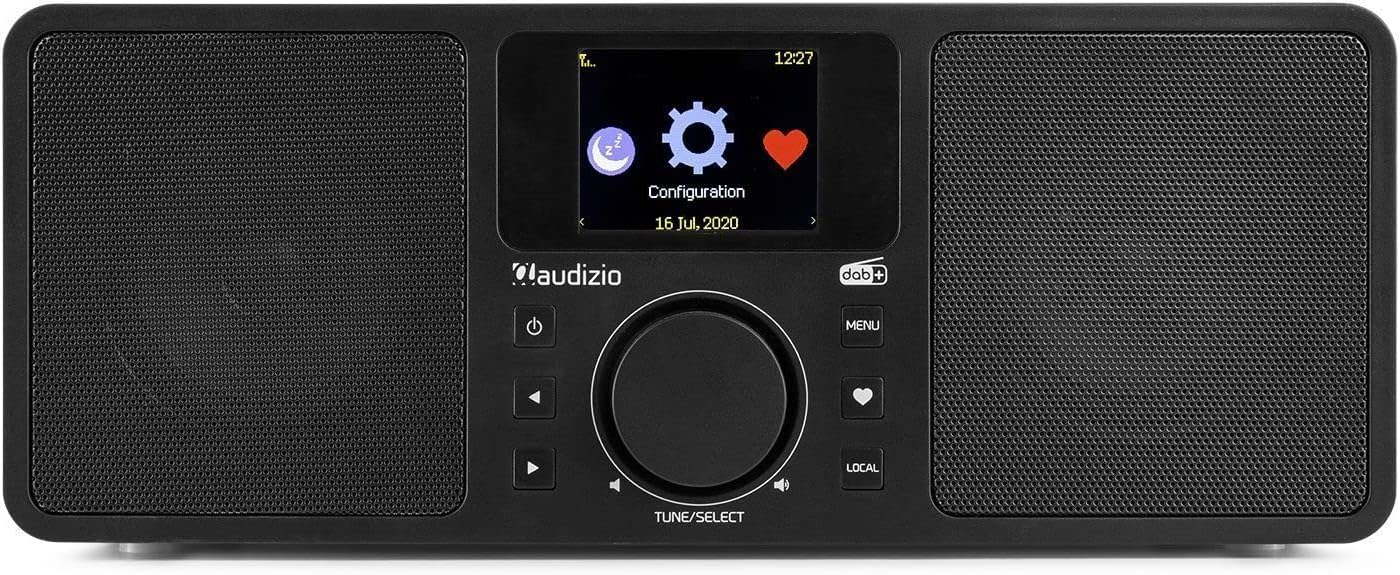
Rajah 6.2: The Audizio Rome radio's display showing system configuration options, including settings for alarms and timers.
- Menetapkan Penggera: Navigasi ke Menu > System Settings > Alarm. Configure Alarm 1 and Alarm 2 with desired time, source (buzzer, Internet Radio, DAB+, FM), and recurrence.
- Pemasa Tidur: Navigasi ke Menu > System Settings > Sleep Timer. Set the duration after which the radio will automatically turn off.
7. Penggunaan Alat Kawalan Jauh
The included remote control provides convenient access to all functions of the Audizio Rome radio.
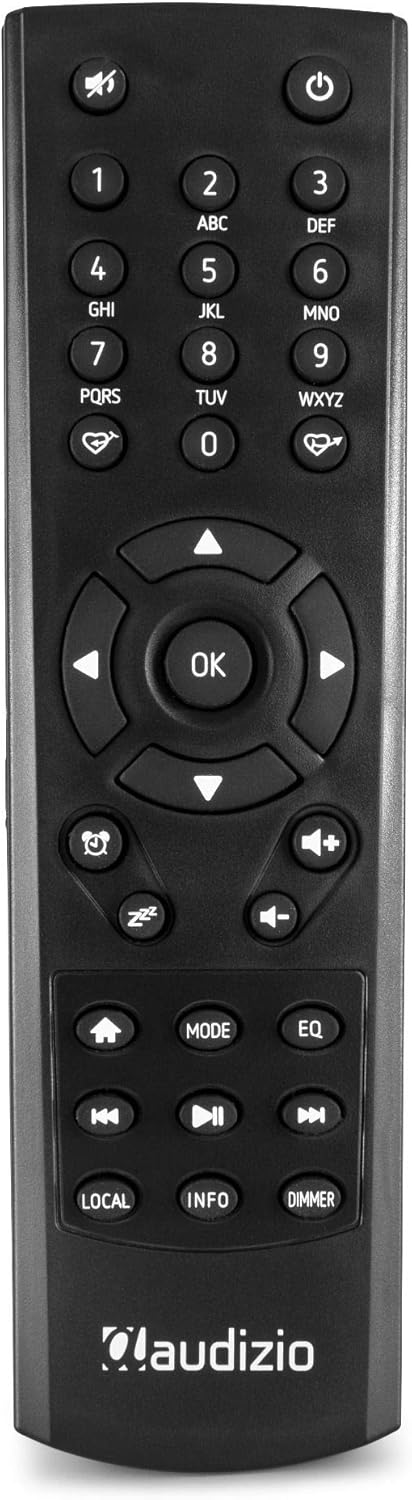
Rajah 7.1: Terperinci view of the Audizio Rome radio's remote control, showing various buttons for navigation, volume, mode, and presets. The remote allows for full control of the device from a distance.
- Kuasa: Menghidupkan/mematikan radio.
- Redam: Mutes/unmutes the audio.
- Butang angka (0-9): For direct input or selecting presets.
- Navigation (Arrows & OK): Untuk navigasi dan pemilihan menu.
- Kelantangan (+/-): Melaraskan tahap kelantangan.
- Menu: Mengakses menu utama.
- Mod: Switches between different audio sources (Internet Radio, DAB+, FM, Bluetooth, AUX).
- Preset/Favorite: Saves or recalls favorite stations.
- Tempatan: Accesses local radio stations.
- maklumat: Displays detailed information about the current station or track.
- Lebih malap: Melaraskan kecerahan paparan.
- Alarm/Sleep: Mengakses tetapan penggera dan pemasa tidur.
8. Penyelenggaraan
- Pembersihan: Always unplug the radio from the power outlet before cleaning. Use a soft, dry, lint-free cloth to wipe the surfaces. Do not use abrasive cleaners, waxes, or solvents.
- Antena: Ensure the telescopic antenna is fully extended for optimal DAB+ and FM reception. Handle with care to avoid damage.
- Storan: Jika menyimpan unit untuk tempoh yang lama, putuskan sambungannya daripada bekalan kuasa dan simpan di tempat yang sejuk dan kering.
9. Penyelesaian masalah
| Masalah | Kemungkinan Punca | Penyelesaian |
|---|---|---|
| Tiada kuasa | Power adapter not connected; Main power switch off; Power outlet faulty. | Check power adapter connection; Ensure rear ON/OFF switch is ON; Try a different power outlet. |
| Tiada bunyi | Volume too low; Mute activated; Incorrect audio source selected. | Increase volume; Press Mute button on remote; Select correct audio source (Internet Radio, DAB+, FM, Bluetooth, AUX). |
| Tidak dapat menyambung ke Wi-Fi | Incorrect password; Router too far; Network issue. | Re-enter Wi-Fi password carefully; Move radio closer to router; Restart router; Check network settings (Menu > System Settings > Network). |
| Penerimaan DAB+/FM yang lemah | Antena tidak dilanjutkan; Kawasan isyarat lemah; Gangguan. | Fully extend the telescopic antenna; Reposition the radio; Check for local interference sources. |
| Penggandingan Bluetooth gagal | Device not in pairing mode; Radio not in Bluetooth mode; Device already paired with another unit. | Ensure radio is in Bluetooth mode; Make sure your device's Bluetooth is on and searching; Disconnect from other devices. |
10. Spesifikasi
| Ciri | Spesifikasi |
|---|---|
| Jenama | Audizio |
| Nombor Model | 102.228 |
| warna | Hitam |
| Teknologi Ketersambungan | Bluetooth, Wi-Fi, LAN (RJ45) |
| Teknologi Penala | DAB+, FM |
| Kumpulan Radio yang Disokong | FM |
| Ciri Khas | Integrated Clock, 2.4-inch TFT Color Display, 99 Presets, 2 Alarms, Sleep Timer, DLNA (UPnP) compatible |
| Kuasa Keluaran | 2x 25W (jumlah 50W) |
| Sambungan Fon Kepala | bicu 3.5 mm |
| Sambungan Output Talian | bicu 3.5 mm |
| Sambungan Input Talian | bicu 3.5 mm |
| Wi-Fi Standard | 802.11b/g/n |
| Sambungan Voltage | 230Vac / 50Hz |
| Dimensi (L x W x H) | 300 x 135 x 120 mm |
| Berat badan | 2 kg |
| Komponen yang Disertakan | Alat Kawalan Jauh |
| Peranti Serasi | Headphones, Earphones, MP3 Player, Smartphone, Laptop, External Speakers (for Auxiliary and Bluetooth connectivity) |
11. Waranti dan Sokongan
The Audizio Rome Internet WiFi Stereo DAB+ Radio comes with a Waranti 2 tahun dari tarikh pembelian. Sila simpan bukti pembelian anda untuk tuntutan waranti.
For technical support, service, or warranty inquiries, please contact your retailer or the Audizio customer service department. Information regarding spare parts availability and software updates is not available at this time.


