pengenalan
The Naztech Xpods PRO are advanced true wireless noise-cancelling earbuds designed for an immersive audio experience and clear communication. Featuring HD sound, touch controls, and IPX4 water resistance, these earbuds are suitable for various activities, including sports and daily use. They come with a wireless charging case for extended playtime and convenient recharging.

Image: Naztech Xpods PRO earbuds, charging case, and product packaging, highlighting key features like 25 hours play time and touch controls.
Persediaan
Apa yang ada dalam Kotak
- Sarung Pengecas Tanpa Wayar
- Kabel Pengecas USB-C
- 6 Sets of Silicone Ear Tips (3 sizes, 2 colors)
Mengecas Fon telinga dan Sarung
Before first use, fully charge the Xpods PRO and their charging case. The case can be charged via the included USB-C cable or a Qi-compatible wireless charging pad.
- Pengecasan USB-C: Sambungkan kabel USB-C ke port pengecasan pada bekas dan ke sumber kuasa.
- Pengecasan Tanpa Wayar: Place the charging case on a Qi-compatible wireless charging pad. Ensure the case is properly aligned for charging.
A 10-minute quick charge provides approximately 1 hour of playback. A full charge offers up to 5 hours of playtime for the earbuds, with the charging case providing an additional 20 hours, totaling 25 hours of playtime.
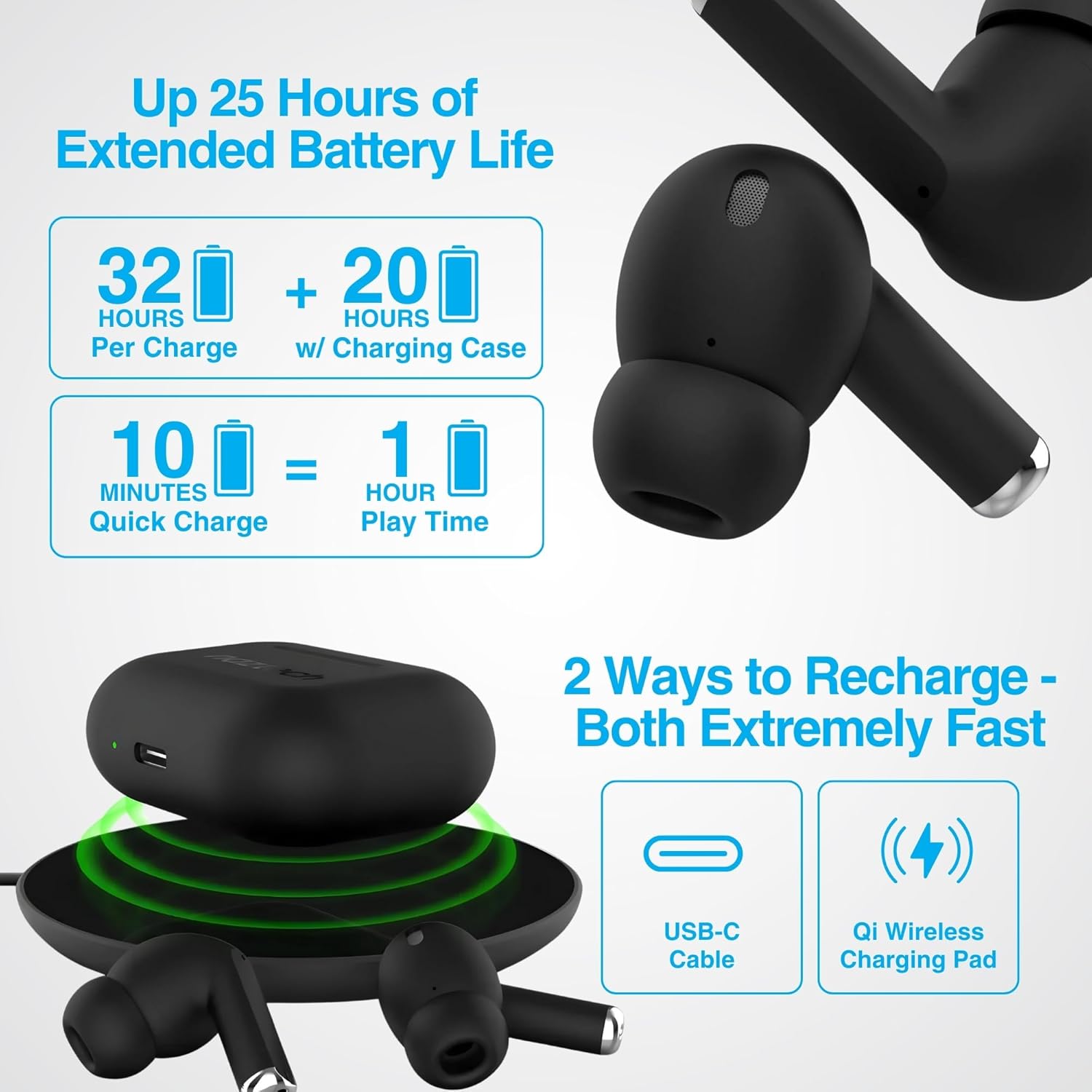
Image: Illustration showing USB-C and Qi wireless charging options for the Naztech Xpods PRO case, along with battery life indicators.
Berpasangan dengan Peranti Anda
- Pastikan fon telinga dicas.
- Buka bekas pengecas. Fon telinga akan memasuki mod berpasangan secara automatik.
- Pada peranti anda (telefon pintar, tablet, dll.), pergi ke tetapan Bluetooth dan dayakan Bluetooth.
- Select "NAZTECH Xpods PRO" from the list of available devices.
- Setelah disambungkan, anda akan mendengar pengesahan yang boleh didengar, dan fon telinga akan sedia untuk digunakan.
The Xpods PRO feature Bluetooth 5.0 for stable connectivity up to 33 feet (10 meters) and auto-pair technology for seamless re-connection with previously paired devices.

Image: A smartphone screen showing the "NAZTECH Xpods PRO" listed in Bluetooth settings, demonstrating universal compatibility with various devices.
Arahan Operasi
Kawalan Sentuh
The Xpods PRO feature intuitive touch sensor controls on each earbud for easy management of audio playback and calls.
| Tindakan | Kawalan |
|---|---|
| Main/Jeda Muzik | Ketik sekali pada salah satu fon telinga |
| Trek Seterusnya | Ketik dua kali pada fon telinga kanan |
| Trek Sebelumnya | Ketik dua kali pada fon telinga kiri |
| Jawab/Tamatkan Panggilan | Ketik sekali pada salah satu fon telinga |
| Tolak Panggilan | Tekan dan tahan salah satu fon telinga selama 2 saat |
| Aktifkan Pembantu Suara | Ketik tiga kali pada salah satu fon telinga |

Image: Diagram illustrating the touch control functions on the Naztech Xpods PRO earbuds.
Memakai Earbud
For optimal sound quality and a secure fit, choose the silicone ear tips that best suit your ear canal. The Xpods PRO come with 6 sets of silicone ear tips in 3 sizes and 2 colors to ensure a comfortable and noise-isolating fit.

Image: Naztech Xpods PRO earbuds shown with various silicone ear tip sizes, emphasizing customizable fit.
Pembatalan Bunyi
The Xpods PRO feature Passive Noise Cancellation through their closed-system design, which helps to immerse you in music by preserving low-frequency bass richness and reducing ambient noise. Dual microphones with advanced voice capture technology filter out wind and background noise for clear conversations.

Image: A person using Naztech Xpods PRO, illustrating the clear call quality and passive noise cancellation features.
Penyelenggaraan
Pembersihan
To maintain optimal performance and hygiene, regularly clean your Xpods PRO earbuds and charging case. Use a soft, dry, lint-free cloth to wipe down the surfaces. For ear tips, you may gently wipe them with a slightly damp kain dan biarkan ia kering sepenuhnya sebelum dilekatkan semula.
Elakkan menggunakan bahan kasar, pelarut atau bahan kimia yang keras, kerana ini boleh merosakkan produk.
Rintangan Air (IPX4)
The Naztech Xpods PRO are rated IPX4 water-resistant, meaning they are protected against splashing water from any direction. This makes them suitable for workouts and light rain. However, they are not designed for submersion in water or exposure to pressurized water jets. Do not use them while swimming or showering.

Image: A person wiping sweat from their face, indicating the IPX4 water-resistant rating of the Naztech Xpods PRO for active use.
Penyimpanan
When not in use, store your Xpods PRO in their charging case to protect them from dust, dirt, and physical damage. Store the case and earbuds in a cool, dry place away from extreme temperatures and direct sunlight.
Menyelesaikan masalah
If you encounter issues with your Naztech Xpods PRO, refer to the following common solutions:
Earbuds Not Pairing or Connecting
- Periksa Bateri: Pastikan kedua-dua fon telinga dan bekas pengecas dicas dengan secukupnya.
- pasangan semula: Turn off Bluetooth on your device, place earbuds back in the case, close and reopen the case. Then, re-enable Bluetooth on your device and try pairing again.
- Lupakan Peranti: On your device's Bluetooth settings, "forget" or "unpair" the "NAZTECH Xpods PRO" and then attempt to pair from scratch.
- Jarak: Ensure your device is within the 33ft (10m) Bluetooth range.
- Gangguan: Beralih dari peranti wayarles lain yang mungkin menyebabkan gangguan.
Sound Quality Issues (e.g., Static, Low Volume)
- Fon Telinga Bersih: Ensure the mesh filters and ear tips are clean and free of debris.
- Padanan Hujung Telinga: Experiment with different sized silicone ear tips to ensure a proper seal in your ear canal, which significantly impacts sound quality and bass response.
- Kualiti Sumber: Ensure the audio source (music file, streaming service) is of high quality.
- Kelantangan Peranti: Periksa tahap kelantangan pada kedua-dua peranti anda yang disambungkan dan fon telinga.
Masalah Pengecasan
- Pemeriksaan Kabel: Ensure the USB-C cable is securely connected to both the case and the power source. Try a different USB-C cable and power adapter if available.
- Pad Wayarles: If using wireless charging, ensure the case is correctly positioned on the charging pad and the pad is powered on.
- Penempatan Fon Telinga: Pastikan fon telinga diletakkan dengan betul di dalam bekas pengecas, dan pastikan ia bersentuhan dengan pin pengecas dengan betul.
Spesifikasi
| Ciri | Perincian |
|---|---|
| Nama Model | NAZTECH Xpods PRO |
| Nombor Model Item | 15350 |
| Teknologi Ketersambungan | Wayarles (Bluetooth 5.0) |
| Julat Tanpa Wayar | Sehingga 33 kaki / 10m |
| Jenis Kawalan | Sentuh (Kawalan Media) |
| Kawalan Bunyi | Pembatalan Bunyi Pasif |
| Penilaian Ketahanan Air | IPX4 |
| Jumlah Masa Main | Hingga 25 jam (dengan cas pengecasan) |
| Masa Main Fon Telinga (setiap cas) | Sehingga 5 jam |
| Caj Cepat | Cas 10 minit untuk main balik 1 jam |
| Antara Muka Pengecasan | USB-C, Pengecasan Wayarles Qi |
| Komponen yang Disertakan | USB-C Charging Cable, 6 Sets of Silicone Ear Tips, Wireless Charging Case |
| bahan | plastik |
| Dimensi Produk | 2.39 x 1.81 x 0.91 inci |
| Berat Barang | 4.4 auns |
Waranti dan Sokongan
Naztech products are designed for quality and performance. While specific warranty details are not provided in this manual, Naztech generally backs its products with warranties. For detailed warranty information, product support, or technical assistance, please visit the official Naztech webtapak atau hubungi perkhidmatan pelanggan mereka secara langsung.
Anda boleh mendapatkan lebih banyak maklumat dan sumber sokongan dengan melawati Naztech Store on Amazon atau pegawai mereka webtapak.


