pengenalan
This manual provides essential information for the safe and effective operation, maintenance, and troubleshooting of your DEWALT XR 18V 5.0Ah Hammer Drill Driver, model DCD796P3. Please read these instructions carefully before using the tool and keep them for future reference.
The DCD796P3 is a versatile cordless hammer drill driver designed for drilling into wood, metal, and masonry, as well as for screwdriving applications. It features a brushless motor for extended runtime and durability, and comes equipped with 5.0Ah XR Lithium-Ion batteries.
Arahan Keselamatan
Always follow basic safety precautions to reduce the risk of fire, electric shock, and personal injury. Keep your work area clean and well-lit. Do not operate power tools in explosive atmospheres, such as in the presence of flammable liquids, gases, or dust.
- Wear appropriate personal protective equipment (PPE) including eye protection, hearing protection, and gloves.
- Selamatkan bahan kerja. Gunakan clampatau ragum untuk memegang benda kerja dengan kuat.
- Ensure the drill bit or accessory is correctly installed and tightened in the chuck before operation.
- Avoid accidental starting. Ensure the switch is in the off-position before connecting to a battery pack, picking up or carrying the tool.
- Do not force the tool. Let the tool do the work at the correct speed.
- Putuskan sambungan pek bateri sebelum membuat sebarang pelarasan, menukar aksesori atau menyimpan alat.
- Use only DEWALT recommended accessories and battery packs.
- Jaga alatan dengan berhati-hati. Pastikan alat pemotong tajam dan bersih.
Komponen Lebihview
Familiarize yourself with the main components of your DEWALT DCD796P3 Hammer Drill Driver.

Rajah 1: Keseluruhannya view of the DEWALT DCD796P3 Hammer Drill Driver with an attached 5.0Ah battery pack. This image displays the main body, chuck, clutch settings, mode selector, trigger, and battery interface.
- chuck: Keyless chuck for quick bit changes.
- Kolar Pelarasan Tork: Adjusts the torque setting for screwdriving applications.
- Pemilih Mod: Switches between screwdriving, drilling, and hammer drilling modes.
- Pemilih Kelajuan: Two-speed gearbox for high-speed drilling or high-torque screwdriving.
- Suis Pencetus: Kawalan kelajuan berubah-ubah.
- Butang Maju/Undur: Mengubah arah putaran.
- Lampu Kerja LED: Menerangi kawasan kerja.
- Butang Pelepas Bateri: Untuk menanggalkan pek bateri.
- Klip tali pinggang: Untuk mudah dibawa.
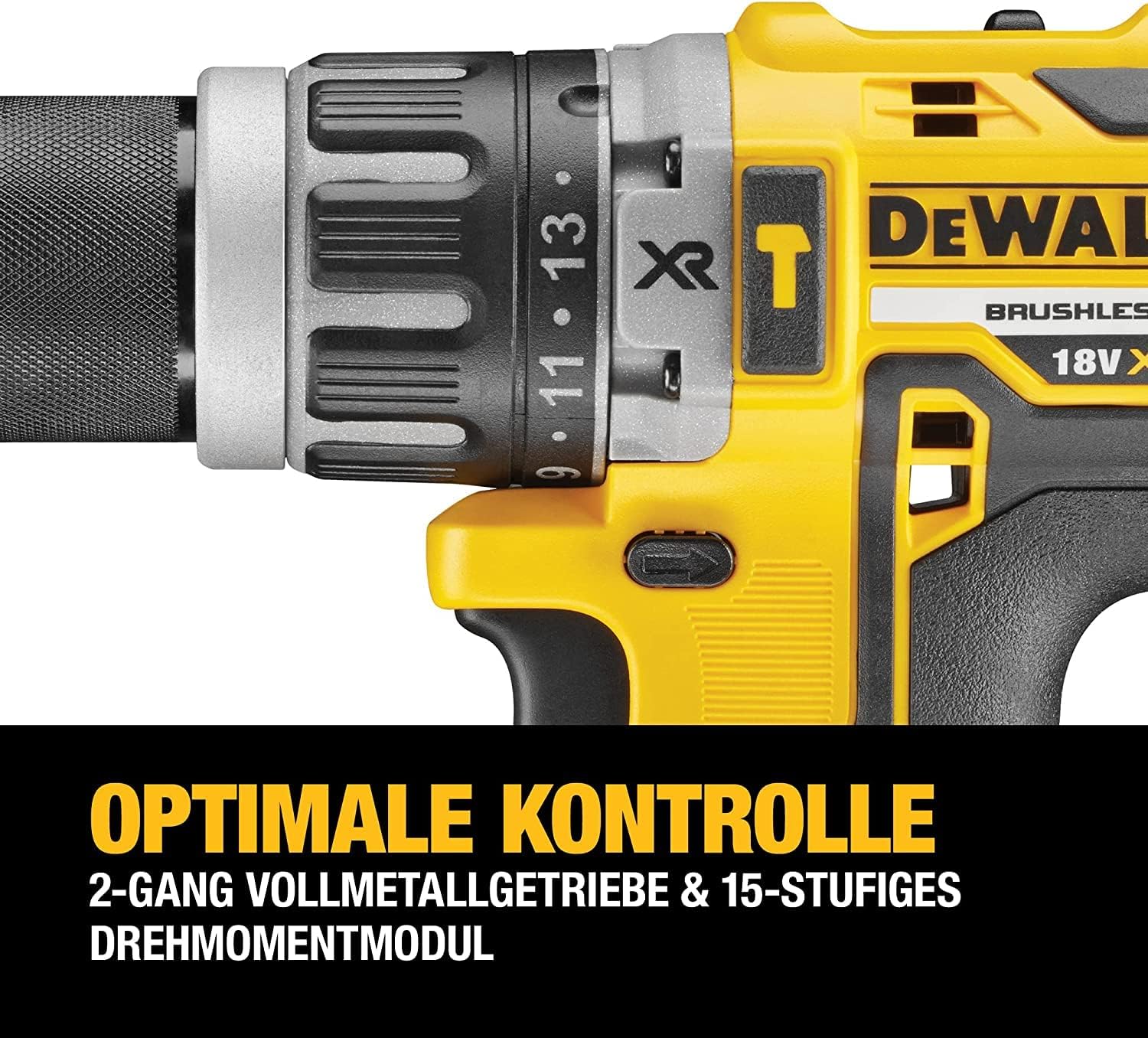
Rajah 2: A terperinci view of the drill's chuck, torque adjustment collar, and mode selector. The numbers on the collar indicate different torque settings, and the icons represent screwdriving, drilling, and hammer drilling modes.
Persediaan
Pemasangan dan Pengecasan Bateri
The DCD796P3 uses DEWALT 18V XR Lithium-Ion battery packs. Ensure the battery is fully charged before first use.
- To install the battery: Align the battery pack with the tool's handle and slide it in until it clicks securely into place.
- To remove the battery: Press the battery release button and pull the battery pack out of the tool.
- To charge the battery: Insert the battery pack into the DEWALT charger (included). Refer to the charger's instruction manual for specific charging procedures and indicators.
Installing and Removing Drill Bits/Accessories
The drill features a keyless chuck for easy accessory changes.
- Rotate the front collar of the chuck counter-clockwise until the chuck jaws are open wide enough to accept the bit.
- Masukkan bit gerudi atau aksesori sepenuhnya ke dalam chuck.
- Rotate the front collar clockwise to tighten the chuck jaws securely around the bit. Ensure the bit is centered and firmly gripped.
- To remove the bit, reverse the tightening procedure.
Arahan Operasi
Memilih Mod Pengendalian
The mode selector allows you to choose between three operating modes:
- Screwdriving Mode (⚙ icon): For driving screws. Use the torque adjustment collar to set the desired clutch setting. The clutch will disengage once the set torque is reached, preventing overtightening or stripping.
- Drilling Mode (★ icon): For drilling into wood and metal. The clutch is bypassed in this mode, providing maximum torque.
- Mod Penggerudian Tukul (⚒ icon): For drilling into masonry and concrete. This mode combines rotary action with a hammering action.
Rotate the mode selector collar to align the desired icon with the indicator mark on the drill body.
Setting Torque (Screwdriving Mode Only)
The torque adjustment collar has settings from 1 to 15, plus a drill icon. Select a lower number for smaller screws or softer materials, and a higher number for larger screws or harder materials. Experiment on scrap material to find the appropriate setting.
Memilih Kelajuan
The speed selector switch is located on top of the drill. It has two settings:
- Kelajuan 1 (Kelajuan Rendah): Provides higher torque for heavy-duty screwdriving and large diameter drilling. (0-550 RPM)
- Kelajuan 2 (Kelajuan Tinggi): Provides higher speed for fast drilling with smaller bits. (0-2000 RPM)
Ensure the tool is stopped before changing speed settings.
Operating the Trigger Switch and Forward/Reverse Control
- Suis Pencetus: Squeeze the trigger to start the tool. The speed is variable; press further for higher speed.
- Butang Maju/Undur: Push the button from the left side for forward rotation (drilling/driving). Push from the right side for reverse rotation (removing screws/bits). Center position locks the trigger to prevent accidental starting.

Rajah 3: The DEWALT DCD796P3 Hammer Drill Driver being used to drive a screw into a wooden beam, demonstrating a typical application. The user is holding the tool firmly, and a magnetic bit holder is visible.
Penyelenggaraan
Penyelenggaraan tetap memastikan prestasi optimum dan memanjangkan hayat alat anda.
- Pembersihan: Keep the ventilation slots clear of dust and debris. Use a soft brush or compressed air to clean the tool. Do not use water or chemical cleaners.
- Penyelenggaraan Chuck: Bersihkan rahang chuck secara berkala untuk memastikan cengkaman bit yang betul.
- Penjagaan Bateri: Simpan bateri di tempat yang sejuk dan kering jauh dari cahaya matahari langsung. Jangan simpan bateri yang telah dinyahcas sepenuhnya untuk tempoh yang lama.
- Pemeriksaan: Regularly inspect the power tool, battery pack, and charger for any damage. Do not use damaged components.
- Pelinciran: Alat ini dilincirkan dari kilang dan tidak memerlukan pelinciran tambahan.
Menyelesaikan masalah
If your DEWALT DCD796P3 is not operating correctly, refer to the following common issues and solutions:
| Masalah | Kemungkinan Punca | Penyelesaian |
|---|---|---|
| Alat tidak bermula. | Bateri tidak dicas atau tidak dipasang dengan betul. Kunci pencetus terlibat. | Charge battery and ensure it is fully seated. Disengage trigger lock by pushing the forward/reverse button to either side. |
| Mengurangkan kuasa atau kelajuan. | Low battery charge. Tool overheating. | Cas semula bateri. Biarkan alat sejuk. |
| Sedikit tergelincir dalam chuck. | Chuck tidak diketatkan secukupnya. Bit shank kotor atau rosak. | Ketatkan semula chuck dengan kuat. Bersihkan atau gantikan sedikit. |
| Aksi tukul tidak menarik. | Mode selector not set to hammer drilling. | Rotate mode selector to the hammer drilling icon. |
For issues not covered here, contact DEWALT customer service or an authorized service center.
Spesifikasi
| Ciri | Spesifikasi |
|---|---|
| Nombor Model | DCD796P3 |
| Voltage | 18 V |
| Jenis Bateri | XR Lithium-Ion |
| Kapasiti Bateri | 5.0 Ah |
| Max Torque | 70 Nm |
| Output Kuasa Maks | 460 W |
| Tiada Kelajuan Beban (Kelajuan 1) | 0-550 RPM |
| Tiada Kelajuan Beban (Kelajuan 2) | 0-2000 RPM |
| Kapasiti Chuck | 1.5 - 13 mm |
| Kapasiti Penggerudian Maksimum (Kayu) | 40 mm |
| Max Drilling Capacity (Metal) | 13 mm |
| Max Drilling Capacity (Masonry) | 13 mm |
| Berat (Alat sahaja) | Approximately 1.7 kg (without battery) |
| Dimensi (Panjang x Tinggi x Lebar) | 190 mm x 203 mm x 67 mm |
Catatan: Spesifikasi boleh berubah tanpa notis.
Waranti dan Sokongan
DEWALT provides a limited warranty for its products. For detailed warranty information, including terms and conditions, please refer to the warranty card included with your product or visit the official DEWALT webtapak. Simpan bukti pembelian anda untuk tuntutan waranti.
Untuk bantuan teknikal, servis atau mencari pusat servis yang sah, sila hubungi khidmat pelanggan DEWALT. Maklumat hubungan biasanya boleh didapati di DEWALT. webtapak atau dalam dokumentasi yang disediakan bersama alat anda.
Sumber Dalam Talian: For additional support, product registration, and access to the latest manuals and parts diagrams, visit www.dewalt.com.


