1. Pengenalan
The Watts BT-D03 RF is a wireless digital room thermostat designed for precise temperature control in various heating and cooling installations. It features a backlit LCD screen and operates via 868 MHz radio frequency communication. This manual provides comprehensive instructions for the proper installation, operation, and maintenance of your thermostat.

Rajah 1: Depan view of the Watts BT-D03 RF Thermostat, showing the display and control buttons.
2. Maklumat Keselamatan
- Baca semua arahan dengan teliti sebelum pemasangan dan operasi.
- Installation should only be performed by a qualified electrician or heating engineer.
- Pastikan bekalan kuasa diputuskan sebelum melakukan sebarang pendawaian atau penyelenggaraan.
- Jangan dedahkan peranti kepada suhu yang melampau, kelembapan atau cahaya matahari langsung.
- Jauhkan peranti daripada kanak-kanak.
3. Kandungan Pakej
Sahkan bahawa semua komponen terdapat dalam pakej:
- Watts BT-D03 RF Wireless Digital Room Thermostat
- Pendirian meja
- Memasang skru dan palam dinding
- Manual Pengguna
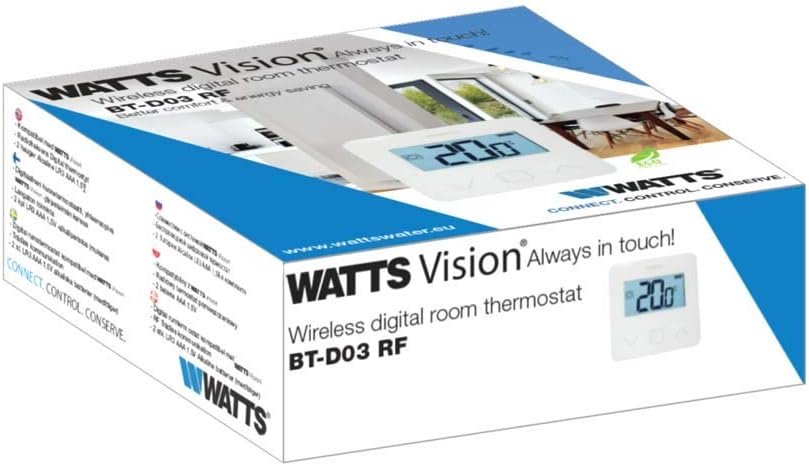
Figure 2: Product packaging of the Watts BT-D03 RF Thermostat.
4. Produk Lebihview
4.1 Komponen
- Paparan LCD: Backlit screen showing temperature, battery level, and operating status.
- Butang Kawalan: Up, Down, and OK/Menu buttons for navigation and setting adjustments.
- Penderia Dalaman: For detecting ambient room temperature.
- External Sensor Port: For optional NTC 10 kOhm external sensor (not included).
- Penunjuk LED: Shows active heating/cooling signal.
- Internal Reset Button: For quick RF pairing or system reset.
- Buzzer: Provides audible feedback for certain operations.

Rajah 3: Bahagian hadapan terperinci view of the thermostat display.

Rajah 4: Belakang view of the thermostat, showing battery compartment and mounting points.
4.2 Dimensi
The physical dimensions of the thermostat are provided below for installation planning.
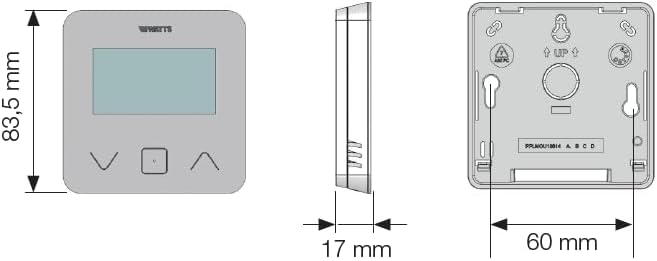
Figure 5: Dimensional drawing of the Watts BT-D03 RF Thermostat.
5. Persediaan
5.1 Pemasangan Bateri
- Remove the back cover of the thermostat.
- Masukkan dua bateri AAA, memastikan kekutuban yang betul.
- Pasang semula penutup belakang.
5.2 Pilihan Pemasangan
The thermostat can be installed in two ways:
- Pemasangan Dinding: Use the provided screws and wall plugs to secure the thermostat to a wall at an appropriate height (typically 1.5 meters from the floor).
- Peletakan Atas Meja: Attach the included stand to the back of the thermostat for placement on a flat surface.

Figure 6: Thermostat with tabletop stand attached.
5.3 RF Pairing
To establish wireless communication with the receiver unit (sold separately), follow the pairing instructions provided with your receiver. The thermostat features an internal reset button for quick RF pairing, typically requiring a short press during the receiver's pairing mode.
6. Arahan Operasi
6.1 Menghidupkan/Mematikan
The thermostat powers on automatically upon battery insertion. There is no dedicated on/off button for the thermostat unit itself; it remains active as long as batteries are present.
6.2 Pelarasan Suhu
Use the Up and Down buttons to adjust the desired setpoint temperature. The LCD will display the current setpoint during adjustment.
6.3 Mod Paparan
You can choose to display either the detected ambient temperature or the currently set temperature on the LCD. Refer to the full installation parameters mode for configuration details.
6.4 Keypad Lock (PIN Code)
To prevent unauthorized changes, the keypad can be locked using a PIN code. This feature is particularly useful for installations in public areas. Consult the advanced settings menu for PIN code setup and activation.
6.5 Pengesanan Tetingkap Terbuka
The thermostat includes an open window detection feature. When a sudden drop in temperature is detected, the thermostat can temporarily suspend heating/cooling to conserve energy. This function can be configured in the settings.
6.6 Proportional Band Setting (PWM)
The thermostat supports proportional band setting (PWM) or configurable institutions (0.2÷3) for precise control of heating/cooling systems. This advanced setting allows for fine-tuning the system's response to temperature changes.
7. Penyelenggaraan
7.1 Penggantian Bateri
When the battery charge level indicator on the LCD shows low power, replace the two AAA batteries promptly to ensure continuous operation. Follow the battery installation steps in Section 5.1.
7.2 Pembersihan
Clean the thermostat's exterior with a soft, dry cloth. Do not use abrasive cleaners, solvents, or spray directly onto the device.
8. Penyelesaian masalah
- Tiada Paparan: Periksa pemasangan dan tahap pengecasan bateri. Gantikan bateri jika perlu.
- No Communication with Receiver: Ensure the thermostat and receiver are within range. Re-perform the RF pairing procedure (Section 5.3).
- Bacaan Suhu yang salah: Pastikan termostat tidak terdedah kepada cahaya matahari langsung, draf atau sumber haba.
- Pad kekunci Tidak Responsif: Check if the keypad lock (PIN Code) is active. Unlock the keypad as per instructions.
8.1 Tetapkan Semula Fungsi
If the thermostat is not functioning as expected, an internal reset button can be used. Consult the full installation parameters mode for specific reset procedures, as this may clear custom settings.
9. Spesifikasi Teknikal
| Jenama | Watt |
| Nombor Model | BT-D03-RF-GT |
| Dimensi Produk (L x W x H) | 6.2 x 1.7 x 8.35 cm |
| Berat Barang | 0.18 g |
| Voltage | 230 Volts (for connected system, thermostat is battery powered) |
| Sumber Kuasa | Dikuasakan bateri |
| Jenis Pengawal | Kawalan Manual |
| Jenis Paparan | LCD |
| Lampu latar | ya |
| Suhu Operasi | 0 hingga 40 °C |
10. Maklumat Pematuhan
The Watts BT-D03 RF Wireless Digital Room Thermostat complies with the following directives:
- 2014/35/EU
- 2014/30/EU
- 2014/53/EU
- 2011/65/EU
- 2012/19/EU
- 2015/1188/EU


