1. Pengenalan
This manual provides essential information for the safe and efficient installation, operation, and maintenance of your Onforu 100W 14000lm LED Shop Lights. Please read this manual thoroughly before use and retain it for future reference.
2. Maklumat Keselamatan
Sentiasa ikuti langkah berjaga-jaga keselamatan asas untuk mengurangkan risiko kebakaran, kejutan elektrik dan kecederaan diri.
- Pastikan bekalan elektrik diputuskan sebelum pemasangan atau penyelenggaraan.
- Do not look directly into the LED light when it is on, as it may cause eye damage.
- Jauhkan produk daripada bahan mudah terbakar.
- This product is IP66 waterproof, suitable for outdoor use, but avoid submerging it in water.
- Pemasangan hendaklah dilakukan oleh juruelektrik bertauliah jika anda tidak pasti.
- Pastikan permukaan pelekap boleh menyokong berat lekapan.
3. Kandungan Pakej
Sahkan bahawa semua komponen ada dan tidak rosak semasa membuka bungkusan:
- LED Shop Light (2 units)
- Lamp Brackets (2 pairs)
- M6 Hex Screw Key (1 unit)
- M6 Screws (2 units)
- Plastic Expansion Nails (2 units)
- Screws for Mounting (2 units)
- Additional connectors for linking (as shown in assembly video)

4. Persediaan dan Pemasangan
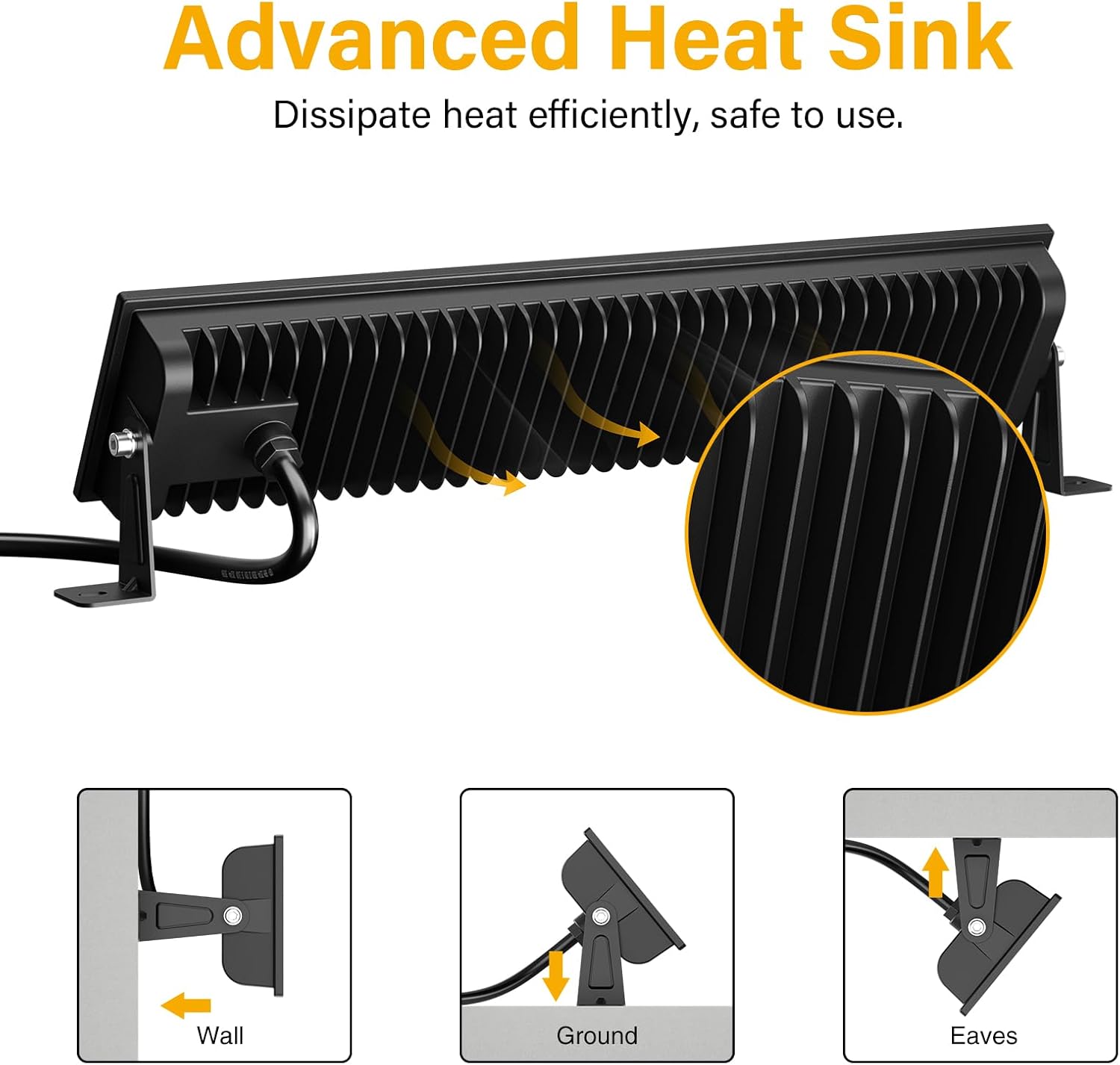
The Onforu LED Shop Lights are designed for easy installation and can be mounted in various configurations (wall, ground, or ceiling) and can also be linked horizontally or vertically.
4.1 Single Unit Installation
- Lampirkan Kurungan: Selamatkan lamp brackets to the sides of the LED light fixture using the provided M6 screws and hex key. Do not overtighten initially to allow for angle adjustment.
- Pasang Lekapan: Choose your desired mounting location (wall, ground, or ceiling). Use the plastic expansion nails and mounting screws to firmly attach the brackets to the surface.
- Laraskan Sudut: Once mounted, adjust the angle of the light fixture to direct illumination as needed. The fixture allows for 180° adjustment. Tighten the M6 screws on the brackets to secure the angle.
- Sambungkan Kuasa: Plug the power cord into a standard 120V AC outlet. The light features an in-line switch for convenient power control.

Video 1: Pra ringkasview demonstrating the installation process and adjustable features of the Onforu LED Flood Light.
4.2 Linking Multiple Units
The lights can be connected horizontally or vertically to create a longer or wider lighting solution. Use the provided connectors and hex key to secure the units together.
- Horizontal Connection: Align two light units side-by-side. Use the small connecting brackets and screws to join them securely. Ensure the power cables are routed appropriately.
- Vertical Connection: Align two light units one above the other. Use the small connecting brackets and screws to join them securely.
Video 2: An official product video from Onforu demonstrating the various installation methods, including linking multiple units horizontally and vertically, and showcasing the included hardware.
5. Arahan Operasi
Operating your Onforu LED Shop Light is straightforward:
- Once installed and plugged into a power outlet, locate the in-line switch on the power cord.
- Press the switch to turn the light ON.
- Press the switch again to turn the light OFF.

6. Penyelenggaraan
To ensure optimal performance and longevity of your LED Shop Lights:
- Pembersihan: Periodically clean the glass cover with a soft, damp kain. Elakkan pembersih atau pelarut yang melelas yang boleh merosakkan permukaan.
- Pemeriksaan: Regularly check the power cord and plug for any signs of damage. Ensure all mounting screws remain tight.
- Pelesapan Haba: The fixture is designed with a fin-type heat sink. Ensure it is not obstructed to allow for efficient heat dissipation.
7. Penyelesaian masalah
If you encounter issues with your LED Shop Light, refer to the following common solutions:
| Masalah | Kemungkinan Punca | Penyelesaian |
|---|---|---|
| Cahaya tidak menyala. | No power supply; faulty switch; loose connection. | Check if the plug is securely inserted and the power outlet is functional. Ensure the in-line switch is ON. Inspect the power cord for damage. |
| Cahaya berkelip-kelip. | Bekalan kuasa tidak stabil; sambungan longgar. | Ensure the power supply is stable. Check all connections for tightness. |
| Kecerahan berkurangan. | Dirt or debris on the glass cover. | Clean the glass cover with a soft, damp kain. |
8. Spesifikasi
| Ciri | Perincian |
|---|---|
| Jenama | Onforu |
| Nombor Model | CT08 |
| Wattage | 100 watt |
| Kecerahan | 14000 Lumen |
| Suhu Warna | 6500 Kelvin (Putih Siang) |
| bahan | Aluminium, Kaca Terbaja |
| Tahap Ketahanan Air | IP66 Kalis Air |
| Dimensi Produk | 15.27"L x 3.46"W x 1.37"H |
| Sudut Rasuk | 120° |
| Ciri Khas | With Plug, Thick die-cast aluminum, Waterproof, Not Dimmable |
9. Waranti dan Sokongan
Onforu products come with a limited warranty. For specific warranty details or technical support, please refer to the official Onforu webtapak atau hubungi perkhidmatan pelanggan.
Pelan perlindungan pilihan tersedia untuk dibeli secara berasingan:
- Pelan Perlindungan 3 Tahun
- Pelan Perlindungan 4 Tahun
- Perlindungan Lengkap (langganan bulanan)
Untuk bantuan lanjut, lawati Onforu Store on Amazon.


