1. Pengenalan
The Renkforce USB 3.2 Gen 1 4 Port Hard Drive Copy Station is a versatile device designed for efficient data management. It allows users to connect up to four 2.5-inch or 3.5-inch SATA SSDs or HDDs simultaneously for data transfer to a computer or for offline cloning of one source drive to up to three target drives.
This manual provides detailed instructions for setting up, operating, and maintaining your device, along with troubleshooting tips and technical specifications.
2. Ciri-ciri Produk
- Four independent hard drive slots for 2.5-inch / 3.5-inch SSD or HDD hard drives.
- Supports USB 3.2 Gen 1 (USB 3.0) with data transfer rates up to 5Gbps.
- Offline clone function for direct drive-to-drive copying without a computer.
- Maximum hard drive capacity support of 40TB (4 x 10TB).
- LED status display for power, activity, and cloning progress.
- Audible sound signal upon completion of cloning process.
- Tool-free installation for quick and easy drive insertion and removal.
3. Kandungan Pakej
Sila semak kandungan bungkusan semasa membongkar untuk memastikan semua item ada dan tidak rosak:
- Renkforce USB 3.2 Gen 1 4 Port Hard Drive Copy Station
- Penyesuai Kuasa
- Kabel USB 3.0 Jenis-B ke Jenis-A
- Manual Pengguna (dokumen ini)

Image: Renkforce Hard Drive Copy Station with its power adapter and USB 3.0 cable.
4. Arahan Keselamatan
Please read the following safety instructions carefully before using the device to prevent injury or damage:
- Jangan dedahkan peranti kepada kelembapan, hujan atau suhu yang melampau.
- Use only the provided power adapter. Using an incompatible adapter may damage the device.
- Jangan buka peranti casing. Rujuk semua servis kepada kakitangan yang berkelayakan.
- Jauhkan peranti daripada medan magnet yang kuat.
- Pastikan pengudaraan yang betul di sekeliling peranti semasa operasi.
- Handle hard drives with care to avoid damage.
5. Produk Lebihview
Depan View

Imej: Depan view of the Renkforce Hard Drive Copy Station.
- Drive Bays (1-4): Slots for inserting 2.5-inch or 3.5-inch SATA hard drives. Bay 1 is designated as the 'Source' drive for cloning. Bays 2, 3, and 4 are 'Target' drives.
- Butang Kuasa: Menghidupkan atau mematikan peranti.
- Penunjuk LED: Indicate power status, drive activity, and cloning progress for each bay.
belakang View

Imej: Belakang view of the Renkforce Hard Drive Copy Station.
- Port USB 3.0: Menyambungkan stesen dok ke komputer anda.
- Clone/PC Switch: Selects between offline cloning mode and PC connection mode.
- Butang MULA: Initiates the cloning process when in Clone mode.
- Butang TETAP SEMULA: Resets the device or cancels the cloning process.
- Pelabuhan DC IN: Menyambungkan penyesuai kuasa.
6. Persediaan
Follow these steps to set up your Renkforce Hard Drive Copy Station:
- Sambungkan Kuasa: Plug the provided power adapter into the DC IN port on the back of the docking station, then plug the adapter into a power outlet.
- Sambung ke PC (Pilihan): If you intend to use the device as an external hard drive dock, connect the USB 3.0 cable from the docking station's USB 3.0 port to an available USB port on your computer.
- Masukkan Pemacu Keras: Gently slide your 2.5-inch or 3.5-inch SATA SSDs or HDDs into the drive bays until they are securely seated. Ensure the SATA connectors align correctly.
- Hidupkan kuasa: Press the Power button on the front of the docking station. The power LED will illuminate.
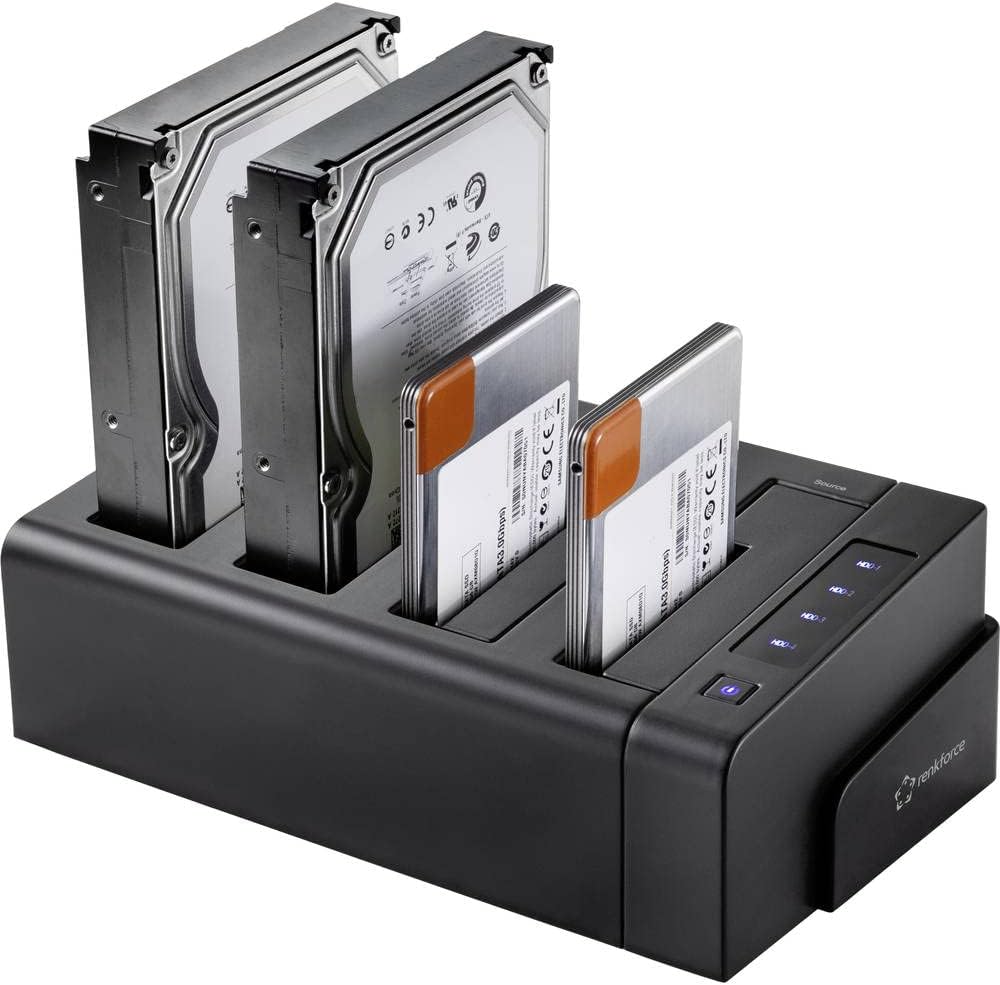
Image: Hard drives inserted into the docking station bays.
7. Arahan Operasi
7.1. Data Transfer Mode (PC Mode)
In this mode, the docking station functions as an external multi-bay enclosure for your computer.
- Memastikan Clone/PC switch on the rear is set to PC.
- Connect the USB 3.0 cable from the docking station to your computer.
- Insert the desired hard drives into any of the four bays.
- Hidupkan stesen dok.
- Your computer will detect the drives as external storage devices. You can now access, transfer, and manage files as you would with any external drive.
7.2. Fungsi Klon Luar Talian
The offline clone function allows you to duplicate a source hard drive to up to three target hard drives without needing a computer connection.
Pertimbangan Penting:
- Ensure the target drive(s) have a capacity equal to or greater than the source drive.
- All data on the target drive(s) will be erased during the cloning process. Back up any important data before proceeding.
- Do not disconnect drives or power during the cloning process.
Steps for Offline Cloning:
- Ensure the docking station is powered off and disconnected from any computer.
- Masukkan Sumber hard drive into Bay 1 (Source).
- Insert one, two, or three Sasaran hard drives into Bays 2, 3, and/or 4 (Target).
- Memastikan Clone/PC switch on the rear is set to Klon.
- Hidupkan stesen dok.
- Tekan dan tahan butang MULAKAN button for approximately 3-5 seconds until the cloning progress LEDs begin to flash.
- The cloning process will begin. The progress LEDs (25%, 50%, 75%, 100%) will illuminate sequentially to indicate completion percentage.
- Once the cloning is complete, all progress LEDs will be solid, and the device will emit three short beeps.
- Power off the docking station before removing the drives.
8. Penyelenggaraan
Penyelenggaraan yang betul memastikan jangka hayat dan prestasi optimum peranti anda:
- Pembersihan: Gunakan kain lembut dan kering untuk membersihkan bahagian luar peranti. Jangan gunakan pembersih cecair atau aerosol.
- Storan: Apabila tidak digunakan, simpan peranti di tempat yang sejuk dan kering jauh dari cahaya matahari langsung dan suhu yang melampau.
- Pengudaraan: Ensure the ventilation slots are not blocked during operation to prevent overheating.
- Pengendalian: Elakkan daripada menjatuhkan atau meletakkan peranti kepada kesan yang kuat.
9. Penyelesaian masalah
If you encounter issues with your Renkforce Hard Drive Copy Station, refer to the table below for common problems and solutions:
| Masalah | Kemungkinan Punca | Penyelesaian |
|---|---|---|
| Peranti tidak dihidupkan. | Penyesuai kuasa tidak disambungkan atau rosak; isu salur keluar kuasa. | Check power adapter connection; try a different power outlet; ensure power button is pressed. |
| Drives not recognized by computer. | USB cable not connected properly; Clone/PC switch in wrong position; drive not initialized/formatted. | Ensure USB cable is securely connected; set switch to PC mode; check Disk Management (Windows) or Disk Utility (macOS) to initialize/format new drives. |
| Cloning fails or does not start. | Target drive capacity is smaller than source; drives not seated correctly; switch not in Clone mode. | Ensure target drive(s) are equal or larger than source; re-insert drives firmly; set switch to Clone mode; press START button firmly. |
| Kelajuan pemindahan data yang perlahan. | Connected to a USB 2.0 port; faulty USB cable. | Connect to a USB 3.0 (blue port) or higher port on your computer; try a different USB 3.0 cable. |
| Cloning process stops unexpectedly. | Power interruption; faulty drive; overheating. | Ensure stable power supply; check drives for errors; ensure adequate ventilation. |
10. Spesifikasi Teknikal
| Ciri | Spesifikasi |
|---|---|
| Nombor Model | RF-4528332 |
| Pemacu Serasi | 2.5" / 3.5" SATA I/II/III SSD & HDD |
| Bilangan Teluk | 4 (1 Source, 3 Target) |
| Max Capacity per Drive | Up to 10TB (40TB total) |
| Antara muka | USB 3.2 Gen 1 (USB 3.0) |
| Kadar Pemindahan Data | Sehingga 5Gbps |
| Klon Luar Talian | Yes (1-to-1, 1-to-2, 1-to-3) |
| Sistem Operasi yang Serasi | Windows, macOS, Linux |
| Bekalan Kuasa | Penyesuai Kuasa Luaran |
| Dimensi (L x W x H) | Anggaran. 9.13 x 6.1 x 5.67 inci |
| Berat badan | Approx. 2.17 pounds (983 grams) |
11. Waranti dan Sokongan
Renkforce products are designed and manufactured to the highest quality standards. This product is covered by a limited warranty against defects in materials and workmanship. For specific warranty terms and conditions, please refer to the warranty card included with your purchase or visit the official Renkforce webtapak.
For technical support, troubleshooting assistance, or to inquire about replacement parts, please contact Renkforce customer service through the contact information provided on the official Renkforce website or your retailer's support channels. Please have your model number (RF-4528332) and purchase details ready when contacting support.


