pengenalan
Thank you for choosing the Xtorm 20W Fuel Series Power Bank 10.000mAh. This manual provides essential information for the safe and efficient use of your power bank. Please read it carefully before use and keep it for future reference.
The Xtorm Fuel Series Power Bank is designed to provide portable power for your mobile devices, featuring 20W power delivery, a 10,000mAh battery capacity, and multiple output ports for versatile charging.
Kandungan Pakej
Pastikan semua item ada dalam pakej:
- 1x Xtorm 20W Fuel Series Power Bank 10.000mAh (Model: FS401)
- 1x USB ke Kabel USB-C
- 1x Manual Pengguna
Produk Selesaiview
Familiarize yourself with the components of your Xtorm Power Bank:

Imej: Atas ke bawah view of the Xtorm Fuel Series Power Bank FS401, showcasing its textured grey surface and orange accent.
This image displays the overall design of the power bank, highlighting its compact and ergonomic form factor. The textured surface provides a secure grip, and the orange accent adds a touch of style.

Imej: Xtorm Fuel Series Power Bank shown next to a credit card and passport, with dimensions indicated.
This image illustrates the portable travel size of the power bank, with dimensions of 136mm length, 71mm width, and 15mm thickness. It weighs 215 grams, making it easy to carry in a pocket or bag.
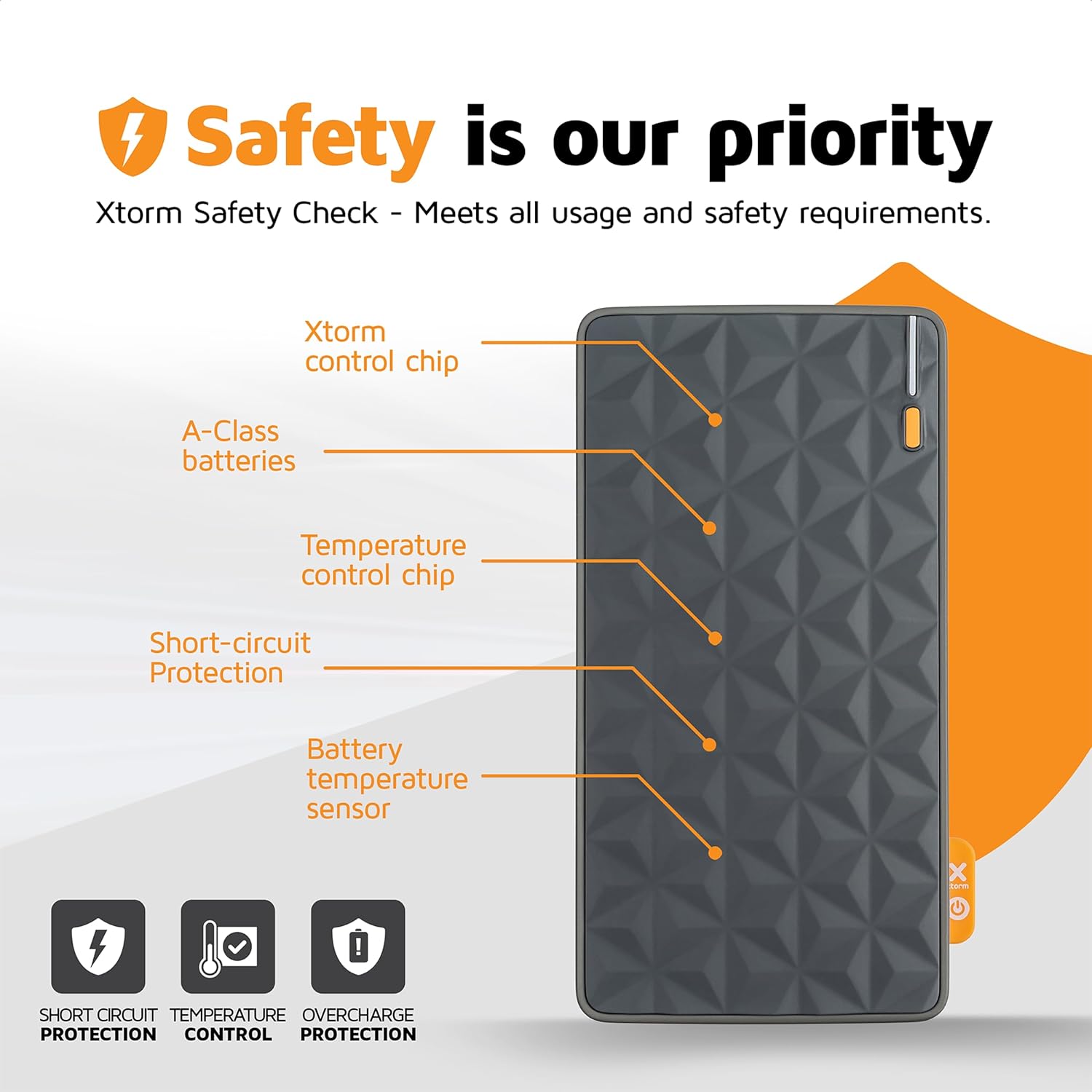
Imej: Diagram highlighting the safety features of the Xtorm Fuel Series Power Bank.
This diagram points out key internal components responsible for safety, including the Xtorm control chip, A-Class batteries, temperature control chip, short-circuit protection, and battery temperature sensor. These features ensure safe and reliable operation, protecting against short circuits, temperature fluctuations, and overcharge.

Imej: Xtorm Fuel Series Power Bank demonstrating universal compatibility with various devices.
This image shows the power bank's ability to charge different devices, including smartphones (Apple iPhone, Samsung Galaxy) and tablets, indicating its versatile charging capabilities with 2x Universal USB output and 1x USB-C in/output.

Imej: Xtorm Fuel Series Power Bank simultaneously charging a smartphone, tablet, and wireless earbuds.
This image illustrates the power bank's capability to charge up to three devices concurrently using its multiple output ports (1x USB-C PD 20W, 2x USB Quick Charge 3.0).
Persediaan
Pengecasan Awal Bank Kuasa
Before first use, it is recommended to fully charge your Xtorm Power Bank.
- Connect the supplied USB to USB-C cable to the USB-C input port on the power bank.
- Connect the other end of the cable to a compatible USB wall charger (not included). For optimal charging speed, use a 20W USB-C PD adapter.
- Penunjuk LED pada power bank akan menyala untuk menunjukkan kemajuan pengecasan.
- The power bank is fully charged when all LED indicators are solid. A full charge takes approximately 2.5 hours with a 20W PD charger.
Nota: The power bank may not be fully charged out of the box.
Arahan Operasi
Mengecas Peranti Anda
The Xtorm Power Bank features one USB-C output and two standard USB outputs, allowing you to charge up to three devices simultaneously.
- Identify the correct charging cable for your device.
- Connect one end of your device's charging cable to the appropriate output port on the power bank (USB-C or USB-A).
- Sambungkan hujung kabel yang lain ke peranti anda.
- Bank kuasa akan mula mengecas peranti anda secara automatik. Penunjuk LED akan menunjukkan baki paras bateri bank kuasa.
Output USB-C: Provides up to 20W Power Delivery (PD) for fast charging compatible smartphones and tablets.
Output USB-A: Provide standard USB charging for a wide range of devices.
Menyemak Tahap Bateri
The power bank is equipped with LED indicators to show its current battery level. Press the power button once to activate the indicators.
- 4 LEDs solid: Dikenakan caj 75-100%
- 3 LEDs solid: Dikenakan caj 50-75%
- 2 LEDs solid: Dikenakan caj 25-50%
- 1 LED solid: Dikenakan caj 0-25%
- 1 LED berkelip: Bateri lemah, perlu dicas semula
Penyelenggaraan
Penyelenggaraan yang betul memastikan ketahanan dan prestasi optimum power bank anda.
- Pembersihan: Gunakan kain lembut dan kering untuk membersihkan permukaan bank kuasa. Jangan gunakan bahan kimia yang keras atau bahan yang melelas.
- Storan: Simpan bank kuasa di tempat yang sejuk dan kering jauh dari cahaya matahari langsung dan suhu yang melampau.
- Penjagaan Bateri: Untuk memanjangkan hayat bateri, elakkan daripada menyahcas sepenuhnya bank kuasa dengan kerap. Cas semula apabila tahap bateri rendah. Jika menyimpan untuk tempoh yang lama, cajkannya kepada kira-kira 50-70% setiap 3-6 bulan.
- Elakkan Titisan: Protect the power bank from drops and impacts, which can damage internal components.
Menyelesaikan masalah
| Masalah | Kemungkinan Punca | Penyelesaian |
|---|---|---|
| Power bank tidak dicas |
|
|
| Peranti tidak mengecas daripada bank kuasa |
|
|
| Kelajuan pengecasan perlahan |
|
|
| Power bank gets hot during use/charging |
|
|
Spesifikasi
| Ciri | Perincian |
|---|---|
| Nombor Model | FS401 |
| Kapasiti Bateri | 10,000mAh |
| Input (USB-C) | Penghantaran Kuasa 20W (PD) |
| Output 1 (USB-C) | Penghantaran Kuasa 20W (PD) |
| Output 2 (USB-A) | Output USB Standard |
| Output 3 (USB-A) | Output USB Standard |
| Dimensi | 136 x 71 x 15 mm |
| Berat badan | 215 gram |
| Jenis Bateri | Litium-Polymer |
| warna | Multicolor (Grey/Orange) |
Waranti dan Sokongan
The Xtorm 20W Fuel Series Power Bank 10.000mAh comes with a 2-year Xtorm warranty.
For warranty claims, technical support, or any questions regarding your product, please contact Xtorm customer service. Refer to the official Xtorm webtapak untuk maklumat hubungan yang paling terkini.
Penting: Do not attempt to disassemble or repair the power bank yourself. This will void the warranty and may cause damage or injury.
Maklumat Keselamatan
Sila baca dan patuhi garis panduan keselamatan ini untuk mengelakkan kerosakan pada produk atau kecederaan pada diri anda.
- Jangan dedahkan bank kuasa kepada suhu yang melampau (panas atau sejuk), cahaya matahari langsung atau kelembapan yang tinggi.
- Do not use the power bank in wet environments or submerge it in water.
- Jauhkan bank kuasa daripada bahan mudah terbakar dan persekitaran yang mudah meletup.
- Jangan jatuhkan, tebuk atau buka bank kuasa.
- Jauhkan daripada kanak-kanak.
- Lupuskan power bank secara bertanggungjawab mengikut peraturan tempatan untuk sisa elektronik.
- Only use original or certified charging cables and adapters.


