1. Pengenalan
The Aputure Amaran 200d is a high-output 200W LED video light designed for professional and enthusiast filmmakers and photographers. It offers exceptional color fidelity, versatile control options, and a robust build, making it suitable for various lighting scenarios. This manual provides detailed instructions for the safe and effective use of your Amaran 200d.

Figure 1.1: The Amaran 200d LED Video Light with its standard reflector mounted on a light stand.
2. Maklumat Keselamatan
Sila baca dan fahami semua amaran dan arahan keselamatan sebelum menggunakan produk ini. Kegagalan mematuhi arahan ini boleh mengakibatkan renjatan elektrik, kebakaran atau kecederaan serius.
- Do not expose the light to water or high humidity.
- Jangan buka atau ubah suai lampu. Rujuk semua servis kepada kakitangan yang berkelayakan.
- Ensure the power supply is compatible with the local voltage (100-240V).
- Do not block the ventilation openings on the light fixture. Overheating can cause damage.
- Avoid direct eye exposure to the LED light source when it is powered on.
- Always secure the light fixture properly on a stable light stand before operation.
3. Apa yang ada di dalam Kotak
Sahkan bahawa semua komponen hadir semasa menyahkotak:
- Amaran 200d LED Lamp kepala
- Standard Bowens Mount Reflector
- Unit Bekalan Kuasa AC
- Kabel Kuasa AC

Figure 3.1: Included components of the Amaran 200d package.
4. Persediaan
4.1 Mounting the Light Head
- Attach the Amaran 200d lamp head to a compatible light stand using the integrated mounting bracket.
- Secure the light head by tightening the locking knob on the mounting bracket.

Figure 4.1: The Amaran 200d securely mounted on a light stand.
4.2 Memasang Reflektor
- Align the three mounting prongs of the standard reflector with the Bowens Mount on the front of the lamp kepala.
- Insert the reflector into the mount and twist clockwise until it locks securely into place.
4.3 Sambungan Kuasa
The Amaran 200d supports both AC and DC (48V) power input.
- Connect the AC power cable to the power supply unit.
- Connect the power supply unit's output cable to the 48V DC input port on the rear of the Amaran 200d lamp kepala.
- Plug the AC power cable into a suitable wall outlet.
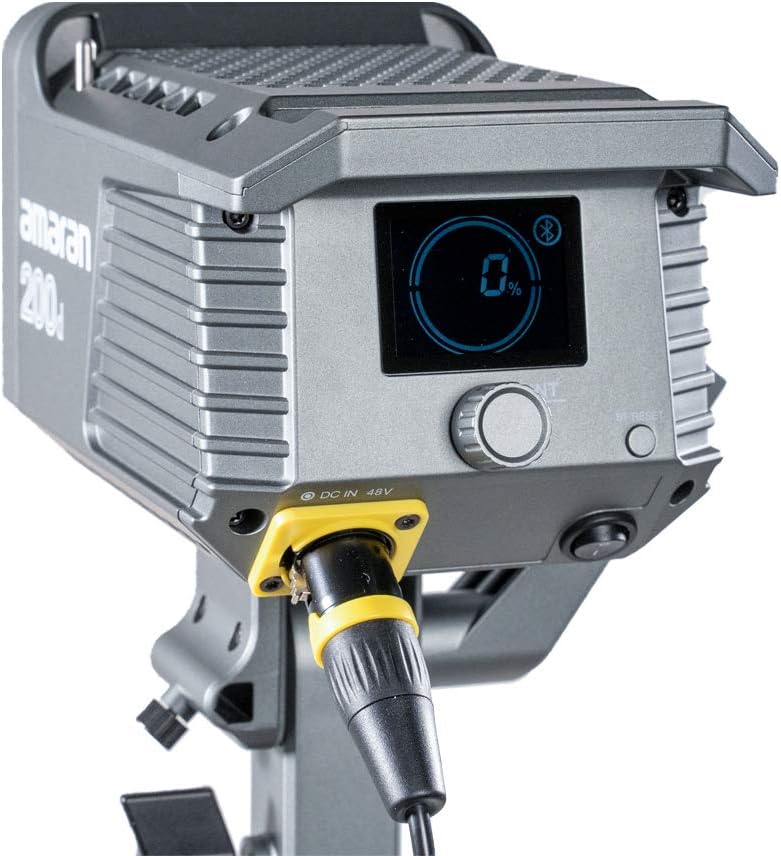
Figure 4.2: Detail of the DC 48V power input on the Amaran 200d.
5. Beroperasi
5.1 Menghidupkan/Mematikan
Locate the power switch on the rear panel of the light head. Flip the switch to the 'ON' position to power on the device. Flip it to 'OFF' to power down.
5.2 Kawalan Kecerahan
The Amaran 200d features an INT adjustment knob for brightness control (0-100%).
- Rotate the INT knob clockwise to increase brightness.
- Rotate the INT knob counter-clockwise to decrease brightness.
- Press the INT knob to quickly cycle through preset brightness levels: 20%, 40%, 60%, 80%, 100%.
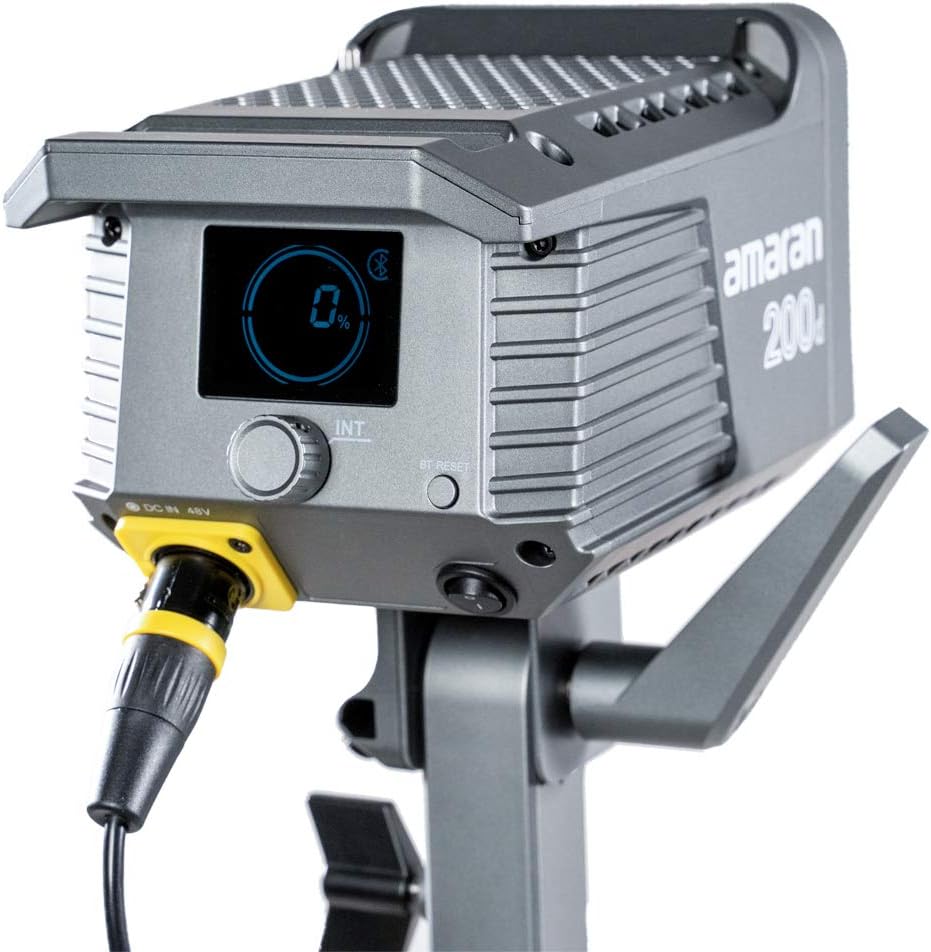
Figure 5.1: The control panel of the Amaran 200d, showing the display and adjustment knob.
5.3 Kesan Pencahayaan
The Amaran 200d includes 8 pre-programmed lighting effects:
- Paparazi
- Bunga api
- kilat
- Mentol yang rosak
- TV
- nafas
- kilat
- Letupan
These effects can be accessed and controlled via the Sidus Link App.
5.4 Sidus Link App Control
The Amaran 200d supports 2.4G Bluetooth control via the Sidus Link App, allowing remote adjustment of brightness, lighting effects, and frequency.
- Download the Sidus Link App from your device's app store.
- Pastikan Bluetooth didayakan pada peranti mudah alih anda.
- Open the Sidus Link App and follow the on-screen instructions to connect to your Amaran 200d.
- Once connected, you can control various parameters of the light remotely.

Figure 5.2: Controlling the Amaran 200d via the Sidus Link App.
6. Penyelenggaraan
6.1 Pembersihan
- Sentiasa putuskan sambungan kuasa sebelum membersihkan.
- Use a soft, dry cloth to wipe the surface of the light.
- Jangan gunakan bahan kimia yang keras atau bahan yang melelas.
6.2 Penyimpanan
- Simpan cahaya di tempat yang sejuk dan kering jauh dari cahaya matahari langsung.
- If storing for extended periods, disconnect the power supply.
7. Penyelesaian masalah
| Masalah | Kemungkinan Punca | Penyelesaian |
|---|---|---|
| Lampu tidak boleh dihidupkan. | No power supply; loose connection; faulty power supply. | Check power cable connection; ensure outlet is working; test with another power supply if available. |
| Cahaya berkelip-kelip atau tidak stabil. | Loose power connection; overheating; interference. | Secure all connections; ensure proper ventilation; move away from other electronic devices. |
| Sidus Link App cannot connect. | Bluetooth off; light not in pairing mode; app issue. | Ensure Bluetooth is on; restart light and app; try pairing again. |
8. Spesifikasi
- Dimensi Produk: 13 x 11.4 x 21 inci
- Berat Barang: 10.34 paun
- Nombor Model: 200D
- Jenama: Aputure
- Teknologi Ketersambungan: Bluetooth, Frekuensi Radio
- Penerangan Mod Denyar: Constant illumination, adjustable brightness, 8 built-in lighting effects
- Suhu Warna: 5600K (Siang)
- CRI: ≥95
- TLCI: ≥96
- Pencahayaan: Up to 65,000 lux@1m (with Hyper-Reflector)
- Lekapkan: Universal Bowens Mount
- Input Kuasa: 48V DC
9. Waranti dan Sokongan
Aputure products are designed for durability and performance. For specific warranty details and terms, please refer to the warranty card included with your product or visit the official Aputure website. For technical support, troubleshooting assistance, or service inquiries, please contact Aputure customer support through their official channels.
Optional protection plans are available for purchase, such as 2-Year and 3-Year Protection Plans, which can provide extended coverage beyond the standard manufacturer's warranty.
Untuk maklumat lanjut, lawati Aputure Store.


