pengenalan
This manual provides comprehensive instructions for the Elekpia Universal Remote Control, model CT-RC1US-18. This remote is designed for seamless compatibility with a wide range of Toshiba LED LCD HDTV models, including but not limited to CT-90325, CT-90326, CT-90329, CT-8037, CT-90302, CT-90275, CT-90, CT-90366, and CT-RC1US-18. Please read this manual carefully to ensure proper setup and operation of your new remote control.
Persediaan
Pemasangan Bateri
The Elekpia Universal Remote Control requires two (2) 1.5V AA batteries for operation. No programming is needed; simply install the batteries, and the remote will be ready to use with your compatible Toshiba TV.
- Cari penutup petak bateri di belakang alat kawalan jauh.
- Tekan ke bawah pada tab dan luncurkan penutup ke bawah untuk membuka petak.
- Masukkan dua (2) bateri AA, pastikan terminal positif (+) dan negatif (-) sejajar dengan tanda di dalam petak.
- Luncurkan penutup petak bateri kembali ke tempatnya sehingga ia berbunyi dengan selamat.

Rajah 1: Depan dan belakang view of the Elekpia Universal Remote Control, highlighting the battery compartment on the rear.
Once batteries are installed, the remote is ready for immediate use with your Toshiba TV. No additional setup or code entry is required.
Arahan Operasi
This universal remote control is designed to replicate the functions of your original Toshiba TV remote. Point the remote directly at your television's infrared receiver for optimal performance.
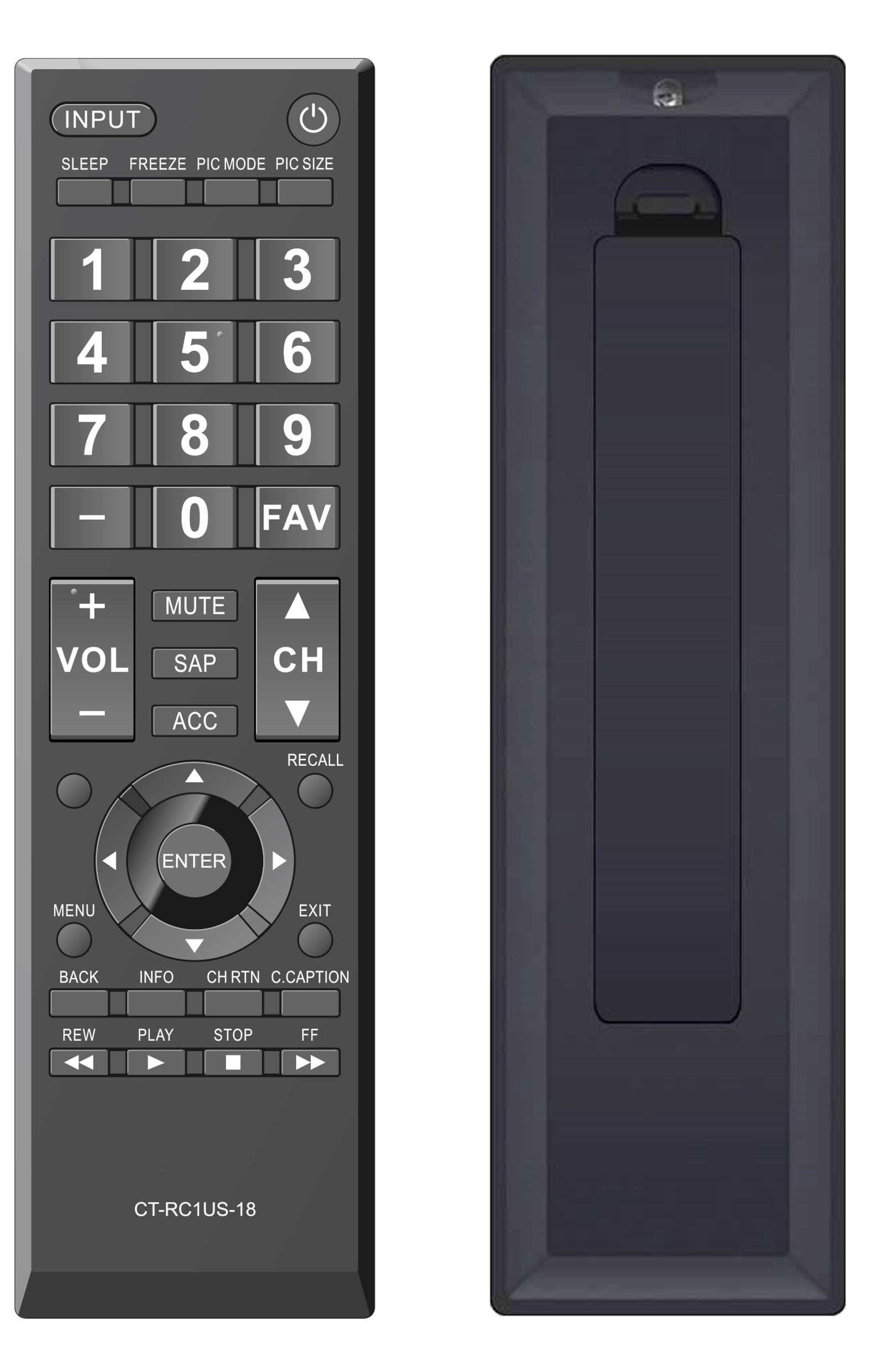
Rajah 2: Depan view of the Elekpia Universal Remote Control, displaying the layout of all buttons.
Fungsi Butang
- KUASA (⏻): Menghidupkan atau mematikan televisyen.
- INPUT: Cycles through available input sources (HDMI 1, HDMI 2, AV, etc.).
- TIDUR: Activates or adjusts the TV's sleep timer function.
- BEKUKAN: Pauses the current image on the screen (functionality may vary by TV model).
- MOD PIC: Adjusts picture modes (e.g., Standard, Movie, Dynamic).
- PIC SIZE: Changes the aspect ratio or picture size.
- Pad Nombor (0-9): Memasukkan terus nombor saluran.
- - (Dash): Used for entering sub-channels (e.g., 7-1).
- FAV: Accesses favorite channels list.
- VOL (+/-): Increases or decreases the volume level.
- HILANGKAN: Silences the television audio.
- SAP: Selects Secondary Audio Program (SAP) or alternate audio tracks.
- ACC: Accesses accessibility features or audio settings.
- CH (Atas/Bawah): Changes the television channel up or down.
- INGAT SEMULA: Switches between the current and previously viewsaluran ed.
- Pad Navigasi (Atas, Bawah, Kiri, Kanan, ENTER): Navigates through on-screen menus and confirms selections.
- MENU: Opens the main menu of the television.
- EXIT: Closes the current menu or returns to the previous screen.
- KEMBALI: Kembali ke menu atau skrin sebelumnya.
- INFO: Memaparkan maklumat tentang program atau input semasa.
- CH RTN (Channel Return): Similar to RECALL, returns to the previous channel.
- C.CAPTION (Closed Caption): Toggles closed captions on or off.
- REW (Rewind), PLAY, STOP, FF (Fast Forward): Controls for media playback (e.g., when using a connected USB device or smart TV apps, if supported by the TV).
Penyelenggaraan
Membersihkan Alat Jauh
Untuk mengekalkan rupa dan fungsi alat kawalan jauh, bersihkannya dengan kerap:
- Gunakan kain lembut dan kering untuk mengelap permukaan alat kawalan jauh.
- Untuk kotoran degil, sedikit dampen kain dengan air atau pembersih yang lembut dan tidak melelas. Elakkan kelembapan berlebihan.
- Jangan gunakan bahan kimia, pelarut atau pad pembersih yang kasar, kerana ini boleh merosakkan kemasan alat kawalan jauh atau komponen dalaman.
Penggantian Bateri
Replace batteries when the remote's response becomes sluggish or stops working. Always replace both AA batteries at the same time with new ones. Do not mix old and new batteries, or different types of batteries, as this can lead to leakage or damage.
Penyimpanan
If the remote control will not be used for an extended period, remove the batteries to prevent potential leakage and damage to the device.
Menyelesaikan masalah
If you encounter issues with your Elekpia Universal Remote Control, please refer to the following common solutions:
- Jauh tidak bertindak balas:
- Ensure the batteries are correctly installed with the proper polarity (+/-).
- Gantikan bateri dengan bateri AA yang baru.
- Periksa sebarang halangan antara alat kawalan jauh dan penderia inframerah TV.
- Ensure you are pointing the remote directly at the TV.
- Beberapa butang tidak berfungsi:
- This remote is pre-programmed for Toshiba TVs. Verify your TV model is compatible.
- Clean the remote's surface, especially around the unresponsive buttons, to remove any dirt or debris that might be interfering with button presses.
- TV not turning on/off:
- Confirm the TV is plugged into a working power outlet.
- Try using the power button directly on the TV to confirm it is operational.
If these steps do not resolve the issue, please refer to the customer support section.
Spesifikasi
| Nombor Model | CT-RC1US-18 |
| Jenama | Elekpia |
| Dimensi Produk | 7 x 2 x 0.6 inci |
| Berat Barang | 3 auns |
| Sumber Kuasa | 2 x Bateri AA 1.5V (tidak termasuk) |
| Peranti Serasi | Toshiba LED LCD HDTVs |
| Bilangan Maks Peranti yang Disokong | 1 |
| warna | Hitam |
Maklumat Waranti
Specific warranty details for the Elekpia Universal Remote Control CT-RC1US-18 are not provided in this manual. Please refer to the product packaging, the retailer's return policy, or the manufacturer's official webtapak untuk maklumat mengenai perlindungan waranti dan terma.
Sokongan Pelanggan
For further assistance or inquiries regarding your Elekpia Universal Remote Control, please contact the retailer from whom you purchased the product. You may also visit the official Elekpia weblaman web untuk sumber sokongan yang berpotensi atau maklumat hubungan.


