1. Produk Lebihview
The Fiodio FK-2063 is a wired mechanical gaming keyboard designed for an immersive gaming and typing experience. It features RGD blue switches, dedicated media controls, and an aluminum top case for durability. All 104 keys are anti-ghosting, ensuring precise input during intense gaming sessions.
Ciri-ciri Utama:
- Greater Immersion with RGB Backlit: Equipped with 20 backlight color effects presets, delivering dynamic and vibrant lighting effects with adjustable breathing frequency.
- Gaming with “Clicky” BGM: Classical blue equivalent switches trigger sensitively with crisp click sound, providing precise and unique typing/gaming performance.
- Without any Procedure Error: All 104 anti-ghosting keys have individual switches with full n-key rollover for ultimate gaming performance, allowing for accurate execution.
- Ergonomic and High-Quality: Precision engineered keycaps, 2 anti-slip feet, and 2 angle feet on the back of the keyboard relieve hand fatigue and provide comfort during extended use.
- Reka Bentuk Kalis Percikan: Durable Metal-ABS construction designed to withstand spilled drinks or coffee.
- Unrivalled Durability: Tested over 60,000,000 keystrokes, ensuring a longer service life.
- Keserasian Hebat: Compatible with Windows 2000 / 2003 / XP / Vista / Win7 / Win8 / Win10.
2. Kandungan Pakej
Sila semak kandungan pakej untuk memastikan semua item ada:
- Fiodio FK-2063 Mechanical Gaming Keyboard
- Kabel USB (bersepadu)
- Manual Pengguna (dokumen ini)
3. Panduan Persediaan
- Buka pek Papan Kekunci: Carefully remove the Fiodio FK-2063 keyboard from its packaging.
- Sambung ke Komputer: Plug the integrated USB cable from the keyboard into an available USB port on your desktop, laptop, or PC.
- Pemasangan Pemacu (Pasang & Main): The keyboard is plug-and-play. Your operating system (Windows 2000 / 2003 / XP / Vista / Win7 / Win8 / Win10) should automatically detect and install the necessary drivers. No additional software installation is typically required.
- Position the Keyboard: Place the keyboard on a stable, flat surface. Adjust the two angle feet on the back of the keyboard for your preferred typing angle to enhance ergonomic comfort.

Rajah 3.1: Atas-bawah view of the Fiodio FK-2063 Mechanical Gaming Keyboard, showcasing its full layout and RGB lighting.
4. Arahan Operasi
4.1 Kawalan Lampu Latar RGB
The Fiodio FK-2063 keyboard features vibrant RGB backlighting with multiple effects. Use the dedicated "Fiodio" button and function keys to customize your lighting experience.
- Menukar Mod Pencahayaan: Press the dedicated "Fiodio" button located on the top right of the keyboard to cycle through 20 preset backlight effects.
- Melaraskan Kecerahan: Use the combination of the Fn key (Function key) and the Arus Atas / Bawah keys to increase or decrease the backlight brightness.
- Adjusting Breathing/Effect Speed: Use the combination of the Fn kunci dan Anak panah Kiri/Kanan keys to adjust the speed of dynamic lighting effects.

Figure 4.1: The keyboard illuminated with vibrant RGB backlighting, enhancing the gaming atmosphere.

Rajah 4.2: Gambar jarak dekat view of the multi-function digital dial, used for adjusting backlight modes and potentially other settings.
4.2 Kawalan Media
The keyboard features dedicated media controls for convenient audio management.
- Kawalan Kelantangan: The multi-function digital dial (located near the Fiodio button) can be used to adjust the system volume. Rotate the dial clockwise to increase volume and counter-clockwise to decrease volume.
- Redam/Nyahredam: Press the multi-function digital dial to mute or unmute the audio.
- Other Media Functions: Specific function keys (F1-F12) may have secondary media functions (e.g., Play/Pause, Next Track, Previous Track) when pressed in combination with the Fn key. Refer to the keycap legends for specific icons.
4.3 Anti-Ghosting dan Rollover N-Key
The Fiodio FK-2063 keyboard is designed with full 104-key anti-ghosting and N-key rollover. This means that every key press is registered accurately, even when multiple keys are pressed simultaneously, which is crucial for fast-paced gaming.

Figure 4.3: The full 104-key layout of the mechanical gaming keyboard, designed for accuracy and anti-ghosting.
5. Penjagaan dan Penyelenggaraan
To ensure the longevity and optimal performance of your Fiodio FK-2063 keyboard, follow these maintenance guidelines:
- Pembersihan: Regularly clean the keyboard with a soft, dry cloth. For deeper cleaning, use compressed air to remove dust and debris from between the keycaps. You may gently remove keycaps for thorough cleaning if necessary, but exercise caution to avoid damaging the switches.
- Perlindungan Tumpahan: While the keyboard features a splash-proof design, it is not fully waterproof. Avoid submerging the keyboard in liquids. In case of accidental spills, immediately unplug the keyboard, wipe off the liquid, and allow it to air dry completely before reconnecting.
- Storan: Apabila tidak digunakan, simpan papan kekunci di tempat yang sejuk dan kering, jauh daripada cahaya matahari langsung dan suhu yang melampau.
- Elakkan Paksa: Jangan gunakan daya berlebihan pada kekunci atau cuba membuka papan kekunci, kerana ini boleh membatalkan jaminan dan menyebabkan kerosakan.

Figure 5.1: The keyboard's splash-resistant design helps protect against accidental liquid spills.
6. Penyelesaian masalah
If you encounter issues with your Fiodio FK-2063 keyboard, please refer to the following common troubleshooting steps:
| Masalah | Kemungkinan Punca | Penyelesaian |
|---|---|---|
| Papan kekunci tidak bertindak balas. | Sambungan USB longgar, port USB rosak, isu pemandu. | Pastikan kabel USB dipasang dengan kukuh pada papan kekunci dan komputer. Cuba port USB yang lain. Mulakan semula komputer anda. |
| Backlight not working or inconsistent. | Lighting mode off, brightness set too low, software conflict. | Press the "Fiodio" button to cycle through modes. Adjust brightness using Fn + Up Arrow. Ensure no conflicting software is running. |
| Keys not registering or ghosting. | Debris under keycap, rare hardware issue. | Clean the affected key area with compressed air. If the issue persists, contact Fiodio support. |
| Media controls not working. | Software conflict, incorrect key combination. | Ensure no other media player software is interfering. Verify correct Fn key combinations. |
If the problem persists after trying these steps, please contact Fiodio customer support for further assistance.
7. Spesifikasi Teknikal
| Ciri | Perincian |
|---|---|
| Jenama | Fiodio |
| Nombor Model | FK-2063-US |
| Teknologi Ketersambungan | Berwayar (USB) |
| Penerangan Papan Kekunci | Papan Kekunci Permainan Mekanikal |
| Jenis Suis | Suis Biru |
| Pencahayaan latar | RGB Rainbow Backlit |
| Bilangan Kunci | 104 |
| Anti-Ghosting | All 104 keys with full N-key rollover |
| Ciri Khas | Ergonomic, Backlit, Water Resistant (Splash-proof), Dedicated Media Control |
| Platform Perkakasan | Komputer riba, PC |
| Keserasian Sistem Pengendalian | Windows 2000 / 2003 / XP / Vista / Win7 / Win8 / Win10 |
| Berat Barang | 2 paun |
| Dimensi Produk (LxWxH) | 17 x 5 x 2 inci |
| Pengeluar | Fiodio |

Figure 7.1: Detail of the blue mechanical key switches, known for their tactile and clicky feedback.

Figure 7.2: An illustration detailing the linear action and durable construction of the key switches, designed for 60 million keystrokes.
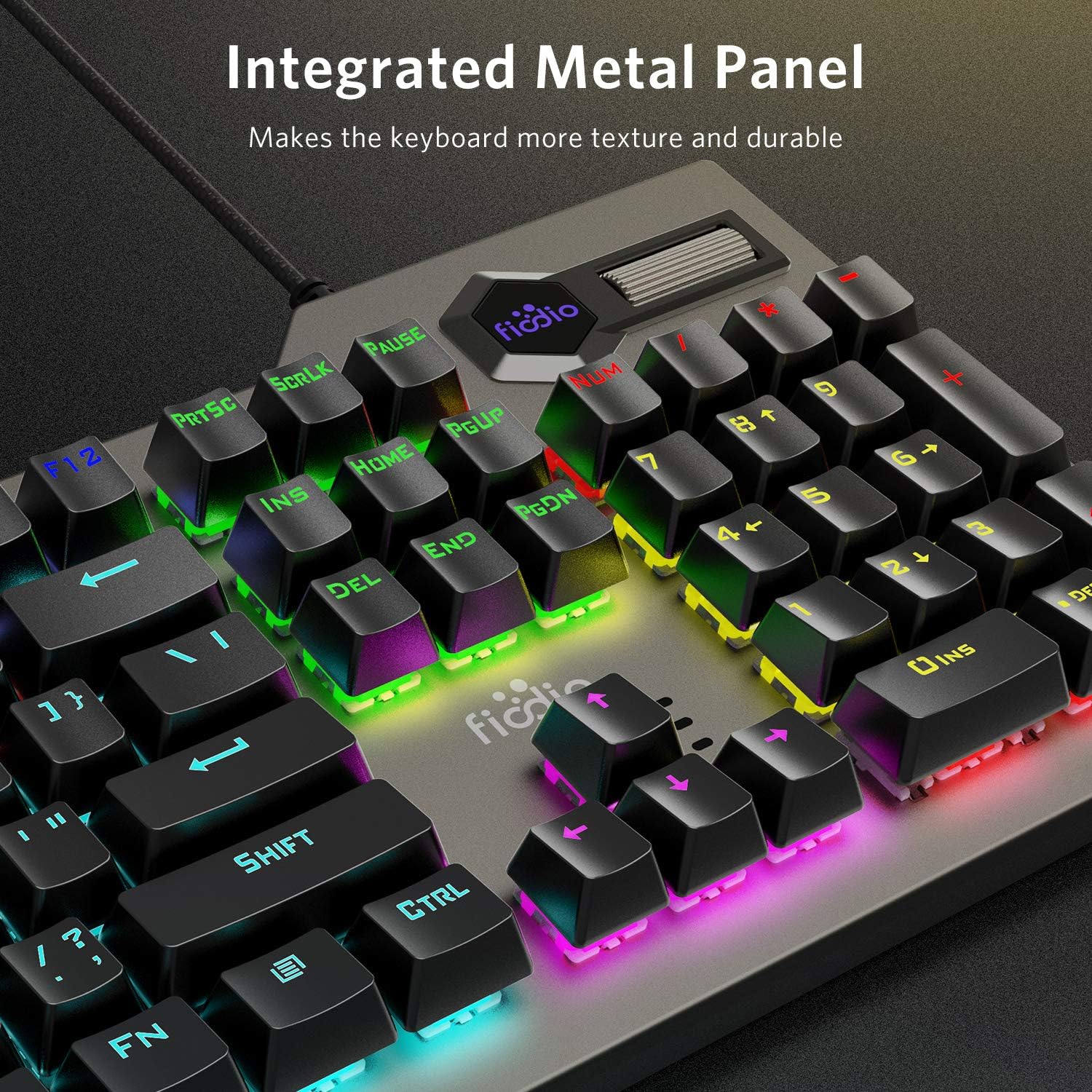
Figure 7.3: The integrated metal panel provides enhanced texture and durability to the keyboard's construction.
8. Waranti dan Sokongan
The Fiodio FK-2063 Mechanical Gaming Keyboard is built for durability and long-term performance, tested for over 60 million keystrokes.
For additional support, troubleshooting, or warranty inquiries, please refer to the official Fiodio user manual available in PDF format or contact Fiodio customer service.
Anda boleh mengakses Manual Pengguna (PDF) rasmi di sini.


