pengenalan
This manual provides essential instructions for the safe and efficient operation of your Technical Pro STAGE28 Dual 8" Rechargeable LED Bluetooth Speaker. Please read this manual thoroughly before using the product and retain it for future reference.
Kandungan Pakej
Sahkan bahawa semua item terdapat dalam pakej:
- Technical Pro STAGE28 Speaker Unit
- Mikrofon Pegang Tangan Tanpa Wayar
- Speaker Stand (Tripod)
- Charging Cable (DC5V)
- Manual Arahan (dokumen ini)
Persediaan
1. Mengisi Speaker
Before initial use, fully charge the speaker's built-in rechargeable battery. Connect the provided charging cable to the DC5V IN port on the rear panel of the speaker and to a suitable power source. The charging status indicator will show when the unit is charging.

Image: Rear control panel detail, highlighting the DC5V IN port.
2. Assembling the Speaker Stand
Unfold the tripod legs of the speaker stand. Adjust the height to your preference and secure it using the locking mechanism. Place the STAGE28 speaker securely onto the top pole of the stand.

Image: The included speaker tripod stand.
3. Microphone Preparation
Ensure the wireless handheld microphone has fresh batteries installed. The microphone can be stored in the dedicated compartment on the rear of the speaker when not in use.
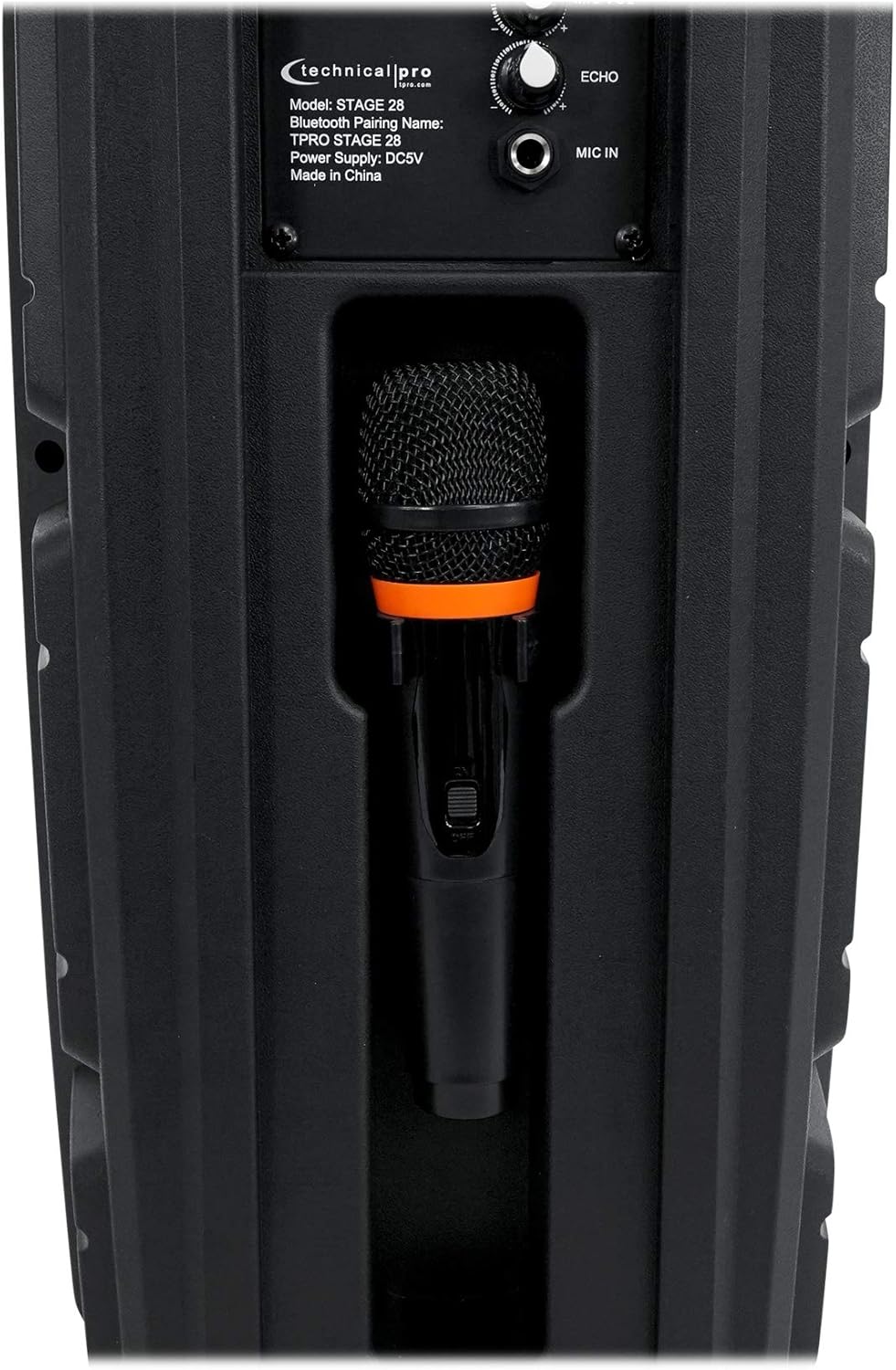
Image: Microphone storage compartment on the speaker's rear.
Arahan Operasi
1. Hidupkan/Mati Kuasa dan Kawalan Kelantangan
Putar KUASA/ISI PADU knob clockwise to turn the speaker on and increase the master volume. Rotate counter-clockwise to decrease volume and turn off the speaker.

Image: Full rear panel of the speaker with controls.
2. Berpasangan Bluetooth
- Turn on the speaker. The display will show "BLUE" indicating Bluetooth mode.
- Enable Bluetooth on your audio device (smartphone, tablet, etc.).
- Cari untuk peranti yang tersedia dan pilih "TPRO STAGE 28"dari senarai.
- Once paired, the speaker will emit a confirmation tone.
- Julat Bluetooth adalah lebih kurang 30 kaki (9 meter).
3. Fungsi True Wireless Stereo (TWS).
To connect two STAGE28 speakers for TWS stereo sound:
- Ensure both STAGE28 speakers are powered on and in Bluetooth mode.
- On one of the speakers (this will be the primary unit), press and hold the TWS button. The speaker will search for another STAGE28 unit.
- Once connected, both speakers will play audio in stereo from a single Bluetooth source.
4. Main Semula Kad USB/TF
Insert a USB flash drive or TF (microSD) card (up to 64GB) containing .mp3 audio files into the respective USB or TF port. The speaker will automatically switch to USB/TF mode and begin playback. Use the Sebelumnya/Seterusnya butang untuk menavigasi trek.
5. Operasi Radio FM
Tekan ke MODE / CAHAYA button to cycle through input modes until "FM" appears on the display. Press and hold the Main/Jeda button to auto-scan and save available FM stations. Use the Sebelumnya/Seterusnya butang untuk bertukar antara stesen yang disimpan.
6. Input Aux
Connect an external audio device using a 1/8" (3.5mm) audio cable to the AUX input port. Press the MODE / CAHAYA butang untuk memilih mod AUX.
7. Penggunaan Mikrofon
Plug the wireless microphone receiver (if applicable) or a wired microphone into the MIC DALAM 1/4" input. Adjust the microphone volume using the MIC VOL knob and add echo effect with the ECHO tombol.
8. Lampu LED
The speaker features LED lights on its woofers. Press the MODE / CAHAYA button briefly to toggle the LED lights on or off, or to change light modes.

Imej: Depan view of the speaker with LED lights active.
Penyelenggaraan
- Pembersihan: Gunakan kain lembut dan kering untuk membersihkan bahagian luar pembesar suara. Jangan gunakan pembersih atau pelarut yang melelas.
- Penjagaan Bateri: To prolong battery life, avoid fully discharging the battery frequently. Recharge the speaker regularly, even if not in use for extended periods. Store in a cool, dry place.
- Storan: When storing the speaker, ensure it is turned off and disconnected from power. Keep it in a dry environment away from extreme temperatures.
Menyelesaikan masalah
| Masalah | Kemungkinan Punca | Penyelesaian |
|---|---|---|
| Speaker tidak dihidupkan. | Battery is discharged. Power/Volume knob is off. | Charge the speaker. Rotate the POWER/VOLUME knob clockwise to turn on. |
| Tiada bunyi dari pembesar suara. | Volume is too low. Incorrect input mode selected. Audio source not playing. | Increase master volume. Ensure correct input mode (Bluetooth, USB, AUX, FM). Check audio source device. |
| Peranti Bluetooth tidak boleh berpasangan. | Speaker not in Bluetooth mode. Device too far. Previously paired device connected. | Ensure speaker is in Bluetooth mode ("BLUE" on display). Move device closer (within 30 ft). Disconnect from other devices. |
| Mikrofon tidak berfungsi. | Microphone not connected. MIC VOL knob is low. Microphone batteries are dead. | Ensure microphone is properly connected to MIC IN. Increase MIC VOL. Replace microphone batteries. |
Spesifikasi
| model: | STAGE28 |
| Kuasa Puncak: | 1000 Watt |
| Woofer: | Dual 8" LED Woofers |
| Tweeter: | Piezo Horn Tweeter |
| Bateri: | Terbina dalam Boleh dicas semula |
| Input: | Bluetooth, USB, TF Card, FM Radio, Aux (1/8"), Microphone (1/4") |
| USB/TF Card Max Size: | 64GB |
| Audio yang disokong Files: | .mp3 |
| Versi Bluetooth: | v2.0 with EDR |
| Julat Bluetooth: | 30 Kaki (9 meter) |
| Respons Kekerapan: | 50Hz-20kHz |
| Impedans: | 4 ohm |
| Sensitiviti: | 95 ±2dB (1W@1M) |
| Dimensi Produk (H x W x D): | 22" x 9.5" x 7.5" (55.9 cm x 24.1 cm x 19.1 cm) |
| Berat produk: | 8.5 paun (3.86 kg) |
| Bekalan Kuasa: | DC5V |
Waranti dan Sokongan
For warranty information and technical support, please refer to the documentation provided at the point of purchase or contact the retailer/manufacturer directly. Keep your proof of purchase for warranty claims.


