1. Pengenalan
This manual provides essential instructions for the safe and efficient operation, maintenance, and care of your Waring Commercial WCM50P Café Deco Pour Over Coffee Brewer. Designed for commercial use, this brewer offers both pour-over and automatic refill capabilities to meet high demand for fresh-brewed coffee. Please read all instructions thoroughly before initial use to ensure proper function and longevity of the appliance.
2. Perlindungan Penting
Apabila menggunakan peralatan elektrik, langkah berjaga-jaga keselamatan asas hendaklah sentiasa dipatuhi, termasuk yang berikut:
- Baca semua arahan sebelum mengendalikan perkakas.
- Jangan sentuh permukaan panas. Gunakan pemegang atau tombol.
- Untuk melindungi daripada bahaya elektrik, jangan celupkan kabel, palam, atau alat ke dalam air atau cecair lain.
- Pengawasan rapi diperlukan apabila sebarang perkakas digunakan oleh atau berhampiran kanak-kanak.
- Cabut plag dari soket apabila tidak digunakan dan sebelum membersihkan. Biarkan sejuk sebelum memakai atau menanggalkan bahagian, dan sebelum membersihkan perkakas.
- Jangan kendalikan sebarang perkakas dengan kord atau palam yang rosak, atau selepas perkakas tidak berfungsi atau rosak dalam apa jua cara. Kembalikan perkakas ke kemudahan servis sah terdekat untuk pemeriksaan, pembaikan atau pelarasan.
- Penggunaan lampiran aksesori yang tidak disyorkan oleh pengilang perkakas boleh menyebabkan kecederaan.
- Jangan gunakan di luar rumah.
- Jangan biarkan kord tergantung di tepi meja atau kaunter, atau menyentuh permukaan panas.
- Jangan letakkan pada atau berhampiran gas panas atau penunu elektrik, atau dalam ketuhar yang dipanaskan.
- Sentiasa pasangkan plag pada perkakas dahulu, kemudian palamkan kord ke dalam salur keluar dinding. Untuk memutuskan sambungan, matikan mana-mana kawalan kepada "mati", kemudian tanggalkan palam dari alur keluar dinding.
- Jangan gunakan perkakas untuk kegunaan selain daripada yang dimaksudkan.
- Melecur mungkin berlaku jika penutup ditanggalkan semasa kitaran membancuh.
3. Produk Lebihview dan Komponen
The Waring Commercial WCM50P is a robust coffee brewer designed for commercial environments, offering both manual pour-over and automatic water refill options. It features two individually controlled warmers to maintain optimal coffee temperature.

Rajah 1: Depan view of the Waring Commercial WCM50P Café Deco Pour Over Coffee Brewer. This image displays the main unit with its stainless steel finish, control panel, brew basket, and lower warmer plate. The hot water faucet is visible on the right side.

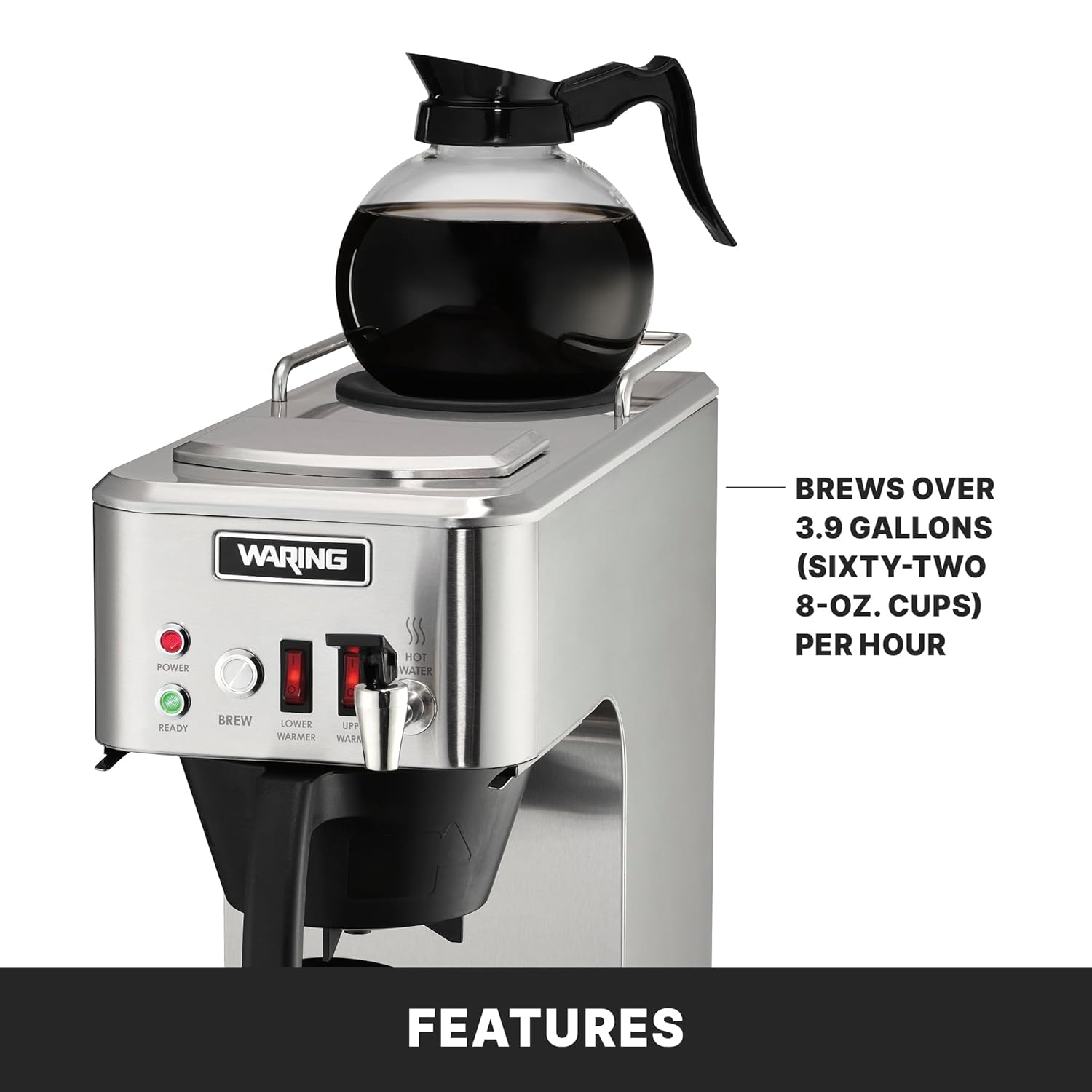
Rajah 2: Key features of the WCM50P brewer. This image highlights the front-mounted hot water faucet, push-button brew start, upper warmer with guardrails, and the inclusion of a 25-piece coffee filter starter pack. It also shows a glass decanter filled with coffee on the upper warmer.
Komponen Utama:
- Takungan Air: Located at the top, for adding water for brewing.
- Bakul Brew: Holds the coffee filter and ground coffee.
- Decanter Warmers: Two independently controlled warmers (upper and lower) to keep coffee at serving temperature.
- Hot Water Faucet: Dispenses hot water on demand.
- Panel Kawalan: Includes Power switch, Brew switch, and Ready indicator light.
4. Persediaan dan Penggunaan Pertama
Membongkar:
- Carefully remove the coffee brewer from its packaging.
- Remove all packing materials and protective films.
- Inspect the brewer for any signs of damage. If damaged, do not operate and contact your supplier.
Pembersihan Awal:
Before first use, it is recommended to clean the brewer to remove any manufacturing residues.
- Wash the brew basket and glass decanters with warm, soapy water. Rinse thoroughly and dry.
- Lap bahagian luar pembuat bir dengan iklanamp kain.
- Run at least two cycles of plain water through the brewer without coffee to flush the internal components.
Peletakan dan Sambungan Kuasa:
- Letakkan mesin pembuat bir di atas permukaan yang stabil dan rata.
- Ensure adequate clearance around the unit for ventilation.
- Plug the brewer into a grounded 120V, 5-15 phase electrical outlet.

Rajah 3: The WCM50P brewer in a commercial kitchen setting, demonstrating its suitability for both front-of-house and back-of-house use. Two glass decanters are shown, one on the upper warmer and one on the lower warmer.
5. Arahan Operasi
Pour-Over Coffee Brewing:
- Ensure the brewer is plugged in and the Power switch is ON. The Ready light will illuminate when the water is heated to the optimal brewing temperature.
- Letakkan penapis kertas bersih ke dalam bakul minuman.
- Add the desired amount of ground coffee to the filter.
- Place an empty glass decanter on the lower warmer plate.
- Open the lid of the water reservoir at the top of the brewer.
- Carefully pour cold, fresh water into the reservoir. The brewer is designed for 64 oz. decanters. Do not overfill.
- Tutup penutup takungan.
- Press the BREW switch to initiate the brewing cycle.
- Once brewing is complete, the coffee will drip into the decanter. The lower warmer will keep the coffee hot.
- To keep a second decanter warm, place it on the upper warmer and activate the UPPER WARMER switch.
Rajah 4: Demonstrates the pour-over method, where water is manually added to the top reservoir. This image also highlights the brewer's two-year parts and one-year labor warranty.
Automatic Refill Feature:
The WCM50P is equipped with an automatic refill feature, allowing for continuous operation when plumbed. If your unit is plumbed, it will automatically draw water as needed for brewing cycles, eliminating the need for manual water addition.
Pemberian Air Panas:
The front-mounted faucet provides hot water on demand.
- Ensure the brewer is powered ON and the Ready light is illuminated.
- Place a cup or container under the hot water faucet.
- Push the faucet lever to dispense hot water. Release the lever to stop.
6. Penyelenggaraan dan Pembersihan
Regular cleaning and maintenance will ensure optimal performance and extend the life of your coffee brewer.
Pembersihan Harian:
- Turn off the brewer and unplug it from the power outlet. Allow it to cool completely.
- Remove the brew basket and discard the used coffee filter and grounds. Wash the brew basket with warm, soapy water and rinse thoroughly.
- Wash the glass decanters with warm, soapy water. For stubborn coffee stains, use a coffee pot cleaner. Rinse thoroughly.
- Wipe down the exterior of the brewer, including the warmer plates, with a damp cloth. For stainless steel surfaces, use a non-abrasive cleaner designed for stainless steel.
- Pastikan semua bahagian kering sebelum memasang semula atau menyimpannya.
Penyahkerak (Bulanan atau mengikut keperluan):
Mineral deposits from water can build up over time, affecting brewing performance. Descale your brewer regularly.
- Sediakan larutan penyahkerak mengikut arahan pengilang (cth, cuka putih dan air, atau agen penyahkerak komersial).
- Tuangkan larutan penyahkerak ke dalam takungan air.
- Place an empty decanter on the lower warmer.
- Run a brew cycle with the descaling solution.
- Selepas kitaran, buang penyelesaiannya.
- Run several cycles of plain, fresh water through the brewer to rinse thoroughly and remove any residual descaling solution.
7. Penyelesaian masalah
Rujuk jadual berikut untuk isu biasa dan penyelesaiannya.
| Masalah | Kemungkinan Punca | Penyelesaian |
|---|---|---|
| Brewer tidak dihidupkan. | No power, Power switch OFF. | Check power cord connection. Ensure Power switch is ON. Check circuit breaker. |
| Kopi tidak dibancuh. | No water in reservoir, Brew switch OFF, Ready light not on. | Add water to reservoir. Ensure Brew switch is ON. Wait for Ready light to illuminate. |
| Kopi terasa lemah atau terlalu kuat. | Incorrect coffee-to-water ratio, grind size. | Adjust amount of coffee grounds or water. Ensure correct grind size for drip coffee. |
| Water leaking from brewer. | Overfilled reservoir, loose connections (if plumbed), damaged components. | Do not overfill reservoir. Check plumbing connections. Contact service if damage is suspected. |
| Kopi tidak kekal panas. | Warmer switch OFF, faulty warmer. | Ensure appropriate warmer switch (LOWER or UPPER) is ON. Contact service if warmer is faulty. |
Jika masalah berterusan selepas mencuba penyelesaian ini, sila hubungi khidmat pelanggan Waring Commercial.
8. Spesifikasi

Rajah 5: Dimensi berakhirview of the WCM50P brewer, showing a width of 8 inches, height of 19 inches, and depth of 17.5 inches.
- model: WCM50P
- Dimensi Produk: 8" W x 17.5" D x 19" H
- Berat: Kira-kira 26.8 Pound
- Kapasiti Pembuatan Bir: Over 3.9 gallons (sixty-two 8 oz. cups) per hour
- Decanter Size: Fits large, 64 oz. glass decanters
- Voltage: 120V
- Jenis Palam: 5-15 Phase Plug
- Ciri Khas: Manual (Pour Over) and Automatic Refill capable
- Pensijilan: NSF, TUV Rheinland
9. Waranti dan Sokongan
The Waring Commercial WCM50P Café Deco Pour Over Coffee Brewer comes with a Two-Year Parts, One-Year Labor Warranty. Waranti ini melindungi kecacatan pada bahan dan mutu kerja di bawah penggunaan dan perkhidmatan biasa.
For warranty claims, technical support, or service inquiries, please contact Waring Commercial customer service. Ensure you have your model number (WCM50P) and proof of purchase available when contacting support.


