1. Pengenalan
This manual provides detailed instructions for the installation, operation, and maintenance of your xmartO DT3034 2K Wireless Security Camera. Please read this manual thoroughly before using the product to ensure proper functionality and safety. The xmartO DT3034 is an outdoor WiFi security camera featuring 2K Super HD resolution, auto-tracking, pan-tilt-zoom control, enhanced two-way audio, auto floodlights, and IP66 weatherproofing. It can operate standalone via the xmartO WallPixel App or integrate with an xmartO NVR system.
2. Kandungan Pakej
Sahkan bahawa semua item terdapat dalam pakej anda:
- 1 x xmartO DT3034 WiFi Security Camera
- 2 x Antena WiFi
- 1 x 12V DC 1A Penyesuai Kuasa
- 1 x Manual Pengguna (dokumen ini)
- 1 x Mounting Kits (screws and wall anchors)
3. Produk Lebihview
The xmartO DT3034 camera is designed for outdoor surveillance, offering a range of features for comprehensive security monitoring.


4. Persediaan
4.1 Power and Connectivity Requirements
The camera requires a continuous power supply from a nearby electrical outlet. It can connect to your network wirelessly via WiFi or through a wired Ethernet connection.

4.2 Pemasangan Fizikal
- Pilih Lokasi: Select a mounting location that provides the desired viewing angle and is within range of a power outlet and your WiFi network. Ensure the location offers good signal strength for wireless operation.
- Lekapkan Kamera: Use the provided mounting kit to securely attach the camera to a wall or ceiling.
- Sambungkan Kuasa: Plug the 12V DC 1A power adapter into the camera and then into a power outlet.
4.3 Pemasangan Aplikasi dan Konfigurasi Awal
- Muat turun Apl: Cari untuk 'xmartO WallPixel' in your smartphone's app store (available on Google Play and Apple App Store) and install it.
- Buat Akaun: Buka aplikasi dan ikut arahan pada skrin untuk membuat akaun pengguna baharu.
- Tambah Kamera: Follow the in-app guide to add your DT3034 camera. This typically involves scanning a QR code on the camera or manually entering its ID.
- Sambungkan ke Rangkaian: Configure the camera's network settings within the app. You can choose to connect via WiFi or a wired Ethernet cable.
- Kemas kini Firmware: It is important to perform an Over-The-Air (OTA) firmware upgrade to the latest version upon initial setup to enable features like Auto-Track and Home Point.
5. Arahan Operasi
5.1 Penjejakan Auto
The camera features automatic motion tracking. When movement is detected, the camera will automatically pan and tilt to follow the subject and record the activity. You can enable or disable this feature in the xmartO WallPixel app.

5.2 Night Vision and Auto Flood Lights
The DT3034 camera is equipped with both infrared (IR) LEDs and professional floodlights for night vision capabilities.
- Penglihatan Malam IR: Six built-in IR LEDs provide clear black-and-white video in complete darkness.
- Auto Flood Lights & Color Night Vision: Four professional LED floodlights automatically activate upon motion detection at night, illuminating the area and enabling the camera to capture full-color night vision video. The floodlights can be configured to turn on or off based on your preferences.


5.3 Audio Dua Hala
The camera includes a high-gain microphone and enhanced speakers, allowing for clear two-way communication through the xmartO WallPixel app. You can listen to the camera's surroundings and speak through the camera from your smartphone.

5.4 Deterrence Protection
With auto floodlights and an integrated siren, the camera can deter intruders. These features can be activated automatically upon motion detection or manually controlled via the app. You have the option to enable or disable the siren and floodlights independently.

5.5 Pilihan Storan
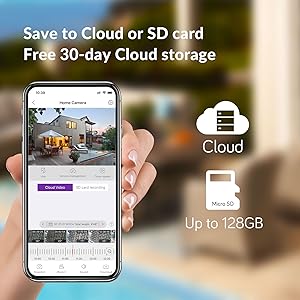
The xmartO DT3034 supports two primary storage methods for recorded video:
- Kad SD mikro: The camera supports up to a 128GB TF (Micro SD) card for local storage.
- Storan Awan: Encrypted AWS Cloud storage is available, often with a free trial period (e.g., 30 days).

5.6 Integrasi Alexa
The xmartO DT3034 camera is compatible with Amazon Alexa. You can use voice commands to view suapan kamera pada peranti berdaya Alexa yang serasi.

6. Penyelenggaraan
- Pembersihan: Bersihkan kanta dan perumah kamera secara berkala dengan lembut, damp kain untuk menghilangkan habuk dan serpihan. Jangan gunakan bahan kimia yang keras.
- Kemas kini Firmware: Regularly check for and install firmware updates via the xmartO WallPixel app. Updates often include performance improvements, new features, and security enhancements.
- Kitaran Kuasa: Jika kamera mengalami masalah, cuba kitaran kuasa dengan mencabut dan memasang semula penyesuai kuasa.
7. Penyelesaian masalah
If you encounter problems with your xmartO DT3034 camera, refer to the following common issues and solutions:
| Masalah | Kemungkinan Punca / Penyelesaian |
|---|---|
| Camera is offline or disconnects frequently |
|
| Auto-tracking is not working or inaccurate |
|
| False alarms from motion detection |
|
| Floodlights or siren do not activate |
|
| Camera rotation (Pan/Tilt) issues |
|
8. Spesifikasi
| Ciri | Spesifikasi |
|---|---|
| Nombor Model | DT3034 |
| Resolusi Tangkapan Video | 3 MP (2K Super HD) |
| Teknologi Ketersambungan | Wayarles (Wi-Fi) |
| Sumber Kuasa | Elektrik Bertali arus (12V DC) |
| Penggunaan Dalaman/Luar | Luar |
| Penilaian Perlindungan Antarabangsa | Kalis Cuaca IP66 |
| Julat Penglihatan Malam | 30 Meter |
| Pilihan Storan | Kad Mikro SD (sehingga 128GB), Storan Awan |
| Ciri Audio | Enhanced 2-Way Audio |
| Ciri Khas | Auto-Track, Auto Flood Lights, Color Night Vision, Auto Siren, Motion Sensor, Alexa Integration |
| Dimensi (L x W x H) | 8.35 x 8.23 x 5.51 inci |
| Berat Barang | 1 paun |
9. Waranti dan Sokongan
xmartO is committed to providing reliable products and customer support.
- 30-Day Money Back Guarantee and Free Return: Jika anda tidak berpuas hati dengan pembelian anda, anda boleh mengembalikannya dalam masa 30 hari untuk bayaran balik penuh.
- Waranti Terhad 1 Tahun: The xmartO DT3034 camera is covered by a 1-year limited warranty against manufacturing defects.
- Sokongan Dalam Talian 24/7: Access 1-on-1 online support for any technical assistance or inquiries.