1. Pengenalan
Thank you for choosing the MEDION P66538 Retro Boombox. This versatile audio system combines classic design with modern functionality, offering a CD player, cassette deck, DAB+/FM radio, Bluetooth 5.3 connectivity, and USB/SD card playback. This manual will guide you through the features and ensure optimal performance of your device.

Rajah 1: Depan view of the MEDION P66538 Retro Boombox.
2. Persediaan
2.1 Membongkar dan Meletakkan
Carefully remove the boombox from its packaging. Place the unit on a stable, flat surface away from direct sunlight, heat sources, and moisture. Ensure adequate ventilation around the unit.
2.2 Sambungan Kuasa
The MEDION P66538 can be powered by AC mains or batteries.
- Kuasa AC: Connect the supplied power cable to the AC input on the back of the unit and then to a wall outlet.
- Kuasa Bateri: For portable use, insert the required number of D-size batteries (not included) into the battery compartment located on the bottom of the unit. Ensure correct polarity.

Figure 2: The boombox supports both mains and battery operation for versatile use.
2.3 Persediaan Antena
For optimal radio reception, extend the telescopic antenna fully. Adjust its position and direction to achieve the best signal quality for both DAB+ and FM broadcasts.
3. Operasi
3.1 Kawalan Asas
- Butang Kuasa: Tekan untuk menghidupkan atau mematikan unit.
- Kawalan Kelantangan: Putar tombol untuk melaraskan tahap output audio.
- Butang Mod: Press repeatedly to switch between functions: DAB+, FM, CD, Cassette, Bluetooth, USB, SD, AUX.
- Peningkatan Bass: Activate this feature for enhanced bass response.
3.2 Operasi Radio (DAB+/FM)
Select DAB+ or FM mode using the Mode button.
- Radio DAB+: The unit will automatically scan for available DAB+ stations upon first use. Use the tuning controls to navigate through stations. You can store up to 20 preset stations.
- Radio FM: Use the tuning knob or buttons to manually or automatically scan for FM stations. Extend and adjust the telescopic antenna for best reception. Up to 20 FM stations can be stored as presets.

Figure 3: The digital display shows radio frequency and station information.
3.3 Pemain CD/MP3
The front-loading CD player supports audio CDs, CD-R/RW, and MP3-CDs.
- Memuatkan CD: Press the OPEN/CLOSE button to open the CD compartment. Insert a disc with the label side facing up. Close the compartment.
- Main balik: The CD will start playing automatically. Use the PLAY/PAUSE, STOP, SKIP (forward/backward) buttons to control playback.
- Repeat/Random: Use the dedicated buttons for repeat track/album or random playback.
3.4 Cassette Player/Recorder
The cassette deck features a Soft Eject system and recording capability.
- Memuatkan Kaset: Press the STOP/EJECT button to open the cassette compartment. Insert a cassette tape. Close the compartment.
- Main balik: Press the PLAY button to start playback. Use FAST FORWARD and REWIND buttons for navigation. Press STOP/EJECT to stop and eject the tape.
- Rakaman: To record from radio, CD, Bluetooth, AUX, or microphone, select the desired source. Insert a blank cassette. Press the RECORD button (usually simultaneously with PLAY) to begin recording. The automatic stop system will engage at the end of the tape.

Figure 4: The unit features a front-loading CD player and a soft-eject cassette deck.
3.5 Kesambungan Bluetooth
Stream music wirelessly from your smartphone or tablet via Bluetooth 5.3.
- Berpasangan: Select Bluetooth mode on the boombox. The unit will enter pairing mode, indicated by a flashing Bluetooth icon on the display.
- Sambungkan Peranti: On your smartphone or tablet, enable Bluetooth and search for "MEDION P66538" (or similar). Select it to pair. Once connected, you can stream audio.
- Julat: The effective range is approximately 10 meters, depending on environmental conditions.
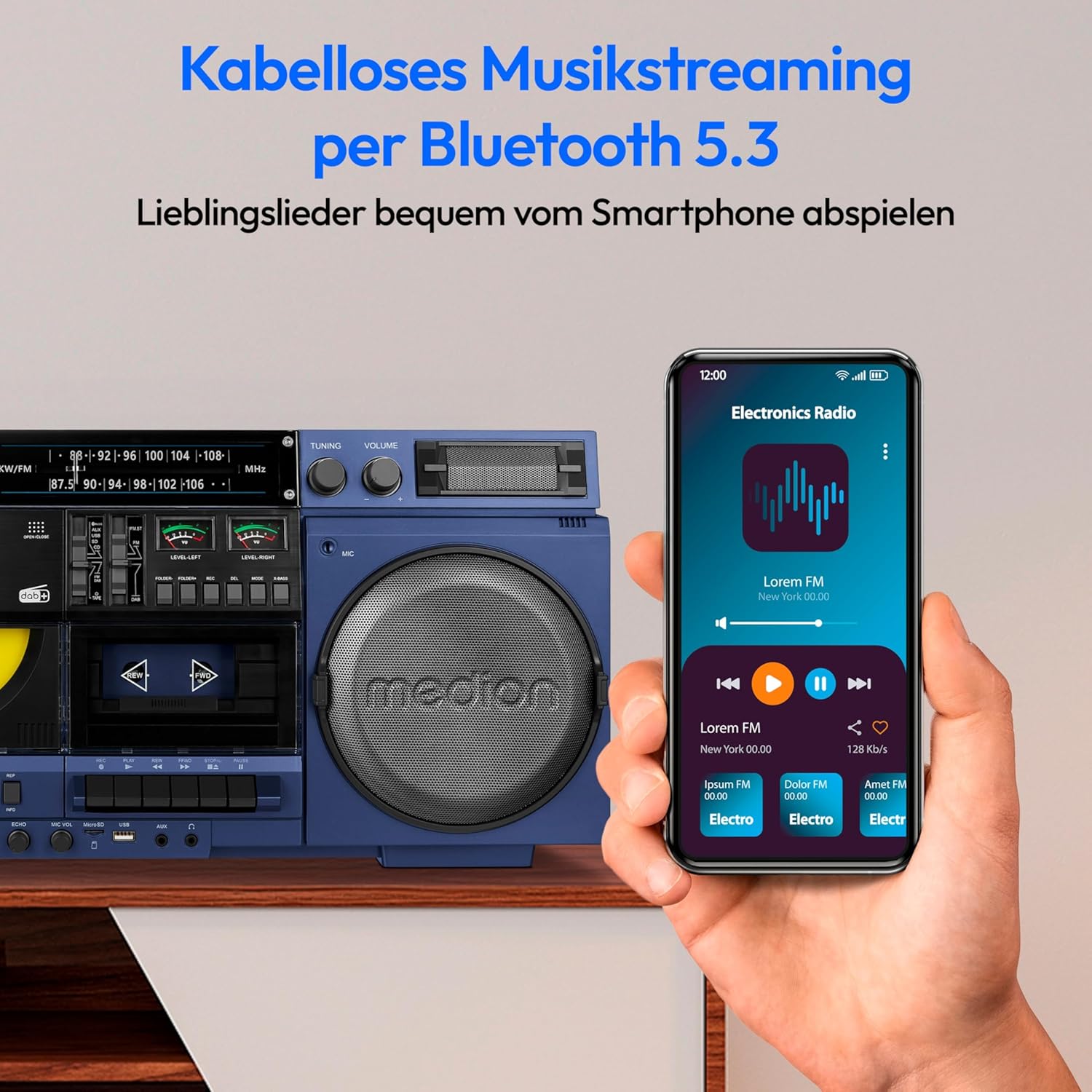
Figure 5: Wirelessly stream music from your Bluetooth-enabled devices.
3.6 Main Semula USB/Kad SD
Mainkan audio files directly from a USB flash drive or SD card.
- Sisipkan Media: Masukkan pemacu USB ke dalam port USB atau kad SD ke dalam slot kad SD.
- Pilih Mod: Switch to USB or SD mode using the Mode button. The unit will automatically detect and play compatible audio files.
- Kawalan: Use the playback controls (PLAY/PAUSE, SKIP) to manage your music.
3.7 Input AUX
Connect external audio devices (e.g., MP3 players, smartphones without Bluetooth) using a 3.5mm audio cable to the AUX input jack.
- Sambungkan Kabel: Plug one end of a 3.5mm audio cable into the AUX IN jack on the boombox and the other end into the headphone or line-out jack of your external device.
- Pilih Mod: Tukar boombox kepada mod AUX.
- Main balik: Control playback from your external device. Adjust volume on both the boombox and the external device.
3.8 Input Mikrofon
The unit features two microphone inputs (MIC1, MIC2) and an echo function.
- Sambungkan Mikrofon: Plug 6.3mm jack microphones into the MIC1 or MIC2 inputs.
- Laraskan Kelantangan: Use the MIC VOL knob to adjust microphone volume.
- Fungsi Gema: Rotate the ECHO knob to add an echo effect to the microphone audio.
4. Penyelenggaraan
4.1 Membersihkan Unit
Wipe the exterior of the boombox with a soft, dry cloth. Do not use abrasive cleaners, waxes, or solvents as they may damage the finish. Ensure the unit is unplugged before cleaning.
4.2 CD/Cassette Mechanism Care
- Pemain CD: Handle CDs by their edges to avoid fingerprints and scratches. Use a soft, lint-free cloth to clean discs if necessary.
- Dek Kaset: Periodically clean the tape heads and pinch rollers using a cotton swab lightly dampdilarutkan dengan alkohol isopropil. Ini membantu mengekalkan kualiti bunyi dan mencegah kerosakan pita.
5. Penyelesaian masalah
If you encounter issues with your MEDION P66538, please refer to the following common problems and solutions before contacting support.
| Masalah | Kemungkinan Punca | Penyelesaian |
|---|---|---|
| Tiada kuasa | Power cable not connected; batteries depleted or incorrectly inserted. | Ensure AC cable is securely plugged in. Check battery orientation and replace if necessary. |
| Tiada bunyi | Volume too low; incorrect mode selected; headphones connected. | Increase volume. Select the correct input mode (CD, Radio, Bluetooth, etc.). Disconnect headphones if sound is desired from speakers. |
| Penerimaan radio yang lemah | Antena tidak dipanjangkan atau diletakkan dengan teruk; gangguan yang kuat. | Fully extend and adjust the telescopic antenna. Move the unit away from other electronic devices that may cause interference. |
| CD/Kaset tidak dimainkan | Disc/tape inserted incorrectly; disc/tape damaged or dirty; mechanism issue. | Ensure disc is clean and inserted label-side up. Ensure cassette is inserted correctly. Try a different disc/tape. |
| Kegagalan berpasangan Bluetooth | Boombox not in pairing mode; device too far; Bluetooth disabled on external device. | Ensure boombox is in Bluetooth pairing mode. Keep devices within 10 meters. Enable Bluetooth on your external device and search for the boombox. |
6. Spesifikasi
Below are the technical specifications for the MEDION P66538 Retro Boombox.
- Jenama: MEDION
- Nombor Model: P66538
- warna: Biru
- Dimensi (L x W x H): 670 mm x 171 mm x 271 mm (lebih kurang 26.4 x 6.7 x 10.7 inci)
- Berat: 6.1 Kilogram (lebih kurang 13.4 paun)
- Ketersambungan: Bluetooth 5.3, USB, SD Card Slot, 3.5mm AUX Input, 2x Microphone Inputs (6.3mm Jack)
- Radio: DAB+, FM/PLL with 20 preset stations
- Pemain CD: Front-loading, compatible with CD, CD-R/RW, MP3-CDs (Repeat, Random functions)
- Dek Kaset: Soft Eject system, Auto Stop, Recording function
- Ciri Khas: Bass Boost, Echo function for microphones
- Sumber Kuasa: AC Power Cable, Battery operation (D-size batteries, not included)

Figure 6: Dimensions of the MEDION P66538 Boombox.
7. Waranti dan Sokongan
Your MEDION P66538 comes with a warranty card. Please refer to the warranty card included in the packaging for detailed terms and conditions regarding your product's warranty coverage.
For technical support, service, or further inquiries, please visit the official MEDION website or contact their customer service department. Contact details can typically be found on the warranty card or the manufacturer's webtapak.


