1. Pengenalan
This manual provides comprehensive instructions for the installation, operation, and maintenance of the Cisco C9200L-24T-4G-E 24-Port Full Gigabit Layer 2 Access Switch. This device is designed to provide reliable network connectivity with advanced features for various network environments.
2. Maklumat Keselamatan
Please read all safety warnings and instructions before installing or operating this equipment. Failure to follow these guidelines may result in injury or damage to the device.
- Pastikan pembumian yang betul untuk peranti.
- Jangan kendalikan peranti dalam keadaan basah atau damp syarat.
- Use only the power supply provided or specified by the manufacturer.
- Elakkan menyekat bukaan pengudaraan untuk mengelakkan terlalu panas.
- Rujuk semua servis kepada kakitangan yang berkelayakan.
3. Produk Lebihview
The Cisco C9200L-24T-4G-E switch features 24 Gigabit Ethernet ports and 4 1G SFP uplink ports, designed for efficient network access and aggregation.
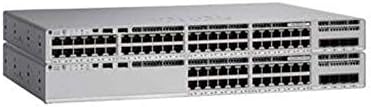
Rajah 3.1: Depan view of the Cisco C9200L-24T-4G-E switch, showing 24 Ethernet ports and 4 SFP uplink ports.

Rajah 3.2: bersudut view of the Cisco C9200L-24T-4G-E switch, highlighting the port layout and chassis design.
Ciri-ciri Panel Depan:
- 24 x 10/100/1000Base-T Ports: Untuk menyambungkan peranti rangkaian.
- 4 x 1G SFP Uplink Ports: For high-speed fiber or copper uplinks to other switches or routers.
- Penunjuk LED: System status, port status, and power indicators.
4. Persediaan dan Pemasangan
4.1 Membongkar
Carefully unpack the switch and verify that all components are present. Inspect the device for any signs of damage during shipping. If any items are missing or damaged, contact your vendor immediately.
4.2 Pemasangan Fizikal
- Pemasangan Rak: The switch is designed for standard 19-inch rack mounting. Secure the switch using the provided rack-mount brackets and screws.
- Peletakan Desktop: If not rack-mounting, place the switch on a flat, stable surface, ensuring adequate ventilation around the device.
4.3 Kuasa Penyambung
- Sambungkan kord kuasa ke salur masuk kuasa AC pada panel belakang suis.
- Palamkan hujung kord kuasa yang lain ke dalam salur keluar elektrik yang dibumikan.
- Sahkan bahawa LED kuasa pada panel hadapan menyala, menunjukkan suis sedang menerima kuasa.
4.4 Sambungan Rangkaian
- Port Ethernet: Connect network devices (computers, servers, other switches) to the 24 10/100/1000Base-T ports using standard Ethernet cables.
- SFP Uplink Ports: Insert compatible 1G SFP transceivers into the 4 SFP uplink ports. Connect fiber optic or copper cables from these transceivers to your core network or other switches.
5. Arahan Operasi
The Cisco C9200L-24T-4G-E is a Layer 2 access switch with Layer 3 capabilities. Initial configuration typically involves accessing the switch via a console port, Telnet, SSH, or a webantara muka berasaskan.
5.1 Konfigurasi Asas
- Akses Konsol: Connect a console cable to the console port and use a terminal emulator (e.g., PuTTY) to access the command-line interface (CLI).
- Tugasan Alamat IP: Configure an IP address for the management VLAN interface to enable remote access.
- Akaun Pengguna: Create secure user accounts with appropriate privilege levels.
5.2 Ciri-ciri Utama
- Sokongan VLAN: Create and manage Virtual Local Area Networks to segment network traffic.
- QoS (Kualiti Perkhidmatan): Prioritize critical network traffic for optimal performance.
- SNMP (Protokol Pengurusan Rangkaian Mudah): Monitor and manage the switch remotely.
- LACP (Link Aggregation Control Protocol): Bundle multiple physical links into a single logical link for increased bandwidth and redundancy.
- Layer 3 Capabilities: Supports OSPF, EIGRP, ISIS, RIP, and routed access for advanced routing functionalities.
6. Penyelenggaraan
- Pembersihan tetap: Keep the switch free from dust and debris. Use a soft, dry cloth for cleaning.
- Kemas kini Firmware: Periksa Cisco secara berkala webtapak untuk kemas kini perisian tegar bagi memastikan prestasi dan keselamatan yang optimum.
- Kawalan Alam Sekitar: Ensure the operating environment maintains appropriate temperature and humidity levels as specified in the product's technical specifications.
7. Penyelesaian masalah
7.1 Tiada Kuasa
- Sahkan kord kuasa disambungkan dengan selamat ke kedua-dua suis dan alur keluar kuasa.
- Periksa soket kuasa dengan peranti lain untuk memastikan ia berfungsi.
- Ensure the power supply unit (if external) is correctly connected and functional.
7.2 Tiada Kesambungan Rangkaian
- Check the Ethernet cable connections to ensure they are secure and not damaged.
- Verify the link/activity LEDs on the switch ports are illuminated for connected devices.
- Confirm IP address settings and VLAN configurations are correct.
- Test with a different cable or port.
7.3 Prestasi Rangkaian Perlahan
- Check for network congestion or excessive broadcast traffic.
- Ensure duplex settings match between the switch and connected devices.
- Verify that QoS policies are correctly configured if prioritizing traffic.
8. Spesifikasi
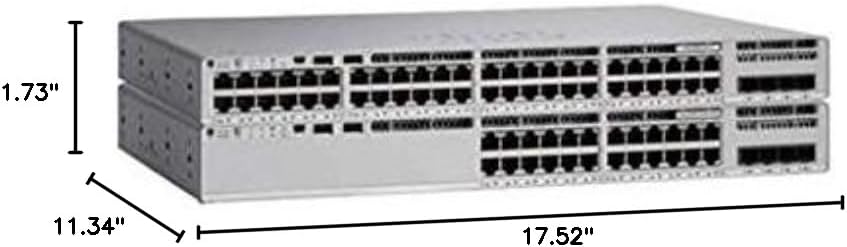
Rajah 8.1: Physical dimensions of the Cisco C9200L-24T-4G-E switch.
| Ciri | Penerangan |
|---|---|
| Nombor Model | C9200L-24T-4G-E |
| Pelabuhan | 24 x 10/100/1000Mbps Ethernet, 4 x 1G SFP Uplink |
| Kadar Penghantaran | 10/100/1000Mbps |
| Kapasiti Penukaran | 56 Gbps |
| Kadar Pemajuan | 41.66 Mpps |
| Mod Komunikasi | Dupleks Penuh & Separuh Dupleks |
| Dimensi (W x D x H) | 44.5 x 28.8 x 4.4 sm (17.52" x 11.34" x 1.73") |
| Bekalan Kuasa | PWR-C5-125WAC (Default Primary AC) |
| Layer 3 Capabilities | OSPF, EIGRP, ISIS, RIP, Routed Access |
| Pensijilan | FCC, CE, RoHS, ISO9001 |
| UPC | 764256220338 |
9. Waranti dan Sokongan
The Cisco C9200L-24T-4G-E switch typically comes with a 1-year warranty. For detailed warranty information, technical support, or to download the latest drivers and firmware, please visit the official Cisco website or contact your authorized reseller.
Official Cisco Store: Kedai Cisco di Amazon


