1. Produk Lebihview
The Meliconi Cleaning Tower is a robust and elegant freestanding support designed to organize your Dyson cordless vacuum cleaner and its accessories. It eliminates the need for wall drilling, providing a stable and convenient storage solution.
Ciri-ciri Utama:
- Reka Bentuk Berdiri Bebas: No wall drilling required.
- Storan Aksesori: Accommodates up to 8 vacuum accessories.
- Pengurusan Kabel: Integrated cable routing system for a tidy appearance.
- Keserasian: Designed for Dyson V6, V7, V8, V10, V11, V12 Slim, and V15 models.
- Pembinaan Tahan Lama: Made from high-quality steel and aluminum.
- Perlindungan Lantai: Equipped with protective rubber feet to prevent scratches and ensure stability.

Figure 1: The Meliconi Cleaning Tower in its standalone configuration, showcasing its sleek black design and accessory hooks.
2. Kandungan Pakej
Sebelum pemasangan, pastikan semua komponen ada:
- Plat asas
- Lajur Sokongan Menegak
- Accessory Hooks (quantity may vary)
- Mounting Hardware (screws, Allen key)
- Manual Arahan (dokumen ini)
3. Arahan Persediaan
Follow these steps to assemble your Meliconi Cleaning Tower. Assembly typically takes approximately 10 minutes.
- Attach Vertical Column to Base: Secure the vertical support column to the base plate using the provided screws and Allen key. Ensure the column is firmly seated and stable.
- Install Accessory Hooks: Attach the accessory hooks to the designated slots on the vertical column. Some hooks may require screws for secure fastening.
- Mount Dyson Charging Dock: The original Dyson charging dock (not included) must be mounted onto the vertical column. Align the dock with the pre-drilled holes and secure it using the appropriate screws. Multiple height options may be available to suit different Dyson models.
- Kabel Kuasa Laluan: Guide the Dyson vacuum's power cable through the integrated cable management channel on the back of the vertical column. This keeps the cable tidy and out of sight.
- Letakkan Pendirian: Place the assembled Cleaning Tower on a flat, stable surface. The protective rubber feet on the base will prevent floor scratches and enhance stability.
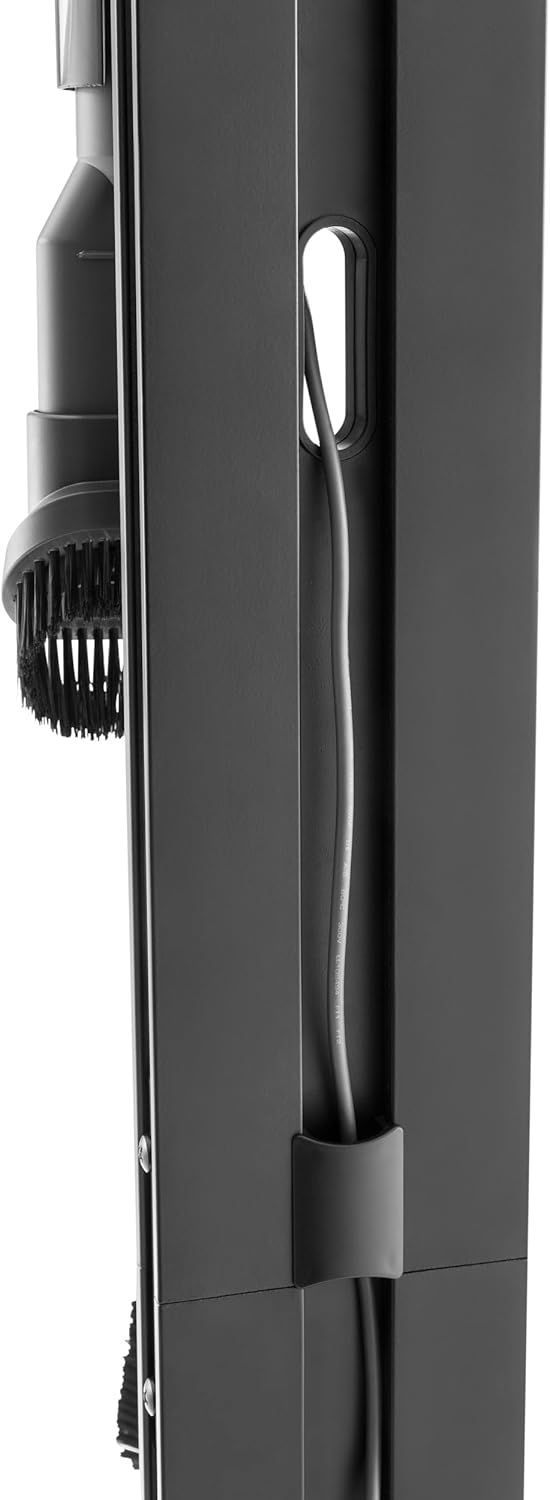
Figure 2: Detail of the integrated cable management system on the rear of the vertical column, designed to keep the power cable organized.

Rajah 3: Jarak dekat view of the accessory hooks, demonstrating how vacuum attachments are securely stored.
4. Arahan Operasi
Using the Meliconi Cleaning Tower is straightforward:
- Mengecas Vakum: Once the Dyson charging dock is installed, simply place your Dyson vacuum onto the dock. Ensure it clicks into place and begins charging.
- Menyimpan Aksesori: Hang your Dyson vacuum accessories on the provided hooks. The stand is designed to hold various brush heads and tools, keeping them readily accessible.
- Menggerakkan Pendirian: While the stand is stable, exercise caution when moving it, especially with the vacuum attached. Lift from the base to relocate.

Figure 4: The Meliconi Cleaning Tower with a Dyson vacuum cleaner securely docked and accessories organized.
5. Penyelenggaraan
To ensure the longevity and appearance of your Cleaning Tower:
- Pembersihan: Lap dirian dengan lembut, damp kain. Elakkan pembersih atau pelarut yang melelas yang boleh merosakkan kemasan.
- Pemeriksaan: Periksa semua skru dan sambungan secara berkala untuk memastikan ia kekal ketat. Ketatkan semula jika perlu.
- Elakkan beban berlebihan: Do not exceed the intended capacity for accessories to maintain stability.
6. Penyelesaian masalah
- Issue: Stand feels unstable.
- Penyelesaian: Ensure all assembly screws are fully tightened. Verify the stand is placed on a flat, level surface. Check that the protective rubber feet are properly installed.
- Issue: Dyson vacuum not charging when docked.
- Penyelesaian: Confirm the Dyson charging dock is correctly installed and securely connected to its power source. Ensure the vacuum is properly seated in the dock. This issue is typically related to the vacuum or its charging dock, not the stand itself.
- Issue: Accessories do not fit on hooks.
- Penyelesaian: Ensure you are using genuine Dyson accessories compatible with your vacuum model. The hooks are designed for standard Dyson attachments. If an accessory is unusually shaped, it may not fit optimally.
7. Spesifikasi
| Ciri | Perincian |
|---|---|
| Jenama | Meliconi |
| Model | 655271 |
| warna | Hitam |
| bahan | Metal (Steel and Aluminum) |
| Peranti Serasi | Dyson V6, V7, V8, V10, V11, V12 Slim, V15 |
| Berat Barang | 3.5 Kilogram |
| Dimensi Asas | 22 x 29.5 cm (approx.) |
| Ketinggian | 128 cm (lebih kurang) |
8. Waranti dan Sokongan
For warranty information or technical support regarding your Meliconi Cleaning Tower, please refer to the official Meliconi webtapak atau hubungi perkhidmatan pelanggan mereka secara langsung. Simpan bukti pembelian anda untuk tuntutan waranti.
Meliconi is committed to providing quality products and customer satisfaction. For further assistance, visit the Meliconi Store on Amazon.


