1. Pengenalan
This manual provides essential information for the safe and effective use of your Lenovo Smartwatch R1. Please read this manual thoroughly before using the device to ensure proper operation and to prevent damage.
2. Produk Lebihview
The Lenovo Smartwatch R1 is a versatile wearable device designed to integrate seamlessly with your smartphone, offering features such as activity tracking, heart rate monitoring, and notification alerts. It features a 1.33-inch TFT touchscreen display and IP68 water resistance.

Rajah 2.1: Depan view of the Lenovo Smartwatch R1 displaying the time and date.

Rajah 2.2: Pro sampinganfile daripada jam tangan pintar, tunjukkanasing its design and strap texture.

Figure 2.3: Various colored straps and bezels, illustrating the customization options for the smartwatch.

Figure 2.4: Display of various watch faces and key features, including continuous heart rate monitoring.
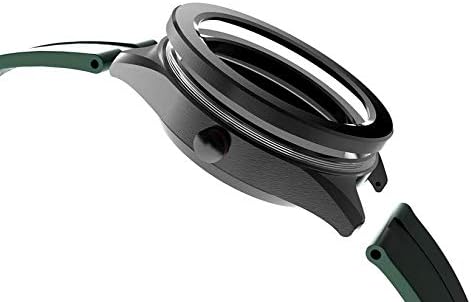
Rajah 2.5: Terperinci view of the watch casing and the strap attachment point.
3. Persediaan
3.1. Mengecas Jam Pintar
Before first use, fully charge your Lenovo Smartwatch R1. Connect the provided charging cable to the charging port on the back of the watch and plug the USB end into a standard USB power adapter (not included) or a computer USB port. The watch display will indicate charging status. A full charge typically takes approximately 2 hours.
3.2. Menghidupkan/Mematikan
- Untuk Menghidupkan: Press and hold the side button until the Lenovo logo appears on the screen.
- Untuk Mematikan: Press and hold the side button, then select 'Power Off' from the options on the screen.
3.3. Berpasangan dengan Telefon Pintar Anda
- Download the official Lenovo Smartwatch application from your smartphone's app store (compatible with iOS 8.0+ and Android 4.4+).
- Pastikan Bluetooth didayakan pada telefon pintar anda.
- Open the Lenovo Smartwatch app and follow the on-screen instructions to create an account or log in.
- Pilih 'Tambah Peranti' atau 'Gandingkan Peranti Baharu' dalam aplikasi.
- The app will search for available devices. Select 'Lenovo R1' from the list.
- Sahkan permintaan berpasangan pada telefon pintar anda dan jam tangan pintar.
4. Arahan Operasi
4.1. Navigasi Asas
The Lenovo Smartwatch R1 features a 1.33-inch TFT touchscreen for navigation.
- Leret ke atas/bawah: Tatal melalui menu atau pemberitahuan.
- Leret Kiri/Kanan: Akses widget atau tetapan pantas yang berbeza.
- Ketik: Pilih item atau buka aplikasi.
- Tekan Butang Sisi: Kembali ke skrin utama atau bangunkan peranti.
4.2. Ciri-ciri Utama
- Pemantauan Denyut Jantung: The smartwatch provides 24-hour continuous heart rate monitoring. Access this feature from the main menu or a dedicated widget.
- Penjejakan Aktiviti: Track steps, distance, calories burned, and sleep patterns. Data is synchronized with the companion app.
- Pemberitahuan: Receive call, message, and app notifications directly on your wrist after successful pairing with your smartphone.
- Tonton Wajah: Customize your watch face through the device settings or the companion app.
4.3. Menggunakan Aplikasi Pendamping
The Lenovo Smartwatch app on your smartphone provides a comprehensive overview of your health data, allows for device settings customization, and enables firmware updates. Ensure your watch is connected via Bluetooth to synchronize data and apply settings.
5. Penyelenggaraan
5.1. Cleaning the Smartwatch
Bersihkan jam tangan pintar anda secara berkala untuk mengekalkan penampilan dan fungsinya.
- Lap skrin dan badan dengan kain lembut,amp, kain tidak berbulu.
- For the strap, use mild soap and water, then rinse thoroughly and dry completely before wearing.
- Elakkan menggunakan bahan kimia yang keras, pembersih yang melelas, atau pelarut.
5.2. Rintangan Air (IP68)
The Lenovo Smartwatch R1 is rated IP68, meaning it is resistant to dust and can withstand immersion in water up to 1.5 meters for up to 30 minutes. It is suitable for daily use, such as hand washing or light rain. It is not recommended for swimming, diving, or high-pressure water activities.
5.3. Penjagaan Bateri
- Elakkan suhu yang melampau, yang boleh merendahkan hayat bateri.
- Cas peranti dengan kerap, tetapi elakkan membiarkannya dinyahcas sepenuhnya untuk tempoh yang lama.
- Gunakan hanya kabel pengecasan yang disediakan.
6. Penyelesaian masalah
6.1. Peranti Tidak Dihidupkan
- Pastikan peranti dicas sepenuhnya. Sambungkannya ke pengecas selama sekurang-kurangnya 30 minit.
- Try pressing and holding the side button for 10-15 seconds to force a restart.
6.2. Tidak Dapat Dipasangkan dengan Telefon Pintar
- Verify Bluetooth is enabled on your smartphone and the smartwatch.
- Ensure the smartwatch is within range of your smartphone.
- Mulakan semula telefon pintar dan jam tangan pintar anda.
- Kosongkan cache Bluetooth pada telefon pintar anda (jika berkenaan) dan cuba pasangkan semula.
- Ensure the Lenovo Smartwatch app is up to date.
6.3. Inaccurate Heart Rate Readings
- Ensure the watch is worn snugly on your wrist, about one finger-width above your wrist bone.
- Bersihkan penderia di belakang jam tangan.
- Elakkan pergerakan berlebihan semasa bacaan.
6.4. Skrin Tidak Responsif
- Restart the smartwatch by holding the side button.
- Pastikan skrin bersih dan kering.
7. Spesifikasi
| Ciri | Spesifikasi |
|---|---|
| Jenama | Lenovo |
| Nama Model | R1 |
| Paparan | 1.33-inch TFT Touchscreen |
| Resolusi Paparan | 240 x 240 piksel |
| Sistem Operasi | Pakai OS |
| Ketersambungan | Bluetooth 4.0 |
| Kapasiti Bateri | Polimer Litium 280 mAh |
| Hayat Bateri (Penggunaan Biasa) | 7-10 hari |
| Hayat Bateri (Bersedia) | Sehingga 30 hari |
| Tahan Air | IP68 |
| Keserasian | iOS 8.0+ / Android 4.4+ |
| Penderia | 24h Continuous Heart Rate Monitor |
| GPS | Tiada GPS |
| Dimensi | 36.58 x 12.7 x 27.94 cm |
| Berat badan | 65 g |
| Komponen yang Disertakan | Smartwatch, Charging Cables |
| Bahasa yang Disokong | German, Spanish, French, English, Italian |
8. Waranti dan Sokongan
Untuk maklumat jaminan dan sokongan teknikal, sila rujuk kad jaminan yang disertakan dengan produk anda atau lawati sokongan rasmi Lenovo. webtapak. Simpan resit pembelian anda sebagai bukti pembelian.


