1. Pengenalan
This user manual provides comprehensive instructions for the installation, operation, and maintenance of your ABSOSO Double Din Car Stereo System. This 7-inch HD touchscreen MP5 car player features Bluetooth connectivity, PhoneLink compatibility (CarPlay/Android Auto), support for rear and front view cameras, AM/FM radio, and various media input options including USB, SD, and AUX. Please read this manual thoroughly before using the product to ensure proper functionality and safety.
2. Maklumat Keselamatan Penting
Sentiasa patuhi langkah keselamatan berikut untuk mengelakkan kecederaan atau kerosakan pada unit:
- Pemasangan Profesional Disyorkan: Due to the complexity of car electrical systems, professional installation is highly recommended. Incorrect wiring can cause damage to the unit or vehicle.
- Bekalan Kuasa: Pastikan unit disambungkan kepada bekalan kuasa 12V DC dengan pembumian negatif.
- Elakkan Air dan Kelembapan: Jangan dedahkan unit kepada air atau kelembapan berlebihan.
- Suhu: Kendalikan unit dalam julat suhu yang ditetapkan.
- Keselamatan Memandu: Jangan kendalikan unit dengan cara yang mengalihkan perhatian anda daripada memandu. Sentiasa mengutamakan keselamatan jalan raya.
- Pembersihan Skrin: Use a soft, dry cloth to clean the touchscreen. Avoid abrasive cleaners.
- Pengudaraan: Pastikan pengudaraan yang mencukupi di sekeliling unit untuk mengelakkan terlalu panas.
3. Apa yang Termasuk
Sahkan bahawa semua komponen yang disenaraikan di bawah terdapat dalam pakej anda:
- 1 x 7-inch Double Din Bluetooth CarPlay Radio
- 1 x Kamera Sandaran
- 1 x Backup Camera Cable
- 1 x Alat Kawalan Jauh IR
- 1 x Alat Kawalan Roda Stereng
- 1 x Wires Harness
- 1 x Kit Pemasangan
- 1 x Manual Pengguna (dokumen ini)

Rajah 3.1: All components included in the ABSOSO Double Din Car Stereo System package. This image displays the main head unit, backup camera, two remote controls (IR and steering wheel), wiring harnesses, mounting brackets, and the user manual.
4. Persediaan & Pemasangan
4.1. Pemeriksaan Pra-Pemasangan
- Ensure your vehicle has a double din opening (approximately 7 x 4 inches).
- Disconnect the vehicle's negative battery terminal before starting installation to prevent electrical shorts.
- Gather necessary tools: wire strippers, crimpers, electrical tape, screwdrivers.
4.2. Wiring Diagram and Dimensions
Refer to the following diagrams for proper wiring connections and unit dimensions. Incorrect wiring can damage the unit or vehicle's electrical system.
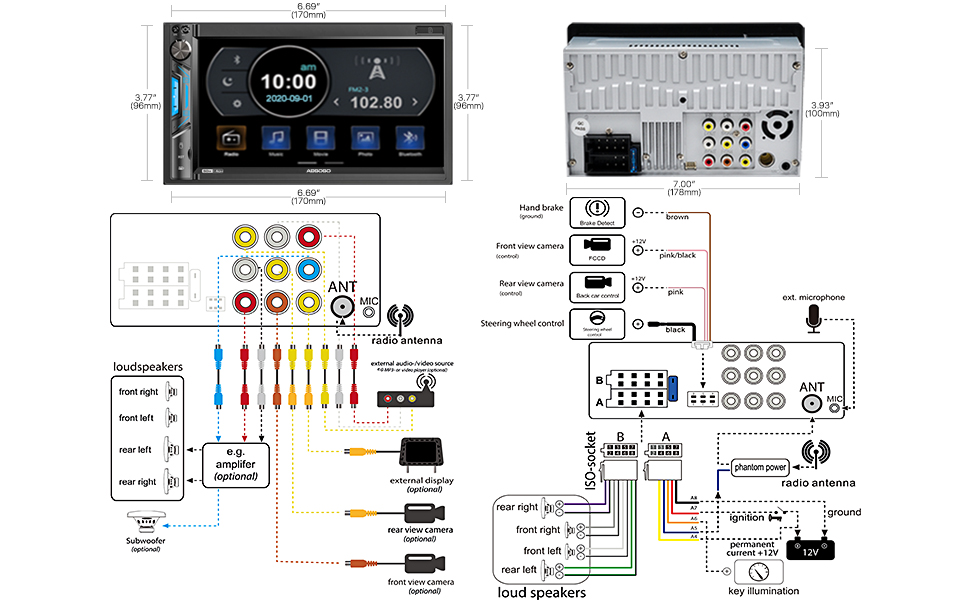
Rajah 4.1: Detailed wiring diagram and physical dimensions of the ABSOSO Double Din Car Stereo. This diagram illustrates connections for power, speakers, camera inputs, steering wheel controls, and auxiliary inputs/outputs. Dimensions are provided in both inches and millimeters for precise fitting.
- Sambungan Kuasa:
- Yellow wire: Constant 12V (Battery)
- Red wire: ACC (Ignition Switched 12V)
- Black wire: Ground
- Sambungan Pembesar Suara: Connect speaker wires according to the diagram, ensuring correct polarity for each speaker (Front Left, Front Right, Rear Left, Rear Right).
- Input Kamera: Connect the backup camera to the "Rear View Camera Input" (usually a yellow RCA jack). The reverse trigger wire (often pink/brown) should be connected to the vehicle's reverse light circuit.
- Kawalan Roda Stereng: Connect the steering wheel control wires (Key1, Key2) to your vehicle's steering wheel control interface, if applicable.
- Antena: Connect the vehicle's radio antenna to the unit's antenna input.
4.3. Memasang Unit
Once wiring is complete, carefully slide the unit into the double din opening in your dashboard. Secure it using the provided mounting brackets and screws. Ensure the unit is firmly seated and does not obstruct any vehicle controls.
5. Arahan Operasi
5.1. Basic Controls and Interface

Rajah 5.1: The main interface of the ABSOSO Double Din Car Stereo, showing the 7-inch HD touchscreen with various application icons, physical buttons, and a rotary knob. This image also displays the included remote controls and backup camera.
- Power Button/Volume Knob: Press to turn on/off. Rotate to adjust volume.
- Butang rumah: Kembali ke menu utama.
- Ikon Tetapan: Access system settings (audio, display, general).
- Skrin sentuh: Navigate menus and select options by touching the screen.
- Multicolor Buttons: The unit features 7 customizable multicolor buttons for enhanced aesthetics.
5.2. Kesambungan Bluetooth
Bluetooth terbina dalam membolehkan panggilan bebas tangan dan penstriman audio tanpa wayar.

Rajah 5.2: Illustration of the Bluetooth features, including hands-free calling with a dial pad, music streaming interface, and voice navigation prompts displayed on the stereo screen.
- On the stereo, go to the Bluetooth menu.
- Dayakan Bluetooth pada peranti mudah alih anda dan cari peranti yang tersedia.
- Select "ABSOSO" (or similar name) from the list on your phone.
- Sahkan kod pasangan jika digesa.
- Once connected, you can make/receive calls and stream audio wirelessly.
5.3. PhoneLink (CarPlay / Android Auto / MirrorLink)
Connect your smartphone for integrated navigation, music, and other apps. Note: Only compatible with Android 11.0 or below, and iPhone XR, iPhone 8 Plus or below via original charging cable. This unit is not a GPS unit itself.

Rajah 5.3: Displays the CarPlay, Android Auto, and MirrorLink interfaces on the stereo screen, showing navigation, music playback, and voice assistant interaction (Siri, Google Assistant). A user is shown interacting with the system while driving.
- Connect your smartphone to the unit's USB port using a high-quality USB cable (preferably the original charging cable for iPhones).
- The unit should automatically detect and launch CarPlay or Android Auto.
- Follow any on-screen prompts on both the stereo and your phone to complete the connection.
- For MirrorLink, ensure your phone supports the feature and follow the specific instructions provided by your phone manufacturer.
5.4. Media Playback (USB/SD/AUX)
Enjoy your favorite audio and video files daripada pelbagai sumber.
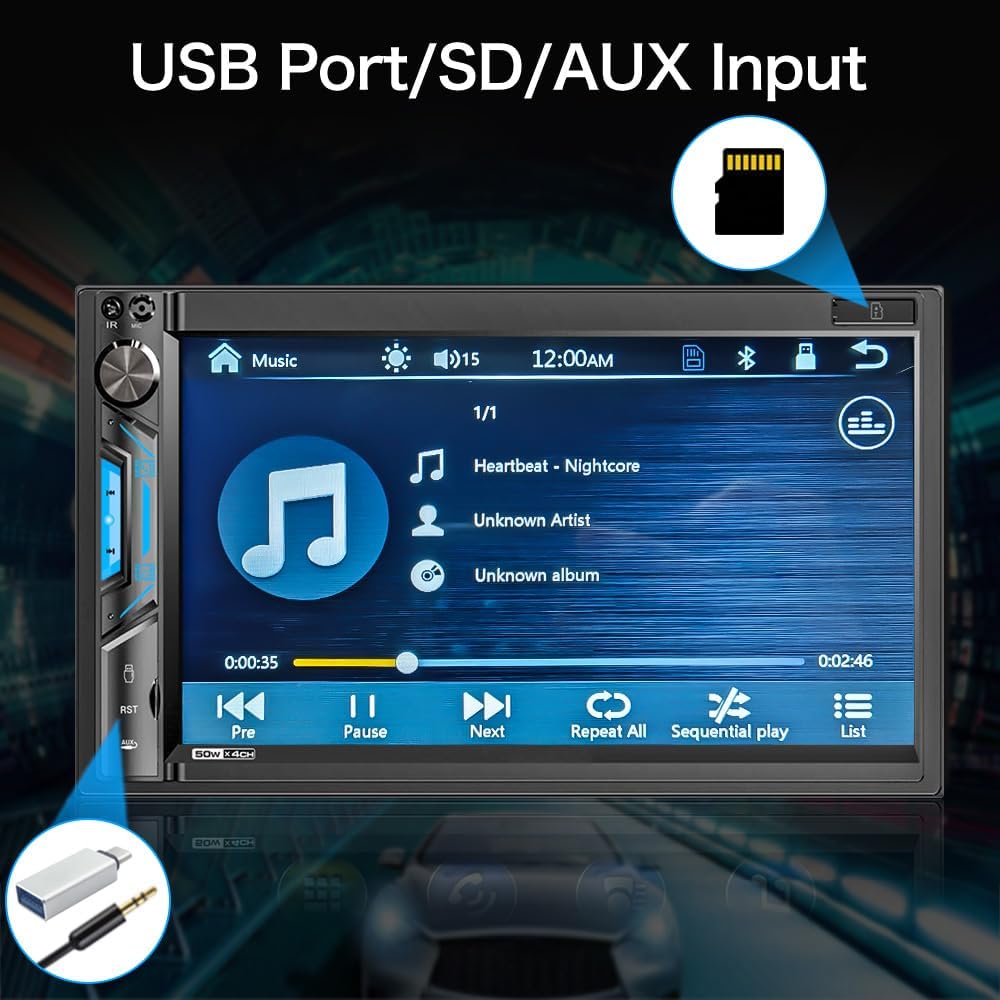
Rajah 5.4: jarak dekat view of the stereo screen showing a music playback interface, with visual cues pointing to the USB port and SD card slot. This highlights the unit's capability to play media from external storage.
- USB: Insert a USB drive into the USB port. The unit will automatically detect and display playable media files.
- Kad SD: Insert an SD card into the SD card slot. The unit will access media files disimpan pada kad.
- Input AUX: Connect an external audio device (e.g., MP3 player) to the 3.5mm AUX input jack using an audio cable. Select "AUX" as the source on the stereo.
- Format yang Disokong:
- Audio: MP3, WMA, AVI, MKV, MP4, WMV, RMVB, MPEG
- Video: RM, RMVB, DVD(VOB), VCD(DAT), MP1, MP2, DIVX, XVID, MP4, H263, H264, FLV, 3GP, SWF, AVI, ASF, MJPEG
5.5. Radio AM/FM
Dengar stesen radio kegemaran anda.

Rajah 5.5: The AM/FM radio interface on the stereo screen, showing frequency display, station presets, and tuning controls. The image emphasizes the unit's ability to support both AM and FM bands with 30 total station presets.
- Pilih ikon "Radio" daripada menu utama.
- Gunakan kawalan pada skrin untuk mengimbas stesen, menala secara manual atau memilih daripada stesen pratetap.
- The unit supports 30 total station presets.
5.6. Belakang dan Depan View Kamera
The unit supports automatic display of camera feeds when reversing or manually selecting the front camera.

Rajah 5.6: Depicts the stereo screen displaying a rear view camera feed, showing parking lines and a clear view behind the vehicle. An image of a car with a backup camera is also shown, illustrating the camera's function.
- When the vehicle is shifted into reverse, the unit will automatically display the rear camera feed.
- Ensure the backup camera is properly installed and connected to the "Rear View Camera Input" and the reverse trigger wire.
- If a front camera is installed, it can typically be accessed through a dedicated icon on the main menu or settings.
5.7. Kawalan Roda Stereng (SWC)
Program your vehicle's steering wheel controls to operate the stereo.
- Go to the "Settings" menu on the stereo.
- Navigate to "Steering Wheel Control" or "SWC Learning".
- Follow the on-screen instructions to assign functions (e.g., volume up/down, track next/previous) to your steering wheel buttons.
- Press and hold each button on your steering wheel while selecting the corresponding function on the stereo's screen to program it.
6. Penyelenggaraan
- Membersihkan Skrin: Gunakan kain lembut dan tidak berbulu untuk mengelap skrin sentuh dengan lembut. Untuk calitan degil, sedikit dampbersihkan kain dengan air atau pembersih yang selamat untuk skrin. Jangan sembur pembersih terus ke skrin.
- Pembersihan Am: Use a dry, soft cloth to wipe the unit's body. Avoid using harsh chemicals or abrasive materials.
- Kemas Kini Perisian: Check the ABSOSO official weblaman web secara berkala untuk sebarang kemas kini perisian tegar yang tersedia bagi memastikan prestasi dan keserasian yang optimum.
7. Penyelesaian masalah
If you encounter issues with your stereo, refer to the following common problems and solutions:
| Masalah | Kemungkinan Punca | Penyelesaian |
|---|---|---|
| Tiada Kuasa | pendawaian yang salah; Fius yang ditiup; Sambungan longgar. | Check power (Yellow, Red, Black) wires. Verify fuse. Ensure all connections are secure. |
| Tiada Bunyi | Incorrect speaker wiring; Volume too low; Mute enabled; Incorrect audio source. | Check speaker connections and polarity. Increase volume. Disable mute. Select correct audio source. |
| Bluetooth Tidak Bersambung | Bluetooth not enabled on device; Device not in pairing mode; Interference. | Ensure Bluetooth is on and discoverable. Restart both devices. Clear previous pairings. |
| CarPlay/Android Auto Tidak Berfungsi | Incorrect USB cable; Phone OS version incompatible; App issues. | Use original USB cable. Check phone OS compatibility (Android 11.0 or below, iPhone XR/8 Plus or below). Restart phone and stereo. |
| Kamera Belakang Tidak Dipaparkan | Camera not powered; Incorrect video input; Reverse trigger wire not connected. | Check camera power supply. Verify RCA video connection. Ensure reverse trigger wire is connected to reverse light. |
| Penerimaan Radio yang lemah | Antena tidak disambungkan; Kawasan isyarat lemah; Antena rosak. | Ensure antenna is securely connected. Try tuning in a different location. Inspect antenna for damage. |
If the problem persists after attempting these solutions, please contact ABSOSO customer support for assistance.
8. Spesifikasi
| Ciri | Perincian |
|---|---|
| Nombor Model | CA71BT |
| Saiz Skrin | Skrin Sentuh HD 7 inci |
| Resolusi Paparan | 1080P Video Playback Support |
| Ketersambungan | Bluetooth, PhoneLink (CarPlay/Android Auto/MirrorLink), USB, SD, AUX |
| Versi Bluetooth | Built-in Bluetooth for hands-free calling and audio streaming |
| PhoneLink Compatibility | Android 11.0 or below, iPhone XR, iPhone 8 Plus or below (via original charging cable) |
| Sokongan Kamera | Belakang dan Depan View Camera Input (Waterproof HD rear camera included) |
| Penala Radio | AM/FM Radio with 30 Presets |
| Format Audio Disokong | MP3, WMA, AVI, MKV, MP4, WMV, RMVB, MPEG |
| Format Video Disokong | RM, RMVB, DVD(VOB), VCD(DAT), MP1, MP2, DIVX, XVID, MP4, H263, H264, FLV, 3GP, SWF, AVI, ASF, MJPEG |
| Output Kuasa | 200 Watt (Puncak) |
| pra-amp Keluaran | ya |
| Output Subwufer | ya |
| Kawalan Roda Stereng | Disokong |
| Dimensi (Produk) | 7 x 3 x 4 inci |
| Berat badan | 2.56 paun |
| Bekalan Kuasa | 12V DC (Tanah Negatif) |
9. Waranti & Sokongan
ABSOSO is committed to providing excellent customer service. Your ABSOSO Bluetooth car stereo comes with professional technical support.
- Perkhidmatan Pelanggan: For any questions, issues, or technical assistance, please contact ABSOSO customer service.
- User Manual & FAQ: This professional user manual and a comprehensive FAQ section are available to assist you.
- Sokongan Teknikal 24 Jam: 24-hour technical support is available before and after sales for purchases made through Amazon.com.
- Maklumat Waranti: Please refer to your purchase documentation or contact customer support for specific warranty terms and conditions.
For the most up-to-date support information, please visit the official ABSOSO store on Amazon or contact them directly.
ABSOSO Store Link: Visit the ABSOSO Store on Amazon