1. Pengenalan
Produk Selesaiview
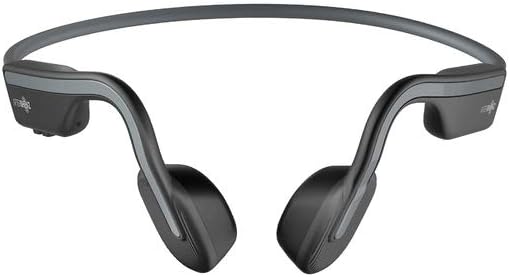
The AfterShokz OpenMove are bone conduction headphones designed for comfort and situational awareness. They transmit audio through your cheekbones, leaving your ears open to ambient sounds. The headphones feature Bluetooth 5.0 connectivity and multiple EQ modes to optimize your listening experience for various activities.

Rajah 1: Sebuah bersudut view of the AfterShokz OpenMove bone conduction headphones in slate grey, showcasing their lightweight, open-ear design.
Kandungan Pakej
Sila sahkan bahawa semua item terdapat dalam pakej anda:
- AfterShokz OpenMove Headphones
- Kabel Pengecas USB-C
- Penyumbat telinga
- Dedicated Pouch
- User Manual (English version)
2. Persediaan
Mengecas Fon Kepala
Before initial use, fully charge your headphones to ensure optimal battery performance.
- Connect the USB-C charging cable to the charging port located on the headphones.
- Sambungkan hujung kabel yang satu lagi ke penyesuai kuasa USB (tidak disertakan) atau port USB komputer.
- The LED indicator will illuminate to show the charging status. A complete charge typically takes approximately 2 hours.
Berpasangan dengan Peranti Bluetooth
Follow these steps to connect your headphones to your smartphone, tablet, or other Bluetooth-enabled device:
- Pastikan fon kepala dimatikan.
- Press and hold the power button for 5-7 seconds until the LED indicator flashes red and blue alternately. This indicates the headphones are in pairing mode.
- Pada peranti anda, dayakan Bluetooth dan cari peranti yang tersedia.
- Select "OpenMove by AfterShokz" from the list of detected devices.
- Sebaik sahaja berjaya dipasangkan, penunjuk LED akan bertukar menjadi biru pekat.
3. Arahan Operasi
Kawalan Fon Kepala
The AfterShokz OpenMove headphones feature intuitive controls for managing audio playback and calls.

Rajah 2: Satu terperinci view of the control buttons located on the right transducer arm, including volume and multi-function controls.
| Butang/Fungsi | Tindakan |
|---|---|
| Butang Kuasa | Press and hold to Power On/Off; Single press to Play/Pause audio; Single press to Answer/End Call. |
| Kelantangan Naik (+) | Single press to Increase Volume; Long press to skip to Next Track. |
| Perlahankan suara (-) | Single press to Decrease Volume; Long press to go to Previous Track. |
| Multi-function Button (often combined with power) | Double press to Activate Voice Assistant; Triple press to Change EQ Mode. |
Mod EQ
The OpenMove headphones offer three distinct equalizer modes to optimize audio for different content and listening environments.
- Mod Standard: This mode is suitable for general outdoor listening, providing a balanced audio experience.
- Mod Vokal: Designed to enhance human voices, making it ideal for listening to audiobooks, podcasts, and radio broadcasts.
- Earplug Mode: When used with the included earplugs, this mode provides a more immersive listening experience. It is suitable for noisy environments such as airplanes or trains, or for enjoying movies and games at home.
Memakai Fon Kepala
For optimal sound quality and comfort, position the headphones correctly.
Rajah 3: Depan view of the AfterShokz OpenMove headphones, illustrating how the band rests behind the head and the transducers sit on the cheekbones.
Position the transducers on your cheekbones, just in front of your ears. The flexible band should rest comfortably behind your head. Ensure a snug fit for optimal sound transmission and clarity.
4. Penyelenggaraan
Pembersihan
Untuk mengekalkan ketahanan dan kebersihan fon kepala anda:
- Lap fon kepala dengan lembut, damp kain.
- Jangan gunakan bahan kimia yang keras atau pembersih yang kasar, kerana ini boleh merosakkan bahan tersebut.
- Pastikan port pengecasan kering sepenuhnya sebelum menyambungkan kabel pengecas.
Penyimpanan
When not in use, store your headphones properly:
- Store the headphones in the dedicated pouch provided to protect them from dust, scratches, and minor impacts.
- Avoid storing the headphones in environments with extreme temperatures (very hot or very cold) or high humidity.
5. Penyelesaian masalah
Isu dan Penyelesaian Biasa
If you encounter any problems with your AfterShokz OpenMove headphones, refer to the table below for potential solutions.
| Isu | Penyelesaian yang Mungkin |
|---|---|
| Fon kepala tidak dihidupkan. | Charge the headphones fully. Ensure the charging cable is securely connected. |
| Tiada bunyi dari fon kepala. | Ensure the headphones are powered on and successfully paired with your device. Check the volume level on both the headphones and your connected device. |
| Tidak boleh berpasangan dengan peranti. | Ensure the headphones are in pairing mode (LED flashing red and blue). Turn off and then on Bluetooth on your device. Try restarting both the headphones and your device. |
| Kualiti bunyi buruk atau kelantangan rendah. | Adjust the position of the transducers on your cheekbones for a better fit. Experiment with different EQ modes. Ensure there are no obstructions between the headphones and your device. |
| Fon kepala tidak dicas. | Verify that the USB-C charging cable is properly connected to both the headphones and a working power source. Try a different USB port or power adapter. |
6. Spesifikasi
Spesifikasi Teknikal
Detailed technical specifications for the AfterShokz OpenMove headphones:
| Ciri | Spesifikasi |
|---|---|
| Nombor Model | AFT-EP-000022 |
| Jenis Pembesar Suara | Transduser Pengaliran Tulang |
| Respons Kekerapan | 20Hz - 20,000Hz |
| Sensitiviti | 100 ± 3dB |
| Kepekaan Mikrofon | -40dB±3dB |
| Versi Bluetooth | 5.0 |
| Pro yang disokongfiles | A2DP, AVRCP, HSP, HFP |
| Julat Tanpa Wayar | Sehingga 10 meter (33 kaki) |
| Hayat Bateri | Sehingga 6 jam |
| Masa Mengecas | Lebih kurang 2 jam |
| Berat badan | 29 gram (1.02 auns) |
| Tahap Ketahanan Air | Kalis air |
| Teknologi Ketersambungan | Wayarles (Bluetooth) |
| Komponen yang Disertakan | Headphones, USB-C Cable, Earplugs, Pouch |
7. Waranti dan Sokongan
Maklumat Waranti
For detailed information regarding the product warranty, including terms, conditions, and duration, please refer to the official AfterShokz website or the warranty card included with your purchase. It is recommended to retain your proof of purchase for warranty claims.
Sokongan Pelanggan
If you encounter any issues or have questions not addressed in this manual, please visit the AfterShokz support page on their official website. You can also contact their customer service team for further assistance.


