pengenalan
This manual provides essential information for the installation, operation, maintenance, and troubleshooting of your Amazon Basics Grade 3 Electronic Touchscreen Deadbolt Door Keypad Lock with Handleset. Please read these instructions carefully before installation and use to ensure proper function and safety.
Maklumat Keselamatan
- Pastikan semua komponen dipasang dengan kukuh semasa pemasangan.
- Do not use abrasive cleaners or solvents on the lock's finish.
- Replace batteries promptly when low to avoid operational issues.
- Keep master codes and user codes confidential.
Kandungan Pakej
Sahkan bahawa semua komponen berikut disertakan dalam pakej anda:
- Electronic Touchscreen Deadbolt
- Handleset (Upper and Lower sections)
- selak
- mogok
- Pek skru
- kunci

Image: All components of the lock and handleset, including the touchscreen keypad, interior assembly, handleset, latch, strike plates, and various screws.
Spesifikasi
| Jenama | Asas Amazon |
| Nama Model | ZGP0S10 |
| Jenis Kunci | Keypad, Deadbolt |
| Ciri Khas | Skrin sentuh |
| bahan | Alloy Steel, Nickel, Zinc |
| Jenis Selesai | Nikel |
| warna | Satin Nickel |
| Dimensi Item (L x W x H) | 11.59 x 2.67 x 0.39 inci |
| Berat Barang | 5.26 paun (2.39 Kilogram) |
| Keserasian Ketebalan Pintu | 1-3/8 hingga 1-3/4 inci |
| Standard Door Hole | 2-1/8-inch (54mm) |
| Keserasian Backset | 2-3/8-inch (60mm) or 2-3/4-inch (70mm) |
| Bateri Diperlukan | Ya (4 bateri AA, tidak termasuk) |
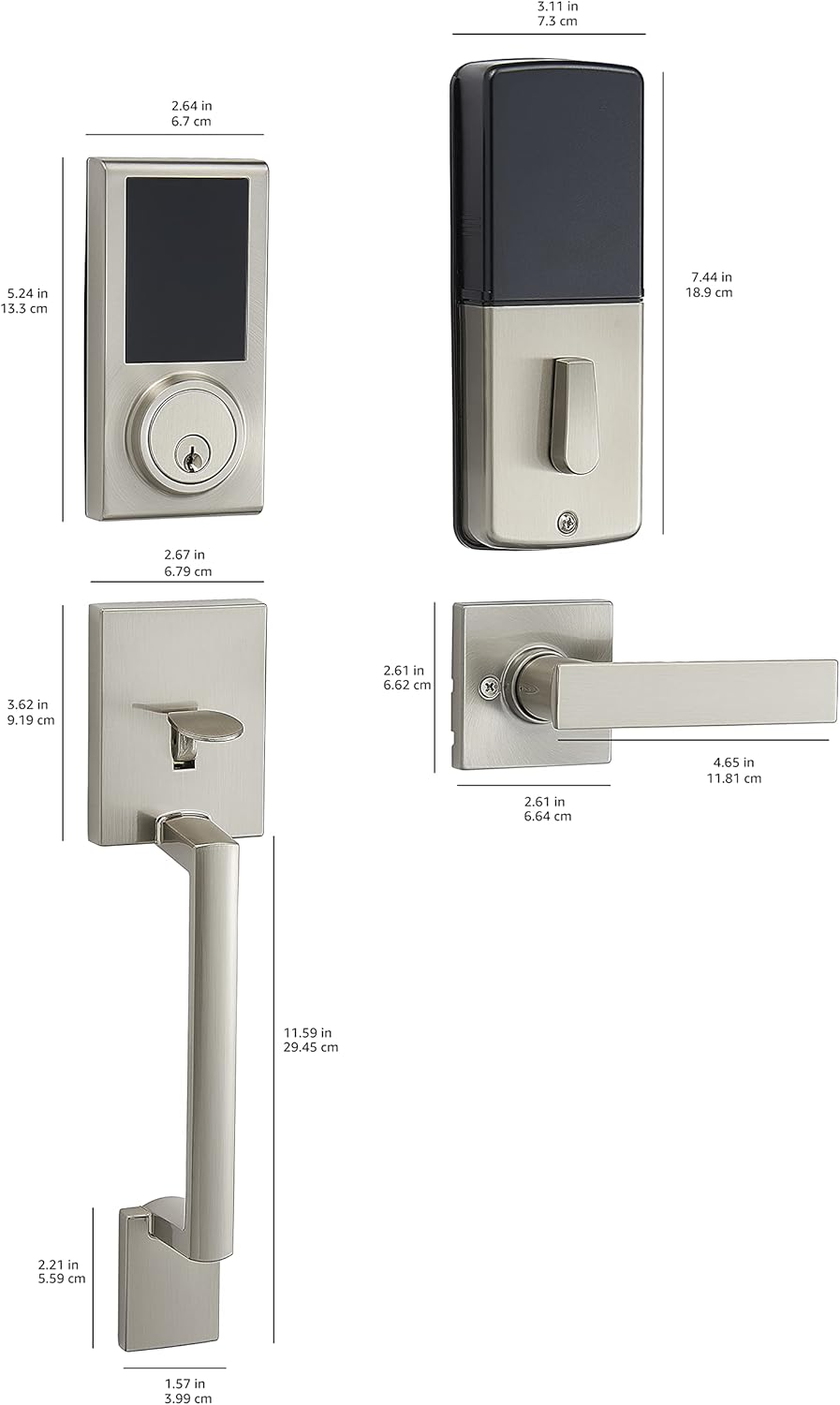
Image: Detailed dimensional drawing of the lock and handleset components.
Persediaan dan Pemasangan
Installation is designed to be straightforward, typically requiring only a screwdriver. All necessary hardware is included.
- Sediakan Pintu: Ensure your door's backset, cross bore, and thickness are compatible with the lock's specifications (door thickness 1-3/8 to 1-3/4 inches; standard door hole 2-1/8 inches / 54mm; 6-way adjustable latch fits 2-3/8 inches / 60mm or 2-3/4 inches / 70mm backset).
- Pasang Selak: Masukkan selak ke tepi pintu dan pasangkannya dengan skru.
- Pasang Perhimpunan Luaran: Place the exterior touchscreen deadbolt and handleset components onto the door, aligning them with the latch.
- Pasang Perhimpunan Dalaman: Attach the interior assembly, ensuring all wires are connected correctly and tucked away. Secure with screws.
- Pasang Bateri: Open the battery cover on the interior assembly and insert 4 AA alkaline batteries. Ensure correct polarity.
- Kefungsian Ujian: After installation, test the mechanical operation of the handleset and the electronic deadbolt with the default settings before programming custom codes.

Image: The Amazon Basics Electronic Touchscreen Deadbolt and Handleset in Satin Nickel, showcasing its exterior appearance when installed on a door.
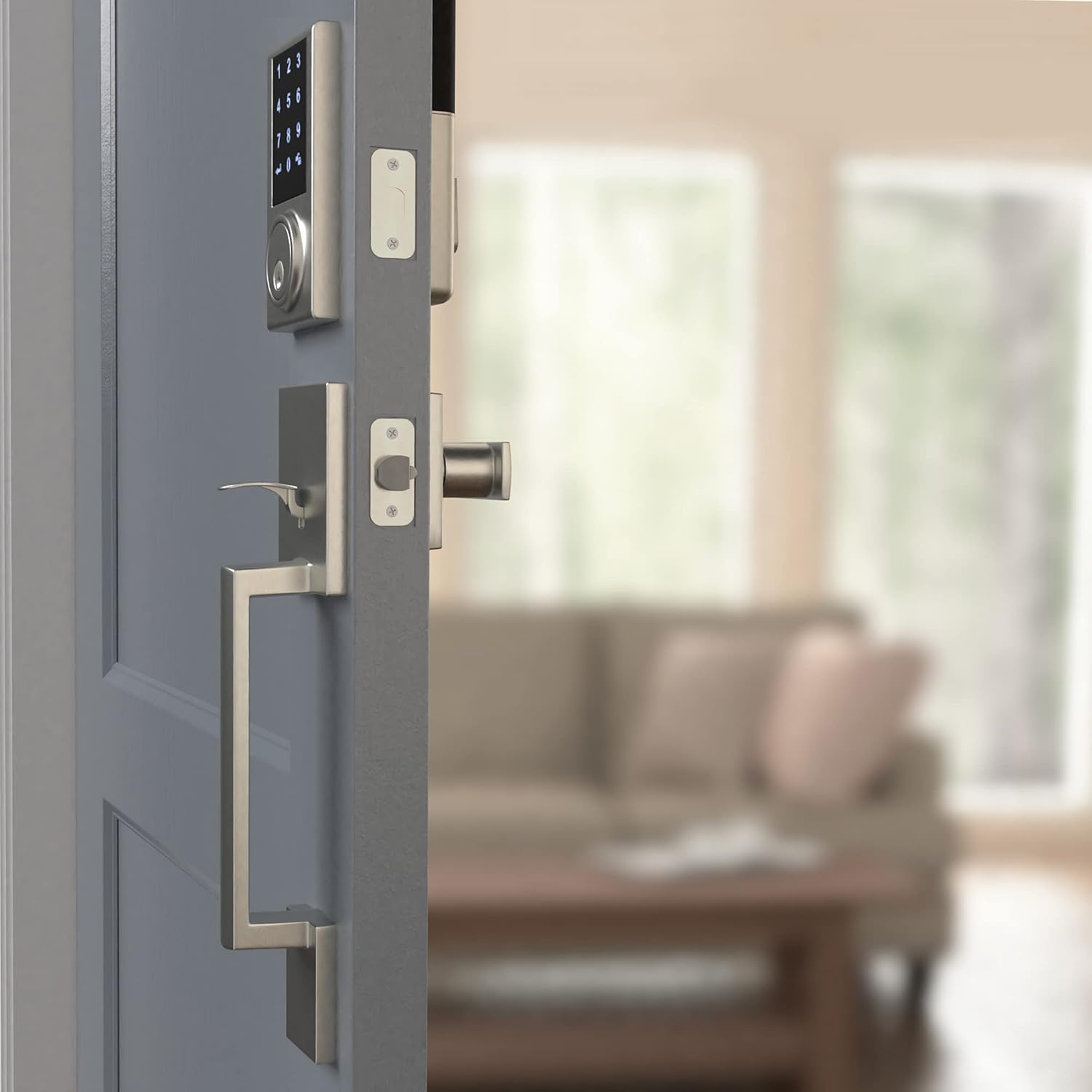
Image: The interior assembly of the lock and handleset, showing the thumb turn and battery cover.
Arahan Operasi
Touchscreen Keypad Operation
The touchscreen keypad allows for keyless entry. To activate the keypad, simply touch the screen. The numbers will illuminate.

Imej: Dari dekat view of the illuminated touchscreen keypad, displaying numbers 0-9 and arrow/lock symbols.
Kod Pengguna Pengaturcaraan
The lock supports up to 30 customizable user codes. Refer to the detailed programming instructions in the full manual for specific steps on adding, deleting, or modifying codes.
Penguncian Satu Sentuhan
The motorized deadbolt allows for convenient one-touch locking from the exterior keypad. Simply press the lock symbol on the keypad to engage the deadbolt.
Random Number Generator (Security Feature)
For enhanced security, the keypad may display a random sequence of numbers before presenting the full keypad. This feature helps prevent fingerprint analysis on frequently used digits. You must touch the randomly displayed numbers first, then enter your actual code.
Ciri Kunci Auto
The lock can be configured to automatically lock after a set period (default is 30 seconds). This feature can be adjusted or disabled via the programming settings.
Penyelenggaraan
Penggantian Bateri
The lock requires 4 AA alkaline batteries. When batteries are low, the lock may exhibit unusual behavior such as random beeping or failure to accept codes. Replace all four batteries with new, strong alkaline batteries to ensure optimal performance.
Pembersihan
Bersihkan bahagian luar kunci dengan lembut, damp cloth. Avoid using harsh chemicals or abrasive materials that could damage the finish or touchscreen.
Menyelesaikan masalah
- Kunci tidak bertindak balas atau berbunyi bip secara rawak: This often indicates low battery power. Replace all 4 AA batteries with new ones.
- Keypad not displaying all numbers: This is a security feature. Touch the randomly illuminated numbers first, then the full keypad will appear for code entry.
- Deadbolt tidak memanjang/menarik balik dengan lancar: Check for any obstructions in the door frame or strike plate. Ensure the lock is properly aligned and installed according to the instructions. A diagnostic run may be necessary.
- Kod tidak berfungsi: Re-enter the master programming code and re-program the user codes. Ensure you are following the programming steps precisely.
Waranti
This Amazon Basics Electronic Touchscreen Deadbolt Door Keypad Lock with Handleset is backed by an Amazon Basics 1-year limited warranty. Please retain your proof of purchase for warranty claims.
Sokongan
For further assistance or detailed programming instructions not covered in this brief manual, please refer to the complete product manual available online or contact Amazon Basics customer support.