1. Pengenalan
Thank you for choosing the Sunbuck AS-35BU Stereo Amplifier. This compact yet powerful amplifier is designed to enhance your home audio experience, offering versatile connectivity options including Bluetooth 5.0, RCA, USB, SD card, FM radio, and AUX input. With a maximum output of 400W x 2 (RMS 60W x 2), it delivers high-fidelity sound with low distortion, suitable for various environments such as offices, small apartments, basements, and garages. This manual provides detailed instructions for setup, operation, maintenance, and troubleshooting to ensure optimal performance and longevity of your device.
2. Arahan Keselamatan Penting
- Sumber Kuasa: Memastikan amplifier is connected to a power supply matching the voltage indicated on the unit. Use only the provided AC power plug.
- Pengudaraan: Do not block any ventilation openings. Install in accordance with the manufacturer's instructions. Adequate airflow is crucial to prevent overheating.
- Air dan Kelembapan: Do not expose this apparatus to rain or moisture. Do not use near water (e.g., bathtubs, sinks, swimming pools).
- haba: Jangan pasang berhampiran mana-mana sumber haba seperti radiator, daftar haba, dapur, atau radas lain (termasuk amppenghidup) yang menghasilkan haba.
- Pembersihan: Bersihkan hanya dengan kain kering. Elakkan menggunakan cecair atau pembersih aerosol.
- Servis: Jangan cuba servis produk ini sendiri. Rujuk semua servis kepada kakitangan perkhidmatan yang berkelayakan. Servis diperlukan apabila radas telah rosak dalam apa jua cara, seperti kord bekalan kuasa atau palam rosak, cecair telah tertumpah atau objek telah jatuh ke dalam radas, radas telah terdedah kepada hujan atau lembapan, tidak beroperasi seperti biasa, atau telah terjatuh.
- Lebihan beban: Jangan membebankan alur keluar dinding atau kord sambungan kerana ini boleh mengakibatkan risiko kebakaran atau kejutan elektrik.
3. Kandungan Pakej
Sahkan bahawa semua item yang disenaraikan di bawah disertakan dalam pakej anda:
- 1 x Sunbuck AS-35BU Stereo Amppenyambung (110V)
- 1 x Alat Kawalan Jauh
- 1 x Antena FM
- 1 x AC Power Plug

Image: Contents of the Sunbuck AS-35BU amplifier package, including the amplifier unit, remote control, FM antenna, and AC power plug.
4. Produk Lebihview
4.1 Panel Depan
The front panel provides access to primary controls and inputs for convenient operation.
- Suis kuasa: Togol amppengikat hidup/mati.
- Pemilih Input: Rotary knob to select between Media Player (USB/SD/Bluetooth/FM), AUX, CD, and Line inputs.
- Kawalan Nada: Separate knobs for Treble and Bass adjustment to fine-tune audio output.
- Kawalan Gema: Adjusts the echo effect for microphone inputs.
- Mic 1/2 Volume: Controls the overall volume for both microphone inputs.
- Kelantangan Muzik: Main rotary knob for adjusting the overall music volume.
- USB/SD/MMC/BT Player: Digital display and control buttons for media playback (Play/Pause, Scan, Mode, Next/Previous Track, Volume +/-).
- Input mikrofon: Two 1/4" (6.35mm) jacks for connecting microphones.

Imej: Depan view of the Sunbuck AS-35BU amplifier, showing all controls and inputs including power switch, input selector, tone controls, media player interface, and microphone inputs.
4.2 Panel Belakang
The rear panel houses all the necessary connections for your audio sources and speakers.
- Input Audio RCA: Two pairs of RCA inputs labeled 'CD' and 'LINE' for connecting external audio devices.
- Keluaran Pembesar suara: Spring clip terminals for connecting left and right passive speakers.
- Input Kuasa DC: For alternative DC power supply (DC12V 5A-10A).
- Input Kuasa AC: Standard AC power cord connection.
- Voltage Conversion Switch: Allows selection between 230V and 115V AC power.
- Input Antena FM: Coaxial connector for the FM antenna.

Imej: Belakang view of the Sunbuck AS-35BU amplifier, displaying RCA audio inputs, speaker terminals, power input, voltage selector, and FM antenna connection.
4.3 Dimensi
The compact design of the AS-35BU allows for flexible placement in various settings.
- Dimensi Produk: 6.1 x 5.31 x 2.17 inci (15.5 x 13.5 x 5.5 cm)
- Berat Barang: 2.2 paun (1 kg)
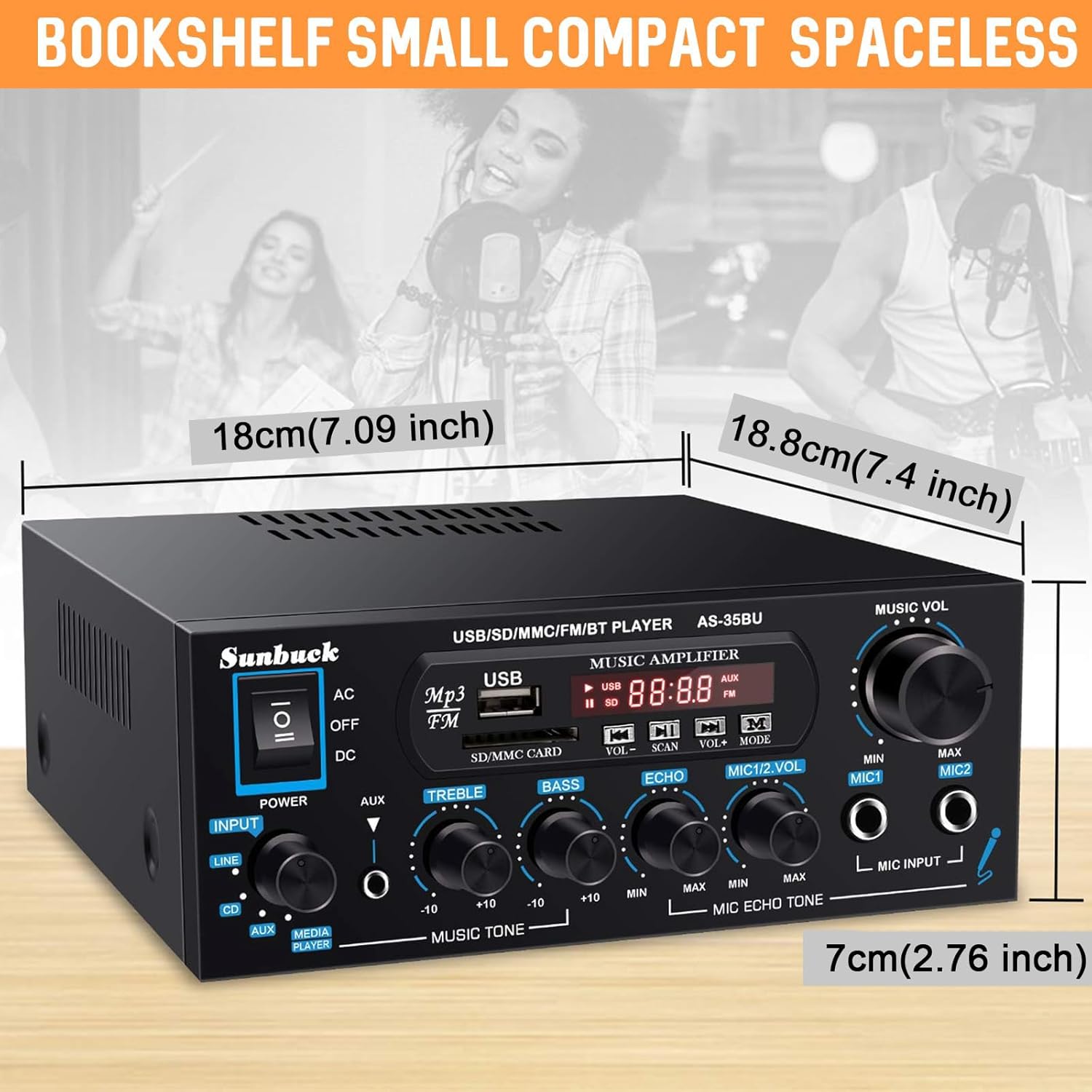
Image: Diagram showing the compact dimensions of the Sunbuck AS-35BU amplifier, highlighting its small footprint.
5. Persediaan
5.1 Sambungan Pembesar suara
Connect your passive speakers to the speaker output terminals on the rear panel. Ensure correct polarity (positive to positive, negative to negative) for optimal sound quality.
- Strip approximately 1/2 inch (1.2 cm) of insulation from the ends of your speaker wires.
- Press down on the spring clip terminal to open the connection point.
- Insert the bare wire into the opening.
- Release the spring clip to secure the wire.
- Repeat for all four connections (Left +, Left -, Right +, Right -).
5.2 Sambungan Input Audio
Connect your audio sources to the appropriate RCA inputs on the rear panel.
- Input CD: Use RCA cables to connect a CD player or other audio device.
- Input LINE: Use RCA cables to connect devices like laptops, TVs, or projectors with AV audio output.
- AUX Input (Front Panel): Use a 3.5mm to 3.5mm audio cable to connect portable devices like smartphones or tablets to the front panel AUX jack.

Image: Diagram illustrating various input and output connections for the Sunbuck AS-35BU amplifier, including RCA, speaker terminals, and compatible devices.
5.3 Sambungan Kuasa
Before connecting to power, ensure the voltage conversion switch on the rear panel is set correctly for your region (230V or 115V). Then, connect the provided AC power plug to the amppenyangga dan saluran keluar dinding.
Sambungan Antena FM 5.4
Connect the included FM antenna to the FM ANT coaxial input on the rear panel for radio reception.
6. Arahan Operasi
6.1 Hidupkan/Mati Kuasa
Flip the power switch on the front panel to the 'ON' position to power on the amplifier. The digital display will illuminate. Flip to 'OFF' to power down.
6.2 Pemilihan Input
Rotate the 'INPUT' knob on the front panel to select your desired audio source: 'MEDIA PLAYER' (for USB/SD/Bluetooth/FM), 'AUX', 'CD', or 'LINE'.
6.3 Kawalan Kelantangan dan Nada
Adjust the 'MUSIC VOL' knob to control the overall output volume. Use the 'TREBLE' and 'BASS' knobs to fine-tune the high and low frequencies of your music.
6.4 USB/SD/MMC Playback
Insert a USB drive or SD/MMC card containing MP3 audio files into the respective slots on the front panel. The amplifier will automatically switch to 'MEDIA PLAYER' mode and begin playback. Use the control buttons (VOL+/-, SCAN, MODE, Next/Previous) to navigate and control playback.
6.5 Sambungan Bluetooth
Untuk menyambungkan peranti Bluetooth:
- Switch the input selector to 'MEDIA PLAYER'. The display will show 'BLUE' indicating Bluetooth mode.
- Pada peranti mudah alih anda (telefon pintar, tablet, komputer riba), dayakan Bluetooth dan cari peranti yang tersedia.
- Select 'AS-35BU' from the list of devices to pair. Once connected, you will hear a confirmation tone.
- Anda kini boleh menstrim audio secara wayarles dari peranti anda ke amplifier. The wireless range is approximately 40 feet (12 meters). Note that signal and volume may be intermittent if there are physical obstructions like walls between the devices.

Image: Visual representation of the Sunbuck AS-35BU amplifier connecting wirelessly to various devices via Bluetooth, including smartphones, tablets, and laptops.
6.6 Operasi Radio FM
Untuk menggunakan fungsi radio FM:
- Switch the input selector to 'MEDIA PLAYER' and then press the 'MODE' button until 'FM' is displayed.
- Press the 'SCAN' button to automatically scan and save available FM stations as presets.
- Use the 'Next/Previous Track' buttons on the front panel or the remote control to cycle through the saved presets. For direct frequency input, use the number pad on the remote control.
6.7 Fungsi Mikrofon dan Karaoke
The amplifier supports two microphone inputs for karaoke or public address.
- Plug your 1/4" (6.35mm) microphones into the 'MIC INPUT' jacks on the front panel.
- Adjust the 'MIC 1/2 VOL' knob to control the microphone volume.
- Use the 'ECHO' knob to add or remove echo effect to the microphone sound.
6.8 Penggunaan Alat Kawalan Jauh
The included remote control provides convenient access to various functions from a distance. It allows for direct input of FM frequencies, track navigation, volume control, and mode selection.

Image: Step-by-step guide for installing the battery in the remote control, ensuring proper functionality.
7. Penyelesaian masalah
If you encounter any issues with your Sunbuck AS-35BU amplifier, please refer to the table below for common problems and their solutions.
| Masalah | Kemungkinan Punca | Penyelesaian |
|---|---|---|
| Tiada kuasa | Power cord not connected; Power switch off; Incorrect voltage pemilihan. | Ensure power cord is securely plugged in. Turn power switch ON. Verify voltage switch (230V/115V) is set correctly. |
| Tiada keluaran bunyi | Incorrect input selected; Volume too low; Speaker wires loose or incorrect polarity. | Select the correct input source. Increase 'MUSIC VOL' knob. Check speaker wire connections and polarity. |
| Isu sambungan Bluetooth | Peranti tidak dalam mod berpasangan; Amplifier too far from device; Obstructions. | pastikan amplifier is in 'BLUE' mode. Move device closer to amplifier. Remove obstructions. Try re-pairing. |
| Penerimaan radio FM yang lemah | Antena tidak disambungkan atau diletakkan dengan teruk; Isyarat lemah. | Connect FM antenna securely. Adjust antenna position for better reception. Perform a new auto-scan for stations. |
| Bunyi herot | Volume too high; Tone controls set incorrectly; Poor audio source quality. | Reduce 'MUSIC VOL'. Adjust 'TREBLE' and 'BASS' knobs. Test with a different audio source. |
8. Spesifikasi
- model: AS-35BU
- Output Kuasa: Max 400W x 2 (RMS 60W x 2)
- Versi Bluetooth: 5.0 (Wireless range: 40 feet / 12 meters)
- Input: 2 x RCA Audio (CD, Line), 2 x Microphone (1/4"), USB2.0, SD Card, Bluetooth 5.0, FM Radio, AUX (3.5mm front)
- Keluaran: 2-Channel Speaker Output
- Dimensi (L x W x H): 6.1 x 5.31 x 2.17 inci (15.5 x 13.5 x 5.5 cm)
- Berat: 2.2 paun (1 kg)
- Pengeluar: JS Electronics Limited
9. Penyelenggaraan dan Penjagaan
Untuk memastikan jangka hayat dan prestasi optimum anda amplifier, ikut garis panduan penyelenggaraan ini:
- Pembersihan: Lap bahagian luar secara berkala amplifier with a soft, dry cloth. Do not use abrasive cleaners, waxes, or solvents.
- Pengudaraan: Keep the ventilation openings clear of dust and debris. Ensure adequate space around the unit for proper airflow.
- Storan: Jika menyimpan amplifier for an extended period, disconnect it from the power source and store it in a cool, dry place away from direct sunlight and extreme temperatures.
- Pengendalian: Kendalikan unit ini dengan berhati-hati. Elakkan daripada menjatuhkan atau menyebabkannya terkena hentaman kuat.
10. Waranti dan Sokongan
Sunbuck products are manufactured with high-quality standards. For specific warranty information, please refer to the documentation included with your purchase or contact the retailer. If you require technical support or have questions not covered in this manual, please contact Sunbuck customer service or the authorized dealer from whom you purchased the product. Provide your model number (AS-35BU) and a detailed description of the issue for faster assistance.


