1. Pengenalan
This user manual provides comprehensive instructions for the UNIWA E1801 Senior Mobile Phone. Designed with large buttons and a clear display, this phone is ideal for users seeking simplicity and essential communication features. Please read this manual carefully before using your device to ensure proper operation and longevity.
2. Kandungan Pakej
Selepas membuka pakej, sila sahkan bahawa semua item berikut disertakan:
- 1 x UNIWA E1801 Mobile Phone
- 1 x BL-5C 800 mAh Battery
- 1 x Pengecas
- 1 x Manual Pengguna (dokumen ini)
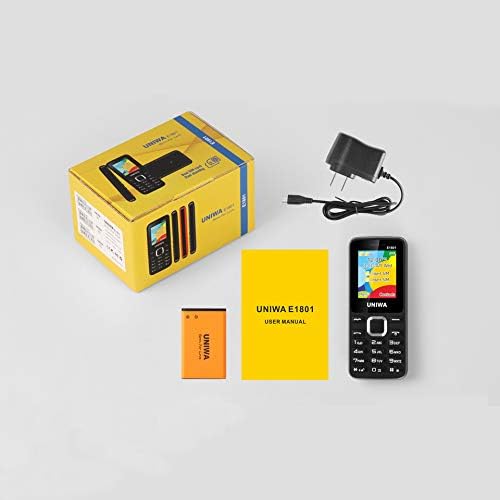
Image: Contents of the UNIWA E1801 package, including the phone, battery, charger, and user manual.
3. Peranti Lebihview
The UNIWA E1801 features a user-friendly design with large, easy-to-press buttons and a non-slip frame for comfortable handling. It includes an ergonomic keypad with plating navigation keys for intuitive operation.
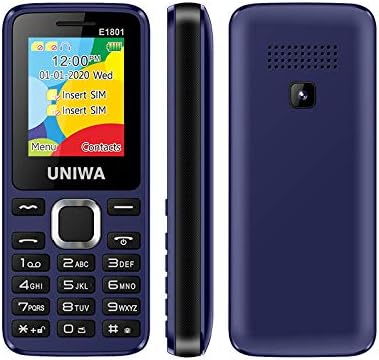
Imej: Depan, sisi dan belakang views of the UNIWA E1801 phone, highlighting its compact design.

Image: Detail showing the non-slip frame of the UNIWA E1801, designed for secure grip.

Image: Close-up of the ergonomic keypad and plating navigation keys on the UNIWA E1801.
4. Persediaan
4.1. Pemasangan Bateri
- Tanggalkan penutup belakang telefon dengan membukanya perlahan-lahan dari takuk.
- Align the gold contacts of the BL-5C 800 mAh battery with the contacts in the battery compartment.
- Tekan perlahan bateri ke bawah sehingga ia berbunyi klik pada tempatnya.
- Gantikan penutup belakang, pastikan ia terkunci dengan selamat.
4.2. Pemasangan Kad SIM
The UNIWA E1801 supports Dual SIM cards, allowing for two active phone numbers simultaneously.
- With the back cover removed and battery out (if necessary), locate the SIM card slots.
- Insert your SIM card(s) into the designated slot(s) with the gold contacts facing down and the cut corner aligned correctly.
- Tolak perlahan kad SIM sehingga ia terduduk sepenuhnya.
- Pasang semula bateri dan penutup belakang.

Image: The dual SIM card slots of the UNIWA E1801, illustrating how SIM cards are inserted.
4.3. Mengecas Peranti
Sebelum penggunaan pertama, cas sepenuhnya bateri telefon.
- Connect the charger cable to the charging port on the phone.
- Palamkan pengecas ke salur keluar dinding standard.
- Penunjuk bateri pada skrin akan menunjukkan status pengecasan.
- Setelah dicas sepenuhnya, cabut pengecas.
5. Arahan Operasi
5.1. Hidupkan/Mati Kuasa
- Untuk Menghidupkan: Press and hold the Power/End Call button until the screen lights up.
- Untuk Mematikan: Press and hold the Power/End Call button until the power-off options appear, then confirm.
5.2. Membuat Panggilan
- Dari skrin melahu, masukkan nombor telefon menggunakan pad kekunci.
- Tekan butang Panggil (biasanya berwarna hijau) untuk memulakan panggilan.
- Untuk menamatkan panggilan, tekan butang Tamat Panggilan (biasanya berwarna merah).
5.3. Menghantar Mesej
- Navigate to the 'Messages' menu from the main screen.
- Select 'Write Message' or 'New SMS'.
- Masukkan mesej anda menggunakan pad kekunci.
- Masukkan nombor penerima atau pilih daripada kenalan.
- Hantar mesej.
5.4. Kenalan
Buku telefon boleh menyimpan sehingga 300 kenalan.
- Menambah Kenalan: Go to 'Contacts' > 'Add New Contact', then enter the name and number.
- Searching for a Contact: From the 'Contacts' menu, use the navigation keys to scroll or search by name.
5.5. Radio FM
The UNIWA E1801 features a wireless FM radio, allowing you to listen to your favorite stations without needing headphones as an antenna.
- Navigasi ke aplikasi 'Radio FM' daripada menu utama.
- Use the navigation keys to scan for available stations or manually tune to a frequency.
- Adjust the volume using the side keys (if available) or navigation keys.

Image: The UNIWA E1801 showcasing its wireless FM radio feature.
5.6. Multimedia (MP3/MP4)
The phone supports MP3 audio and MP4 video playback.
- Ensure you have a TF card (up to 16GB) inserted with your media files.
- Navigate to the 'Multimedia' or 'File Manager' menu.
- Select 'MP3 Player' or 'Video Player' to browse and play your files.

Image: Illustration of the 2030 Box Speaker on the UNIWA E1801, indicating its audio capabilities.
5.7. Kamera
The phone is equipped with a 0.08 MP rear camera.
- Dari menu utama, pilih 'Kamera'.
- Bingkaikan tangkapan anda menggunakan skrin sebagai viewpencari.
- Press the designated button (usually the center navigation key) to take a photo.
5.8. Lampu suluh
The built-in flashlight can be useful in low-light conditions.
- Refer to your phone's specific shortcut key or menu option to activate/deactivate the flashlight. This is often a long press on a specific number key or a dedicated button.

Image: The UNIWA E1801 demonstrating its integrated flashlight function.
5.9. Fungsi Lain
The UNIWA E1801 includes several utility functions:
- Permainan: Simple pre-installed games.
- Kalendar: To keep track of dates and events.
- Jam loceng: Tetapkan berbilang penggera.
- Kalkulator: Fungsi asas aritmetik.
- Jam dunia: View masa dalam zon waktu yang berbeza.
- E-buku: Basic text file pembaca.
- WAP: Basic internet browsing (requires GPRS data plan).
- Perakam: Voice recording function.
6. Penyelenggaraan
- Pembersihan: Gunakan kain lembut dan kering untuk membersihkan permukaan telefon. Elakkan pencuci cecair atau bahan kasar.
- Penjagaan Bateri: To prolong battery life, avoid extreme temperatures. Do not leave the phone charging for excessively long periods after it is full.
- Storan: Jika menyimpan telefon untuk tempoh yang lama, pastikan bateri dicas separa (sekitar 50%) dan simpan di tempat yang sejuk dan kering.
7. Penyelesaian masalah
| Masalah | Kemungkinan Punca / Penyelesaian |
|---|---|
| Telefon tidak dihidupkan. | Battery is depleted. Charge the phone for at least 30 minutes. Ensure battery is correctly installed. |
| Tidak boleh membuat atau menerima panggilan. | No network signal. Move to an area with better reception. SIM card not properly inserted. Reinsert SIM card. |
| Bateri cepat habis. | Background applications running. Close unused applications. Battery may be old and require replacement. |
| Tidak dapat mendengar pemanggil / Pemanggil tidak dapat mendengar saya. | Volume too low. Adjust call volume. Microphone/speaker blocked. Ensure no obstructions. |
Jika masalah berterusan selepas mencuba penyelesaian ini, sila hubungi sokongan pelanggan.
8. Spesifikasi
| Ciri | Perincian |
|---|---|
| Nombor Model | ECON E1801 |
| Dimensi | 108 x 45 x 14 mm |
| Berat badan | 68 g |
| CPU | SC6531E |
| Jalur Rangkaian | 2G: GSM850/900/1800/1900 MHz, GPRS |
| Kad SIM | Dual-SIM, Dual-Standby |
| Kapasiti Buku Telefon | 300 nombor |
| Nada dering | 64 chords, supports MP3, Midi ringtones |
| Penceramah | 2030 Penceramah |
| Radio FM | Radio FM Tanpa Wayar |
| Skrin | 1.77 inch QQVGA Display, 160 x 128 pixels |
| Kamera | 0.08 MP Rear Camera, 640 x 480 pixels |
| Multimedia | MP3, MP4 |
| Ingatan | Supports TF cards up to 16 GB max |
| Bluetooth | V2.1 |
| Alat penggetar | ya |
| Masa Berbual | Sehingga 240 minit |
| Masa Tunggu Sedia | Sehingga 200 jam |
| Bahasa | English, Russian, Hebrew, Arabic, French, Spanish, Polish, German, Italian, Portuguese, Chinese |
9. Waranti dan Sokongan
For warranty information and technical support, please refer to the warranty card included with your product or contact the retailer where you purchased the UNIWA E1801. You may also visit the official UNIWA website for further assistance and updated support information.


