1. Pengenalan
Welcome to the user manual for your Behringer RHYTHM DESIGNER RD-6 Analog Drum Machine. This device is designed to provide authentic analog drum sounds with modern connectivity and sequencing capabilities. The RD-6 features true analog circuitry, 8 distinct drum voices, a 16-step sequencer, and a built-in distortion effect. Please read this manual thoroughly to ensure proper setup, operation, and maintenance, allowing you to fully explore its creative potential.
2. Arahan Keselamatan Penting
- Baca arahan ini.
- Simpan arahan ini.
- Patuhi semua amaran.
- Ikut semua arahan.
- Jangan gunakan alat ini berhampiran air.
- Bersihkan hanya dengan kain kering.
- Jangan sekat sebarang bukaan pengudaraan. Pasang mengikut arahan pengilang.
- Jangan pasang berhampiran mana-mana sumber haba seperti radiator, daftar haba, dapur, atau radas lain (termasuk amppenghidup) yang menghasilkan haba.
- Jangan kalahkan tujuan keselamatan palam terkutub atau jenis pembumian. Palam terkutub mempunyai dua bilah dengan satu lebih lebar daripada yang lain. Palam jenis pembumian mempunyai dua bilah dan serampang pembumian ketiga. Bilah lebar atau serampang ketiga disediakan untuk keselamatan anda. Jika palam yang disediakan tidak sesuai dengan alur keluar anda, rujuk juruelektrik untuk menggantikan alur keluar usang.
- Lindungi kord kuasa daripada berjalan atau tersepit terutamanya pada palam, bekas kemudahan dan tempat keluarnya dari radas.
- Hanya gunakan lampiran/aksesori yang ditentukan oleh pengilang.
- Gunakan hanya dengan troli, dirian, tripod, pendakap atau meja yang ditentukan oleh pengilang, atau dijual dengan radas. Apabila troli digunakan, berhati-hati apabila menggerakkan kombinasi troli/radas untuk mengelakkan kecederaan daripada terbalik.
- Cabut plag radas ini semasa ribut petir atau apabila tidak digunakan untuk jangka masa yang lama.
- Rujuk semua servis kepada kakitangan perkhidmatan yang berkelayakan. Servis diperlukan apabila radas telah rosak dalam apa jua cara, seperti kord bekalan kuasa atau palam rosak, cecair telah tertumpah atau objek jatuh ke dalam radas, radas telah terdedah kepada hujan atau lembapan, tidak beroperasi seperti biasa. , atau telah digugurkan.
3. Apa yang ada di dalam Kotak
- Behringer RHYTHM DESIGNER RD-6 Analog Drum Machine
- Penyesuai Kuasa
- Kabel USB
- Panduan Mula Pantas
4. Controls and Connectors Overview
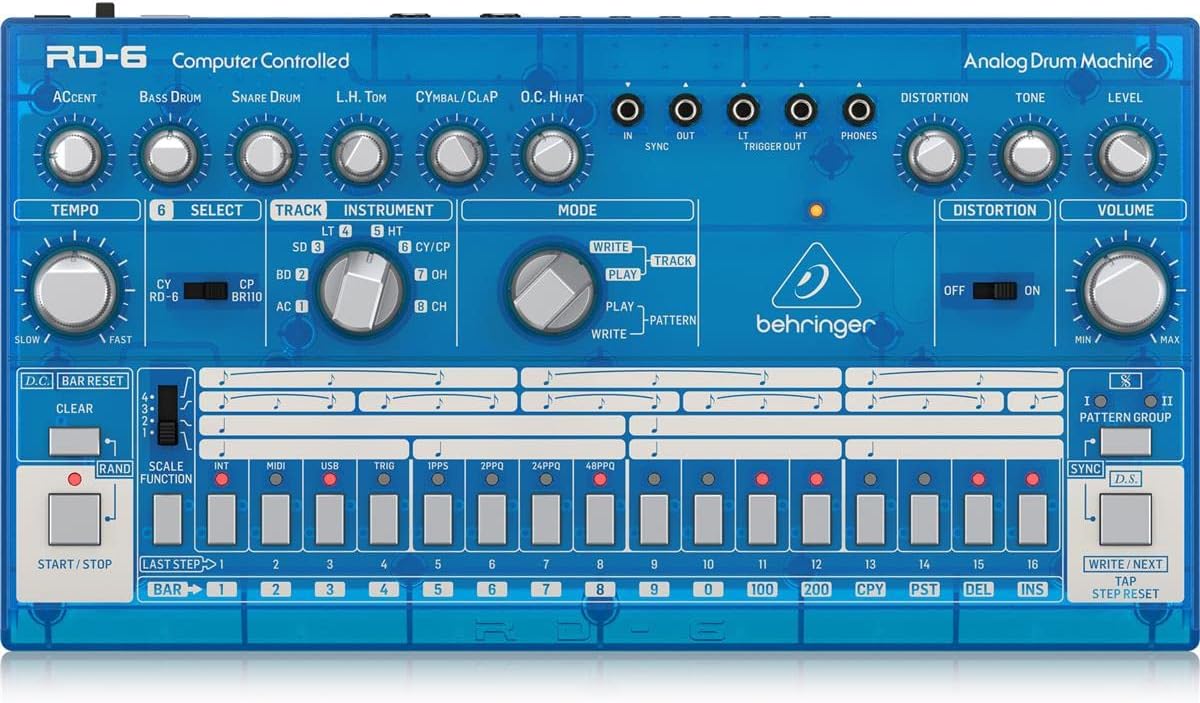
The Behringer RD-6 features an intuitive layout for easy access to all its functions, designed for both performance and studio integration.
4.1 Kawalan Panel Hadapan

Imej: Atas ke bawah view of the Behringer RD-6 front panel, showing various knobs, buttons, and the 16-step sequencer.
- MASA: Adjusts the playback speed of patterns.
- AKSEN: Controls the intensity of accented steps.
- BASS DRUM, SNARE DRUM, L.H. TOM, CYMBAL/CLAP, O.C. HI HAT: Individual controls for tone, decay, and level of each drum voice.
- JARAK: Activates the built-in distortion effect.
- TONE/LEVEL (Distortion): Adjusts the character and intensity of the distortion.
- JILID: Kawalan kelantangan keluaran induk.
- PILIH: Used to select various functions or parameters.
- TRACK/INSTRUMENT: Selects the current track or instrument for editing.
- MODE (WRITE/PLAY/PATTERN): Switches between pattern writing, playback, and pattern selection modes.
- 16 STEP BUTTONS: Used to program steps in a pattern or select patterns.
- MULAI / BERHENTI: Initiates or halts pattern playback.
- JELAS: Erases patterns or steps.
- SCALE FUNCTION: Adjusts the timing scale for patterns.
- SYNC: Selects the synchronization source (Internal, MIDI, USB, Clock).
- WRITE/NEXT: Saves patterns or advances to the next step/pattern.
- TAP/STEP RESET: Used for tap tempo or resetting the step sequencer.
4.2 Penyambung Panel Belakang
Imej: Belakang view of the Behringer RD-6, highlighting the various audio outputs, MIDI ports, USB port, and power input.
- VOICE OUT (OH/CH, CP, CY, LT/HT, SD, BD): Individual 3.5 mm TS outputs for each drum voice, allowing for external processing.
- CAMPURKAN: 6.35 mm TS output for the main stereo mix.
- MULAI / BERHENTI: 3.5 mm TS input for external start/stop control.
- MIDI IN/OUT/THRU: 5-pin DIN connectors for MIDI communication with other devices.
- USB: USB-B port for MIDI over USB and firmware updates.
- POWER DC INPUT: Sambungan untuk penyesuai kuasa 9V DC yang disertakan.
5. Persediaan Awal
5.1 Sambungan Kuasa
Sambungkan penyesuai kuasa 9V DC yang disertakan kepada INPUT DC KUASA on the rear panel. Plug the adapter into a suitable power outlet. Ensure the KUASA switch is in the OFF position before connecting the power supply.
5.2 Sambungan Audio
For a combined stereo mix, connect the CAMPUR KELUAR (6.35 mm TS) to your mixer or audio interface. For individual drum sound processing and recording, use the dedicated VOICE OUT jacks (3.5 mm TS) for each drum voice (OH/CH, CP, CY, LT/HT, SD, BD).
5.3 USB/MIDI Connection
Sambungkan USB port to your computer for MIDI control and firmware updates. Use the MIDI MASUK/KELUAR/LALU ports for connecting to other MIDI devices such as synthesizers, sequencers, or MIDI interfaces.
6. Operasi Asas
6.1 Menghidupkan/Mematikan
Balikkan KUASA switch on the rear panel to the ON position. The unit will power up and be ready for use. To power off, flip the switch back to OFF.
6.2 Creating a Pattern
- Select a pattern bank (I or II) using the KUMPULAN CORAK butang.
- Tekan ke TULIS button to enter pattern write mode. The TULIS LED akan menyala.
- Select an instrument (e.g., Bass Drum, Snare Drum) using the INSTRUMEN tombol pemilih.
- Gunakan 16 step buttons to program your rhythm. Pressing a button will activate or deactivate a step for the selected instrument. Illuminated buttons indicate active steps.
- Adjust parameters like AKSEN, TEMPO, and individual drum sound controls (e.g., Tone, Decay) as desired to shape your sound.
- Tekan BERMAIN to hear your pattern.
- Tekan TULIS again to exit write mode and save the pattern.
6.3 Real-time Recording
Semasa dalam BERMAIN mod, tekan butang TULIS button to enable real-time recording. The TULIS LED will flash. Play the drum sounds using the step buttons or an external MIDI controller. The notes will be recorded into the current pattern. Press TULIS again to stop real-time recording.
6.4 Using Distortion
Libatkan DISTORSI switch to activate the built-in distortion effect. Adjust the TONA dan TINGKAT knobs to shape the distortion character and intensity to add grit and aggression to your drum sounds.
7. MIDI and USB Connectivity
7.1 MIDI Control
The RD-6 supports MIDI In, Out, and Thru via its 5-pin DIN connectors. Connect to other MIDI devices to synchronize tempo, trigger sounds, or control parameters. The MIDI THRU port allows you to daisy-chain multiple MIDI devices. Refer to the full MIDI implementation chart in the comprehensive manual for detailed CC messages and settings.
7.2 USB Audio/MIDI
The USB port provides class-compliant MIDI connectivity to your computer. This allows the RD-6 to be used as a MIDI controller or to receive MIDI data from your Digital Audio Workstation (DAW) for seamless integration into your production environment.
8. Penyelenggaraan
8.1 Pembersihan
Keep the unit clean using a soft, dry cloth. Avoid abrasive cleaners, solvents, or waxes, as these can damage the finish and internal components.
8.2 Penyimpanan
Protect the RD-6 from dust, moisture, and extreme temperatures. When not in use for extended periods, store it in a cool, dry place, preferably in its original packaging or a protective case.
8.3 Menservis
Do not attempt to service the unit yourself. Refer all servicing to qualified service personnel to prevent electric shock or damage to the device.
9. Penyelesaian masalah
9.1 Tiada Keluaran Bunyi
- Check that the power adapter is securely connected and the unit is powered ON.
- Verify all audio cables are correctly connected to the CAMPUR KELUAR atau individu VOICE OUT ports and to your audio system.
- Ensure the master JILID knob and individual instrument level knobs are turned up.
- Confirm that a pattern is playing and that the selected instrument has active steps.
9.2 MIDI Not Responding
- Verify MIDI cables are correctly connected to the MIDI DALAM / KELUAR ports of the RD-6 and your external device.
- Check that the MIDI channel settings on both the RD-6 and your external device match.
- Ensure the RD-6 is in the correct sync mode (e.g., MIDI Sync, USB Sync) if synchronizing with an external clock.
9.3 Tingkah Laku Yang Tidak Dijangka
If the unit exhibits unexpected behavior, try powering it off and on again. If the issue persists, a factory reset may resolve it. Refer to the comprehensive manual for instructions on how to perform a factory reset.
10. Spesifikasi Teknikal
| Ciri | Perincian |
|---|---|
| Nama Model | RD-6 |
| Jenama | Behringer |
| Berat Barang | 1.98 paun (900 Gram) |
| Dimensi Produk | 17.2 x 8.95 x 3.8 inci |
| Bahan Badan | Coal Fiber |
| bahan | Keluli Tahan Karat |
| warna | Biru |
| Jenis Penyambung | USB |
| Voltage | 230 Volt |
| Nombor Model Item | 000-EE204-00010 |
| UPC | 644216639205 |
| Pengeluar | Puak Muzik AS |
10.1 Ciri-ciri Utama
- True analog circuitry for authentic sound reproduction.
- 8 original drum sounds, including Bass Drum, Snare Drum, Low Tom, High Tom, Cymbal, Clap, Open Hi-Hat, and Closed Hi-Hat.
- 16-step sequencer with 256 patterns for complex rhythm creation.
- Built-in distortion effect with Tone and Level controls.
- USB/MIDI connectivity for seamless integration with modern DAWs and external MIDI devices.
- 7 independent analog outputs for flexible mixing and individual drum sound processing.
- Multiple sync options: USB, MIDI, Clock, and Internal.
11. Waranti dan Sokongan
For detailed warranty information, product registration, and technical support, please visit the official Behringer website or contact your local distributor. It is recommended to keep your proof of purchase for any warranty claims.


