1. Pengenalan
This manual provides instructions for the XR15 Voice Control Remote, designed for use with Xfinity and Comcast X1, Xi6, Xi5, and XG2 systems. The remote allows users to control their television and compatible TV box, offering features such as voice commands, backlit keypad, and direct access to accessibility options.

Image 1.1: The XR15 Voice Control Remote, a replacement remote for Xfinity Comcast systems.
2. Kandungan Pakej
Sahkan bahawa semua item terdapat dalam pakej:
- 1 x XR15 Voice Control Remote
- 2 x Bateri AA
- 1 x User's Guide (this document)
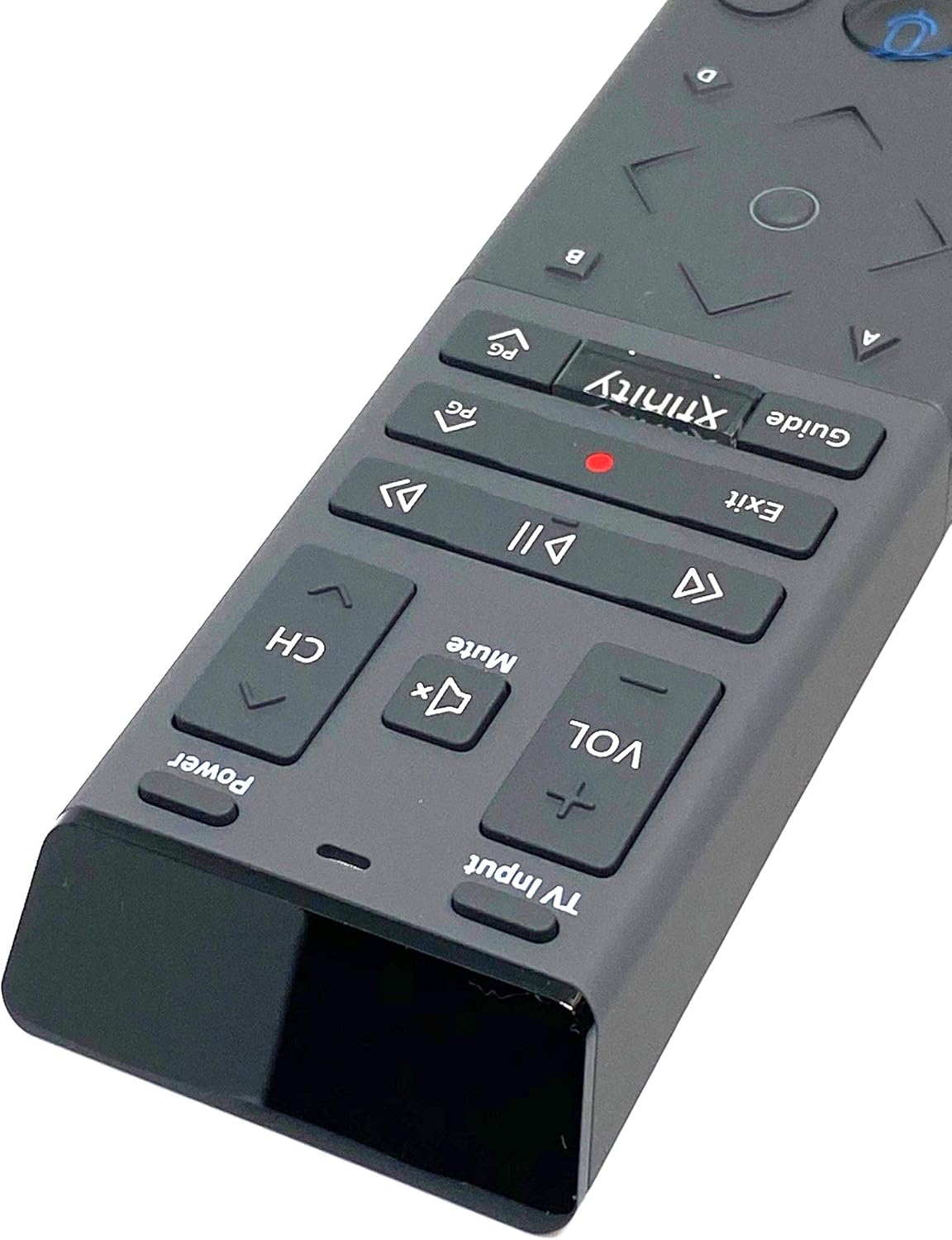
Image 2.1: The XR15 Voice Control Remote as received in its protective packaging.
3. Ciri-ciri Utama
The XR15 Voice Control Remote offers several advanced features for an enhanced user experience:
- Kawalan Suara: Use voice commands to change channels, search for content, and get recommendations.
- Pad Kekunci Berlampu Belakang: Buttons illuminate for visibility in low-light conditions.
- Ciri Sasar Ke Mana-mana Sahaja: Operates without needing to point directly at the device.
- Berpasangan automatik: Simplifies the setup process with compatible devices.
- Ciri Kebolehcapaian: Quick access to Closed Captioning, video description, and voice guidance.
- Kawalan Input TV: Manage TV power and input settings.
4. Persediaan
4.1 Pemasangan Bateri
To power your remote, install the two AA batteries provided:
- Cari petak bateri di belakang alat kawalan jauh.
- Slide the battery cover downwards to open.
- Masukkan dua bateri AA, pastikan terminal positif (+) dan negatif (-) sejajar dengan penunjuk di dalam petak.
- Luncurkan penutup bateri ke tempat semula sehingga ia berbunyi dengan selamat.

Imej 4.1: Belakang view of the XR15 remote, highlighting the battery compartment area.
4.2 Arahan Berpasangan
The XR15 remote can be paired with your Xfinity X1 TV Box and television for full functionality. Follow these steps:
- Pairing with X1 TV Box:
- Ensure your TV Box is powered on.
- Point the remote at the TV Box.
- Tekan dan tahan butang Xfinity butang dan Maklumat (i) button simultaneously for five seconds until the status light on the remote changes from red to green.
- Ikut gesaan pada skrin untuk melengkapkan proses berpasangan.
- Pairing with Television (for TV Power and Volume):
- After pairing with the TV Box, the remote may automatically attempt to pair with your TV.
- If not, or if it fails, press and hold the Persediaan button (usually a small, recessed button on the side or back, or a combination of buttons like Xfinity dan bisu) until the status light turns green.
- Enter the TV brand code. Refer to your TV's user manual for specific codes if the Xfinity codes do not work.
- Uji kuasa dan Kelantangan buttons. If they work, the pairing is successful.
5. Arahan Operasi
The XR15 remote features a clear layout for intuitive control. Below is a guide to its primary buttons and their functions:

Imej 5.1: Jarak dekat view of the upper section of the XR15 remote, showing TV Input, Volume, Mute, Power, and Channel buttons.
5.1 Fungsi Butang
| Butang | Fungsi |
|---|---|
| kuasa | Turns the TV and compatible TV Box on or off. |
| Input TV | Cycles through available TV input sources. |
| VOL + / VOL- | Menambah atau mengurangkan kelantangan. |
| bisu | Mematikan atau menghidupkan bunyi. |
| CH+ / CH- | Memilih saluran seterusnya atau sebelumnya. |
| Main/Jeda (►▮▮) | Memainkan atau menjeda siaran langsung TV, Xfinity Atas Permintaan atau kandungan DVR. |
| FF (►►) | Memajukan kandungan Xfinity Atas Permintaan atau DVR dengan pantas. |
| Rew (◄◄) | Mengundurkan kandungan Xfinity Atas Permintaan atau DVR. |
| Keluar | Exits on-screen guides; stops and exits Xfinity On Demand and DVR content. Returns to "Live" point during live TV replay. |
| Record (Red Dot) | Records the current program. |
| Xfinity | Displays the main menu of the guide, providing access to DVR and Xfinity On Demand. |
| Panduan | Memaparkan senarai TV. |
| Kawalan Suara (ikon Mikrofon) | Activates voice command functionality. Press and speak into the remote. |
| Directional Pad (Up, Down, Left, Right, OK) | Navigates through menus and selects options. |
| Maklumat (i) | Memaparkan maklumat tentang program semasa atau item yang dipilih. |
| Pad Nombor (0-9) | Memasukkan nombor saluran atau input berangka lain secara langsung. |

Imej 5.2: Jarak dekat view of the lower section of the XR15 remote, featuring the voice control button, directional pad, and numeric keypad.
6. Penyelenggaraan
To ensure the longevity and optimal performance of your XR15 Voice Control Remote, follow these maintenance guidelines:
- Pembersihan: Lap alat kawalan jauh dengan kain lembut dan kering. Untuk kotoran degil, lap sedikitampen kain dengan air atau pembersih yang lembut dan tidak melelas. Elakkan kelembapan berlebihan.
- Penggantian Bateri: Replace batteries when the remote's performance degrades or the status LED indicates low power. Always use new AA batteries and dispose of old batteries responsibly.
- Storan: Simpan alat kawalan jauh di tempat yang sejuk dan kering jauh dari cahaya matahari langsung dan suhu yang melampau.
- Elakkan Titisan: Lindungi alat kawalan jauh daripada kesan fizikal, kerana titisan boleh merosakkan komponen dalaman.
7. Penyelesaian masalah
If you encounter issues with your XR15 Voice Control Remote, refer to the following common problems and solutions:
- Jauh Tidak Menjawab:
- Periksa orientasi bateri dan pastikan ia segar.
- Verify the remote is paired correctly with your X1 TV Box and TV (refer to Section 4.2).
- Ensure there are no obstructions between the remote and the TV Box/TV.
- Perintah Suara Tidak Berfungsi:
- Ensure the remote is paired for voice control (refer to Section 4.2).
- Bercakap dengan jelas dan terus ke dalam mikrofon.
- Check your Xfinity X1 system settings for voice control activation.
- TV Power/Volume Not Working:
- Confirm the remote is programmed with the correct TV code (refer to Section 4.2).
- Try re-programming the TV code, potentially using codes from your TV's original manual.
- Backlight Not Illuminating:
- The backlight activates when the remote is moved or a button is pressed. If it doesn't, check batteries.
- Ensure the remote is not in a power-saving mode if such an option exists in your Xfinity settings.
8. Spesifikasi
| Ciri | Perincian |
|---|---|
| Nombor Model | XR15 |
| Jenama | kabel |
| Dimensi Produk | 12 x 3 x 1 inci |
| Berat Barang | 5.9 auns |
| Bateri Diperlukan | 2 bateri AA |
| Ciri Khas | Backlit, Voice Search |
| Bilangan Maks Peranti yang Disokong | 1 (TV Box + TV) |
| Peranti Serasi | Set Top Box, Television (Xfinity X1, Xi6, Xi5, XG2) |
| Teknologi Ketersambungan | Frekuensi Radio (RF) |
| Tarikh Mula-mula Tersedia | 7 September 2020 |
9. Waranti dan Sokongan
For warranty information or technical support, please refer to the documentation provided by your service provider (Xfinity/Comcast) or contact the product manufacturer directly. Keep your purchase receipt for warranty claims.


