1. Produk Lebihview
The Homcloud AS-DM2 is an intelligent 2-channel Wi-Fi dimmer module designed for in-wall installation. It allows for remote control of lighting via a smartphone application, as well as integration with smart home voice assistants like Amazon Alexa and Google Home. This module provides convenient dimming capabilities for compatible light sources.
Ciri-ciri Utama:
- 2-channel Wi-Fi smart dimmer module for in-wall installation.
- Remote control via dedicated smartphone application.
- Compatibility with Amazon Alexa and Google Home for voice control.
- Supports both physical switch control and app control.

Image 1.1: The Homcloud Smart Wi-Fi 2-Channel Dimmer Module, showcasing reka bentuknya yang padat.
2. Maklumat Keselamatan
Sila baca semua amaran dan arahan keselamatan dengan teliti sebelum pemasangan dan pengendalian. Kegagalan mematuhi arahan ini boleh mengakibatkan renjatan elektrik, kebakaran atau kecederaan serius.
- Pemasangan Profesional Disyorkan: Electrical installation should be performed by a qualified electrician.
- Matikan Sebelum Pemasangan: Sentiasa putuskan kuasa pada pemutus litar sebelum memasang atau menservis peranti.
- Voltage Keserasian: Pastikan volum modultage rating (220-240V~ 50Hz) matches your electrical system.
- Had Muatan: Do not exceed the maximum load capacity of 2x100W. Overloading can cause damage or fire.
- Penggunaan Dalaman Sahaja: Peranti ini direka bentuk untuk kegunaan dalaman di lokasi kering.
- Jauhkan dari Air: Jangan dedahkan peranti kepada air atau lembapan.
3. Kandungan Pakej
Sahkan bahawa semua komponen terdapat dalam pakej:
- 1 x Homcloud Smart Wi-Fi 2-Channel Dimmer Module (AS-DM2)
- 1 x Manual Pengguna (dokumen ini)
4. Spesifikasi
| Spesifikasi | Nilai |
|---|---|
| Jenama | Homcloud |
| Model | AS-DM2 |
| Jenis Pemasangan | Lekap di dinding |
| Peranti Serasi | Amazon Alexa, Google Home, iOS, Android |
| Dimensi Pakej (L x W x H) | 29.4 x 5.9 x 2.7 cm |
| Komponen yang Disertakan | Suis Wi-Fi |
| Rujukan Produk | AS-DM2 |
| bahan | plastik |
| Mod Pengendalian | ON-OFF (Dimming functionality via app/smart home) |
| Jenis Kenalan | Butang Maya |
| Terminal | skru |
| Jenis Litar | 2 hala |
| Jenis Penggerak | Butang Tekan |
| International Protection Rating (IP Code) | IP00 |
| Beban Maks | 2x100W |
| Voltage | 220-240V~ 50Hz |

Image 4.1: Product label showing model, voltage, and maximum load specifications.
5. Persediaan dan Pemasangan
Penting: Pastikan bekalan elektrik pada pemutus litar telah diputuskan sebelum memulakan pemasangan.
5.1 Gambarajah Pendawaian
Refer to the following diagram for correct wiring. The module supports 2-way switching configurations.
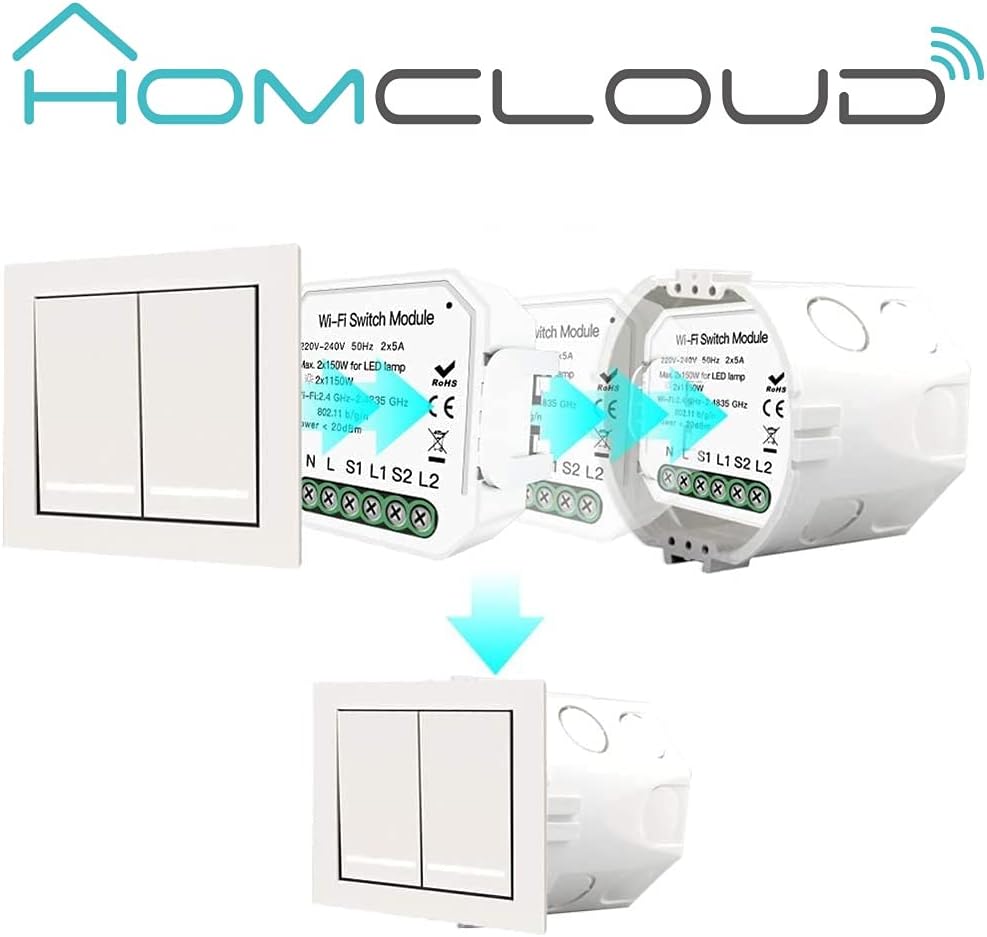
Image 5.1: Wiring diagram for a 2-gang, 2-way setup. Connect Neutral (N), Live (L), and switch inputs (S1, S2) to the module. L1 and L2 are outputs to the lights.
5.2 Pemasangan Fizikal
- Putuskan Kuasa: Turn off the main power supply to the circuit at your home's circuit breaker.
- Sediakan Pendawaian: Identify the Live (L), Neutral (N), and switch wires (S1, S2, L1, L2) in your wall box.
- Sambung wayar: Connect the wires to the corresponding terminals on the Homcloud dimmer module as shown in the wiring diagram (Image 5.1). Ensure all connections are secure.
- Sisipkan Modul: Carefully place the dimmer module into the wall box behind your existing switch. Ensure it fits without obstruction.


Image 5.2: The dimmer module is designed to be installed discreetly behind a standard wall switch, fitting into the existing wall box.
5.3 Pemasangan Apl dan Berpasangan
- Muat turun Aplikasi: Download the Homcloud Smart Home Solutions app from the App Store (iOS) or Google Play Store (Android). You can use the QR codes provided below or visit smartapp.tuya.com/homcloudsmart.
- Daftar/Log Masuk: Buka aplikasi dan daftar akaun baharu atau log masuk dengan akaun sedia ada.
- Tambah Peranti: Power on the circuit at the breaker. The module should enter pairing mode (often indicated by a blinking light). In the app, tap 'Add Device' or the '+' icon.
- Pilih Jenis Peranti: Choose 'Lighting' or 'Dimmer' from the device list.
- Sambung ke Wi-Fi: Follow the in-app instructions to connect the module to your 2.4GHz Wi-Fi network. Ensure your phone is also connected to the same Wi-Fi network.
- Berpasangan Lengkap: Setelah disambungkan, anda boleh menamakan semula peranti dan menetapkannya ke bilik.

Image 5.3: QR codes for downloading the Homcloud Smart Home Solutions app from Apple App Store and Google Play Store.
6. Arahan Operasi
6.1 Kawalan Apl
Once paired, you can control the dimmer module directly from the Homcloud app:
- Hidup/Mati: Tap the power icon to turn the connected lights on or off.
- Peredupan: Use the slider or specific percentage controls within the app interface to adjust the brightness level.
- Penjadualan: Set schedules or timers for automatic on/off or dimming routines.
- Ciptaan Adegan: Create custom scenes to control multiple devices simultaneously.

Image 6.1: Screenshot of the Homcloud app interface, demonstrating remote control capabilities for the dimmer module.
6.2 Physical Switch Control
The module retains functionality with your existing physical wall switch. A short press typically toggles the light on/off, while a long press may initiate dimming (depending on switch type and configuration).
6.3 Smart Home Integration (Alexa/Google Home)
To enable voice control, link your Homcloud account to Amazon Alexa or Google Home:
- Open Smart Home App: Buka apl Amazon Alexa atau Google Home.
- Dayakan Kemahiran/Tindakan: Cari untuk and enable the 'Homcloud' skill (for Alexa) or 'Homcloud' action (for Google Home).
- Pautkan Akaun: Log in with your Homcloud app credentials when prompted.
- Cari Peranti: Once linked, ask your voice assistant to discover new devices (e.g., "Alexa, discover my devices" or "Hey Google, sync my devices").
- Perintah Suara: Anda kini boleh menggunakan arahan suara seperti:
- "Alexa, hidupkan [Nama Cahaya]"
- "Hei Google, malapkan [Nama Cahaya] kepada 50%"
- "Alexa, matikan [Nama Cahaya]"

Image 6.2: The Homcloud system supports multiple users controlling a single device, or a single user controlling multiple devices, enhancing smart home flexibility.
7. Penyelenggaraan
The Homcloud dimmer module requires minimal maintenance.
- Pembersihan: If necessary, gently wipe the surface of the wall switch (not the module itself) with a soft, dry cloth. Do not use harsh chemicals or abrasive cleaners.
- Kemas kini Firmware: Periodically check the Homcloud app for available firmware updates for your device. Updates can improve performance and add new features.
8. Penyelesaian masalah
If you encounter issues with your Homcloud dimmer module, try the following troubleshooting steps:
| Masalah | Kemungkinan Punca | Penyelesaian |
|---|---|---|
| Peranti tidak bersambung ke Wi-Fi | Incorrect Wi-Fi password; Module too far from router; 5GHz Wi-Fi network; Module not in pairing mode. | Ensure correct 2.4GHz Wi-Fi password. Move module closer to router. Confirm module is blinking for pairing. Reset module if necessary (refer to app for reset procedure). |
| Lights not dimming or flickering | Incompatible bulb type; Overload; Wiring issue. | Ensure bulbs are dimmable LED or incandescent. Check total wattage does not exceed 2x100W. Verify wiring connections are secure. |
| Physical switch not working | Incorrect wiring of S1/S2 terminals; Loose connection. | Double-check wiring according to Image 5.1. Ensure switch wires are securely connected to S1/S2. |
| Module loses connection frequently | Weak Wi-Fi signal; Network interference; Cloud connection issues. | Improve Wi-Fi signal strength (e.g., Wi-Fi extender). Reduce interference from other devices. Restart module and router. |
| Only one channel works | Wiring error for L2; Faulty channel. | Verify the L2 output wiring to the light. If wiring is correct, the module may be faulty. |
| Delay in light turning on/off | Normal operation for some smart dimmers; Network latency. | A slight delay (e.g., 1-2 seconds) can be normal for Wi-Fi controlled dimmers. Ensure stable Wi-Fi connection. |
| Interference with S1/S2 inputs (multiple buttons) | Sensitive inputs picking up induced currents. | Consider adding small capacitors (e.g., 1.5 microFarad 400V) between S1/S2 inputs and Neutral to filter interference, especially in complex multi-button setups. Consult a qualified electrician. |
9. Waranti dan Sokongan
9.1 Maklumat Waranti
Homcloud products are designed for reliability and performance. For specific warranty terms and conditions, please refer to the warranty card included with your product or visit the official Homcloud webtapak. Simpan resit pembelian anda sebagai bukti pembelian untuk tuntutan waranti.
9.2 Sokongan Pelanggan
For technical assistance, troubleshooting, or product inquiries, please visit the official Homcloud webtapak atau hubungi sokongan pelanggan mereka:
- Webtapak: www.homcloud.com
- Sokongan Aplikasi: Use the 'Feedback' or 'Help' section within the Homcloud app.


