
pengenalan
Thank you for choosing the WEKOME D6 Desktop Mini Bluetooth Speaker. This compact and portable speaker delivers clear sound quality and offers versatile connectivity options. This manual provides detailed instructions on how to set up, operate, and maintain your speaker to ensure optimal performance.
Produk Selesaiview

Rajah 1: Depan view of the WEKOME D6 Mini Bluetooth Speaker, highlighting its compact cylindrical design and control panel.
The WEKOME D6 is a palm-sized desktop speaker designed for portability and ease of use. It features Bluetooth connectivity for wireless audio streaming and a TF card slot for direct music playback. Its robust design ensures clear audio output for various compatible devices.
Ciri-ciri Utama:
- Kesambungan Bluetooth: Seamless wireless pairing with smartphones, tablets, and laptops.
- Reka bentuk padat: Palm-sized for easy portability.
- Kualiti Bunyi Jelas: Delivers crisp and clear audio.
- Hayat Bateri yang Panjang: 500 mAh battery provides approximately 4-5 hours of playback.
- Julat Lanjutan: Bluetooth transmission distance of up to 10 meters (33 feet).
- Sokongan Kad TF: Maximum support for 32GB TF (MicroSD) cards for direct music playback.
- Kuasa Output: Speaker maximum output power of 10 Watts.
Kandungan Pakej
Sila semak pakej untuk item berikut:
- WEKOME D6 Desktop Mini Bluetooth Speaker
- Kabel Pengecas USB
- Manual Pengguna (dokumen ini)
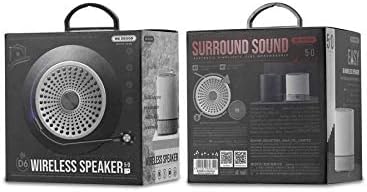
Rajah 2: Retail packaging of the WEKOME D6 Mini Bluetooth Speaker, illustrating the product's branding and key information on the box.
Persediaan
1. Mengecas Speaker:
- Sambungkan hujung kecil kabel pengecas USB ke port pengecasan pada pembesar suara.
- Sambungkan hujung kabel USB yang satu lagi ke penyesuai kuasa USB (tidak disertakan) atau port USB komputer.
- The charging indicator light will illuminate during charging and turn off once fully charged. A full charge typically takes 2-3 hours.
2. Menghidupkan/Mematikan:
- Untuk Menghidupkan: Tekan dan tahan butang Butang kuasa for a few seconds until you hear an audible prompt or see an indicator light.
- Untuk Mematikan: Tekan dan tahan butang Butang kuasa again for a few seconds.
3. Berpasangan Bluetooth:
- Ensure the speaker is powered on and in Bluetooth pairing mode (it will usually enter this mode automatically upon first power-on or if no device is connected). The indicator light will typically flash rapidly.
- Pada peranti anda (telefon pintar, tablet, komputer riba), dayakan Bluetooth dan cari peranti yang tersedia.
- Select "WEKOME D6" from the list of found devices.
- Once paired, the speaker will provide an audible confirmation, and the indicator light will stop flashing and remain solid.
- The speaker will automatically reconnect to the last paired device when powered on, if the device's Bluetooth is enabled and within range.
4. TF Card Insertion:
- Locate the TF card slot on the speaker.
- Gently insert a TF (MicroSD) card (up to 32GB) with pre-loaded music files ke dalam slot sehingga ia klik pada tempatnya.
- The speaker will automatically switch to TF card playback mode if a card is detected.
Mengendalikan Speaker
Butang Kawalan:
Refer to Figure 1 for the location of the control buttons.
- Butang Kuasa: Tekan dan tahan untuk menghidupkan/mematikan kuasa.
- Kelantangan Naik / Butang Trek Seterusnya (+):
- Tekan sebentar: Tingkatkan kelantangan.
- Tekan lama: Langkau ke trek seterusnya.
- Butang Main/Jeda (||): Tekan pendek untuk memainkan atau menjeda muzik.
- Kelantangan Turun / Butang Trek Sebelumnya (-):
- Tekan sebentar: Kurangkan kelantangan.
- Tekan lama: Pergi ke trek sebelumnya.
- Mode Button (Dot between + and Play/Pause): Short press to switch between Bluetooth mode and TF card mode (if a TF card is inserted).
Penyelenggaraan
- Pembersihan: Gunakan kain lembut dan kering untuk membersihkan permukaan pembesar suara. Jangan gunakan pembersih yang kasar, alkohol atau pelarut kimia lain, kerana ini boleh merosakkan kemasannya.
- Storan: Simpan pembesar suara di tempat yang sejuk dan kering jauh dari cahaya matahari langsung dan suhu yang melampau.
- Penjagaan Bateri: To prolong battery life, avoid fully discharging the speaker frequently. Charge the speaker regularly, even if not in use for extended periods.
- Tahan Air: This speaker is not water-resistant. Avoid exposure to liquids.
Menyelesaikan masalah
| Masalah | Kemungkinan Punca | Penyelesaian |
|---|---|---|
| Speaker tidak dihidupkan. | Bateri lemah. | Cas pembesar suara sepenuhnya. |
| Tiada bunyi. | Volume too low; Speaker not paired; Incorrect mode. | Increase volume; Ensure speaker is paired; Switch to correct mode (Bluetooth/TF card). |
| Tidak boleh berpasangan dengan peranti Bluetooth. | Pembesar suara tidak dalam mod berpasangan; Bluetooth peranti dimatikan; Terlalu jauh dari pembesar suara. | Ensure speaker is in pairing mode; Turn on device Bluetooth; Move device closer to speaker (within 10M). |
| Muzik berhenti dimainkan daripada kad TF. | TF card not inserted correctly; Corrupted files; Unsupported format. | Reinsert TF card; Check TF card for errors; Ensure music files berada dalam format yang disokong (cth., MP3). |
Spesifikasi
| Jenama | WEKOME |
| Nama Model | D6 |
| Teknologi Ketersambungan | Bluetooth |
| Jenis Pembesar Suara | Desktop Mini Speaker |
| Kuasa Output Maksimum Pembesar Suara | 10 Watt |
| Kapasiti Bateri | 500 mAh (approx. 4-5 hours playback) |
| Jarak Penghantaran | 10 meter (33 kaki) |
| Sokongan Kad TF | Sehingga 32GB |
| Peranti Serasi | Komputer riba, Telefon Pintar, Tablet |
| Jenis Pemasangan | Atas meja |
| Dimensi Pakej | 12.4 x 11.4 x 7.6 cm |
| Berat badan | 210 g |
Waranti dan Sokongan
For warranty information and technical support, please refer to the warranty card included with your product or contact WEKOME customer service through their official website or authorized retailers. Keep your purchase receipt as proof of purchase for warranty claims.