
pengenalan
This manual provides essential information for the safe and efficient operation of your QFX SBX-213 12-inch Portable Bluetooth Speaker. Please read it thoroughly before using the product and retain it for future reference.
Arahan Keselamatan
Untuk memastikan operasi yang selamat dan mengelakkan kerosakan, sila patuhi langkah berjaga-jaga keselamatan berikut:
- Jangan dedahkan unit kepada hujan, kelembapan atau suhu yang melampau.
- Jangan buka pembesar suara casing. Rujuk semua servis kepada kakitangan yang berkelayakan.
- Keep the speaker away from heat sources, direct sunlight, and open flames.
- Use only the specified power adapter and charging cable provided with the unit.
- Ensure proper ventilation around the speaker to prevent overheating.
- Elakkan meletakkan objek berat di atas pembesar suara.
Kandungan Pakej
Selepas membongkar, sila sahkan bahawa semua item yang disenaraikan di bawah ada dan dalam keadaan baik:
- QFX SBX-213 Portable Bluetooth Speaker
- Kabel Kuasa
- Alat Kawalan Jauh
- Manual Pengguna (dokumen ini)
Produk Selesaiview
The QFX SBX-213 is a 12-inch portable speaker designed for versatile audio playback. It features Bluetooth connectivity for wireless streaming, an FM radio tuner, and a USB input for playing audio files daripada pemacu kilat.
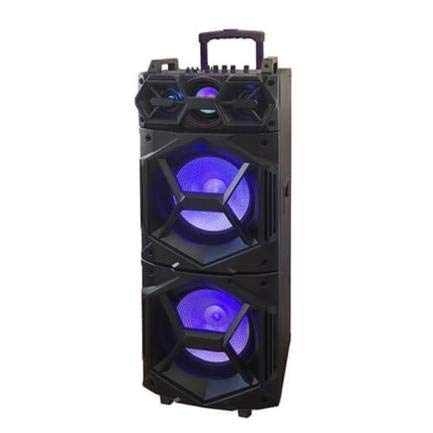
Imej: Depan view of the QFX SBX-213 Portable Bluetooth Speaker, showcasing its 12-inch driver and robust design. The speaker features a black finish and a protective grille over the main driver.
The speaker's control panel and ports typically include:
- Suis Hidupkan/Mati Kuasa
- Mode Button (to switch between Bluetooth, FM, USB inputs)
- Volume Control Knobs or Buttons
- Play/Pause, Previous/Next Track Buttons
- Port USB untuk main balik media
- Charging Port for power cable connection
- LED Indicator Lights for power, charging, and Bluetooth status
Persediaan
- Mengecas Speaker: Before first use, connect the provided power cable to the speaker's charging port and plug it into a standard electrical outlet. Allow the speaker to fully charge. The charging indicator light will typically change color or turn off when charging is complete.
- penempatan: Place the speaker on a stable, flat surface. For optimal sound dispersion, avoid placing it in enclosed spaces or directly against walls.
Arahan Operasi
1. Hidupkan/Mati Kuasa
To power on the speaker, locate the power switch, usually on the back or side panel, and slide it to the "ON" position. To power off, slide the switch to the "OFF" position.
2. Berpasangan Bluetooth
- Turn on the speaker. It will typically enter Bluetooth pairing mode automatically, indicated by a flashing LED light and an audible prompt.
- Dayakan Bluetooth pada peranti mudah alih anda (telefon pintar, tablet, dll.).
- Cari untuk available Bluetooth devices. You should see "QFX SBX-213" or a similar name in the list.
- Select the speaker to pair. Once connected, you will hear a confirmation sound, and the LED indicator will stop flashing.
- Anda kini boleh memainkan audio daripada peranti anda melalui pembesar suara.
3. Operasi Radio FM
- Press the "MODE" button on the speaker or remote control until "FM" mode is selected.
- Press the "Play/Pause" button to initiate an automatic scan for FM stations. The speaker will save all found stations.
- Use the "Previous/Next Track" buttons to navigate between saved FM stations.
4. Main semula USB
- Masukkan pemacu kilat USB yang mengandungi audio MP3 files ke dalam port USB pada pembesar suara.
- Press the "MODE" button until "USB" mode is selected. The speaker will automatically begin playing audio files daripada pemacu USB.
- Gunakan butang "Main/Jeda" dan "Trek Sebelumnya/Seterusnya" untuk mengawal main balik.
5. Kawalan Kelantangan
Adjust the master volume using the dedicated volume knob or buttons on the speaker. You can also control the volume from your connected Bluetooth device or the remote control.
Penyelenggaraan
- Pembersihan: Use a soft, dry cloth to clean the speaker's exterior. Do not use abrasive cleaners, waxes, or solvents, as these may damage the finish.
- Storan: Apabila tidak digunakan untuk tempoh yang lama, simpan pembesar suara di tempat yang sejuk dan kering, jauh dari cahaya matahari langsung dan suhu yang melampau.
- Penjagaan Bateri: To prolong battery life, avoid fully discharging the battery frequently. Charge the speaker regularly, even if not in use for long periods, to maintain battery health.
Menyelesaikan masalah
If you encounter any issues with your QFX SBX-213 speaker, please refer to the following table for common problems and solutions:
| Masalah | Kemungkinan Punca | Penyelesaian |
|---|---|---|
| Tiada kuasa | Battery discharged; Power cable not connected securely | Charge the speaker fully; Ensure power cable is securely connected to both the speaker and the power outlet. |
| Tiada sambungan Bluetooth | Bluetooth not enabled on device; Speaker not in pairing mode; Device too far from speaker | Enable Bluetooth on your device; Put the speaker into Bluetooth pairing mode; Move your device closer to the speaker (within 10 meters). |
| Tiada keluaran bunyi | Volume too low; Incorrect mode selected; Device or speaker is muted | Increase the volume on both the speaker and your connected device; Press the MODE button to select the correct input (Bluetooth, USB, FM); Check if the speaker or device is muted. |
| FM radio static or poor reception | Weak signal; Interference | Relocate the speaker to an area with better reception; Perform an auto-scan for stations again; Avoid placing near other electronic devices that may cause interference. |
Spesifikasi
- Jenama: Qfx
- model: SBX-213
- Saiz pembesar suara: 12 inci
- Teknologi Ketersambungan: USB, Bluetooth
- Ciri Khas: Lightweight, Portable, FM Radio
- Jenis Pemasangan: Floor, Table Mount
- Jenis Pengawal: Alat Kawalan Jauh
- Sumber Kuasa: Kabel Elektrik
- Dimensi (H x W x D): Kira-kira 113 x 42 x 42 cm
- Berat: Kira-kira 4 kg
- UPC: 606540036341
- ASIN: B08GL3SHQP
Waranti dan Sokongan
QFX products are designed for reliability and performance. For detailed warranty information or technical support, please refer to the warranty card included with your purchase or visit the official QFX webtapak. Simpan bukti pembelian anda untuk sebarang tuntutan waranti.
For further assistance, please contact QFX customer service through their official channels.