pengenalan
Terima kasih kerana membeliasing the EARISE M15 Karaoke Machine. This portable PA loudspeaker system is designed to provide high-quality audio for various entertainment and public address needs. Featuring powerful sound output, versatile connectivity options, and vibrant LED lights, the M15 is perfect for parties, gatherings, and karaoke sessions. Please read this manual thoroughly before operating the device to ensure proper use and to maximize its lifespan.
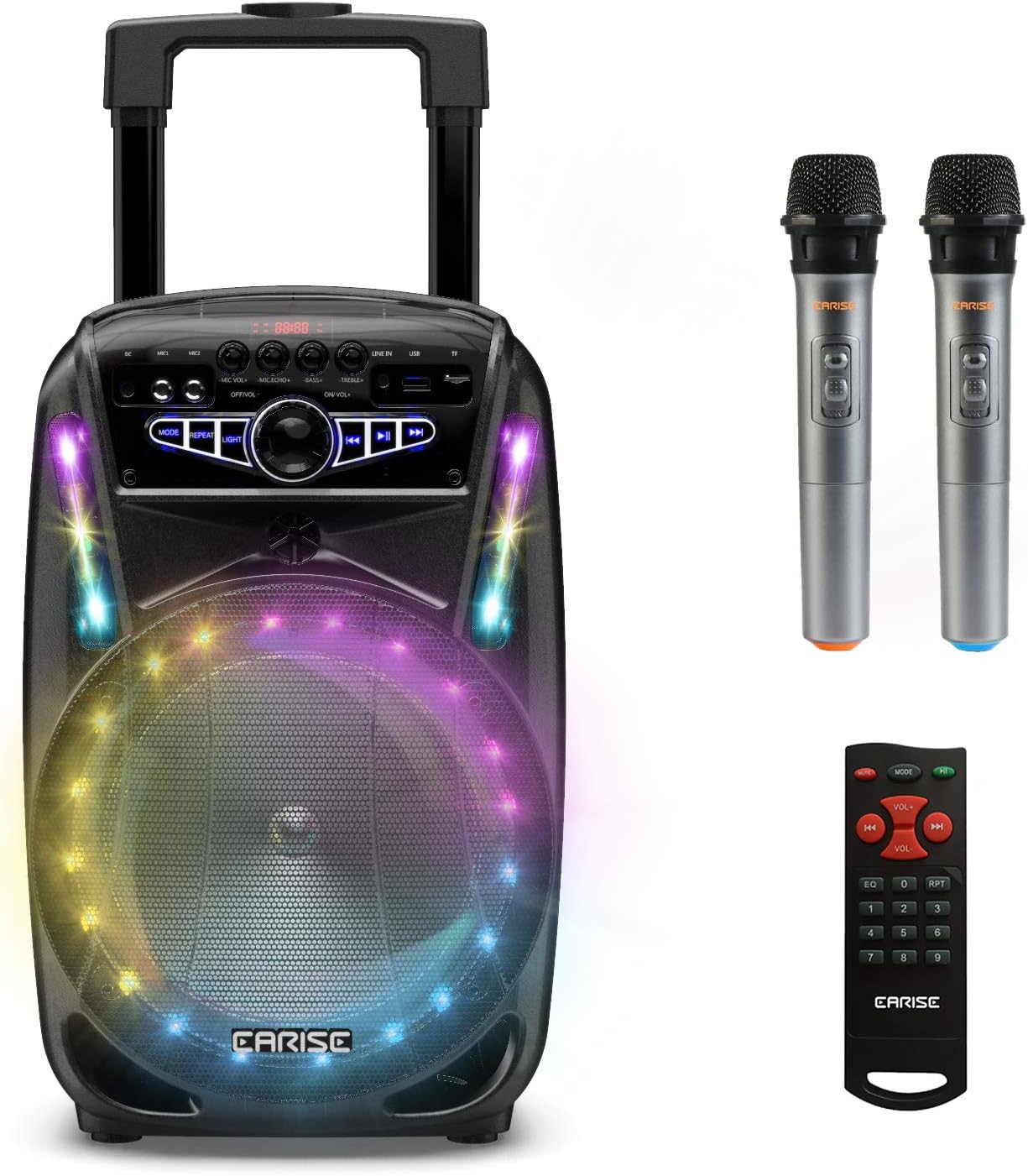
Image: The EARISE M15 Karaoke Machine, a black portable speaker with colorful LED lights on the front, shown with two wireless microphones and a remote control.
Apa yang ada dalam Kotak
Please check the contents of your package to ensure all items are present and in good condition.
- 1 x Sistem PA Troli M15
- 2 x Mikrofon Wayarles (Bateri Tidak Termasuk)
- 1 x Alat Kawalan Jauh
- 1 x Kuasa Kuasa
- 1 x Kabel AUX
- 1 x Manual Pengguna (dokumen ini)

Image: A visual representation of the package contents, showing the M15 speaker, two wireless microphones, a remote control, an AUX cable, and a charging cable.
Panduan Persediaan
1. Mengecas Unit
Before first use, fully charge the M15 Karaoke Machine. The built-in 3600mAh 7.4V Lithium rechargeable battery provides portability. A full recharge takes approximately 3 hours.
- Connect the included power cord to the DC Charging Port (6) on the back of the unit.
- Plug the other end of the power cord into a standard AC 100-240V power outlet.
- The charging indicator light will illuminate. Once fully charged, the light may change color or turn off depending on the unit's design.
2. Memasang Bateri Mikrofon
The wireless microphones require batteries (not included). Open the battery compartment of each microphone and insert the required batteries, ensuring correct polarity.
3. Kuasa Awal Hidup
Locate the Power On/Off switch (15) on the control panel. Turn the switch to the "ON" position to power on the unit.
Arahan Operasi
Panel Kawalan Terlaluview
Familiarize yourself with the control panel for optimal operation.

Image: Close-up of the M15's control panel, highlighting various buttons and ports with corresponding numbers for easy identification.
- Skrin Paparan: Shows current mode, track number, and other information.
- Kelantangan Mikrofon: Melaraskan kelantangan mikrofon yang disambungkan.
- Gema Mikrofon: Controls the echo effect for microphones.
- Bes: Adjusts the bass level of the audio output.
- Tiga kali ganda: Adjusts the treble level of the audio output.
- Port Pengecasan DC: For connecting the power adapter to charge the unit.
- Mic 1 Port: Input untuk mikrofon berwayar.
- Mic 2 Port: Input for a second wired microphone.
- Line In Port (AUX): Untuk menyambungkan peranti audio luaran melalui kabel AUX.
- Slot Pemacu Denyar USB: Untuk memainkan audio files daripada pemacu USB.
- Slot Kad TF/SD: Untuk memainkan audio files from a TF or SD card.
- Mod: Switches between Bluetooth, USB, TF, AUX, and FM Radio modes.
- Ulang: Mengulang trek atau senarai main semasa.
- Cahaya: Toggles or changes the LED light patterns.
- Power On/Off, Master Volume: Turns the unit on/off and adjusts the overall volume.
- Trek Sebelumnya: Melangkau ke trek sebelumnya.
- Main/Jeda: Memainkan atau menjeda trek semasa.
- Lagu Seterusnya: Langkau ke trek seterusnya.
1. Berpasangan Bluetooth
Connect your smartphone, tablet, or other Bluetooth-enabled device to the M15 for wireless audio streaming.
- Power on the M15 unit.
- Tekan ke Mod button (12) until "Bluetooth" or "BT" appears on the Display Screen (1).
- Enable Bluetooth on your device and search for "EARISE M15" in the list of available devices.
- Select "EARISE M15" to pair. A confirmation sound will indicate successful pairing.
- You can now play audio from your device through the M15.

Image: A person sitting outdoors, connecting their smartphone to the EARISE M15 speaker via Bluetooth, indicated by the Bluetooth logo.
2. Main Semula Kad USB/TF
Mainkan audio files directly from a USB flash drive or TF/SD card.
- Insert a USB flash drive into the USB Flash Drive Slot (10) or a TF/SD card into the TF/SD Card Slot (11).
- The unit should automatically switch to USB or TF mode and begin playing compatible audio files. Jika tidak, tekan Mod butang (12) untuk memilih mod yang betul.
- Gunakan Trek Sebelumnya (16), Main/Jeda (17), dan Trek Seterusnya (18) butang untuk mengawal main balik.
3. Input AUX
Connect external audio devices that do not have Bluetooth capability using the AUX cable.
- Connect one end of the included AUX cable to the Line In Port (9) on the M15.
- Connect the other end of the AUX cable to the audio output jack of your external device (e.g., MP3 player, laptop).
- Tekan ke Mod button (12) until "AUX" or "LINE" appears on the Display Screen (1).
- Kawal main balik daripada peranti luaran anda.
4. Penggunaan Mikrofon
The M15 supports up to two wireless microphones and two wired microphones simultaneously for karaoke fun.
- Mikrofon tanpa wayar: Turn on the wireless microphones. They should automatically connect to the M15.
- Mikrofon Berwayar: Plug wired microphones into Mic 1 Port (7) or Mic 2 Port (8).
- Adjust the Microphone Volume (2) and Microphone Echo (3) knobs to achieve desired sound effects.

Image: A group of people enjoying karaoke, with the EARISE M15 speaker providing sound and multiple microphones in use, demonstrating its multi-user capability.
5. Lampu LED
Enhance your party atmosphere with the M15's colorful LED disco lights.
- Tekan ke Cahaya button (14) to toggle the LED lights on/off or to cycle through different light patterns.

Image: The EARISE M15 speaker with its front-facing LED lights glowing in multiple colors, creating a vibrant visual effect.
6. Penggunaan Alat Kawalan Jauh
Alat kawalan jauh yang disertakan menyediakan operasi yang mudah dari jauh.
- Pastikan alat kawalan jauh mempunyai bateri yang berfungsi.
- Point the remote control towards the front of the M15 unit.
- Use the buttons on the remote to control volume, mode, track selection, EQ, and other functions.
Penyelenggaraan
Proper maintenance will ensure the longevity and optimal performance of your EARISE M15 Karaoke Machine.
- Pembersihan: Use a soft, dry cloth to wipe the exterior of the unit. Do not use abrasive cleaners, waxes, or solvents as they may damage the finish.
- Penjagaan Bateri: To prolong battery life, avoid fully discharging the battery frequently. If storing the unit for an extended period, charge it to about 50% every few months.
- Storan: Simpan unit di tempat yang sejuk dan kering jauh dari cahaya matahari langsung, suhu yang melampau dan kelembapan yang tinggi.
- Pengendalian: While the unit is portable with wheels and a handle, avoid dropping or subjecting it to strong impacts.

Image: A person demonstrating the portability of the EARISE M15 by pulling it with its retractable handle and built-in wheels.
Menyelesaikan masalah
If you encounter issues with your M15, please refer to the following common problems and solutions.
| Masalah | Kemungkinan Punca | Penyelesaian |
|---|---|---|
| Tiada kuasa / Unit tidak dihidupkan. | Bateri habis. Kord kuasa tidak disambungkan dengan betul. | Cas unit sepenuhnya. Ensure power cord is securely connected to both the unit and the power outlet. |
| Tiada bunyi dari pembesar suara. | Kelantangan terlalu rendah. Mod salah dipilih. External device volume is low. | Increase the Master Volume (15). Tekan ke Mod button (12) to select the correct input source (Bluetooth, USB, AUX). Increase volume on the connected external device. |
| Mikrofon tidak berfungsi. | Microphone batteries are dead or incorrectly inserted. Kelantangan mikrofon terlalu rendah. Wireless microphone not paired. | Replace microphone batteries, ensuring correct polarity. Increase Microphone Volume (2). Ensure wireless microphones are turned on and within range. |
| Gandingan Bluetooth gagal. | M15 is not in Bluetooth mode. Device is too far from M15. Bluetooth pada peranti dimatikan. | Tekan Mod button (12) to select Bluetooth mode. Move your device closer to the M15. Dayakan Bluetooth pada peranti anda. |
| Kad USB/TF tidak dimainkan. | tak betul file format. Kad/pemacu tidak dimasukkan dengan betul. Unit not in USB/TF mode. | Pastikan audio files adalah dalam format yang serasi (cth., MP3). Masukkan semula pemacu USB atau kad TF dengan kuat. Tekan Mod button (12) to select USB or TF mode. |
Spesifikasi
Detailed technical specifications for the EARISE M15 Karaoke Machine.
| Ciri | Spesifikasi |
|---|---|
| Model | M15 |
| Output Kuasa | Maksimum 400W |
| R.Frequency | 90Hz-20KHz |
| Bateri Li-ion | 3.7V / 2600mAh (Built-in) |
| Unit Drive | 8" 4Ω*1 + 1" tweeter*1 |
| Nisbah S/N | ≥60dB |
| Bekalan Kuasa | AC 100-240V |
| Dimensi Produk (L x W x H) | 27.94 x 25.4 x 40.64 cm (11 x 10.4 x 16.3 inci) |
| Berat Barang | 4.08 kg |
| Teknologi Ketersambungan | Bluetooth, USB, AUX |
| Peranti Serasi | Komputer riba, telefon pintar |

Image: A diagram illustrating the physical dimensions of the EARISE M15 speaker, showing its height, width, and depth.
Waranti dan Sokongan
For warranty information or technical support, please refer to the contact details provided with your purchase documentation or visit the official EARISE webtapak. Simpan resit pembelian anda sebagai bukti pembelian untuk sebarang tuntutan waranti.


