1. Pengenalan
The Genmitsu CNC 3018-PRO is an advanced version of the 3018 series, designed for precision milling and engraving. This machine is suitable for a wide range of materials including plastics, soft aluminum, various woods, acrylics, PVC, and PCBs. Its upgraded design simplifies assembly and enhances working accuracy, making it an ideal tool for hobbyists and professionals alike. This manual provides essential information for the safe and effective operation of your CNC router.

Figure 1.1: The Genmitsu CNC 3018-PRO Router Kit, showcasing its compact design and robust frame.
2. Maklumat Keselamatan
Always prioritize safety when operating the Genmitsu CNC 3018-PRO. Failure to follow safety guidelines can result in injury or damage to the equipment.
- Perlindungan Mata: Always wear safety glasses to protect your eyes from flying debris.
- Kawasan Kerja: Ensure your workspace is clean, well-lit, and free from obstructions. Keep children and pets away from the machine during operation.
- Bekalan Kuasa: Use only the provided CE/FCC/UL-approved power adapter. Ensure the power supply is stable and matches the machine's requirements (24V DC).
- Hentian kecemasan: Biasakan diri anda dengan prosedur berhenti kecemasan.
- Keselamatan Bahan: Understand the properties of the material you are machining. Some materials may produce hazardous dust or fumes.
- Perkakas: Use appropriate and sharp cutting tools for the material being machined. Securely fasten all tools and workpieces.
- Operasi tanpa pengawasan: Jangan biarkan mesin berjalan tanpa pengawasan.
- Penyelenggaraan: Putuskan sambungan kuasa sebelum melakukan sebarang penyelenggaraan atau pelarasan.

Figure 2.1: The CE/FCC/UL-approved 24V power adapter, designed for stable and safe power delivery.
3. Kandungan Pakej
Upon unpacking, verify that all components listed below are present and undamaged. If any parts are missing or damaged, contact customer support immediately.

Figure 3.1: All components included in the Genmitsu CNC 3018-PRO kit, laid out for inspection.
- CNC 3018-PRO Machine Frame Components (Aluminum profiles, lead screws, linear rods, etc.)
- GS-775M 20000RPM Spindle Motor
- ER11 Collet Set
- Control Board with ABS Case and Fan
- Pengawal Luar Talian
- 24V Power Adapter (CE/FCC/UL approved)
- Kabel USB
- Cermin Mata Keselamatan
- Assorted Milling Bits
- Bahan kerja Clamps
- Wrenches and Assembly Tools
- Manual Pengguna
4. Persediaan dan Pemasangan
The Genmitsu 3018-PRO is designed for simplified assembly. While specific positioning is minimized, careful attention to detail during assembly ensures optimal performance.
4.1 Perhimpunan Mekanikal
Follow the detailed assembly instructions provided in the included user manual (physical copy) or refer to the SainSmart wiki page for visual guides. Ensure all screws are tightened securely but do not overtighten.

Figure 4.1: An assembled view of the Genmitsu CNC 3018-PRO, highlighting the structural components.
4.2 Sambungan Elektrik
- Papan kawalan: The control board comes pre-installed in an ABS case with a cooling fan. Connect the stepper motors (X, Y, Z axes) and the spindle motor to their respective ports on the control board.
- Pengawal Luar Talian: Connect the offline controller to its dedicated port on the control board.
- Penyesuai Kuasa: Connect the 24V power adapter to the control board's power input. Ensure the power switch is in the OFF position before connecting.
- Sambungan USB (Pilihan): If controlling via computer, connect the bundled USB cable from the control board to your computer.

Figure 4.2: The control board, showing connection points for power, spindle, stepper motors, and USB.
4.3 Spindle Motor and Collet Installation
The GS-775M spindle motor is a key component for milling and engraving.
- Insert the GS-775M motor into its mounting bracket on the Z-axis assembly.
- Secure the motor firmly using the provided fasteners.
- Attach the ER11 collet to the motor shaft. Ensure the collet nut is tightened securely to hold the milling bit.


Figure 4.3: Left: Proper installation of the GS-775M spindle motor into its housing. Right: The spindle with an ER11 collet and a milling bit securely installed.
5. Arahan Operasi
The Genmitsu 3018-PRO can be operated via a computer connection or using the included offline controller.
5.1 Offline Controller Operation
The offline controller allows for manual adjustment of the X, Y, and Z axes and direct execution of G-code files without a computer connection.
- Hidupkan kuasa: Ensure all connections are secure, then switch on the power.
- Muatkan File: Insert a micro SD card (not included) with your G-code files into the offline controller. Use the controller's interface to select and load the desired file.
- Kawalan manual: Use the directional buttons on the offline controller to move the X, Y, and Z axes. This is useful for setting the workpiece origin (zero point).
- Mulakan Kerja: Once the workpiece is secured and the origin is set, initiate the carving process from the offline controller.
5.2 Computer Control (GRBL Software)
For advanced control and real-time monitoring, connect the CNC machine to a computer running compatible GRBL control software (e.g., Candle, UGS).
- Pemasangan Perisian: Install a GRBL-compatible CNC control software on your computer.
- Sambung: Connect the CNC machine to your computer via the USB cable.
- Pemilihan Pelabuhan: In the software, select the correct COM port for the CNC machine.
- Muatkan kod-G: Muatkan kod G anda file ke dalam perisian.
- Set Origin: Manually or via software commands, set the X, Y, Z origin for your workpiece.
- Mulakan Kerja: Initiate the carving process from the software interface.
5.3 Material Compatibility and Tooling
The Genmitsu 3018-PRO is versatile and can work with various materials. Always select the appropriate milling bit and adjust cutting parameters (feed rate, depth of cut, spindle speed) based on the material.
- Bahan lembut: Plastics, Acrylics, PVC, Woods (soft and hard).
- PCB: For circuit board prototyping.
- Soft Metals: Soft Aluminum.

Figure 5.1: The Genmitsu CNC 3018-PRO actively engraving a design into a wooden workpiece.
6. Penyelenggaraan
Regular maintenance ensures the longevity and accuracy of your Genmitsu CNC 3018-PRO.
- Pembersihan: After each use, clean the machine thoroughly to remove dust, chips, and debris. Use a brush or vacuum. Avoid using compressed air directly on sensitive electronic components.
- Pelinciran: Periodically lubricate the lead screws and linear rods with a suitable lubricant to ensure smooth movement.
- Pemeriksaan kekejangan: Regularly check all screws and fasteners for tightness. Vibrations during operation can loosen components over time.
- Spindle Motor Care: Keep the spindle motor clean and free of dust. Ensure proper ventilation around the motor.
- Penyelenggaraan Collet: Clean the ER11 collet and collet nut regularly to prevent buildup that could affect tool concentricity.
7. Penyelesaian masalah
This section addresses common issues you might encounter with your CNC machine.
| Masalah | Kemungkinan Punca | Penyelesaian |
|---|---|---|
| Mesin tidak dihidupkan. | Power adapter not connected; power switch off; faulty adapter. | Ensure power adapter is securely connected and plugged into a live outlet. Check power switch. Test adapter if possible. |
| Motor tidak bergerak. | Loose motor connections; software not connected; emergency stop engaged. | Check all motor cable connections. Verify software connection (if using PC). Disengage emergency stop. |
| Spindle motor not spinning. | Spindle connection loose; spindle speed set to zero in G-code/software. | Check spindle motor connection to control board. Verify spindle speed settings. |
| Inaccurate carving/skipping steps. | Loose belts/couplings; insufficient motor current; excessive feed rate/depth of cut. | Check and tighten belts/couplings. Adjust motor current (if configurable). Reduce feed rate or depth of cut. |
| Offline controller not responding. | Loose connection; faulty SD card. | Ensure offline controller cable is securely connected. Try a different SD card. |
8. Spesifikasi
Key technical specifications for the Genmitsu CNC 3018-PRO Router Kit.
- Nombor Model: 3018-PRO
- Bahan: Aluminium (Bingkai)
- Sumber Kuasa: Elektrik Bertali
- Input Voltage: 24 Volt DC
- Motor gelendong: GS-775M
- Kelajuan Spindle: 20000 RPM (maks)
- Jenis Collet: ER11
- Bahan yang serasi: Plastics, Soft Aluminum, Woods, Acrylics, PVC, PCBs
- Tarikh Pertama Tersedia: 13 Ogos 2020
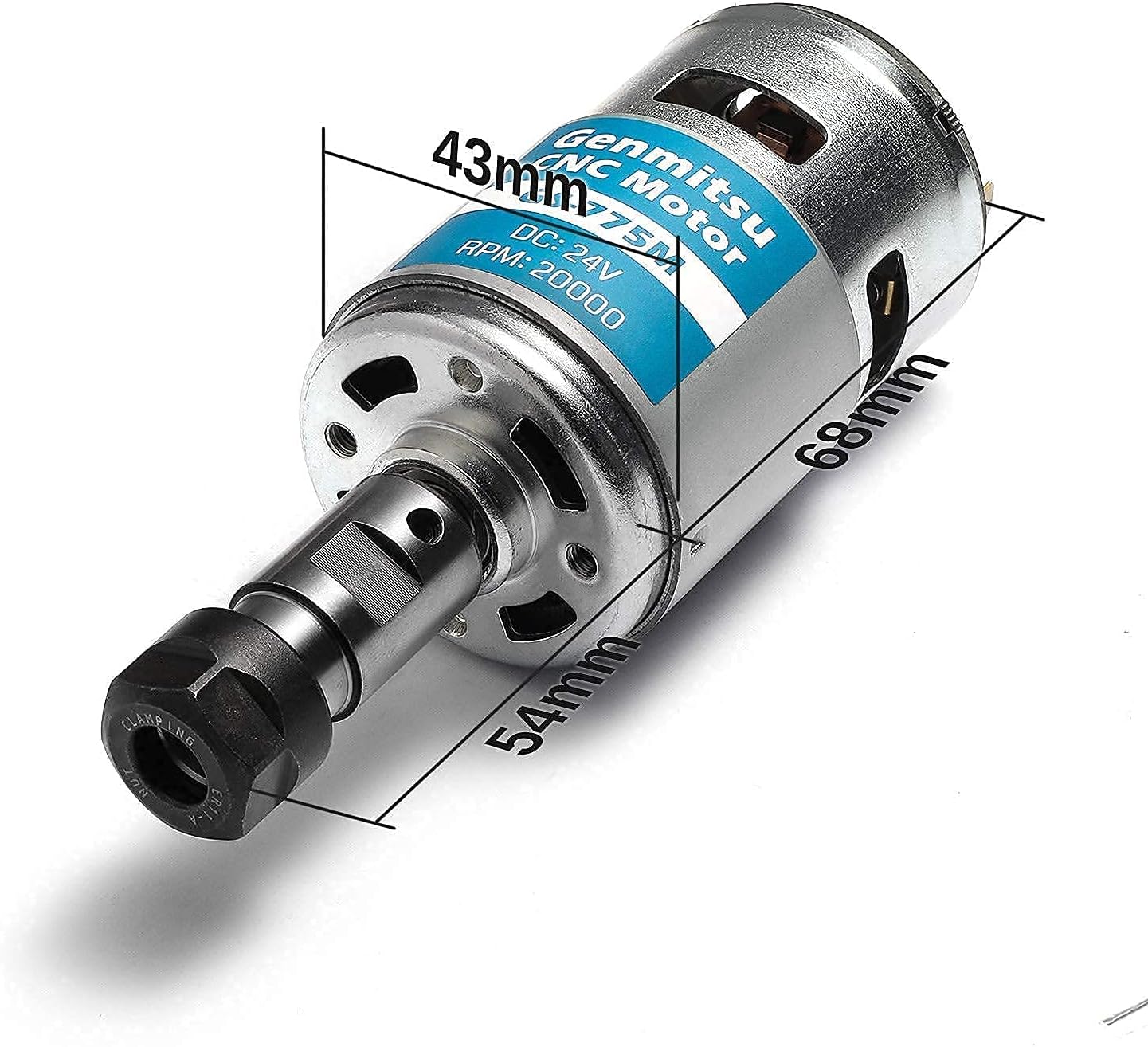
Figure 8.1: Dimensions of the GS-775M spindle motor, indicating its compact size.
9. Waranti dan Sokongan
For any questions, technical assistance, or warranty inquiries, please contact SainSmart customer support. Refer to the official SainSmart website or the contact information provided with your product for the most up-to-date support channels.
Additional resources, including assembly guides and troubleshooting tips, can often be found on the SainSmart wiki page or their official support forums.
Note: Specific warranty terms and conditions may vary by region and purchase date. Please retain your proof of purchase.


