pengenalan
This manual provides essential instructions for the safe and effective operation of your GoolRC WLtoys XKS A180 RC Airplane. The A180 is a 2.4Ghz, 2-channel remote control aircraft featuring a 6-axis gyroscope system for stable flight, an adjustable rudder, and a powerful brushless motor. Constructed from durable EPP foam, it offers good resistance to impacts. Please read this manual thoroughly before first use and retain it for future reference.
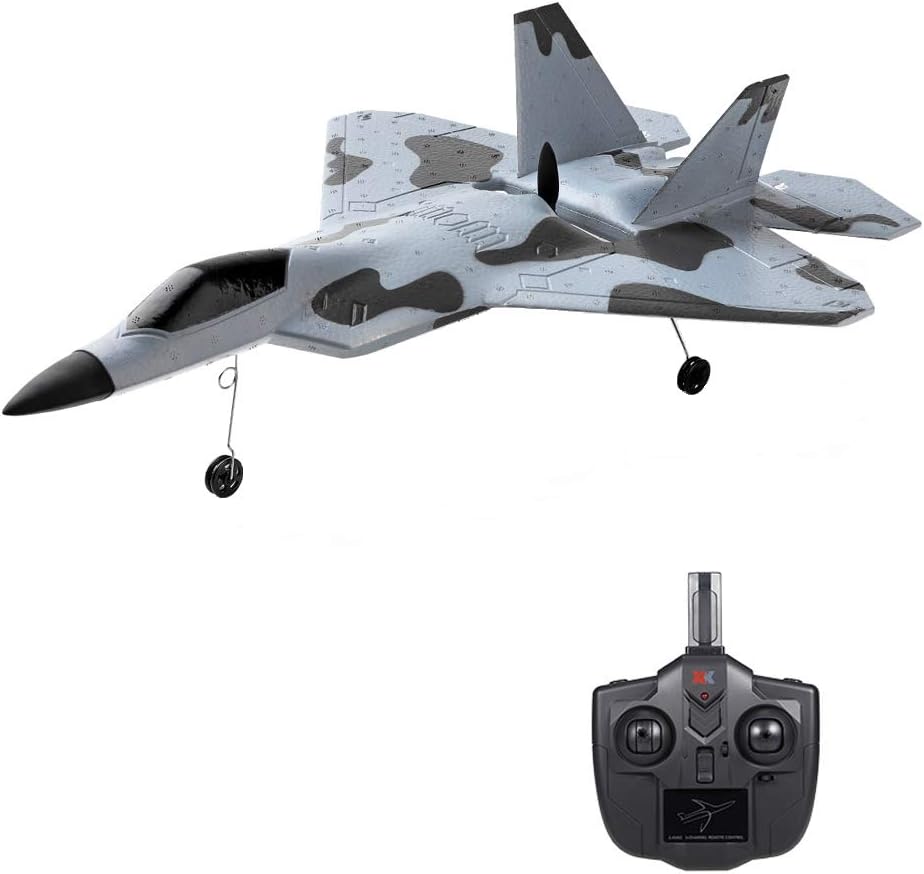
Image: The GoolRC WLtoys XKS A180 RC Airplane, a grey and black fighter jet model, shown alongside its black remote control unit.
Apa yang ada dalam Kotak
Sahkan bahawa semua komponen yang disenaraikan di bawah disertakan dalam pakej anda:
- Pesawat RC
- Alat Kawalan Jauh
- Airplane Battery
- Baling-baling ganti
- Kabel USB (untuk mengecas)
- Pemutar skru
- Manual Pengguna
- Landing Gear Kit

Image: A grid displaying all included components: RC airplane, remote controller, spare propeller, USB cable, screwdriver, user manual, landing gear kit, and airplane battery.
Arahan Persediaan
- Membongkar: Carefully remove the RC airplane and all accessories from its packaging.
- Perhimpunan: Attach the wings and landing gear to the airplane using the provided screws and screwdriver. Ensure all connections are secure.
- Pengecasan Bateri: Connect the airplane battery to the USB charging cable. Plug the USB cable into a suitable USB power source. Charge the battery for approximately 30-60 minutes, or until the charging indicator shows a full charge. Do not overcharge.
- Airplane Battery Installation: Once charged, carefully insert the airplane battery into its designated compartment within the aircraft. Ensure it is connected correctly and secured.
- Bateri Alat Kawalan Jauh: Insert 4 x 1.5V AA batteries (not included) into the remote controller. Observe correct polarity.
Arahan Operasi
Senarai Semak Pra-Penerbangan
- Ensure both the airplane and remote controller batteries are fully charged.
- Verify all parts are securely assembled.
- Choose an open area free from obstacles, people, and animals for flight.
- Semak keadaan cuaca; elakkan terbang dalam angin kencang atau hujan.
Binding and Calibration
- Hidupkan alat kawalan jauh.
- Turn on the airplane. Place the airplane on a flat, level surface to allow the gyroscope to calibrate properly.
- Wait for the remote controller and airplane to bind. A successful bind is usually indicated by a solid light on the airplane and/or a beep from the remote.
Mod Penerbangan
The A180 features two primary flight modes:
- 6G Mode (Automatic Stabilization): This mode utilizes the 6-axis gyroscope for enhanced flight stability. When the joystick is released, the aircraft will automatically maintain a stable flight attitude. This mode is ideal for beginners.

Image: The GoolRC A180 RC Airplane flying steadily through clouds, illustrating the 6-axis gyroscope's automatic stabilization mode.
- 3D Mode (Aerobatic Flight): With the 3-axis gyroscope, this mode allows for precise control and enables advanced maneuvers such as rolls, somersaults, and inverted flight. The remote control reaction is more sensitive in this mode. This mode is suitable for experienced pilots.

Image: The GoolRC A180 RC Airplane leaving a smoke trail during an aerobatic maneuver, demonstrating the 3-axis gyroscope's 3D flight mode.
Switch between 3D and 6G modes using the designated button on the remote controller.
Rudder Adjustment
The remote control offers small and large rudder settings.
- Small Rudder: Provides softer, less sensitive control, recommended for beginners.
- Large Rudder: Offers more sensitive and flexible control, suitable for experienced pilots and aerobatics.
Adjust the rudder setting on the remote controller according to your skill level and the flight environment.
Berlepas dan Mendarat
- Berlepas:
- Pelancaran Tangan: Hold the aircraft firmly and throw it vigorously against the wind, ensuring it is in the correct flight attitude. Gradually increase the throttle to 100% as it leaves your hand.
- Ground Take-off: Place the aircraft on a flat, relatively soft ground (like grass). Confirm that each rudder is centered and correctly oriented. Gently pull the throttle stick up to gradually increase power to 100% until the aircraft takes off.

Image: Diagrams illustrating the correct and incorrect methods for hand launching the RC airplane, and the proper procedure for ground take-off.
- Kawalan Penerbangan: Use the control sticks on the remote to maneuver the airplane. The left stick typically controls throttle and rudder (yaw), while the right stick controls elevator (pitch) and ailerons (roll).
- Pendaratan: Reduce the throttle gradually and gently lower the nose of the airplane. Aim for a smooth, controlled descent onto a flat surface. Once on the ground, fully reduce the throttle to stop the propeller.

Image: The GoolRC A180 RC Airplane in flight, with icons highlighting its 3-channel control, 3-axis and 6-axis gyroscope switch, and 1106 brushless motor.

Image: The 2.4 GHz remote control for the GoolRC A180 RC Airplane, showing its antenna, power indicator, and power switch, with a stated range of 200 meters.
Penyelenggaraan
- Pemeriksaan: Regularly inspect the airplane for any damage to the EPP foam, propeller, landing gear, or control surfaces after each flight.
- Pembersihan: Clean the aircraft with a soft, dry cloth. Avoid using water or chemical cleaners that could damage electronic components or foam.
- Penggantian Kipas: If the propeller is damaged, replace it with the provided spare propeller or an official replacement part to ensure optimal flight performance and safety.
- Penjagaan Bateri: Store batteries in a cool, dry place. Do not leave batteries fully charged or fully discharged for extended periods. Follow all battery safety guidelines.

Imej: Dari dekat view of the underside of the GoolRC A180 RC Airplane, highlighting the 1106 5350KV brushless motor, which provides efficient and powerful flight.
Menyelesaikan masalah
| Masalah | Kemungkinan Punca | Penyelesaian |
|---|---|---|
| Airplane does not respond to remote. |
|
|
| Airplane flies erratically or is unstable. |
|
|
| Propeller does not spin. |
|
|
Spesifikasi
- Jenama: GoolRC
- model: XKS A180
- Bahan: EPP Foam
- Motor: 1106 5350KV Brushless Motor
- Sistem Kawalan: 2.4Ghz, 2 Channel
- Giroskop: 3-axis / 6-axis switchable
- Umur Disyorkan: 16 tahun dan ke atas
- Berat Barang: Kira-kira 1.55 paun
- Dimensi Pakej: 17.6 x 12.5 x 4 inci

Image: The underside of the GoolRC A180 RC Airplane, showing illuminated red and green LED searchlights, designed to enhance visibility during night flights.
Maklumat Keselamatan
Sila patuhi langkah keselamatan berikut untuk mengelakkan kecederaan atau kerosakan:
- Produk ini disyorkan untuk pengguna berumur 16 tahun ke atas.
- Always operate the aircraft in open, unobstructed areas, away from people, buildings, power lines, and water bodies.
- Do not fly in adverse weather conditions such as strong winds, rain, or lightning.
- Keep hands, face, and loose clothing away from the rotating propeller.
- Never attempt to catch a flying aircraft.
- Ensure the battery is properly charged and installed before each flight.
- Turn off the aircraft and remote control when not in use.
- Do not modify or disassemble the aircraft or its components, as this may cause malfunction or injury.
Waranti dan Sokongan
Specific warranty details for the GoolRC WLtoys XKS A180 RC Airplane are not provided in this manual. For warranty information, technical support, or replacement parts, please refer to the product packaging or contact GoolRC customer service directly through their official webtapak atau peruncit tempat produk itu dibeli.