1. Pengenalan
Thank you for choosing the Ourlife Kids Camera OU-630. This digital camera is designed for children, offering 1080p Full HD video recording, 12MP photo resolution, and a unique 60x macro magnification function for exploring the micro-world. It features a 3.5-inch large screen, various creative filters, games, and music playback. Please read this manual carefully to ensure proper use and maintenance of your camera.
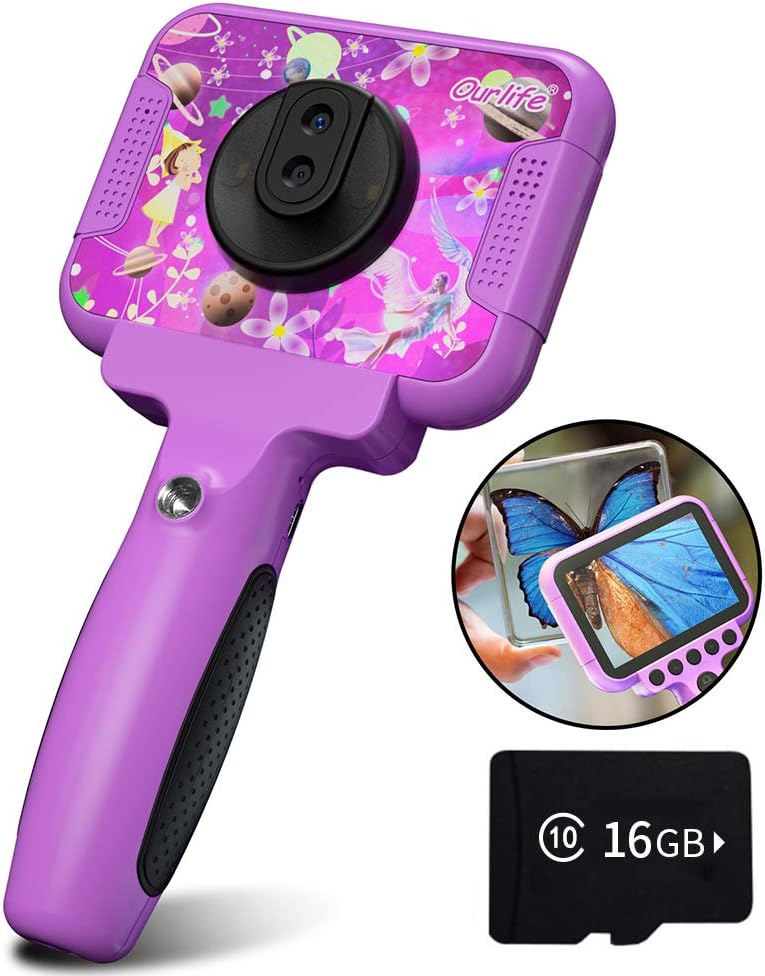
Image 1.1: The Ourlife Kids Camera OU-630, highlighting its design and macro capability.
2. Kandungan Pakej
Sila semak pakej untuk memastikan semua item ada:
- Kids Camera x 1
- 16GB TF Card x 1
- Base Bracket x 1
- Kabel Pengecasan USB x 1
- Manual Pengguna x 1
- Neck Lanyard x 1
- Tali Tangan x 1

Image 2.1: Contents of the Ourlife Kids Camera OU-630 package.
3. Produk Lebihview
Biasakan diri anda dengan komponen dan kawalan kamera:
- Skrin Paparan: Skrin berwarna 3.5 inci untuk viewfoto, video dan menu navigasi.
- Kanta Utama: For standard photography and video.
- Kanta Makro: Dedicated lens for 60x magnification.
- Butang Kawalan: M (Menu), Up, OK, Down, Power, Shutter/LED.
- pemegang: Ergonomically designed for child-friendly grip.
- Port USB: Untuk pengecasan dan pemindahan data.
- Slot Kad TF: Untuk sisipan kad memori.

Image 3.1: Key features and specifications of the Ourlife Kids Camera OU-630.
Jadual Fungsi Butang
| Butang | Mod Kamera | Mod Rakaman | Mod Muzik | Mod Permainan | Mod Main Semula |
|---|---|---|---|---|---|
| M | Kembali ke Menu | ||||
| ▲ | Change filters/Frames Long press: Zoom in | Change filters/Frames | Lagu sebelumnya | Bergerak ke kiri | Previous photo |
| OK | Long press: Open/Close LED light | OK | Choose music/story | OK | Main / Jeda |
| ▼ | Change filters/Frames Long press: Zoom out | Change filters/Frames | Lagu seterusnya | Bergerak ke kanan | Foto seterusnya |
| ⏻ | Switch to Splicing mode | Kembali ke Menu | NULL | NULL | Padam |
| ◎ | Ambil Foto | Kembali ke Menu | NULL | NULL | NULL |
Image 3.2: Detailed functions of each button across different modes.
4. Persediaan
4.1. Mengecas Kamera
Before first use, fully charge the camera. Connect the included USB charging cable to the camera's USB port and to a compatible USB power source (e.g., computer, wall adapter). The charging indicator light will show the charging status. A full charge provides approximately 3 hours of use.
4.2. Memasukkan Kad TF
The camera requires a TF (MicroSD) card to store photos and videos. A 16GB TF card is included. Locate the TF card slot on the side of the camera. Gently insert the TF card with the metal contacts facing down until it clicks into place. To remove, push the card in again until it springs out.
5. Arahan Operasi
5.1. Hidupkan/Mati Kuasa
- Untuk menghidupkan, tekan dan tahan Power button (⏻) sehingga skrin menyala.
- Untuk mematikan, tekan dan tahan Power button (⏻) sehingga skrin dimatikan.
5.2. Navigasi Menu
Gunakan Atas (▲) dan Bawah (▼) buttons to navigate through menu options. Press the butang OK to confirm a selection. Press the Butang M (Menu). to return to the previous menu or the main menu.
5.3. Mengambil Foto
- Daripada menu utama, pilih Ikon kamera dan tekan OK.
- Bingkaikan tangkapan anda menggunakan skrin.
- Tekan ke Shutter button (◎) untuk mengambil gambar.
- Gunakan Atas (▲) dan Bawah (▼) buttons to change filters or frames. Long press Atas (▲) untuk mengezum masuk, tekan lama Bawah (▼) untuk mengezum keluar.
5.4. Merakam Video
- Daripada menu utama, pilih ikon video dan tekan OK.
- Tekan ke Shutter button (◎) untuk memulakan rakaman.
- Tekan ke Shutter button (◎) sekali lagi untuk menghentikan rakaman.
- Gunakan Atas (▲) dan Bawah (▼) buttons to change filters or frames during recording.
5.5. Fungsi Makro
The camera features a dedicated macro lens for 60x magnification, ideal for observing small objects. The optimal focal length for macro photography is 20-40mm.
- To switch between the main lens and macro lens, long press the Shutter button (◎).
- When in macro mode, position the camera close to the subject (20-40mm distance).
- Use the included base bracket for stability during macro shots to prevent hand shake.
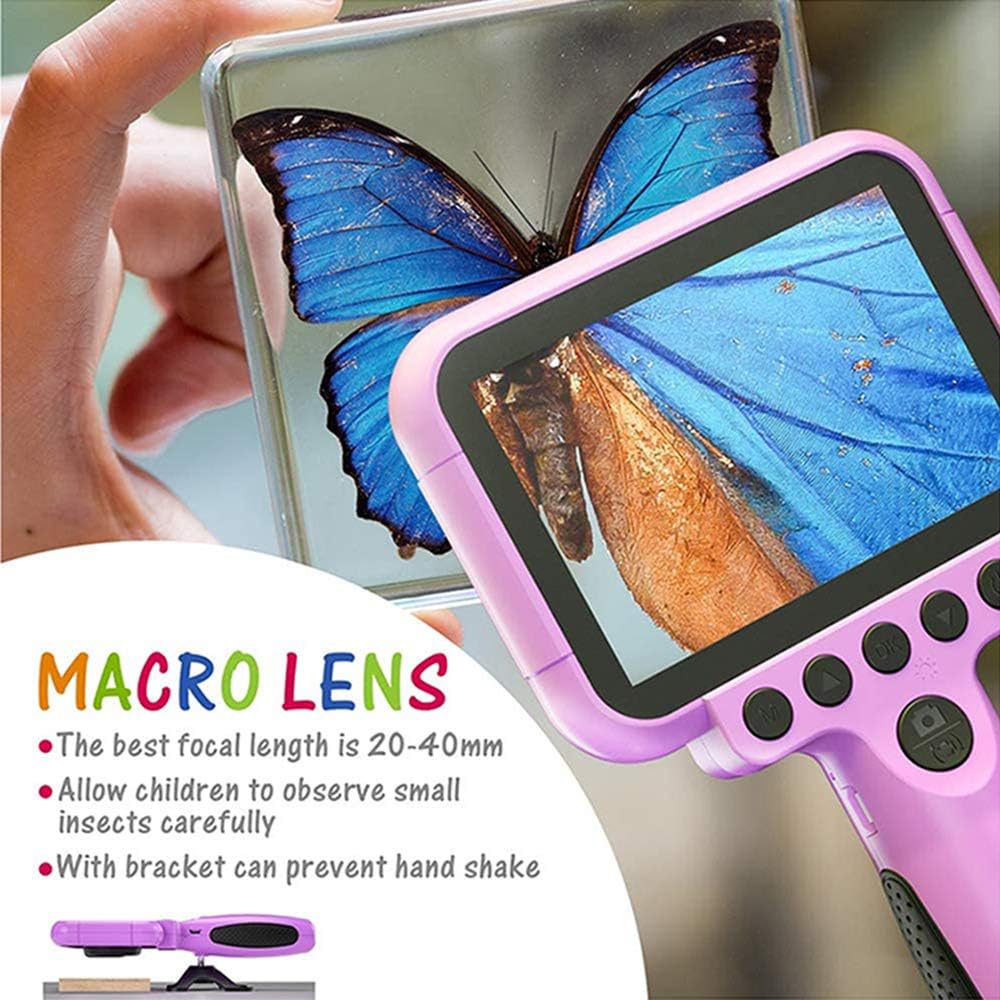
Image 5.1: Demonstrating the macro lens function for detailed observation.

Image 5.2: Switching between HD and Macro lenses.
5.6. Patchwork Mode (Splicing Mode)
This mode allows you to combine two separate photos into one. It includes various border patterns.
- In Camera Mode, press the Power button (⏻) to switch to Splicing (Patchwork) mode.
- Follow the on-screen prompts to take two photos that will be merged.
- Select from 9 available border patterns.

Image 5.3: Using the Patchwork Mode to combine images.
5.7. Mod Muzik
The camera supports MP3 music playback. Store your favorite music files on the TF card. From the main menu, select the Ikon muzik dan tekan OK. Gunakan Atas (▲) dan Bawah (▼) buttons to select songs, and OK untuk bermain/jeda.
5.8. Permainan
The camera includes pre-installed games for entertainment. From the main menu, select the Game icon dan tekan OK. Use the navigation buttons to play.
5.9. Mod Main balik
Kepada view your captured photos and videos, select the Photos/Video Playback icon daripada menu utama dan tekan OK. Gunakan Atas (▲) dan Bawah (▼) buttons to browse, and OK to play videos or view photos. To delete a file, tekan butang Power button (⏻) sementara viewdalam itu.
5.10. Tetapan
Access camera settings by selecting the ikon tetapan from the main menu. Here you can adjust various parameters such as date/time, language, resolution, and more.
6. Penyelenggaraan
- Pastikan kamera bersih dengan mengelapnya dengan kain lembut dan kering.
- Elakkan mendedahkan kamera kepada suhu yang melampau, cahaya matahari langsung atau kelembapan.
- Jangan cuba membuka atau membaiki kamera sendiri.
- Ensure the TF card is inserted correctly to prevent data loss.
- Charge the camera regularly to maintain battery health.
7. Penyelesaian masalah
- Kamera tidak dihidupkan: Pastikan bateri dicas. Sambungkan ke sumber kuasa dan cuba lagi.
- Tidak boleh mengambil gambar/video: Check if a TF card is inserted and if it has sufficient storage space.
- Kualiti imej yang lemah: Ensure the lens is clean. Check lighting conditions. For macro shots, ensure correct focal distance (20-40mm).
- Kamera membeku: Tekan dan tahan butang Kuasa untuk memaksa mula semula.
- TF card error: Reinsert the TF card. If the issue persists, try formatting the card (this will erase all data) or use a different TF card.
8. Spesifikasi
| Ciri | Perincian |
|---|---|
| Nombor Model | OU-630 |
| Resolusi Pegun Berkesan | 12 MP |
| Resolusi Video | 1080p |
| Saiz Skrin | 3.5 Inci |
| Penstabilan Imej | digital |
| Jenis Kanta | Macro (60x zoom) |
| Jenis Bateri | 1 Polimer Litium (termasuk) |
| Teknologi Ketersambungan | USB |
| Jenis Media yang Disokong | Kad SD |
| Mod Penangkapan | Loop recording, Continuous shooting, Timed photo, Macro photography, Filter photos |
| Dimensi Item (D x W x H) | 3.94"D x 7.28"W x 0.79"H |
9. Waranti & Sokongan
This Ourlife Kids Camera OU-630 comes with a Waranti 12 bulan from the date of purchase. This warranty covers manufacturing defects and workmanship. It does not cover damage caused by misuse, accidents, unauthorized repairs, or normal wear and tear.
For technical support, warranty claims, or any questions regarding your product, please contact Ourlife customer service. Refer to the contact information provided on the product packaging or the official Ourljika webtapak.


