Arahan Keselamatan Penting
Baca semua arahan dengan teliti sebelum menggunakan perkakas ini. Simpan manual ini untuk rujukan pada masa hadapan. Kegagalan mematuhi arahan ini boleh mengakibatkan renjatan elektrik, kebakaran atau kecederaan.
- Jangan cuba mengendalikan ketuhar ini dengan pintu terbuka kerana ini boleh mengakibatkan pendedahan berbahaya kepada tenaga gelombang mikro.
- Jangan letakkan sebarang objek di antara muka hadapan ketuhar dan pintu atau biarkan tanah atau sisa yang lebih bersih terkumpul pada permukaan pengedap.
- Jangan kendalikan ketuhar jika ia rosak. Adalah penting bahawa pintu ketuhar ditutup dengan betul dan tiada kerosakan pada: (1) Pintu (bengkok), (2) Engsel dan selak (pecah atau longgar), (3) Kedap pintu dan permukaan pengedap.
- Ketuhar tidak boleh dilaraskan atau dibaiki oleh sesiapa kecuali kakitangan perkhidmatan yang berkelayakan.
- Pastikan perkakas dibumikan dengan betul.
- Jangan panaskan cecair atau makanan lain dalam bekas tertutup kerana ia boleh meletup.
- Always supervise children when the microwave is in use, especially when the Child Lock function is not active.
Produk Selesaiview
The Candy MIG25BNT is a 900W, 25-liter built-in microwave oven designed for seamless integration into your kitchen. It features a sleek stainless steel design, a digital display, and offers various cooking functions including microwave, grill, and combination modes.
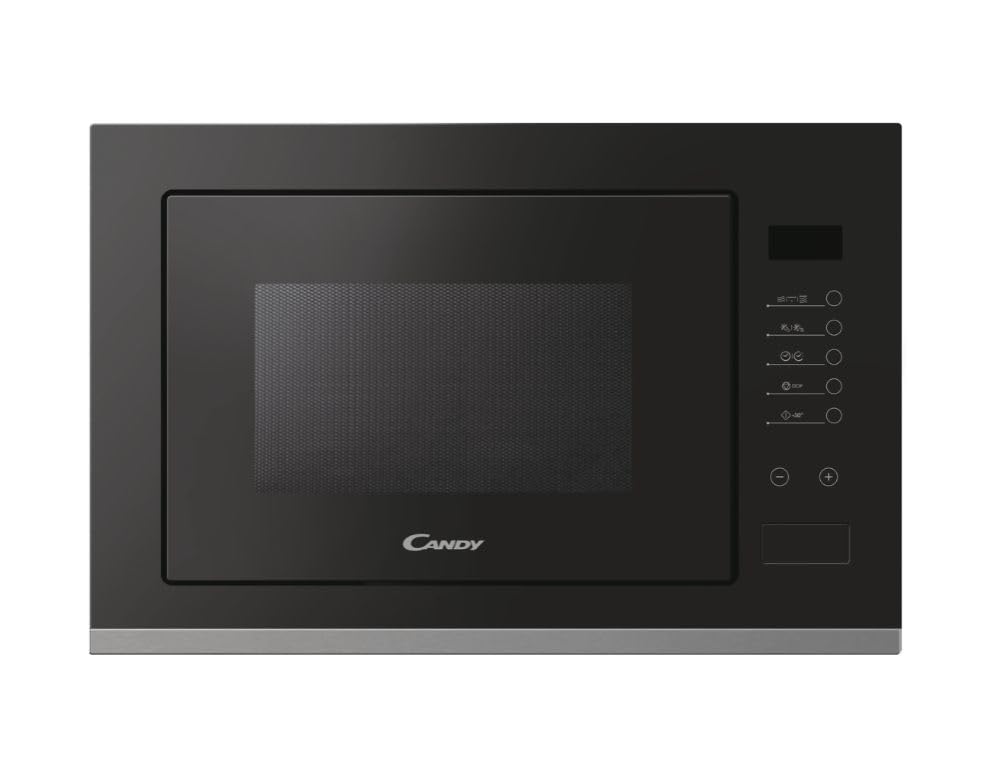
Rajah 1: Depan view of the Candy MIG25BNT Built-in Microwave Oven. This image shows the black finish, digital display, and control panel.
Ciri-ciri Utama:
- Reka Bentuk Terbina Dalam: Seamlessly integrates into kitchen cabinetry.
- Fungsi Grill: Allows for grilling and browning of food.
- Program Memasak Automatik: 13 pre-set programs for various dishes.
- Fungsi Mula Pantas: Instant 30-second cooking at maximum power.
- Rapid Defrost: Defrost food quickly by weight or time.
- Kunci Kanak-kanak: Mencegah operasi tidak sengaja oleh kanak-kanak.
- Paparan Digital: Clear interface for settings and time.
Pemasangan dan Persediaan
This microwave oven is designed for built-in installation. Proper installation is crucial for safe and efficient operation. It is recommended that installation be performed by a qualified technician.
Keperluan Pemasangan:
- Ensure the cabinet opening dimensions match the microwave's specifications. The appliance dimensions are approximately 59.5 cm (width) x 40.1 cm (height) x 38.8 cm (depth).
- Provide adequate ventilation space around the appliance as specified in the detailed installation guide (not included in this general manual).
- The electrical outlet must be easily accessible and properly grounded.
- Jangan halang sebarang bukaan pengudaraan pada ketuhar.
Refer to the separate installation template and instructions provided with the packaging for detailed steps on mounting the microwave into your cabinet.
Arahan Operasi
Familiarize yourself with the control panel before operating the microwave oven.
Panel Kawalan Terlaluview:
The microwave features a digital display and touch controls. Specific button functions will be detailed in the full product manual, but generally include:
- Time/Weight Adjustment: Dials or buttons to set cooking time or food weight.
- Tahap kuasa: Select microwave power (up to 8 levels).
- Mula / Jeda: Untuk memulakan atau menghentikan sementara memasak.
- Berhenti/Kosongkan: To cancel a program or clear settings.
- Grill: Mengaktifkan fungsi gril.
- Memasak Gabungan: Combines microwave and grill functions.
- Menu Auto: Accesses pre-set automatic cooking programs.
- Pencairan: Initiates the defrost function.
- Kunci Kanak-kanak: Activates or deactivates the child safety lock.
Asas Memasak Microwave:
- Letakkan makanan di dalam bekas yang selamat digunakan di dalam ketuhar gelombang mikro.
- Tutup pintu ketuhar dengan selamat.
- Select the desired power level (e.g., 900W for maximum power).
- Set the cooking time using the time adjustment controls.
- Tekan butang Mula untuk mula memasak.
Fungsi Grill:
The grill function is ideal for browning and crisping food. Use heat-resistant dishes.
- Letakkan makanan di atas rak gril (jika disediakan) dalam pinggan tahan panas.
- Tutup pintu ketuhar.
- Tekan butang Grill.
- Tetapkan masa memanggang yang dikehendaki.
- Tekan butang Mula.
Program Memasak Automatik:
The oven features 13 automatic cooking programs. Select the desired program from the menu, and the oven will automatically set the appropriate cooking time and power level based on the food type and weight.
- Letakkan makanan di dalam ketuhar.
- Tekan butang Auto Menu.
- Select the desired program number or icon.
- Masukkan berat makanan jika digesa.
- Tekan butang Mula.
Fungsi Mula Pantas:
For quick reheating, press the Quick Start button (often labeled "Start" or "30 Sec"). Each press adds 30 seconds of cooking time at maximum power.
Fungsi nyahbeku:
The rapid defrost function allows you to defrost food by weight or time.
- Letakkan makanan sejuk beku di dalam ketuhar.
- Tekan butang Nyahbeku.
- Select defrost by weight or time.
- Enter the weight or time.
- Tekan butang Mula.
Kunci Kanak-kanak:
To activate the Child Lock, typically press and hold a specific button (e.g., "Stop/Clear" or a dedicated lock button) for a few seconds until an indicator appears on the display. Repeat the process to deactivate.
Penyelenggaraan dan Pembersihan
Regular cleaning and maintenance ensure the longevity and optimal performance of your microwave oven.
- Pembersihan Dalaman: Lap rongga ketuhar selepas setiap penggunaan dengan iklanamp cloth. For stubborn food splatters, boil a cup of water with lemon slices inside the oven for a few minutes to loosen residue, then wipe clean.
- Pembersihan Luaran: Bersihkan permukaan luar, termasuk panel kawalan dan pintu, dengan lembut, damp cloth. For stainless steel surfaces, use a non-abrasive stainless steel cleaner.
- Pengedap Pintu: Periksa dan bersihkan pengedap pintu dan permukaan pengedap secara berkala untuk memastikan penutupan yang betul dan mencegah kebocoran tenaga gelombang mikro.
- Meja Putar: The glass turntable and roller ring can be removed and washed in warm soapy water or in a dishwasher.
- Jangan guna: Abrasive cleaners, steel wool, or harsh chemicals, as these can damage the oven surfaces.
- Sentiasa Cabut plag: Putuskan sambungan perkakas daripada bekalan kuasa sebelum membersihkan.
Menyelesaikan masalah
Before contacting customer service, try the following troubleshooting steps for common issues:
| Masalah | Kemungkinan Punca | Penyelesaian |
|---|---|---|
| Oven tidak bermula. | Kord kuasa tidak dipasang; Pintu tidak ditutup dengan betul; Fius terputus atau pemutus litar tersandung. | Pastikan kord kuasa dipasang dengan selamat; Tutup pintu dengan kuat; Periksa fius rumah/pemutus litar. |
| Makanan tidak dipanaskan. | Incorrect cooking time or power level set; Microwave-safe dish not used. | Adjust cooking time and power level; Use appropriate microwave-safe cookware. |
| Sparking inside oven. | Logam atau kerajang di dalam ketuhar; Sisa makanan pada dinding rongga. | Keluarkan sebarang objek logam; Bersihkan bahagian dalam ketuhar dengan teliti. |
| Paparan menunjukkan kod ralat. | Kerosakan dalaman. | Unplug the oven for a few minutes, then plug back in. If the error persists, contact service. |
Spesifikasi
Detailed technical specifications for the Candy MIG25BNT Microwave Oven:
- model: MIG25BNT
- Jenis: Ketuhar Gelombang Mikro Terbina Dalam dengan Pemanggang
- kapasiti: 25 Liter
- Kuasa Gelombang Mikro: 900 Watt
- Tahap Kuasa: 8
- Jenis Pemasangan: Bersepadu
- Dimensi (W x H x D): 59.5 cm x 40.1 cm x 38.8 cm
- Berat: 19 Kilogram
- Bahan: Stainless Steel (interior and exterior)
- warna: Hitam
- Jenis Kawalan: Digital Display, Touch Interface
- Ciri Khas: Compact Design, Grill Function, 13 Automatic Cooking Programs, Quick Start, Defrost, Child Lock.
Waranti dan Sokongan
This product comes with a manufacturer's warranty. Please refer to the warranty card included in the product packaging for specific terms and conditions, including the warranty period and coverage details.
For technical assistance, service requests, or to order spare parts, please contact Candy customer support. Contact information can typically be found on the manufacturer's webtapak atau dalam dokumentasi jaminan.
When contacting support, please have your product model (MIG25BNT) and serial number ready.


