pengenalan
Thank you for choosing the Wireless Gear True Wireless Case Earbuds. These in-ear headphones are designed for comfort and convenience, offering a seamless audio experience with advanced features. This manual provides detailed instructions on how to set up, operate, maintain, and troubleshoot your new earbuds to ensure optimal performance.
Ciri-ciri utama termasuk:
- Mikrofon Bebas Tangan: Integrated microphone for seamless transition between music and calls.
- Sesuai Selesa: Flexible Fit-Gel ear gels ensure a secure and comfortable fit for extended wear.
- Masa Main Dilanjutkan: Up to 8 hours of continuous play and talk time.
- Sarung Pengecasan Mudah Alih: The included charging case provides 4-5 full recharges, extending total playtime significantly.
- Extreme Bass Sound: High-performance wireless earbuds delivering rich, superior sound with ultra-deep bass.
Kandungan Pakej
Sila tandai kotak untuk item berikut:
- Wireless Gear True Wireless Case Earbuds (Left and Right)
- Sarung Pengecas Mudah Alih
- Kabel Pengecas USB
- Manual Pengguna
- Multiple sizes of Fit-Gel ear tips
Produk Selesaiview
Familiarize yourself with the components of your Wireless Gear True Wireless Case Earbuds.

Imej 1: The Wireless Gear True Wireless Earbuds resting inside their open charging case. The earbuds are black with a sleek design, and the case is also black with a translucent lid, showing the charging indicators.

Imej 2: Depan view of the retail packaging for the Wireless Gear True Wireless Case Earbuds. The box prominently displays the product name, brand logo, and key features such as "8 HRS" playtime, "4-5 RECHARGES PER FULL CASE", and "EXTREME BASS".
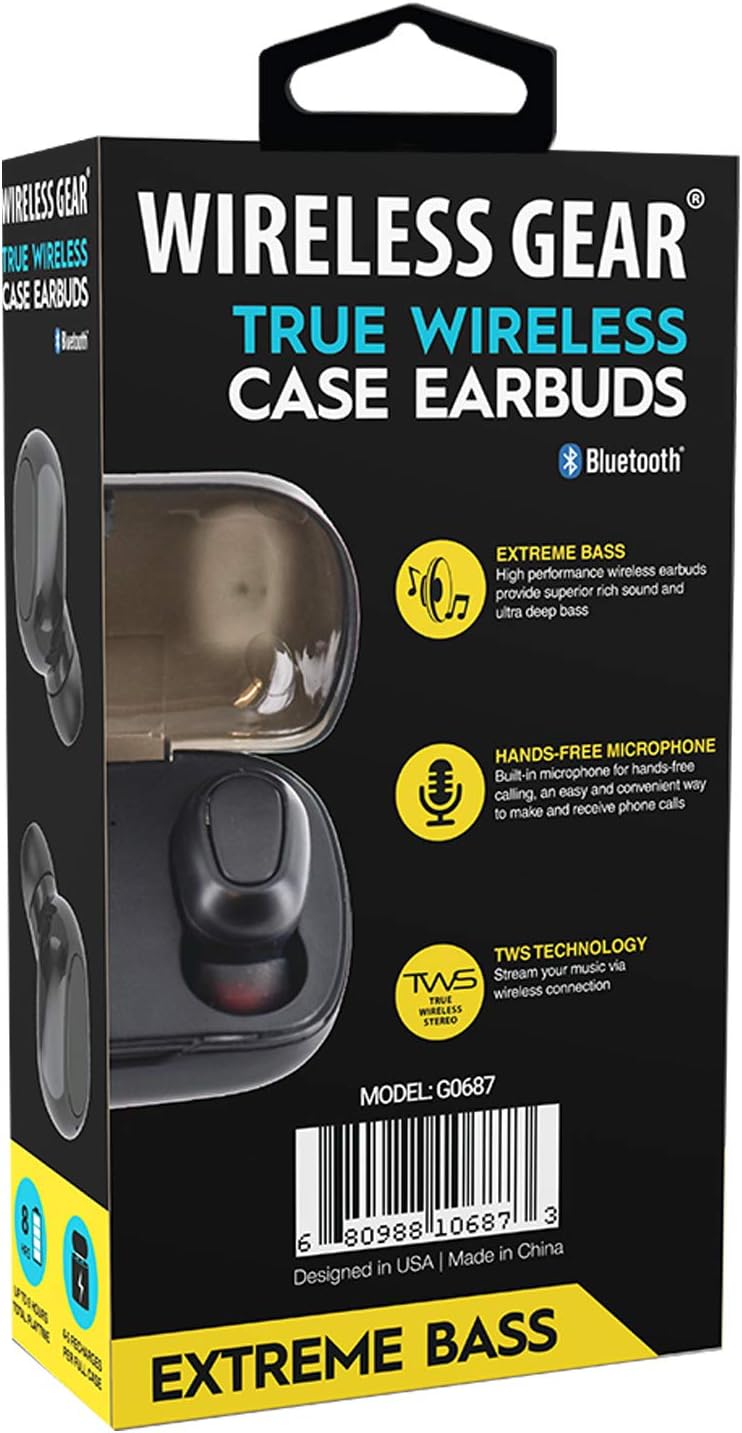
Imej 3: belakang view of the retail packaging, highlighting additional features like "Hands-Free Microphone" and "TWS Technology". The model number G0687 and UPC 0680988106873 are visible at the bottom.
Komponen fon telinga:
- Multi-function Touch/Button Area: For controlling playback, calls, and voice assistant.
- mikrofon: Untuk panggilan bebas tangan.
- Penunjuk LED: Shows pairing status, charging status, and power.
- Mengecas Kenalan: Terletak di bahagian bawah setiap fon telinga.
Komponen Kes Pengecasan:
- Slot Pengecasan Earbud: Pegang dan cas fon telinga dengan selamat.
- Charging Case LED Indicators: Tunjukkan status pengecasan sarung dan fon telinga.
- Port Pengecasan USB: For charging the case itself.
Persediaan
1. Pengecasan Awal
- Place both earbuds into the charging case. Ensure they are properly seated so the charging contacts align.
- Connect the USB charging cable to the charging port on the case and the other end to a USB power source (e.g., wall adapter, computer USB port).
- The LED indicators on the earbuds and/or case will illuminate to show charging status. A full charge for the case and earbuds typically takes 1-2 hours.
- Once fully charged, disconnect the charging cable. The case holds enough power for 4-5 full earbud recharges.
2. Berpasangan dengan Peranti Anda
- Hidupkan kuasa: Open the charging case, or remove the earbuds from the case. They should automatically power on and enter pairing mode. The LED indicator on one earbud will flash, indicating it's ready to pair.
- Aktifkan Bluetooth: Pada telefon pintar, tablet atau peranti lain yang didayakan Bluetooth anda, pergi ke tetapan Bluetooth dan hidupkan Bluetooth.
- Cari untuk Peranti: Your device will scan for available Bluetooth devices. Look for "Wireless Gear Earbuds" or a similar name in the list.
- Sambung: Select the earbuds from the list. Once connected, the LED indicator on the earbud will stop flashing or change color. You will hear an audible confirmation.
- Penyambungan Semula Automatik: After the initial pairing, the earbuds will automatically connect to the last paired device when removed from the case and Bluetooth is active on your device.
Note: If pairing fails, turn off Bluetooth on your device, place earbuds back in the case, close and reopen, then try again.
Arahan Operasi
Basic Controls (Touch/Button Functions):
| Fungsi | Tindakan |
|---|---|
| Hidupkan kuasa | Keluarkan dari bekas pengecasan. |
| Matikan Kuasa | Letakkan semula ke dalam bekas pengecas. |
| Main/Jeda Muzik | Ketik sekali pada salah satu fon telinga. |
| Trek Seterusnya | Ketik dua kali pada fon telinga Kanan. |
| Trek Sebelumnya | Ketik dua kali pada fon telinga Kiri. |
| Jawab/Tamatkan Panggilan | Ketik sekali pada salah satu fon telinga semasa panggilan masuk. |
| Tolak Panggilan | Tekan dan tahan salah satu fon telinga selama 2 saat semasa panggilan masuk. |
| Aktifkan Pembantu Suara | Ketik tiga kali pada salah satu fon telinga. |
| Kelantangan Naik | Press and hold Right earbud. |
| Kelantangan Kurang | Press and hold Left earbud. |
Note: Specific touch/button functions may vary slightly. Refer to the quick start guide included in your package for precise controls if different.
Penyelenggaraan
Cleaning Your Earbuds and Case:
- Gunakan kain lembut, kering dan tidak berbulu untuk mengelap fon telinga dan bekas pengecas.
- Untuk kotoran degil, sedikit dampen kain dengan air atau pembersih yang lembut dan tidak melelas.
- Jangan gunakan bahan kimia yang keras, aerosol atau pembersih yang melelas.
- Pastikan sesentuh pengecasan pada kedua-dua fon telinga dan bekas bersih dan bebas daripada serpihan untuk memastikan pengecasan yang betul.
- Remove ear tips and clean them separately with water and mild soap if necessary, then dry completely before reattaching.
Storan:
- Apabila tidak digunakan, sentiasa simpan fon telinga dalam bekas pengecasnya untuk melindunginya dan memastikan ia dicas.
- Store the device in a cool, dry place, away from extreme temperatures, humidity, and direct sunlight.
Penjagaan Bateri:
- Untuk memanjangkan hayat bateri, elakkan daripada menyahcas sepenuhnya fon telinga dan sarung dengan kerap.
- Cas peranti secara berkala, walaupun tidak kerap digunakan, untuk mengelakkan nyahcas yang dalam.
Menyelesaikan masalah
If you encounter issues with your Wireless Gear True Wireless Case Earbuds, try the following solutions:
- Fon telinga tidak berpasangan dengan peranti:
- Pastikan Bluetooth didayakan pada peranti anda.
- Pastikan fon telinga dicas.
- Place earbuds back in the case, close the lid, wait a few seconds, then open the lid and try pairing again.
- Forget/delete the earbuds from your device's Bluetooth list and re-pair.
- Ensure earbuds are within Bluetooth range (typically 10 meters/33 feet).
- Hanya satu fon telinga berfungsi:
- Pastikan kedua-dua fon telinga dicas.
- Place both earbuds back into the charging case, close the lid, and then remove them simultaneously. This often re-syncs them.
- Try resetting the earbuds (refer to specific reset instructions if available in the quick start guide, usually involves holding a button for a long time).
- Fon telinga tidak dicas:
- Pastikan kabel pengecasan disambungkan dengan selamat pada kedua-dua bekas dan sumber kuasa.
- Periksa sama ada sesentuh pengecasan pada fon telinga dan bahagian dalam sarung bersih dan bebas daripada serpihan.
- Cuba kabel USB atau penyesuai kuasa yang lain.
- Pastikan bekas pengecas itu sendiri mempunyai kuasa.
- Kualiti bunyi yang lemah atau sambungan terputus-putus:
- Bergerak lebih dekat ke peranti yang dipasangkan untuk mengurangkan gangguan.
- Elakkan halangan antara fon telinga dan peranti anda.
- Ensure there are no other strong wireless signals nearby causing interference.
- Clean the ear tips and earbud speakers.
Spesifikasi
| Ciri | Perincian |
|---|---|
| Nombor Model | G0687 |
| Teknologi Komunikasi Tanpa Wayar | Bluetooth |
| Teknologi Ketersambungan | Bluetooth |
| Faktor Bentuk | In-Ear (Intraurales) |
| warna | Hitam |
| Play/Talk Time | Sehingga 8 jam |
| Pengecasan Semula Kes Pengecasan | 4-5 full recharges |
| Jenis Bateri | Ion Litium (boleh dicas semula) |
| Ciri Khas | Bluetooth, Wireless, Microphone Included |
| Pengeluar | Aksesori Tanpa Wayar ESI |
| Dimensi Produk | 13.97 x 7.62 x 3.81 cm; 226.8 g (Package) |
| ASIN | B08DCTH7DW |
| UPC | 0680988106873 |
Waranti dan Sokongan
Maklumat Waranti:
Wireless Gear products are manufactured to the highest quality standards. For specific warranty details, please refer to the warranty card included with your purchase or visit the official Wireless Gear website. Typically, products come with a limited warranty covering manufacturing defects from the date of purchase.
Sokongan Pelanggan:
If you have any questions, require technical assistance, or need to report an issue, please contact Wireless Gear customer support. You can usually find contact information (phone number, email, or support portal) on the product packaging or the official brand webtapak.
Untuk bantuan lanjut, sila layari: Wireless Gear Support Page (Note: This is a placeholder link. Please refer to your product's official documentation for the correct support URL.)


