pengenalan
This manual provides detailed instructions for the Wireless Gear Bluetooth 5.0 True Wireless Stereo Sport Earhooks. Please read this manual carefully before use to ensure proper operation and to maximize the lifespan of your device.
Kandungan Pakej
Pakej harus mengandungi item berikut:
- Dua Pukul Telinga Tanpa Wayar
- Kes pengecasan
- Kabel Pengecas USB
- Manual pengguna
Produk Selesaiview
The Wireless Gear Sport Earhooks are designed for comfortable and secure wear during various activities. They feature touch controls and come with a portable charging case.

Image: Wireless Gear Sport Earhooks (white) inside their black zippered charging case, with the case lid open.
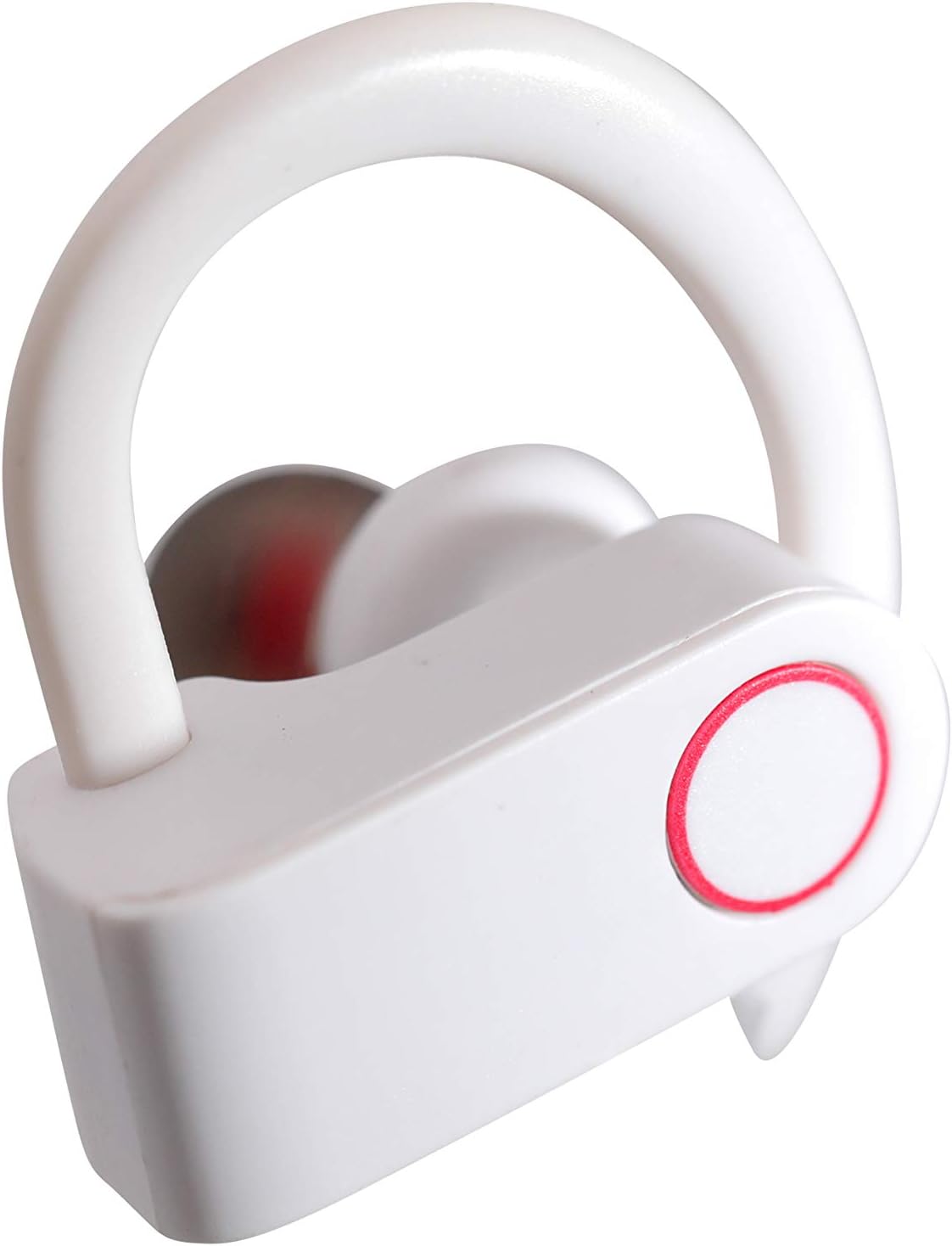
Image: A detailed close-up of a single white Wireless Gear Sport Earhook, highlighting the ear hook design and the circular touch control area with a red outline.
Persediaan
1. Pengecasan Awal
Sebelum penggunaan pertama, cas sepenuhnya fon telinga dan bekas pengecas.
- Letakkan kedua-dua fon telinga ke dalam bekas pengecas. Pastikan ia diletakkan dengan betul.
- Connect the USB charging cable to the charging case and a compatible USB power source (e.g., computer USB port, wall adapter).
- The indicator lights on the case and/or earbuds will show charging status. Refer to the product's specific light indicators for full charge notification.

Image: A person's hands are shown placing the white Wireless Gear Sport Earhooks into their open black charging case, with a laptop visible in the background.
2. Berpasangan dengan Peranti
The earbuds feature auto-pair and auto-power on functionality for seamless connection.
- Tanggalkan kedua-dua fon telinga daripada bekas pengecas. Ia akan dihidupkan secara automatik dan memasuki mod berpasangan.
- Pada peranti anda (telefon pintar, tablet, komputer riba), dayakan Bluetooth.
- Cari untuk "Wireless Gear Earhooks" or a similar name in the list of available Bluetooth devices.
- Select the device name to connect. Once connected, you will hear an audible confirmation.
- Jika gandingan gagal, letakkan semula fon telinga ke dalam bekas, tutup penutup, tunggu beberapa saat, dan kemudian ulangi langkah.

Image: The white Wireless Gear Sport Earhooks are displayed next to a black smartphone, illustrating their compact size and readiness for pairing.
Arahan Operasi
Hidupkan/Mati Kuasa
- Hidupkan kuasa: Tanggalkan fon telinga daripada bekas pengecas. Ia akan dihidupkan secara automatik.
- Matikan: Letakkan semula fon telinga ke dalam bekas pengecas. Ia akan dimatikan secara automatik.
Kawalan Sentuh
The earbuds feature convenient touch controls on the side of each earbud.
- Main/Jeda Muzik: Ketik sekali pada salah satu fon telinga.
- Lagu Seterusnya: Ketik dua kali pada fon telinga kanan.
- Lagu Sebelumnya: Ketik dua kali pada fon telinga kiri.
- Jawab/Tamatkan Panggilan: Ketik sekali pada salah satu fon telinga semasa panggilan masuk.
- Tolak Panggilan: Tekan dan tahan pada mana-mana fon telinga selama 2 saat semasa panggilan masuk.
- Activate Voice Assistant (Siri for iOS): Ketik tiga kali pada salah satu fon telinga.
Wearing the Earhooks
The contoured shape with behind-the-ear hooks and ear gels provides a secure and comfortable fit.
- Kenal pasti fon telinga kiri (L) dan kanan (R).
- Place the earbud into your ear canal and gently hook the ear hook over the back of your ear.
- Adjust the earbud and hook until it feels secure and comfortable.
Penyelenggaraan dan Penjagaan
- Pembersihan: Gunakan kain lembut, kering, bebas serabut untuk membersihkan fon telinga dan bekas pengecas. Jangan gunakan bahan kimia yang keras atau bahan yang melelas.
- Storan: Apabila tidak digunakan, sentiasa simpan fon telinga dalam bekas pengecasnya untuk melindunginya daripada habuk, kotoran dan kerosakan.
- Elakkan Air: These earbuds are not waterproof. Avoid exposure to excessive moisture, rain, or submersion in water.
- Suhu: Jangan dedahkan peranti kepada suhu yang melampau (panas atau sejuk).
Menyelesaikan masalah
| Masalah | Kemungkinan Punca | Penyelesaian |
|---|---|---|
| Fon telinga tidak dihidupkan. | Bateri lemah. | Cas fon telinga dan bekas pengecas sepenuhnya. |
| Tidak boleh berpasangan dengan peranti. | Bluetooth dimatikan pada peranti; fon telinga tidak dalam mod berpasangan; gangguan. | Ensure Bluetooth is enabled. Place earbuds back in case, then remove to re-enter pairing mode. Move closer to the device. |
| Tiada bunyi atau kelantangan rendah. | Volume too low on device; earbuds not connected; earbud placement. | Increase volume on your connected device. Reconnect earbuds. Adjust earbud position in ear. |
| Hanya satu fon telinga berfungsi. | Earbuds not properly synced; one earbud low battery. | Place both earbuds back into the charging case, close the lid, then remove them together. Ensure both are charged. |
Spesifikasi
- model: G0685
- Ketersambungan: Bluetooth 5.0
- Masa Bermain (Fon Telinga): Sehingga 2 jam
- Additional Playtime (with Charging Case): Sehingga 6 jam (3 cas penuh)
- Jenis Kawalan: Kawalan Sentuh
- mikrofon: terbina dalam
- Pengurangan Bunyi: Pengurangan Bunyi Pintar
- Faktor Bentuk: In-Ear with Over-Ear Hooks
- warna: putih
- Bahan: plastik
- Berat Barang: 110 g (including packaging)
- Dimensi (Kes): Lebih kurang 2.25" x 2.25" x 0.75"
Waranti dan Sokongan
For warranty information and customer support, please refer to the product packaging or contact Wireless Gear customer service directly. Keep your proof of purchase for any warranty claims.
Maklumat Hubungan: Please visit the official Wireless Gear weblaman web untuk mendapatkan butiran hubungan sokongan terkini.


