pengenalan
This manual provides instructions for the Mars Gaming MCPTKLES RGB Combo, which includes a gaming keyboard and mouse. This combo is designed for optimal desktop space utilization and is compatible with multiple platforms, including Windows, Mac, PlayStation 4, Xbox One, and Nintendo Switch. The keyboard features RGB Breathing and RGB Flow lighting, H-Mech technology, and anti-ghosting capabilities. The mouse is equipped with a 3200 DPI optical sensor, RGB Flow lighting, and durable HUANO mechanical buttons.
Kandungan Pakej
- Mars Gaming MCPTKLES TKL RGB Keyboard
- Mars Gaming MCPTKLES RGB Mouse
- Manual Pengguna (dokumen ini)
Persediaan
Connecting the Combo
The Mars Gaming MCPTKLES combo uses a standard USB connection for both the keyboard and mouse. No additional drivers are typically required for basic functionality on supported operating systems.
- Cari port USB yang tersedia pada komputer atau konsol permainan anda.
- Plug the USB connector from the keyboard into the USB port.
- Plug the USB connector from the mouse into another available USB port.
- Sistem pengendalian anda sepatutnya mengesan dan memasang pemacu yang diperlukan secara automatik.
- The RGB lighting on both devices should illuminate upon successful connection.
Keserasian Pelbagai Platform
This combo is designed to work with:
- Sistem pengendalian Windows
- Mac operating systems
- PlayStation 4
- Xbox One
- Nintendo Switch
Note: Specific game or console settings may be required for full functionality on gaming consoles. Refer to your console's user manual for peripheral setup.
Arahan Operasi
Keyboard Functions (TKL Design)
The TKL (Tenkeyless) design of the keyboard omits the numeric keypad, offering a more compact form factor. It features H-Mech technology for a smooth and precise typing experience.
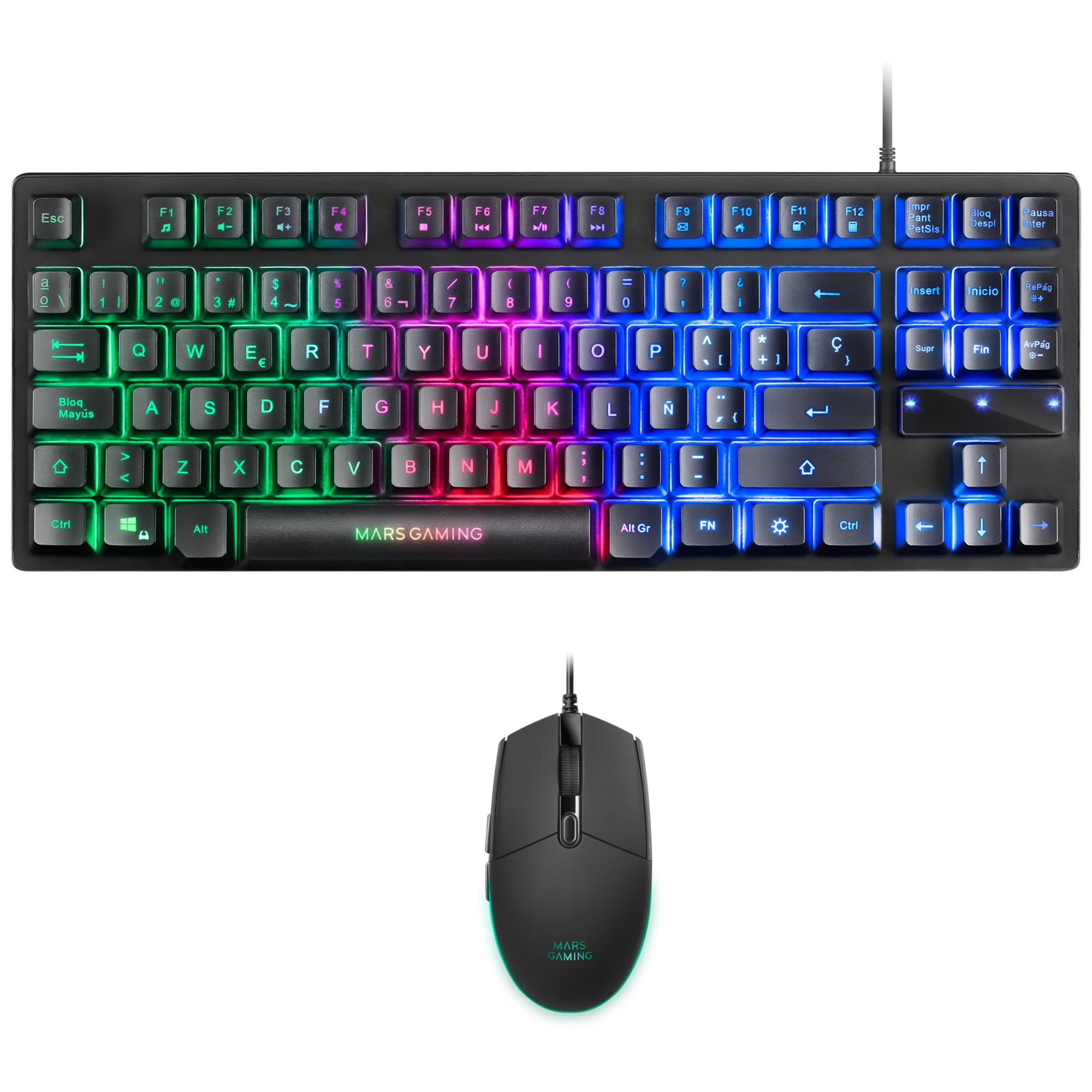
Image: Mars Gaming MCPTKLES TKL RGB Keyboard. This image shows the compact tenkeyless design of the keyboard with its RGB backlighting.
Kawalan Pencahayaan RGB
The keyboard features RGB Control lighting. Specific key combinations allow you to cycle through different lighting modes and effects. Refer to the keyboard's function keys (Fn) combined with other keys for lighting adjustments. Common controls include:
- Fn + [Kekunci]: To change lighting modes (e.g., static, breathing, wave).
- Fn + [Arrow Keys]: To adjust brightness or speed of effects.

Image: Close-up of Mars Gaming MCPTKLES Keyboard RGB Keys. This image highlights the individual keys and their vibrant RGB backlighting.
Anti-Ghosting
The keyboard is equipped with anti-ghosting technology, which ensures that multiple key presses are registered simultaneously without conflict, crucial for fast-paced gaming.
Fungsi Tetikus
The lightweight mouse features an optical sensor with adjustable sensitivity up to 3200 DPI, RGB Flow lighting, and 6 programmable buttons with high-quality HUANO mechanical switches.

Image: Mars Gaming MCPTKLES RGB Mouse Top View. This image displays the top of the mouse, showing the scroll wheel and main buttons.
DPI Adjustment (On-the-fly)
Use the dedicated DPI button (often located near the scroll wheel) to cycle through different sensitivity levels (DPI - Dots Per Inch). This allows for quick adjustments to mouse speed without interrupting gameplay.

Image: Mars Gaming MCPTKLES RGB Mouse Side View. This image shows the ergonomic shape and side buttons of the mouse.
Butang Boleh Aturcara
The mouse features 6 buttons. While basic functionality is plug-and-play, advanced customization and macro programming may require specific software from Mars Gaming, if available. Visit the official Mars Gaming webtapak untuk muat turun perisian.

Image: Mars Gaming MCPTKLES RGB Mouse with RGB Flow Lighting. This image illustrates the dynamic RGB lighting effects on the mouse.
Penyelenggaraan
Pembersihan
- Disconnect the keyboard and mouse from your computer before cleaning.
- Use a soft, dry, lint-free cloth to wipe down the surfaces.
- Untuk kotoran degil, sedikit dampen kain dengan air atau larutan pembersih lembut. Elakkan kelembapan berlebihan.
- Jangan gunakan bahan kimia yang keras, pembersih yang kasar atau pelarut.
- For the keyboard, use compressed air to remove dust and debris from between the keys.
Penyimpanan
Simpan peranti di tempat yang sejuk dan kering jauh dari cahaya matahari langsung dan suhu yang melampau apabila tidak digunakan untuk tempoh yang lama.
Menyelesaikan masalah
Papan Kekunci atau Tetikus Tidak Memberi Respons
- Ensure both USB cables are securely plugged into the computer or console.
- Cuba pasangkan peranti ke port USB yang berbeza.
- Mulakan semula komputer atau konsol anda.
- Test the devices on another computer to determine if the issue is with the combo or your system.
Pencahayaan RGB Tidak Berfungsi
- Verify the devices are properly connected and powered.
- Check if the lighting has been turned off via keyboard shortcuts (Fn + lighting control keys).
- Ensure no software conflicts are present if you are using third-party lighting control applications.
Mouse Cursor Jumps or is Inaccurate
- Bersihkan kawasan sensor tetikus di bahagian bawah tetikus.
- Ensure you are using the mouse on a clean, uniform surface (a mouse pad is recommended).
- Adjust the DPI settings using the mouse's DPI button.
Spesifikasi
| Ciri | Perincian |
|---|---|
| Jenama | Permainan Mars |
| Nombor Model | MCPTKLES |
| Teknologi Ketersambungan | USB (Berwayar) |
| Susun atur papan kekunci | Spanish (TKL - Tenkeyless) |
| Ciri Papan Kekunci | H-Mech Technology, RGB Control Lighting, Anti-Ghosting |
| Penderia Tetikus | Optik |
| DPI tetikus | Up to 3200 DPI (On-the-fly adjustable) |
| Butang Tetikus | 6 (with HUANO mechanical switches) |
| Pencahayaan Tetikus | Aliran RGB |
| Peranti Serasi | Linux, Mac, PS4, Windows, XBOX ONE |
| Dimensi Produk | 44 x 15.9 x 4.4 sm (Papan Kekunci) |
| Berat Barang | 400 g |
| warna | Hitam |
Waranti dan Sokongan
For warranty information and technical support, please refer to the official Mars Gaming webtapak atau hubungi perkhidmatan pelanggan mereka. Simpan bukti pembelian anda untuk tuntutan waranti.
Official Mars Gaming Webtapak: www.marsgaming.eu


