1. Pengenalan
This manual provides comprehensive instructions for the setup, operation, maintenance, and troubleshooting of the Fujitsu USB Type-C Port Replicator 2. This device is designed to expand the connectivity options of compatible Fujitsu mobile clients, including LIFEBOOK and STYLISTIC devices from the 9th generation and later.
Ciri-ciri Utama:
- Power delivery to Fujitsu mobile clients.
- Multiple display outputs: DisplayPort, HDMI, and VGA.
- Integrated On/Off button with resume support.
- Various USB interfaces: USB Type-C and USB Type-A.
- Ethernet LAN data rates: 10, 100, 1000 Mbit/s.

Rajah 1: Atas-bawah view of the Fujitsu USB Type-C Port Replicator 2.
2. Arahan Persediaan
Follow these steps to set up your Fujitsu USB Type-C Port Replicator 2:
- Connect Power (Optional, but recommended for power delivery): Connect a compatible AC adapter (not included with this specific model) to the power input port on the port replicator. Ensure the adapter meets the power requirements of your connected devices.
- Sambung ke Peranti Hos: Use the integrated USB Type-C cable to connect the port replicator to a USB Type-C port on your Fujitsu LIFEBOOK or STYLISTIC device.
- Sambung Peranti:
- Paparan: Connect external monitors using HDMI, DisplayPort, or VGA cables to the corresponding ports on the replicator.
- Peranti USB: Plug in USB peripherals such as keyboards, mice, external hard drives, or USB flash drives into the available USB Type-A or USB Type-C ports.
- Rangkaian: For a wired network connection, connect an Ethernet cable to the RJ-45 port.
- Audio: Sambungkan fon kepala atau pembesar suara ke bicu audio.
- Hidupkan kuasa: Press the power button on the port replicator to turn it on. The device should automatically be recognized by your host computer.

Rajah 2: Belakang view illustrating the various connectivity ports including VGA, HDMI, DisplayPort, Ethernet, USB Type-A, and USB Type-C.
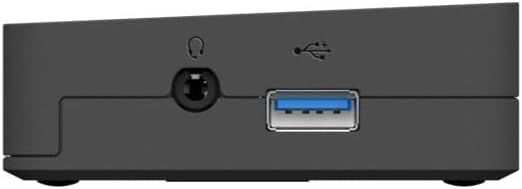
Rajah 3: Sisi view showing the power input port and the integrated USB Type-C host cable connection.
3. Operasi
Once connected, the Fujitsu USB Type-C Port Replicator 2 functions as an extension of your laptop's ports.
- Output Paparan: Your operating system should automatically detect connected external displays. You can configure display settings (e.g., extend, duplicate) through your computer's display settings. The replicator supports DisplayPort, HDMI, and VGA outputs.
- Kesambungan USB: All connected USB devices will be accessible through your host computer. The USB Type-A ports support data transfer, and some may offer charging capabilities.
- Sambungan Rangkaian: The Ethernet port provides a stable wired network connection, ideal for environments where Wi-Fi is unreliable or unavailable.
- Butang Kuasa: The power button on the replicator can be used to turn the device on or off. It also supports resume functionality, allowing your connected laptop to wake from sleep.
- Jack Audio: Connect standard 3.5mm audio devices for sound output.

Rajah 4: Depan view highlighting the power button and an accessible USB port.
4. Penyelenggaraan
To ensure optimal performance and longevity of your port replicator, follow these simple maintenance guidelines:
- Pembersihan: Gunakan kain lembut, kering dan bebas bulu untuk membersihkan bahagian luar peranti. Jangan gunakan pembersih cecair, aerosol atau pelarut.
- Storan: Apabila tidak digunakan untuk tempoh yang lama, simpan peranti di tempat yang sejuk dan kering jauh dari cahaya matahari langsung dan suhu yang melampau.
- Pengendalian: Avoid dropping the device or subjecting it to strong impacts. Do not attempt to disassemble the unit.
5. Penyelesaian masalah
If you encounter issues with your Fujitsu USB Type-C Port Replicator 2, refer to the following common problems and solutions:
| Masalah | Kemungkinan Punca / Penyelesaian |
|---|---|
| No power or device not turning on. |
|
| External display not detected or flickering. |
|
| Peranti USB tidak dikenali. |
|
| Isu sambungan rangkaian. |
|
| Laptop not charging via replicator. |
|
6. Spesifikasi
Below are the technical specifications for the Fujitsu USB Type-C Port Replicator 2 (Model S26391-F3327-L100):
| Ciri | Perincian |
|---|---|
| Jenama | Fujitsu |
| Nombor Model | S26391-F3327-L100 |
| Teknologi Ketersambungan | berwayar |
| Antara Muka Hos | USB 3.2 Gen 1 (3.1 Gen 1) Jenis-C |
| Kadar Data LAN Ethernet | 10, 100, 1000 Mbit/s |
| Warna Produk | Hitam |
| Dimensi (LxWxH) | 1.1 x 9.7 x 6.5 inci (26 x 219 x 75 mm) |
| Berat Barang | 11.8 auns (334 Gram) |
| Antara Muka Perkakasan | USB Type C, HDMI, DisplayPort, VGA, Ethernet |
| Jumlah Port USB | 2 (Type-A) + 1 (Type-C for host) |
| Jumlah Port HDMI | 1 |
| Peranti Serasi | Fujitsu LIFEBOOK (9th generation and later), Fujitsu STYLISTIC (9th generation and later) |
| Voltage | 1 Volts (Input Voltage: 25.7 Volt) |
| Wattage | 25.7 watt |
7. Waranti dan Sokongan
For warranty information and technical support, please refer to the official Fujitsu website or contact Fujitsu customer service directly. Keep your purchase receipt as proof of purchase for warranty claims.
Sumber Dalam Talian:
- Fujitsu Official Webtapak: www.fujitsu.com
- Product Support Page (if available): Cari untuk "Fujitsu USB Type-C Port Replicator 2" on the Fujitsu support portal.


